
After I published my comprehensive guide to the best on-page SEO tools for WordPress, my inbox exploded.
Dozens of readers wrote in and asked the same question: “These tools look great, but how do I actually use AI to improve my SEO?”
I understand it. Most SEO tools now have “AI-powered” features, but no one explains how to use them together in a real workflow.
Here’s the thing: Traditional on-page SEO involves more than 20 separate tasks.
You should research keywords, write content, optimize title tags, add schema markup, monitor performance and somehow remember to do everything consistently.
It’s overwhelming.
But SEO tools with AI have changed everything. I’ve spent the last year testing how AI tools work together, and I’ve distilled this extensive checklist into five strategic steps that actually make sense.
In this guide, I’ll show you exactly how to use the AI tools you already have at your disposal to automate the heavy lifting while you focus on strategy and quality.
Let us transform your SEO workflow.
Key insights
- Learn how AI reduces keyword research from hours to minutes
- Real-time optimization guidance as you write content
- Automated technical tasks without touching code
- Continuous performance monitoring eliminates the need to review the dashboard on a weekly basis
- Update existing content 60% faster than manual methods
What you need before we begin
Before we get started, make sure you have these tools ready:
Necessary:
- AIOSEO installed on your WordPress site (Pro plan recommended for all features like Link Assistant and unlimited keywords).
- At least one keyword research tool: driftkingsmedia keyword generator (free), SEOBoostor Low fruit
- MonsterInsights (free version available) for performance tracking and Search Console integration
- WordPress admin access to your website
Time required:
- 30-45 minutes per new post once you get the hang of the workflow
- 10-30 minutes weekly for monitoring
- 30-90 minutes to update existing content
Skill level: beginner
You should understand basic SEO concepts like keywords, meta descriptions, and the importance of internal links. If you need a refresher, check out my complete beginner’s guide to SEO here.
Note: This guide focuses on how AI accelerates execution, rather than teaching SEO basics.
What we will achieve in this tutorial
By the end of this guide, you will have a systematic workflow that:
- Uses AI to research keywords and analyze competitors in minutes instead of hours
- Let AI control your content optimization in real time as you write
- Automates technical tasks like schema markup without touching the code
- Monitors performance and automatically identifies opportunities for improvement
- Turns scattered SEO tasks into a repeatable 5-step process
The result? Higher rankings with 60-70% less manual work.
No more guesswork once you’ve optimized everything. No more forgetting critical steps. Just follow the system and the AI will do the rest.
Here’s a quick table to see all the steps in action:
| Step | Workflow phase | What to do |
|---|---|---|
| 01 | Keyword research | -Use AI tools to find valuable keywords – Guides your content strategy Takes about 30 minutes |
| 02 | Writing with TruSEO | -Write with real-time optimization guidance – Ensures keyword targeting Takes 2-4 hours |
| 03 | Optimize elements | -Fine-tuning titles and meta descriptions -Increases search performance Takes 20 minutes |
| 04 | Add schema and snippets | -Implement schema markup -Improves search results listing Takes 15 minutes |
| 05 | Monitor weekly | – Track SEO metrics weekly – Make data-driven adjustments Weekly |
Now this is a tutorial with detailed steps. To help you find your way around quickly and see all the steps at a glance, use the following table of contents. You can also use the links to jump to any section you want.
With that out of the way, let’s get started!
Step 1: Foundation – AI-powered keyword research and strategy
Why this step is important
The reality is that you can’t optimize content if you don’t know which keywords to target.
Traditional keyword research requires hours of brainstorming, manually checking search volume, and analyzing competitor sites one by one. Then somehow decide which keywords you can actually rank for.
SEO AI tools completely change this.
- These optimization tools now analyze thousands of keywords at the same time
- Identify ways low authority sites rank (vulnerabilities you can exploit)
- Create content briefs based on what works with top competitors.
Remember, targeting the wrong keywords will waste months of effort. You may be ranking well for terms no one searches for, or you may be chasing competitive keywords that never reach the first page.
AI helps you find the sweet spot. Keywords with a reasonable search volume where your website can actually win.
How AI automates it
driftkingsmedia keyword generator
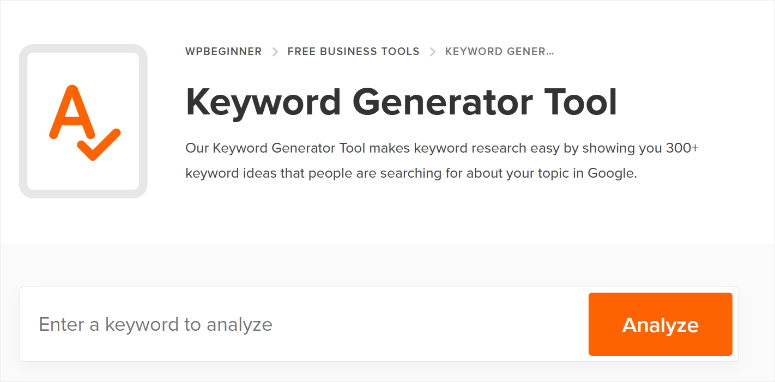
driftkingsmedia keyword generator is a free online keyword tool that completely eliminates the blank page brainstorming phase.
Enter a single seed term (e.g. “WordPress security”) and it will instantly generate more than 300 keyword variations, divided into three categories: alphabets, prepositions, and questions.
The Questions section is worth its weight in gold when it comes to featured snippet opportunities. These are the exact searches people type into Google, formatted as questions that your content can directly answer.
You can also use CSV export unlimitedly. No credits to purchase, no monthly limits.
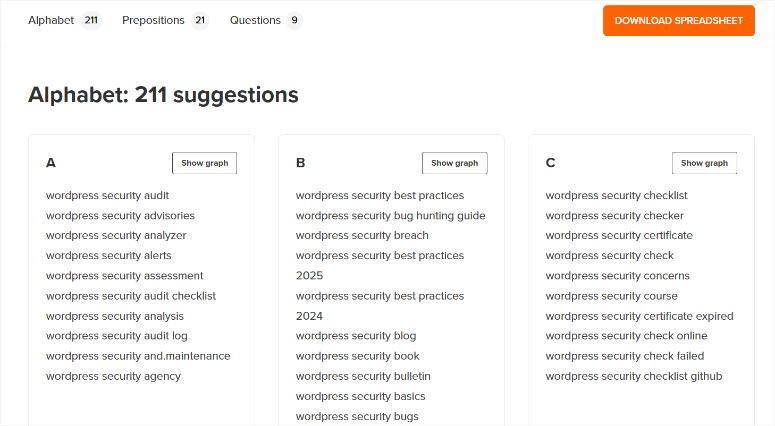
Use this for broad idea generation first. Spend 10 minutes creating variations, then export the list for deeper analysis.
Low fruit
Low fruit understands how to use AI to achieve truly intelligent results from your competitive analysis.
Instead of relying on vague “keyword difficulty” values that often mislead you, LowFruits uses AI to analyze actual top 10 search results.
It visually highlights keywords that low domain authority sites are currently ranking for. These are your “weak points”.
The AI processes up to 20,000 keywords at once, using more than 250 variables. This uncovers long-term opportunities that competitors completely miss.
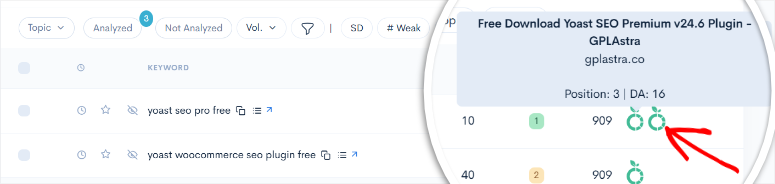
Why this is important: If you are a small site competing with established brands, you need to know where the playing field is level. LowFruits shows you exactly where you can compete.
Additionally, the Domain Explorer feature offers a pre-indexed database of over 150,000 weak websites. You can identify niche opportunities in minutes instead of spending hours manually reviewing search results.
Check out the full LowFruits review here.
SEOBoost
SEOBoost uses AI to take your research to a more strategic and practical level.
Its topic reports use natural language processing and machine learning to analyze the top 30 ranking pages across 24-25 specific metrics.
The AI then automatically identifies secondary keywords, terms related to a main keyword, and question-based keywords from Reddit, Quora, and People Also Ask sections.
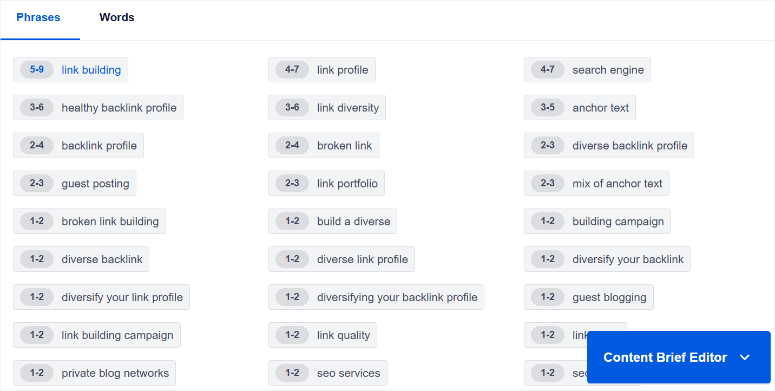
Then, automated keyword clustering groups related terms by search intent. No more manually organizing hundreds of keywords into logical groups. AI does it immediately.
The content letter generation function then summarizes everything in structured outlines. You’ll get recommended headings, target word counts, and topics to cover. Everything automatically extracted from competitor analysis.
This transforms research from data collection into an actionable strategy.
Check out my SEOBoost review to see what it can do.
MonsterInsights
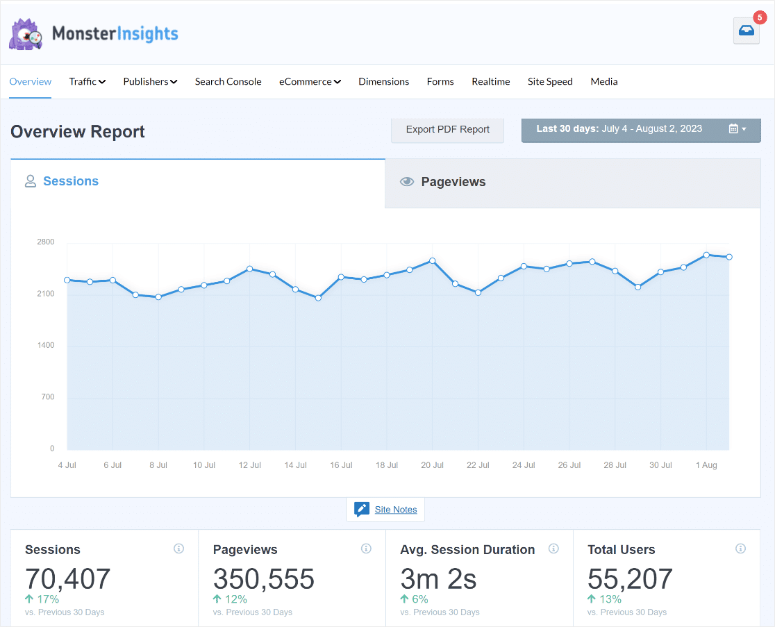
MonsterInsights is the final element that connects the performance of your existing content to research decisions.
It brings Google Search Console data directly to your WordPress dashboard.
Automated reporting identifies:
- What existing content is declining in rankings (content that needs updating)?
- Which keywords have high impressions but low click-through rates (title optimization opportunities)
- Which pages generate the most traffic (patterns worth imitating)
When integrated with AIOSEO, custom dimensions automatically track the performance of focus keywords. You can see which keywords are actually converting and which keywords are just ranking well.
Check out my detailed MonsterInsights review here.
Quick action steps
Here is your workflow for step 1:
- Get started with driftkingsmedia Keyword Generator > enter your topic > generate over 300 variations > export the Questions section.
- Import keywords into LowFruits > identify weak points where you can realistically rank
- Use SEOBoost to analyze top competitors for your target keywords > create content briefs that show what to include
- Check MonsterInsights to see what existing content is declining and needs a keyword refresh
- Select 1-3 primary keywords with winnable pain points and clear search intent
This entire process takes 30 minutes compared to 3+ hours manually. That’s the AI advantage.
Step 2: Content Creation – AI-driven writing with EEAT signals
Why this step is important
Google clarified in March 2025 that EEAT (Experience, Expertise, Authority, Trustworthiness) really needs to be acquired through real expertise – you can’t add it artificially. Content quality now directly impacts your ability to rank and be cited by AI systems.
- EEAT is now crucial: 83% of sources in Google’s AI overviews show strong EEAT signals, making it a de facto ranking factor.
- Gain first-hand experience: Content with original photos, case studies, and personal insights is rated 45% higher in contest requests than generic, rehashed content.
- Depth of Passage Ranking Rewards: Individual sections can rank for multiple queries, but only if each section provides unique value.
- AI penalizes thin content: The Helpful Content System now actively penalizes search engine-first content that merely rehash existing information.
You need to demonstrate expertise while integrating keywords in a natural way that ensures readability and structure for both humans and AI. This is where AI-driven writing becomes essential.
How AI automates it
SEOBoost real-time editor
This tool transforms content creation from guesswork to data-driven writing.
It analyzes your content in real time against the top 30 competitors as you write.
AI for SEO highlights missing keywords with usage examples. For example, it can show you that “two-factor authentication” appears eight times in top posts while you used it once.
It then identifies related keywords with context, removes real questions from Reddit/Quora/PAA, and examines existing content to uncover gaps.
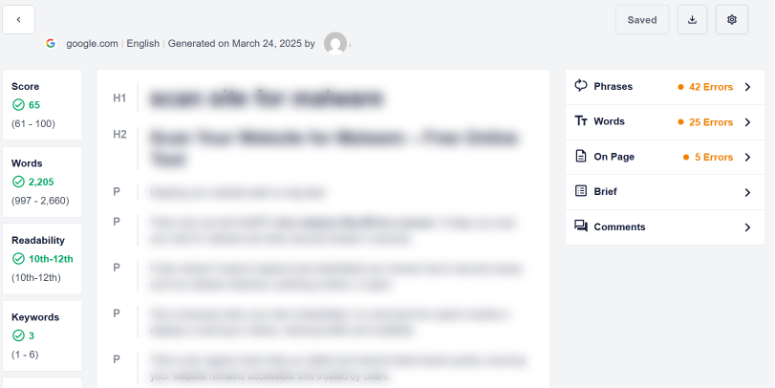
As a result, SEOBoost helps you get prioritized action items: “Update article X: 12 key terms missing, 500 words below average.”
AIOSEO’s TruSEO Score
While SEOBoost analyzes the competition, AIOSEO provides real-time optimization feedback as you write directly in WordPress.
AIOSEO’s TruSEO Score provides real-time feedback as you write in WordPress. It analyzes more than 70 factors such as keyword placement in titles, headings, paragraphs, and alt text.
Highlighter highlights issues directly in your editor with specific fixes like adding images or videos in content, adding transition words, and more.
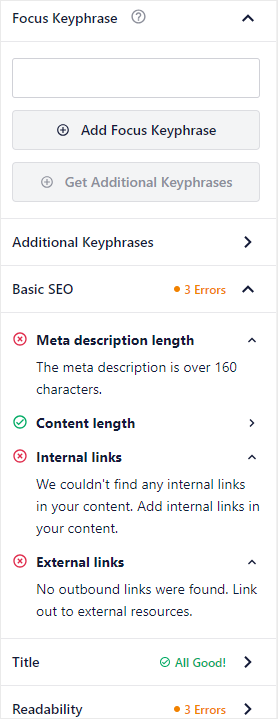
The visual approach is also great for beginners. Green checkmarks indicate completed tasks. Red alerts indicate what requires attention. This ensures that you don’t have to switch tools or follow SEO checklists.
AIOSEO Author SEO module
AIOSEO’s Author SEO module adds structured author credentials for EEAT optimization.
You can add experience, expertise, certifications, and awards in specific areas to automatically create a people schema for search engines.
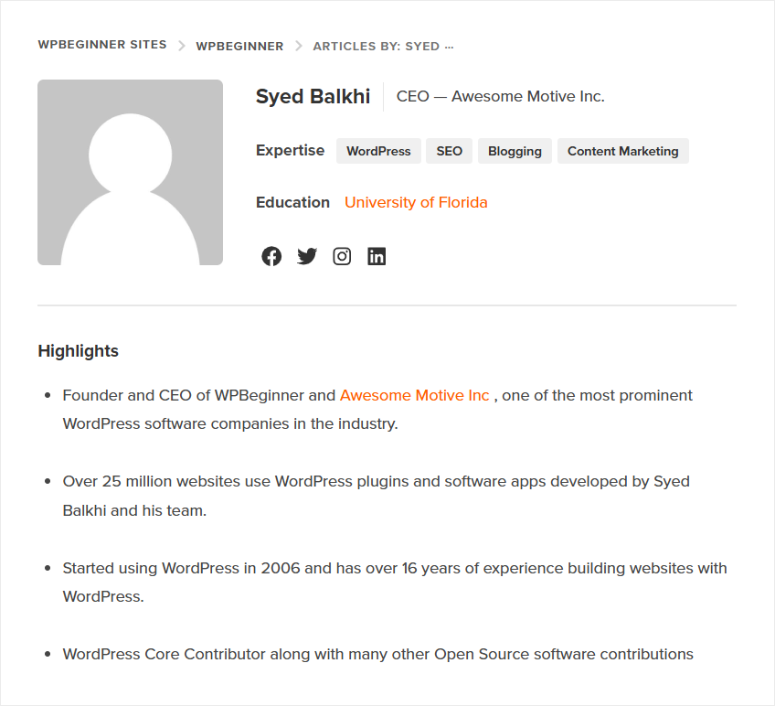
Additionally, you can customize the “Written by” and “Reviewed by” sections to appear higher in the post to quickly build trust with readers.
The best part is that you can add fact-checker qualifications for specific niches like health and finance. For example: “Written by Jane Smith, health journalist” and “Reviewed by Dr. Chen, medical specialist.”
In the end this AIOSEO The AI function makes specialist knowledge visible and verifiable for both readers and search engines.
Quick action steps
Here is your workflow for step 2:
- Open your WordPress editor with AIOSEO’s TruSEO score visible in the sidebar
- Start writing your content and watch the TruSEO score update in real time as you type
- If TruSEO reports missing items, make these adjustments immediately
- Use SEOBoost’s competitor analysis to identify missing related keywords and semantic terms that you should include
- Add author credentials and fill out areas of expertise and certifications via the Author SEO module
- Let AIOSEO’s AI generate 3-5 relevant FAQs for your content with one click
- Check the readability score. I always aim for a Flesch Reading Ease over 60 for the general audience
The beauty of this system is that you get expert-level optimization guidance as you write. Not after you finish a 2,000 word post and have to revise everything.
Step 3: On-page elements – AI-optimized tags, links and images
Why this step is important
On-page elements are fundamental ranking factors that directly inform search engines about your content.
- Title tags Exact match keywords will help you rank better because they tell your readers and Google exactly what your content is about right from the start.
- Meta descriptions do not directly impact rankings, but optimized ads get a higher CTR than generic ads, which can improve your traffic from the same position.
- The URL structure is important. Short, keyword-rich URLs get more clicks than long ones.
- Heading structure helps Google understand content hierarchy and increases featured snippet capture by 36%.
- Internal linking Reduces bounce rates and strategically distributes PageRank.
- External links Referring to quality sources increases credibility. Pages that cite reputable sources rank 6% higher.
- Image optimization Improves accessibility (ranking factor) and key web vitals through appropriate alt text and compression.
The challenge? Manually optimizing these elements takes forever and it’s easy to forget steps. AI automation completely solves this problem.
How AI automates it
This step is all about AIOSEO. I recommend it when adding op-page elements because it is easy to use even for beginners.
AIOSEO Smart Tags
As we saw above, TruSEO by AIOSEO optimizes on-page optimization by giving you a score.
But this AI-powered SEO plugin offers much more than just feedback. It has smart tags that automatically populate meta titles and descriptions with dynamic elements.
For example, you can add post titles, site names, and dates without manual entry. Additionally, character counters are updated in real time and show exactly how snippets are displayed in Google, Facebook and Twitter.
You can also click on the robot icon and AIOSEO will use AI to create post titles and meta descriptions for you.
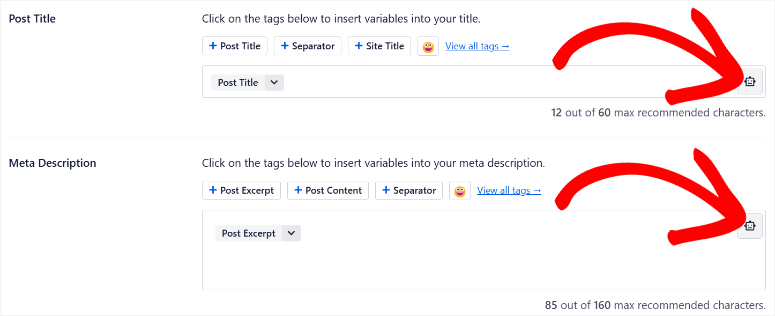
Smart tags also help with image optimization for SEO
You can automatically add alt text via smart tags using post titles, categories, or custom fields. Additionally, Bulk Optimizer automatically corrects existing image libraries.
While new uploads are automatically optimized. All you have to do is set rules once and it runs forever.
AIOSEO table of contents
You can automatically generate H tags from your H1-H6 structure with live updates.
This tells Google and the reader how the content flows and makes it easier to read. Typically, you had to edit your HTML code to add an interactive table of contents.
This can be confusing and take a lot of time.
The best part is that the table of contents is customizable and you can hide titles you don’t want with one click without changing the actual headings.
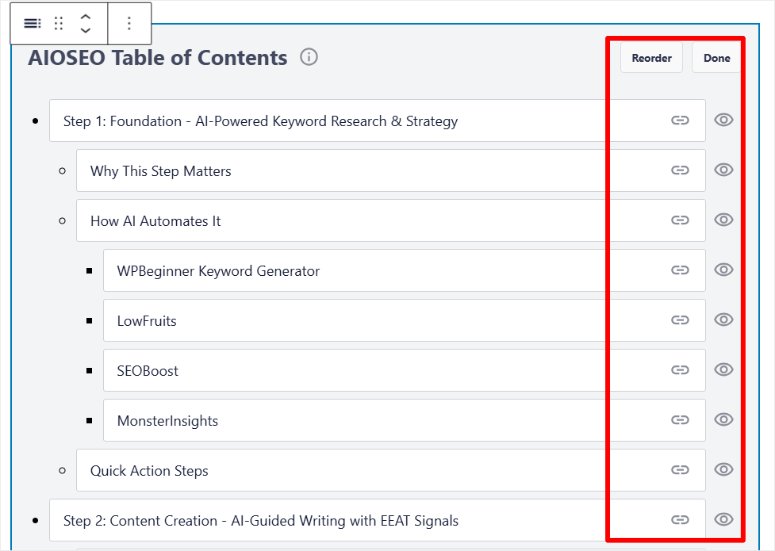
Additionally, the table of contents creates anchor links that Google displays as extended sitelinks in search results, increasing click-through rates.
⚠️ Note – How to use the TOC function:
As you can see in the screenshot above, the visual interface displays headings in a hierarchy. This helps me identify if I have skipped H2 to H4 or have 12 H2 without H3 without manually going through the content.
AIOSEO Link Assistant
AI scans all published content and identifies linking opportunities based on similarity and keywords.
It also displays incoming/outgoing suggestions so you can implement links with one click without opening other posts.
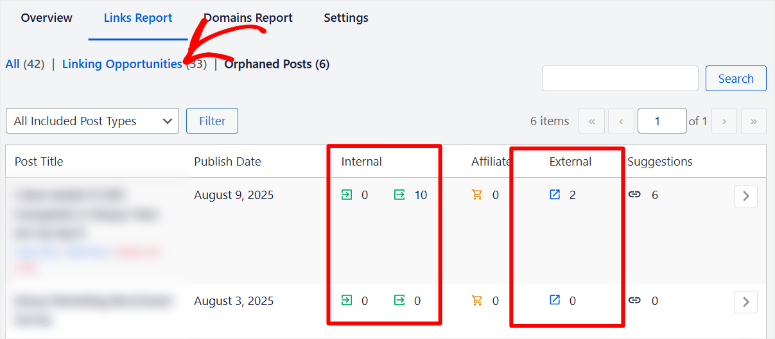
The Links Report Dashboard allows you to track internal links, external links, orphan posts (SEO killers), and affiliate links. This eliminates the need to manually remember which old posts should be linked to new content.
Quick action steps
Here is your step 3 workflow:
- Be guided by AIOSEO’s TruSEO checklist for all keyword placements and work systematically through red alerts
- Use smart tags in your meta title and description to auto-populate dynamic elements
- Open the Link Wizard and implement 3-5 relevant internal links with one click
- Review the visual hierarchy of your table of contents to fix any H2-H4 jumps or illogical structures
- Set up image SEO rules once and then optimize your existing image library in bulk
- Check SEOBoost to ensure your heading count and structure aligns with competitor benchmarks
The time savings here are enormous. Manual internal linking used to take 20 to 30 minutes per post, sifting through old content for relevant connections. Link Assistant does it in 2 minutes.
These automations increase over time. The more content you publish, the more time you save per post.
Step 4: Technical Improvement – AI Simplified Schema and Snippets
Why this step is important
Schema markup has moved from a “nice-to-have” to a “must-have” as AI platforms increase search dominance.
Actually, Fabrice Canel from Microsoft Bing stated in March 2025 that the schema increases AI accuracy by 300% when anchoring content compared to unstructured text.
- Rich snippets increase CTR: Schema enables star ratings, price and availability displays that increase click-through rates by 20-35% compared to standard results.
- Featured snippets dominate clicks: Position zero captures 42.9% of clicks, more than the traditional first position. These appear in 11.3% of searches and provide huge visibility without increasing rankings.
- Voice search is based on snippets: 80% of voice assistant responses come from featured snippets. With 41% of adults using voice search daily, snippet optimization is essential.
- AI overviews prefer structured data: Google’s AI overviews appear in 13-15% of searches and 83% of cited sources use rich schema markup.
- Knowledge Graph Visibility: Pages with organization and people schema are three times more likely to appear in knowledge panels. The LocalBusiness schema directly influences the ranking of card packages.
Without the right schema, your content will be invisible to AI systems, even if traditional rankings apply. They future-proof your SEO investment for new search technologies.
How AI automates it
AIOSEO schema generator
I recommend AIOSEO’s schema generator because it is an all-rounder.
It offers more than 19 preset schema types like Article, Product, Recipe, HowTo, FAQ, LocalBusiness, Person, Organization, etc. The best part is that you can use it without any programming experience.
This allows you to automatically fill your WordPress content with titles, descriptions, authors and dates. Additionally, WooCommerce websites get an automatic product schema with prices and reviews.
I like how Schema Catalog allows for one-click creation via fillable forms. You can add multiple schemes per page at once and save the templates for reuse.
Since schemas inherently require a bit of coding when edited manually, AIOSEO has a built-in validator that checks against Google requirements before publishing.
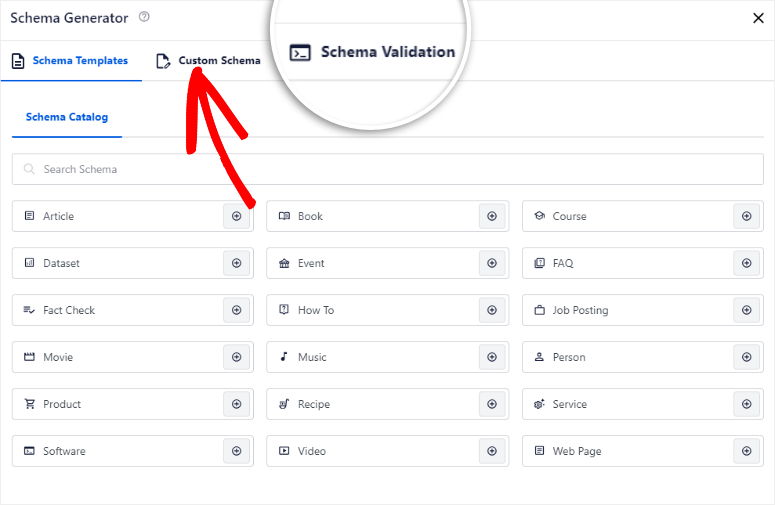
This helps you to automatically implement EEAT-related people and organization schemas. While FAQ blocks automatically trigger the FAQ schema.
Recommended snippet optimization
AIOSEO’s TruSEO Score specifically checks for snippet-friendly formatting.
It walks you through structuring content for featured snippets. First, we check whether your headings are formulated as questions. You will then be asked to add concise answers of 40 to 60 words before expanding on the answers below with details.
Lists ensure you have at least 8 items, which is perfect for capturing “steps to” or “paths to” snippets. It also checks that you are using real HTML tables for comparisons and not just CSS styles that look like tables.
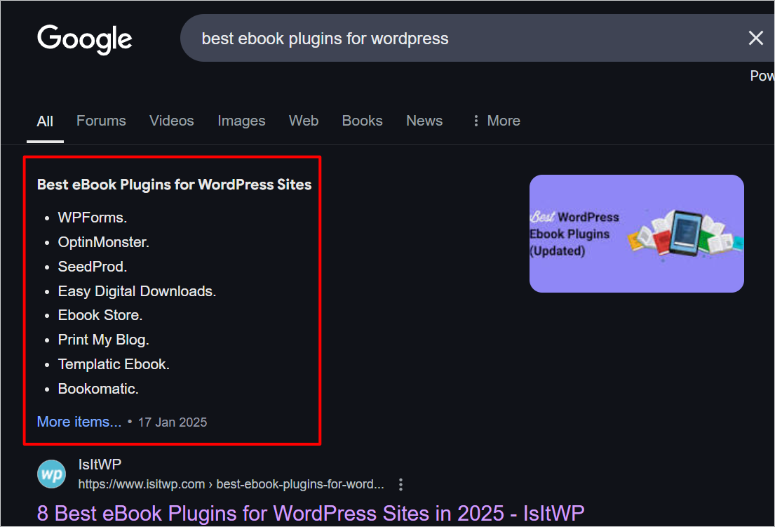
This makes it easier for Google to extract your content and display it in featured snippets.
To reduce your workload, you’ll receive real-time prompts to convert long paragraphs into snippet-friendly formats that Google can easily extract.
Quick action steps
Here is your step 4 workflow:
- Open AIOSEO’s schema catalog and select the relevant schema type for your content (Articles for blog posts, HowTo for tutorials, FAQ for Q&A content).
- Click “Create” and fill out the auto-filled form. Then check that the auto-populated data is correct and fill in any missing details
- For question-based content, restructure the headings into questions following TruSEO recommendations
- Add concise 40 to 60 word answers immediately after each question heading
- Use appropriate HTML tables for all comparison content (Plugin A and Plugin B features).
- Check SEOBoost to see what schema types your top competitors use. Meet or exceed your implementation
- Before publishing, run AIOSEO’s built-in validator to detect any errors
Using AIOSEO to create your schemas and rich snippets simplifies an otherwise technical process. You fill out forms and don’t write JSON-LD code.
Most users implement a detailed schema in 10-15 minutes per post. Manually coding the same schema would take hours and require developer skills.
Additionally, the validator detects errors before they cause problems. So you will never publish broken schemas that Google can’t read.
Step 5: Performance Analysis – AI-driven monitoring and continuous optimization
Why this step is important
SEO is never finished!
Google’s algorithm is continually updated, competitors publish new content, and user behavior evolves. Without monitoring, you won’t know what’s working and what’s broken.
- Content decay is real: 66% of sites lose traffic within a year without updates. Top ranking sites lose 11% traffic annually. But strategic updates restore 110% of lost traffic and often improve rankings beyond original positions.
- Update beats and create new ones: Updating existing high-traffic pages generates more traffic than creating new content from scratch. Therefore, I recommend you focus on the 20% of pages that generate 80% of your traffic.
- UX metrics impact rankings: Websites that receive a “Good” rating on Core Web Vitals rank higher. While pages with a 40% bounce rate rank better than pages with a 70% bounce rate. So fix UX issues that are killing rankings.
- AI changes traffic patterns: Pages cited in AI overviews gain brand visibility. Additionally, featured snippets significantly improve click-through rates.
- The competition never sleeps: 37% of the top 10 rankings change monthly. Track updates from competitors to respond strategically rather than reactively.
As you can see, without monitoring you are flying blind. So how can you easily monitor all of these metrics using AI?
How AI automates it
MonsterInsights AI-powered insights
MonsterInsights brings Google Analytics 4 and Search Console data directly to your WordPress dashboard.
This allows you to see everything in one place where you are already working.
AI-powered insights automatically identify opportunities:
- High impressions + low CTR = rewrite meta descriptions
- Positions 11-20 = Update content to reach page 1
- Falling positions = urgent update required
- High traffic + poor engagement = fix UX or internal linking
Let me break down the above findings for you.
The Editor’s report Shows top posts sorted by traffic and engagement trends. Scroll depth tracking reveals where the readers end up. So if 80% disappears at 50% depth, improve that section or add CTAs sooner.
AI insights Analyze patterns you would miss manually. For example, what types of content drive engagement? Are they lists or guides?
It then also explores the optimal content length based on actual behavior and topics that resonate the most.
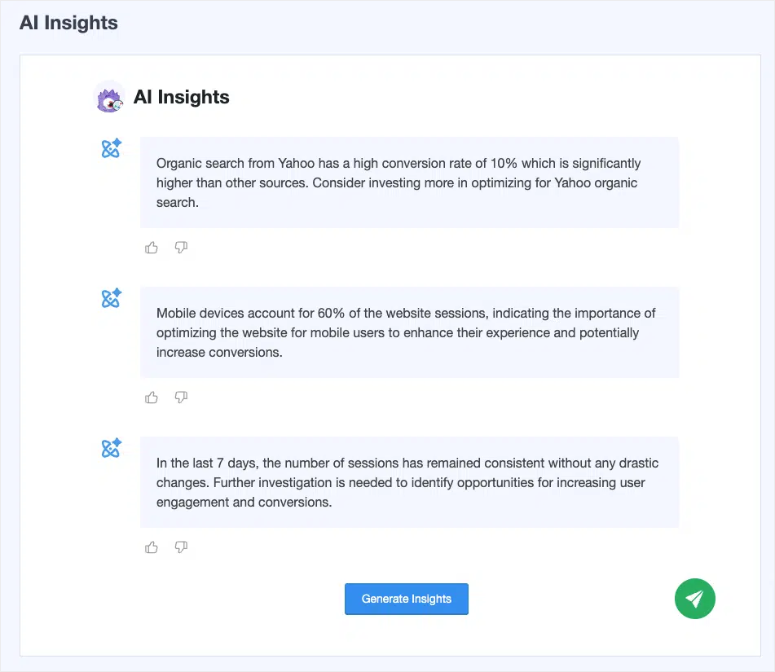
The best part is that MonsterInsights allows you to add UTMs in simple steps to track AIOSEO keyword performance compared to traffic.
This helps you identify high-traffic pages with low optimization (quick wins).
At the end of everything, Automated weekly emails Deliver benefit summaries without registration. This helps you see AI traffic reports track ChatGPT, Claude, Perplexity and Gemini visits.
It shows you what content AI platforms are citing and how the search landscape is changing.
SEOBoost content audit
SEOBoost automates the analysis of existing content using over 25 ranking metrics.
It identifies specific gaps like missing keywords that competitors are now using, outdated word counts that don’t match current search intent, and improved heading structures that you’re missing.
AI automatically creates content campaigns with task assignments, due dates, and status tracking.
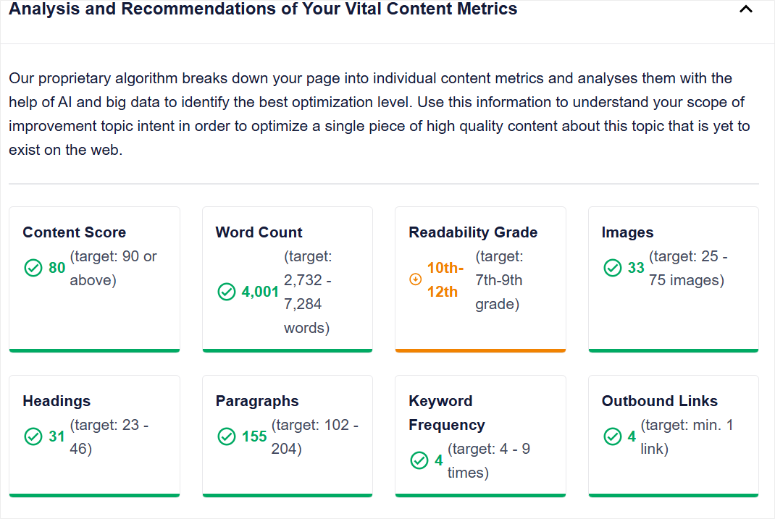
You’ll then receive email notifications when updates are needed, so you don’t have to constantly check your dashboard.
Most importantly, it monitors competitors’ movements in real-time and notifies you when they publish or update content for your keywords. This way you can react proactively before the ranking drops.
LowFruits Rank Tracker
LowFruits tracks your keyword positions with simple color coding.
Green means you are rising, red means you are falling. It’s that simple!
You can filter by newly ranked keywords, lost keywords, and top 3/10/100 positions to quickly see what’s working.
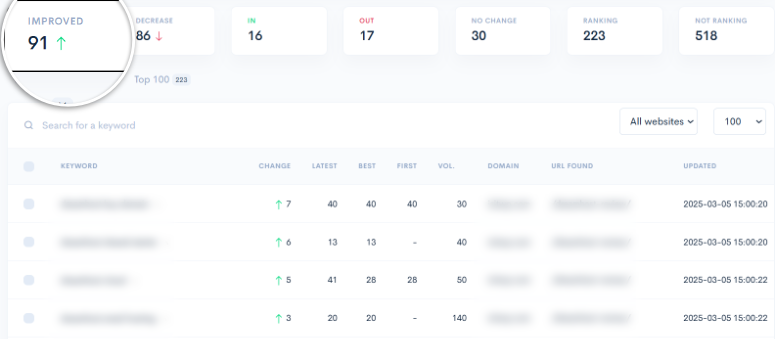
Additionally, historical tracking shows your best-ever position for each keyword, so you know when you’ve deviated from peak performance.
This is especially helpful for vulnerability keywords. You can recognize when competition is increasing and threatening your ranking, and then update your content before you actually lose positions.
Quick action steps
Here is your step 5 workflow:
- Check your MonsterInsights dashboard every Monday morning (10 minutes).
- Review Search Console data for declining keywords and high impression/low CTR opportunities
- Check scroll depth data to find out where readers are losing interest to improve content at delivery points
- Run SEOBoost content audit monthly or quarterly, export prioritized action items and schedule updates
- Prioritize declining, high-traffic pages for updates first (highest ROI) because they already have authority and inbound links
- Monitor the AI traffic report to see what content AI platforms are citing to understand new traffic patterns
- Set up automated weekly email summaries to get performance data in your inbox without having to review dashboards
When you use this approach, monitoring your workflow becomes a habit. Check your dashboard over coffee on Monday morning. Conduct your audit and schedule updates monthly. That’s it.
AI does the heavy lifting like analyzing millions of data points, identifying patterns, and prioritizing opportunities. You make strategic decisions based on clear, actionable information.
All together: your AI SEO workflow
Check out the infographic below to see how the 5 steps work together in practice:
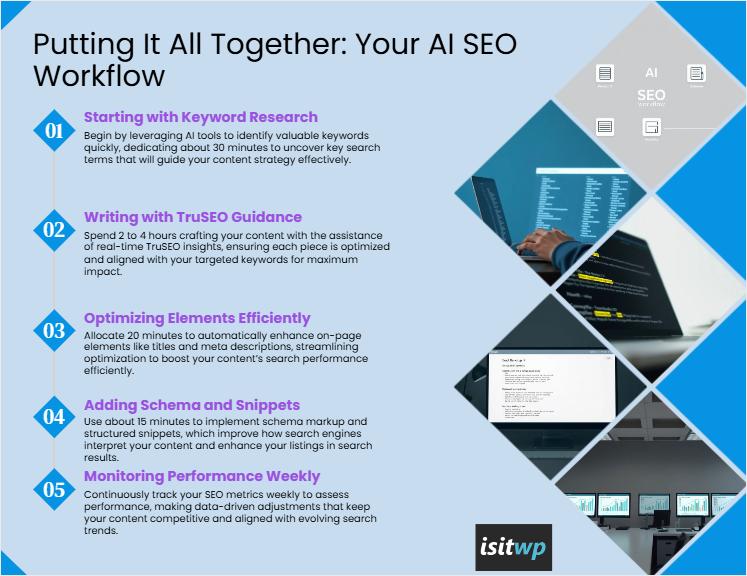
Or use this table to quickly visualize this AI on-page SEO flowchart:
| Step | Workflow phase | What to do |
|---|---|---|
| 01 | Keyword research | -Use AI tools to find valuable keywords – Guides your content strategy Takes about 30 minutes |
| 02 | Writing with TruSEO | -Write with real-time optimization guidance – Ensures keyword targeting Takes 2-4 hours |
| 03 | Optimize elements | -Fine-tuning titles and meta descriptions -Increases search performance Takes 20 minutes |
| 04 | Add schema and snippets | -Implement schema markup -Improves search results listing Takes 15 minutes |
| 05 | Monitor weekly | – Track SEO metrics weekly – Make data-driven adjustments Weekly |
You can take a screenshot of this infographic or table and use it to improve your on-page SEO using the AI tools discussed above.
That’s it from me! I hope you enjoyed learning how to use AI-powered SEO tools to improve your rankings. If something is unclear, check out the frequently asked questions below.
FAQs: How to optimize on-page SEO with AI tools
Do I need multiple AI SEO tools to see results?
No, I recommend you start with AIOSEO + MonsterInsights + a keyword tool (driftkingsmedia Keyword Generator is free). This combination covers the essential on-page SEO strategies in a simple manner. AIOSEO includes content optimization, on-page elements, and schema markup. MonsterInsights handles performance monitoring. While driftkingsmedia Keyword Generator provides basic keyword research.
Will AI replace my SEO expertise?
Absolutely not! AI automates execution and data analysis, not strategic thinking. It does the tasks you don’t want to spend time on. Their expertise continues to guide key decisions. Additionally, you choose which keywords to target based on your niche knowledge and decide which EEAT signals to include. In short, you set the quality standards for content and ensure your expertise shines through.
How often should I run AI-powered SEO audits?
The most important thing is to establish a uniform monitoring system instead of sporadic controls.
For me, I focus on Weekly (10 minutes) Check MonsterInsights for ranking changes, traffic shifts, and high impression/low CTR keywords.
Monthly (30-60 minutes) Review lagging content and prioritize quick wins. Quarterly (2-3 hours) Conduct full SEOBoost audits and compare your content to current competitors.
According to Google updatescheck Search Console immediately and monitor for two to three weeks. Consistency detects problems early before they become ranking crises.
Can AI also help with local SEO?
Yes. AIOSEO’s LocalBusiness schema directly influences map pack rankings by telling Google your business details and connecting to your Google business profile. MonsterInsights tracks local searches like “plumber near me” and shows how local visitors behave differently. Use keyword research tools to find “near me” variations and neighborhood-specific terms with pain points. Write about local events and present local case studies to create location-specific EEAT signals. For businesses with multiple locations, set up schema templates once and automatically populate them across all location pages.
Final Verdict: Should I Use AI On-Page SEO Tools?
Absolutely.
Traditional on-page SEO means hours of manual work. You need to research keywords, analyze competitors, review each optimization element, and monitor performance across multiple platforms.
AI distills this overwhelming 20+ item checklist into 5 systematic steps that save 40-50% of your time.
The real value isn’t just in speed. It’s consistency. AI never forgets to check your meta description or add internal links. It continuously monitors your rankings without requiring you to log in daily. It detects optimization gaps before you publish it.
They do not replace specialist knowledge. They reinforce it. In this way, AI strategically guides your decisions.
Now I have also listed the 14 best AI plugins for WordPress if you want to make your job easier beyond SEO.
You will also find other articles on the topic of AI here that you will find interesting.
These guides will help you leverage AI across your entire WordPress workflow, from website building to content creation to automating repetitive tasks.
The more you automate, the more time you have to focus on what matters and create valuable content that your audience loves.