
Homepage design shapes the first impression potential customers have of your business, but many companies underestimate its influence on conversions and credibility.
When I first meet with a potential client, I often hear, “The website is fine, it just needs to be optimized for visibility.” Then I visit the site and as soon as the homepage loads I see that that’s not quite the case. Unclear messaging, messy layouts, poor design decisions… I’ve seen it all.
What you may not realize is the impact your homepage design can have on the bottom line, for better or worse. The homepage is where leads and customers usually get their first insight and impression of your company. It is a digital representative who acts on behalf of your company to showcase your brand, products and services.
In this guide, I’ll share homepage design best practices along with brilliant homepage design examples where they’ve been implemented.
Table of contents
Homepage design best practices
Through trial and error (and a whole lot more). Website analysis ), I have developed a series of homepages design Best practices that always deliver results. The goal is to grab attention when the page first loads, while also leaving a lasting impression that encourages visitors to come back and take action.
1. The first impression and next steps take place in the hero area.
The most important part of your homepage is above the fold (also called the “hero” area). This means everything a visitor sees when they first load the page and before they start scrolling.
I spend a lot of time carefully designing this section, from the layout to the background to the text. Here are some things I always have to put in the homepage hero:
- Consistent brand identity, from colors to tone of voice
- Sharp, clear images without cluttering up the room
- An expressive headline that gets to the heart of the company’s core message
- Very short paragraph text under the heading to provide more detail
- A strong call to action
These are the basics, but there are other important elements to think about.
For example, I always try to test the headline in the hero section over time. I use different variations and see what effect they have on website metrics such as time on page, scroll depth or bounce rate.
For the call to action, I might use a button that redirects the visitor to a contact or demo page. Sometimes I embed a form directly into the hero to remove the extra step.
The most important factor is specifying what your company offers so that the user knows where they landed. I always try to connect the company’s product or service with a user benefit to encourage visitors to learn more.
For example, an online clothing store might write “Comfortable clothes for on-the-go parents” with a “Shop Now” call-to-action button. The user then knows:
- This is an online daily clothing store
- It was designed for them (busy parents).
- The unique selling point is comfort
2. Write for your target audience.
When writing your homepage texts, I have two main focuses:
- Write for Your target group
- Write How Your target group
Many companies I work with believe that their homepage should focus solely on their brand and products, with little to no content beyond that. But if you don’t consider your target audience when writing, the message won’t resonate and visitors will turn away.
Taylor Shanklin CEO and founder of Barlele, a brand strategy and web design agency, says that when designing a homepage, you should first create a clear list of your target audience’s problems and the solutions you offer to those problems.
“Once you really define that clearly, it’s easier to design the website engagement journey to quickly and clearly communicate that you’re the best company providing a solution to their problem.”
The tone is also important. I research the behaviors, preferences, needs and challenges of my target group. These insights determine the language and tone I use in my homepage elements. My goal is to speak in the terms they use every day and not confuse them with technical jargon.
Pro tip: Visit forums and online communities to get advice and feedback.
If you’re not sure what problems your audience is facing or how they talk about your company’s solutions, visit relevant subreddits or other online spaces. Check out the discussion threads to gain insight into their needs and write your homepage copy accordingly.
3. Use design to showcase your unique selling point.
Your homepage must clearly explain your unique selling point (USP). This includes:
- What makes the products, services and brand unique
- Why they are superior to or different from the competition
I already talked about your hero design and copy above. But don’t forget the visual elements either. Use consistent branding across your colors, fonts, and graphics. Consider adding an explainer video or customer testimonials that reinforce your USP.
For example, HubSpot’s USP is perfectly captured in the homepage subheading: “Unite marketing, sales and customer service on an AI-powered customer platform that delivers results quickly.”
As you work through your homepage design, outline it in a logical way to guide visitors through your offerings. The order or layout could look something like this:
- Hero area
- Short brand story explaining to the customer why you are the best choice for them
- Section about your products or services with links to other sites for more details
- Customer testimonials
- Final call to action banner
Leave plenty of white space between elements and sections to make the information stand out.
Pro tip: Use color or animations to enhance your homepage design.
Consider contrasting colors in your palette or simple animations to draw attention to your USP.
4. Optimize your website for multiple devices.
In 2024, mobile devices were eliminated 67.3% of website traffic. If I’m in a website builder or Content management system (CMS), the default view is usually the desktop. So I know that the tablet or mobile view can easily give the impression that it is secondary.
But that’s where most of your visitors will see the website, especially if you run a direct-to-consumer business.
How do I optimize a homepage for multiple devices? It depends on the platform a customer uses to manage the website. However, here are some basics:
- I use a responsive design that automatically adjusts the layout to fit each device’s screen.
- I value mobile usability, so I use clear and concise navigation bars and menus, large, tap-friendly buttons, and text with larger font sizes.
- I hide some elements in the mobile version of a website if they clutter the layout or cannot be resized responsively.
- I avoid elements like Flash banners, heavy animations, and pop-ups, which can overload mobile screens, slow page load times, and lead to higher bounce rates.
It is especially important to avoid slowing down your site. Paige Arnof FennFounder and CEO of marketing network Mavens & Moguls, says: If your website doesn’t load in 3 seconds or less, “Your users will go elsewhere and the opportunity will be missed.”
Pro tip: I always fully test a website’s responsiveness across multiple devices. It might look good on mobile, but grab a tablet and check on a large desktop monitor to see if the site is usable anywhere.
5. Include multiple calls to action (CTAs).
I know that getting a potential customer to contact or make a purchase through your website is a top priority. However, when reviewing your homepage design, I recommend thinking about what a customer wants to do now, rather than what you want them to do.
Not everyone buys the same way and website visitors often like options.
Let’s say I’m working on the layout and design of a construction company’s homepage. I’ll add one Call to action to contact us or arrange a consultation appointment. Or maybe I’ll include a form to access a home renovation cost calculator. Multiple CTAs engage visitors and give you more opportunities to capture their contact details to further promote them through other channels such as email marketing
Other CTA options include things like:
- Sign up for a free trial
- Explore a specific product category
- Download a valuable resource
- Contact your sales team
Homepages with multiple CTAs act as a bridge between interest and conversion.
Here are some quick tips I use to maximize the effectiveness of my CTAs.
- I place them prominently on the homepage, with the first one clearly visible in the hero without having to scroll.
- I use design elements like contrasting colors or images to make them stand out.
- I use strong verbs and action-oriented language to compel action. Verbs like “get,” “start,” “join,” and “discover” are effective because they convey both action and result.
Pro tip: Don’t overdo it. Too many CTAs can lead to visual clutter on your homepage.
Don’t clutter your homepage with too many CTAs. Consider one or two per section of your homepage. The goal is to make them easy to find and not overwhelming.
6. Stay on brand.
One of my pet peeves is seeing inconsistent design elements on a homepage. It shouldn’t feel like the visitor is seeing a completely different website from section to section. You’ll be surprised how much the little things matter.
In order to stay on brand, the most important thing is the cohesion of your entire website, but also on individual pages such as the homepage. Consistency creates a strong visual identity that visitors can recognize and remember.
For me that includes:
- I make sure to place the logo in the main navigation so that it is visible on the homepage at all times
- Using the brand’s color palette for text, backgrounds, icons, graphics and buttons.
- Use the same font for all headings and paragraph text.
- Maintaining a consistent tone means avoiding a casual tone in one area and a formal tone in another.
Pro tip: It’s completely acceptable (and even common) to use a different font than your paragraph text for headings and subheadings. For headings, I might use a bold, fun font. But when it comes to paragraph text, I always go for something very clean and readable.
7. Localize your homepage content.
This tip applies whether you are a local business, serve multiple regions, or operate internationally.
For local businesses such as restaurants or hardware stores, I always recommend prominently highlighting the location. People like to know that vendors live and operate in the same community as them, and this helps increase your visibility in places like Google Search. For example, I could add the name of the city or county to the hero heading, or embed a map on the homepage to help people find a brick-and-mortar location.
Regional or international companies have other things to consider, such as:
- Do your products or services vary from location to location?
- Do your customers speak different languages depending on where they visit the website?
- Do multiple office or store locations need to be considered?
For example, let’s say I’m working on the website for a franchise company. It may be a national chain, but customers want to know what’s available in their area. Therefore, I could add a “Find Store” CTA in the homepage hero to direct users directly to the most relevant subsite or location page.
Likewise, I have worked on international websites that need to provide content in multiple languages. One website even required completely different content for homepages in different countries as they offer different services in each country.
As with all homepage design considerations, it’s all about the user and making their journey as smooth as possible.
Pro tip: When I need to deploy a website in different languages, but time and budget for translating pages are tight, I often use paid tools that automatically translate content and create language-specific variations of the homepage.
8. Pay close attention to your website analytics.
I’ve spent a lot of time designing homepages before, but was disappointed with the results, such as low conversion rates. However, over time, I learned that analytics are crucial to avoid and correct homepages that don’t produce results.
Many website building platforms like HubSpot have built-in analytics to help you see things like:
- How many visitors does the homepage receive?
- How long visitors spend on the site
- Whether they perform actions such as clicking buttons or visiting other pages
- How many conversions the homepage and the entire website generate?
I also typically create and connect a Google Analytics account to provide more detailed information or the ability to drill down into key metrics.
By keeping an eye on the analytics on a monthly or quarterly basis, I can begin to identify areas for improvement. For example, I might decide to change the hero CTA on the homepage and see if that leads to more conversions.
Pro tip: Other tools let you see how users interact with your homepage by recording their visits in video clips you can watch, or by displaying heatmaps to see where users scroll and click most often. I use it often Microsoft clarity It is free for this purpose, but more advanced paid tools are also available.
Brilliant homepage examples to inspire you
I shared my personal best practices for website homepage design. Now let’s take a look at some of the best real-world homepage examples that put these best practices into action.
1. HubSpot
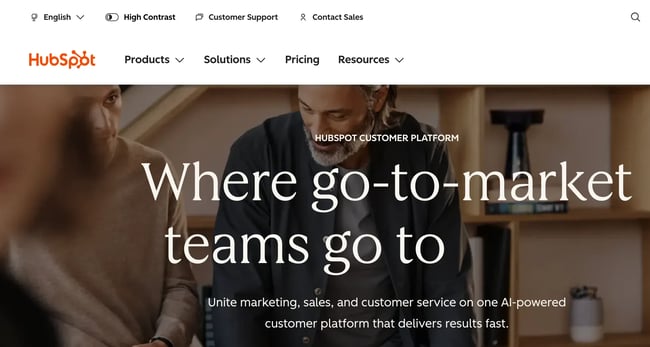
Since this is our website, this may be a little biased, but HubSpot is one of the best examples of good homepage design.
The background visualization is compelling, multiple CTAs are provided, and the layout remains extremely clear while still allowing space for feature explanations and plenty of social proof.
As Gary WestDirector at Imagefix, a design and digital marketing agency, says social proof tells potential customers and visitors that a company “It’s not just about making promises — it delivers for others like them.”
HubSpot’s homepage also uses lots of small animations and micro-interactions to help users scroll further and learn more without overwhelming the design.
What I love: I love the subtle animation in the hero header. The last word in the sentence scrolls through terms like “grow,” “scale,” and “retain” to illustrate the all-in-one power of the platform.
2. Barkbox
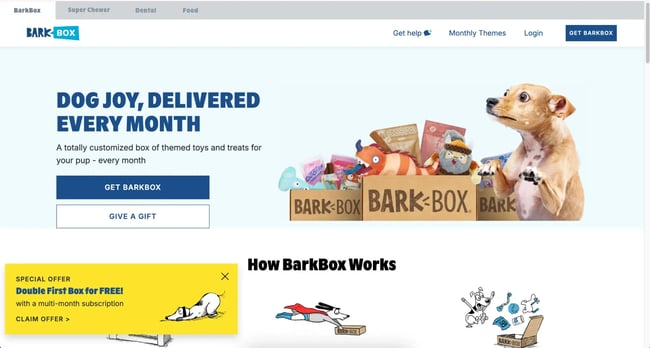
Barkbox is a subscription service for monthly packages of toys and treats for dogs. On their homepage, they combine real pictures of dogs with cute graphics and cartoons to explain the service.
In addition to a cohesive design, they use a strong brand voice in the text, complete with dog-related puns, while maintaining a clear message.
What I love: It can be difficult to get social proof if your end user wags their tail and doesn’t communicate in writing. But Barkbox still embeds customer stories on its homepage, showing how some of its dog customers enjoy the treats and toys included in their packages.
3. A24 films

A24 Films takes a unique approach to its homepage engagement that works wonderfully.
I think this is a great example of relying on visuals to communicate rather than a text-heavy homepage. A24 uses a simple layout, with each section containing an eye-catching image and a simple subheading to direct users to podcasts, interviews, merchandise, or memberships.
What I love: There are no fancy bells and whistles on the A24 website. Everything focuses on clear calls to action and giving each individual plenty of room to stand out.
4. Pixel degree
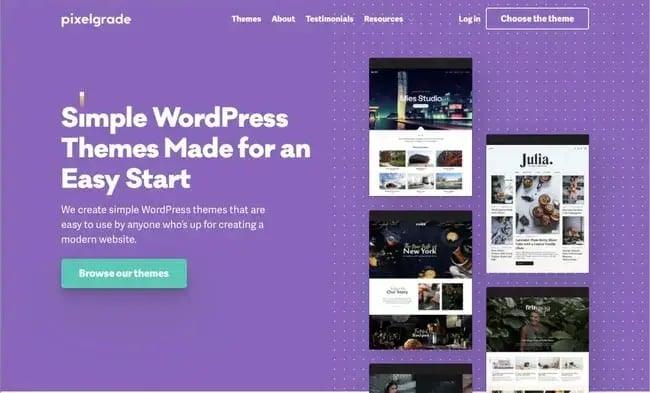
Pixelgrade offers WordPress themes for people building WordPress websites.
They use visuals directly in the hero to showcase examples of their themes before highlighting the benefits of their themes, interspersed with customer testimonials further down the page.
Color is used liberally but consistently to add style without overwhelming the user, with plenty of white backgrounds and contrasting element backgrounds
What I love: The simple design and color combination that makes the CTA stand out above the fold is beautifully done.
5. Chipotle
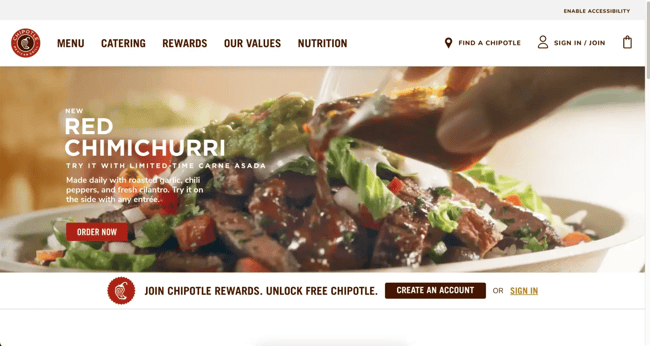
The Chipotle homepage uses tons of background videos. This includes close-ups of food in the hero and a video background where you would normally expect images in modular sections further down the page.
It adds movement and life to the entire site to reflect the fun atmosphere customers can expect at its many locations.
What I love: Some brands believe that homepages need to be static or that they only need to be updated every now and then. Chipotle highlights upcoming events and current offers directly on its homepage to capture the interest of both new and loyal customers.
6. Spotify
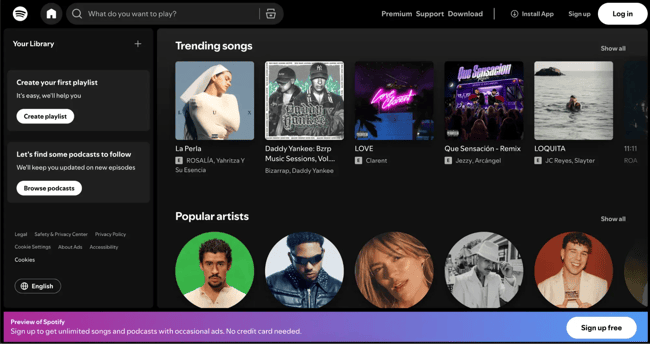
Spotify is interesting. They used to have a pretty standard, static homepage with a CTA to log in to the platform. Now when you open the website, the homepage will look like you are already logged in, even if you are not a user yet. Every element on the page opens a path to conversion and leads to a sign-up option.
It gives new visitors an overview of what the app looks like, and they use the space to show key features like playlists, podcasts, and trending articles.
What I love: Instead of generic text, Spotify uses a “What do you want to play?” Placeholder in the search bar. It’s the perfect opportunity for new users to find something that immediately appeals to them.
7. Future current
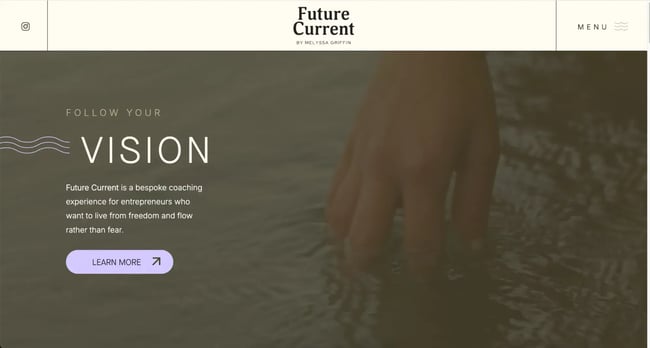
I’ve worked with a few trainers and individual consultants and it can be difficult to nail down a personal brand. Future Current does this beautifully while still finding space to place founder Melyssa’s story front and center on the homepage.
The homepage uses a simple but cohesive combination of colors and images to convey the feeling of calm and “inner knowing” on which Melyssa’s services are based.
What I love: Future Current focuses on the audience throughout the homepage, highlighting what they can gain from working with the company and providing CTAs for their free community section.
8. Digiday
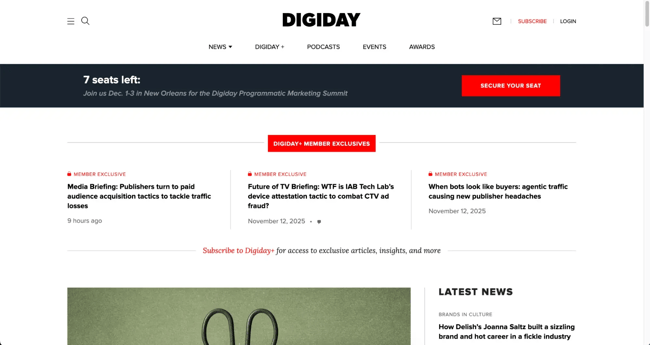
Digiday is an online trade publication aimed at digital marketing and media professionals. Because the site focuses almost entirely on publishing and promoting content, it uses a typical news media layout for the homepage.
From “Latest News” to topic-based rows as users scroll, Digiday ensures that everyone in the industry can find something interesting and useful to engage with on the homepage.
What I love: At the top of the homepage is a banner promoting content for “Digiday+ Member Exclusives.” If you run a content-based website and are struggling to monetize, small CTAs like this can help convert free users to paying subscribers.
9. Evernote
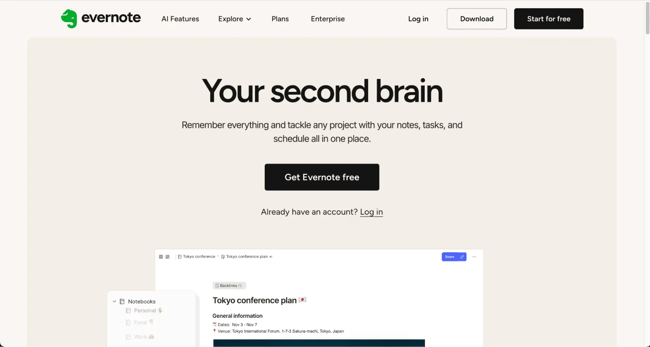
Evernote’s homepage will feel like a beacon of hope if your desk is full of sticky notes like mine. The headline “Your second brain” already makes me want to try it out immediately.
The design stays true to the organizational promise with a simple layout and simple graphics. The CTA cannot be missed with its elegant black color in the white space.
What I love: The primary image is a picture of Evernote in action. I can see my own to-do lists and notes almost clearly in the app. It’s a powerful image that makes you want to get out there and experience this organization first hand.
10. Charity: Water
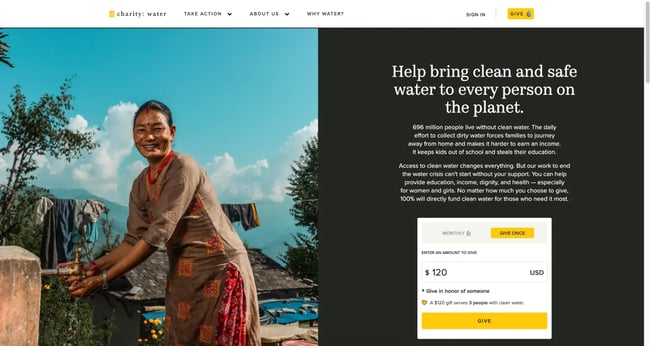
Charities and nonprofits need to focus more on CTAs than many other organizations. Donations are the main goal of the site and Charity: Water does a great job here by placing a donation payment form right on the homepage hero.
Users can enter an amount and donate as smoothly as possible. The rest of the homepage focuses on making the mission behind the organization clear through beautiful images and various other methods visitors can use to donate.
What I love: Charity: Water uses an extensive navigation menu to help users discover more, so the homepage doesn’t become cluttered with too many sections. The focus is exclusively on donations for their important cause.
11. medium
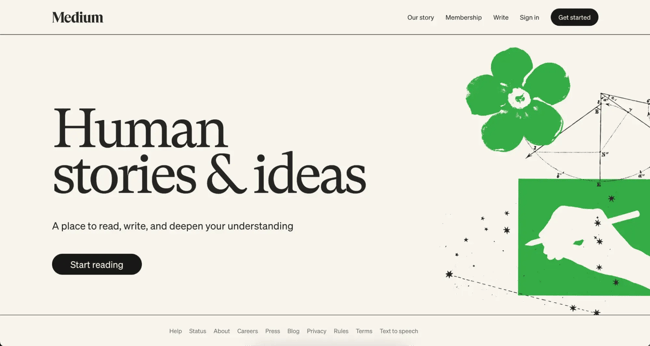
Medium’s homepage is another great example of less is more. It uses simple messaging on a minimalist background that conveys what the brand is about and its core value proposition.
This is followed by a prominent and action-oriented CTA that invites me to the next step. By minimizing messaging, they align with their headline “Human Stories and Ideas” and stimulate curiosity to increase click-through rates.
What I love: Unique CTA button text is one of my favorite things to try on websites. I love the “Start Reading” CTA text on Medium’s homepage.
12. Friendly snacks
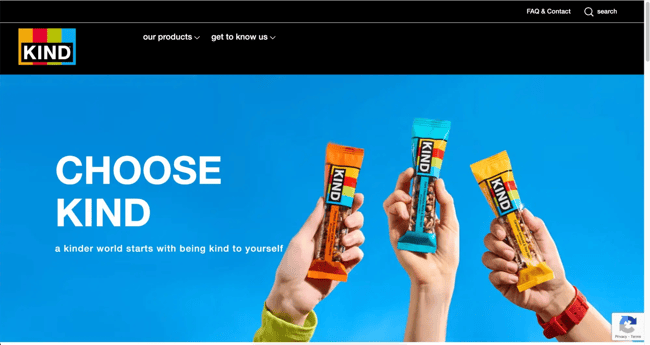
Kind is a snack brand that puts kindness at the heart of all aspects of its vision and products, from caring for the environment to individual health.
The homepage seamlessly combines this mission and brand values into a narrative and always contains high-quality product visualizations.
What I love: Finding the right color balance can be difficult. Kind achieves this by using their brand’s bright primary colors as simple backgrounds throughout each section of the homepage. It adds life to the page without being overwhelming.
13. Happy money
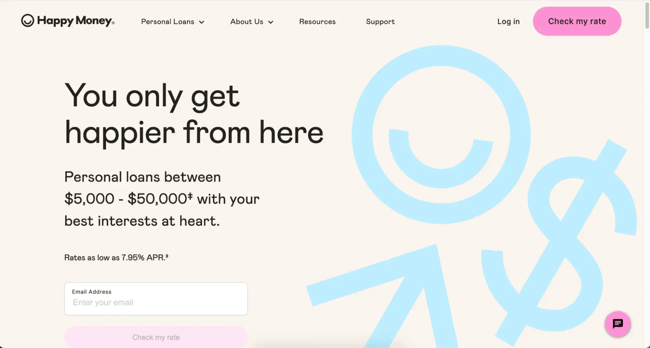
Happy Money’s homepage catches my attention with a positive and emotionally charged message that promises that you won’t be just another number at the company.
The color scheme and graphics match this humanized feel to illustrate the idea of trust and approachability. Below the fold, the content is well organized to keep visitors scrolling by answering questions and providing more encouragement through social proof.
What I love: Many financial services brands opt for dark colors and simple designs. But Happy Money aligns itself with its unique brand values with playful colors and images.
14. Tesla
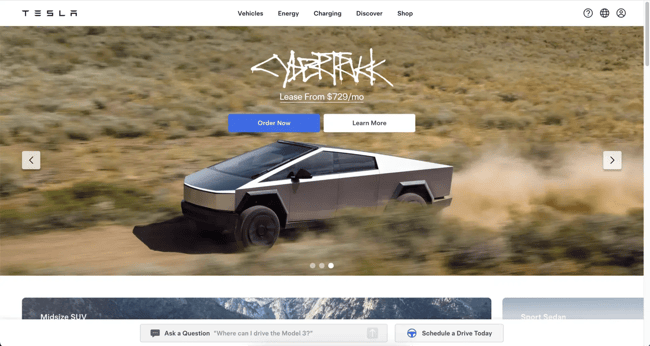
Tesla is a brand known for its innovations and futuristic products. Instead of using excessive text on the homepage, they let the vehicles speak for themselves with an abundance of images.
The hero uses a scrolling carousel to present various models in different environments. Hero CTAs that offer users the option to “Order Now” or “Learn More” demonstrate how to address different stages of the buying journey above the fold.
What I love: Further down the homepage, Tesla embeds an interactive global map of all Tesla Superchargers and destination charging stations around the world. This is a clever way to forestall any objections to electric vehicles.
15. Thriving market
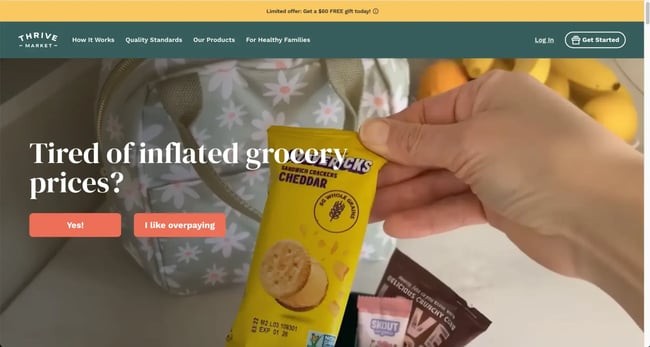
Thrive Market is another example of a website that gets straight to the point. The homepage immediately asks me a question, drives immediate engagement, and brings me one step closer to conversion.
The site features vivid images of healthy foods and natural products with clear, straightforward text that promises you don’t have to spend a lot of money to eat well.
What I love: I love the hero video background. While video backgrounds are no longer unique these days, Thrive Market uses them to show different products in different scenarios. From lunchbox snacks to homemade pizzas, it allows users to visualize the everyday scenarios where the product would come in handy.
16. Security.org
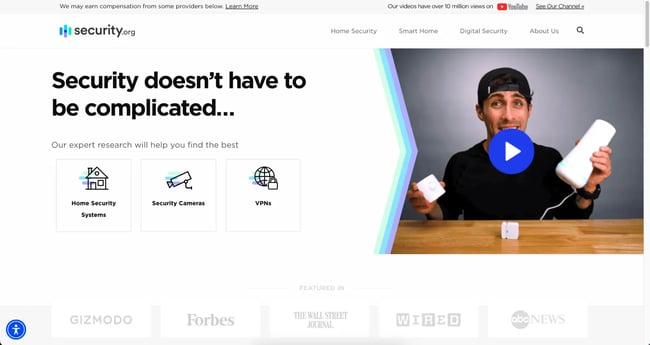
Security.org positions itself as the ultimate resource for all things DIY digital security. The homepage encourages visitors to do this themselves using Security.org.
Additionally, the page features a clean, uncluttered layout with plenty of white space around the text and between elements. This ensures that everything is easy to read and find.
What I love: Security.org is a super niche website that focuses solely on educating customers about home security. They make this clear in the hero header copy to avoid confusing users about the purpose of the site.
17. Carmax
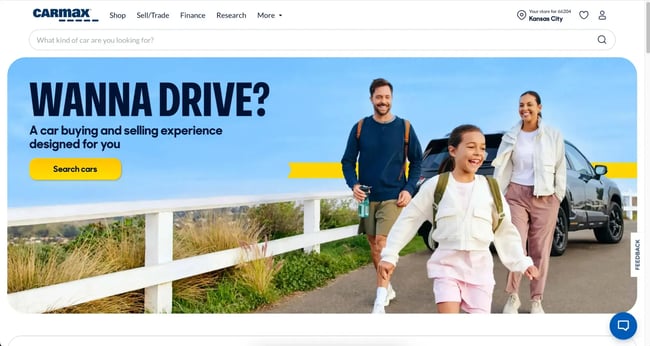
Carmax is an online marketplace for used cars and its design is very simple. After the bright, fun background image in the hero, the rest of the page relies on lots of white space and minimalism.
In addition to CTAs for exploring used cars, the homepage takes visitors on a journey through customer testimonials, resources, and multiple search options.
What I love: Just below the fold is a simple calculator that allows visitors to see what price they should be aiming for while browsing the site.
18. Coursera
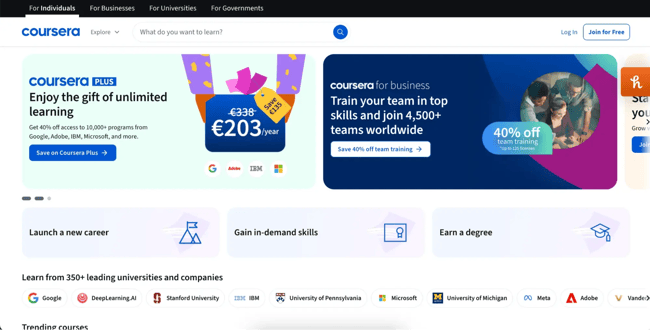
Coursera is another example of a content-rich website that appeals to a wide range of audiences. As an online training marketplace, it uses multiple sections on the homepage to ensure that anyone who lands on the site finds their way to an appropriate course or category.
By grouping courses by specific job functions, learning paths and career stages, the homepage directs the user to the most relevant journey.
What I love: Instead of focusing on a single CTA, the homepage hero scrolls through different offers with beautiful but different graphics and color combinations.
19. The Exploratorium
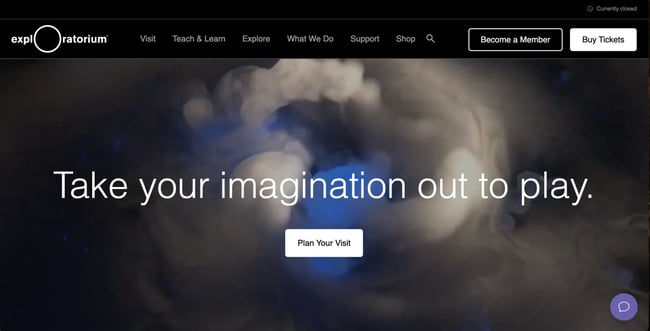
When you market a personal experience, your website’s homepage can become the first point of contact for what users can expect during their visit.
The Exploratorium in San Francisco uses real footage for a background video in Hero, allowing users to get an idea of the attraction as soon as they land on the site.
In the rest of the site, they use sections to promote upcoming special events and school trip reservations to direct the user to the right place.
What I love: Exploratium has a chatbot embedded on the homepage and throughout the site that helps visitors easily take action around memberships and reservations.
20. Italic
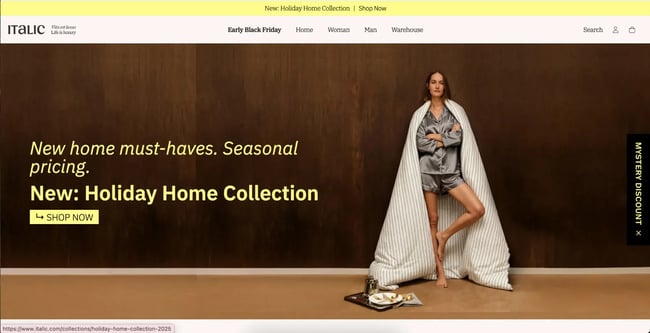
Italic is a luxury homewares and clothing brand. The homepage uses a subtle mix of monochrome colors, making the product highlights stand out even more in different sections of the page.
All images on the site use the same treatment and style to give the products a cohesive feel when scrolling.
What I love: When I open the Italic website, a full-screen popup appears advertising the latest sale. Pop-ups are a great way to increase conversions, especially if you frequently replace them with new offers and promotions.
21. A nice stay
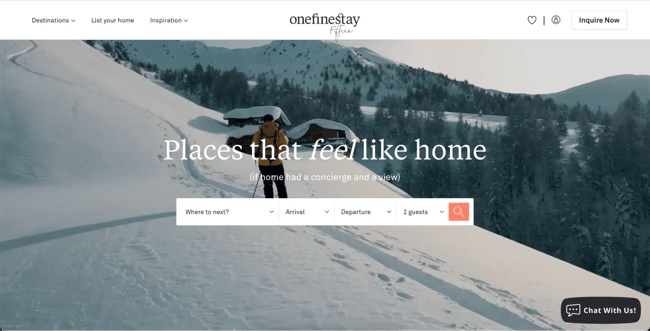
One Fine Stay is another great example of how you can use videos in the background of your hero to help visitors imagine themselves using your product or service.
But One Fine Stay also integrates this very well into the message with the main headline and subheading text.
As the user scrolls, the homepage continues to explain how the stays work, but always with the “home away from home” angle in the copy to keep the message consistent.
What I love: I counted over four CTAs on the homepage, from searching for a destination to calling the reservations team on the phone. Giving users the ability to convert the way they want is a surefire way to increase your homepage conversion rates.
22. Roto Rooter
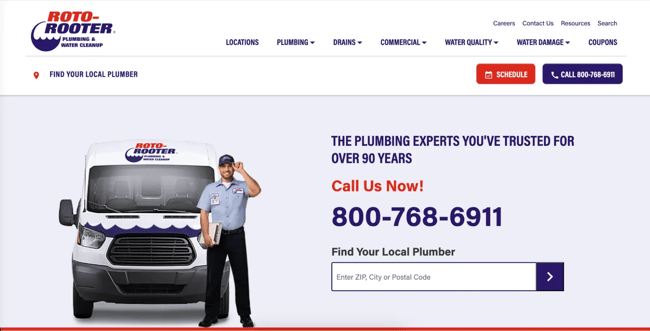
Roto-Rooter is a plumbing service provider with nationwide reach. Your homepage needs to convey a sense of local service while ensuring that it makes the site usable for people in many different locations.
They do this by giving people multiple ways to find the service near them, most notably with a postcode-based search in Hero. Users can also use the “Locations” item in the main navigation and even find the option to switch to the Canadian version of the page further down the page.
What I like: From images of the team to embedded customer reviews, Roto-Rooter uses a lot of social proof on the homepage to reinforce its brand values around quality and expertise.
23. Fitness at any time
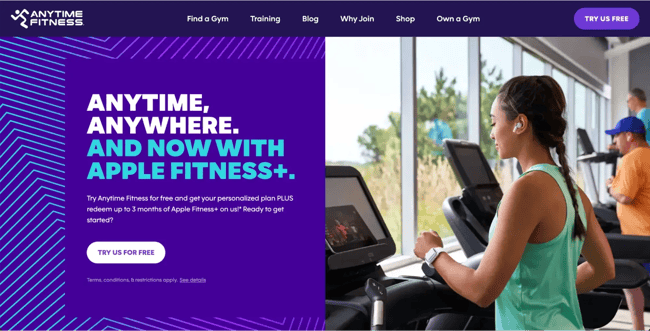
Anytime Fitness is an example of a really strong brand that is used properly on the website homepage. The bold purple base with blue accents gives the hero a striking look. The rest of the homepage still integrates these design elements very well, although with lots of white space and lower-contrast backgrounds so that location and course information can stand out.
What I love: Anytime Fitness’ homepage uses a simple checklist section to highlight the benefits of their gyms, such as 24-hour hours and the number of locations available.
24. Pearl Dental NYC

New York-based dental clinic Pearl Dental uses very simple branding and simple colors. The dark navy blue conveys a sense of professionalism and trust, while the clinic images and team profiles help potential clients feel at ease.
They also include sections on specific dental services they offer and an embedded map to help patients find the clinic more easily.
What I love: Pearl Dental includes an accessibility widget in the bottom right corner so that users with different needs can customize the appearance of the website to better find information.
25. Index Ventures
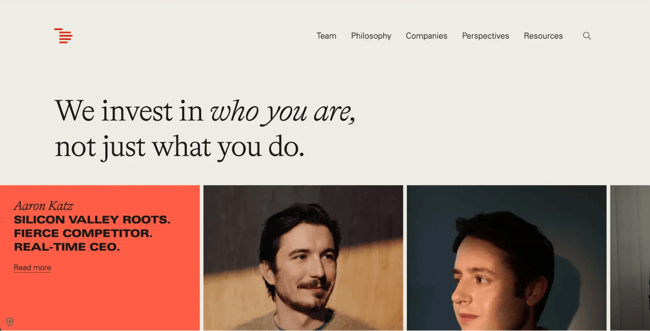
Index Ventures is a venture capital firm that uses its homepage to inform potential founders about who they are and what they do.
The branding is clean and simple, but clever animations like changing the background color as you scroll keep the user engaged as they scroll through the different sections.
What I love: The rolling list of existing portfolio companies such as Figma and Revolut underscores Index Ventures’ industry expertise and past successes.
26. Huda beauty
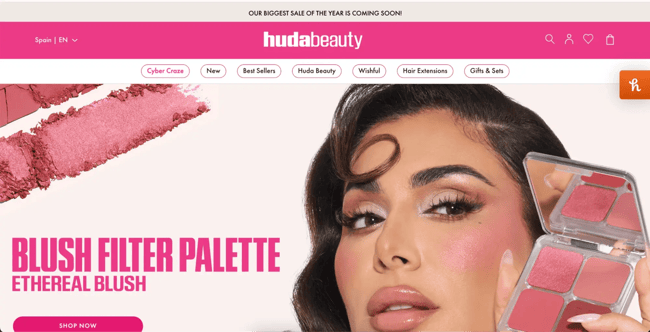
Huda Beauty has grown into a global brand but started as an influencer channel. Huda continues to be the focus of branding and website design. however, to keep the brand’s grassroots origins at the forefront of users’ trust.
The bright pink branding colors and sections create the perfect setting for product shots. The brand also uses Sections to promote items like gifts and kits, with the goal of increasing conversions.
What I love: Another nod to Huda Beauty’s influencer roots are the helpful beauty guides embedded on the homepage.
27. Building
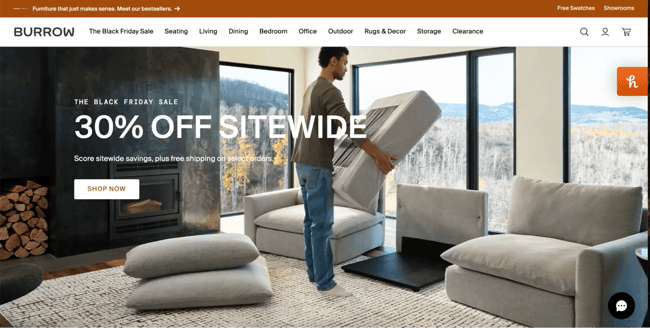
Burrow manufactures and sells various types of modular furniture. I’ve highlighted a few examples of hero background videos in this list, but this one might be my favorite.
Burrow uses a form of stop-motion animation in her video that reflects how her modular furniture products work; each part fits into the other with simplicity.
What I love: Further down the homepage, Burrow includes a longer standard video showing how to unpack and assemble the furniture so users can see for themselves how easy it is.
28. Citrine Cooperman
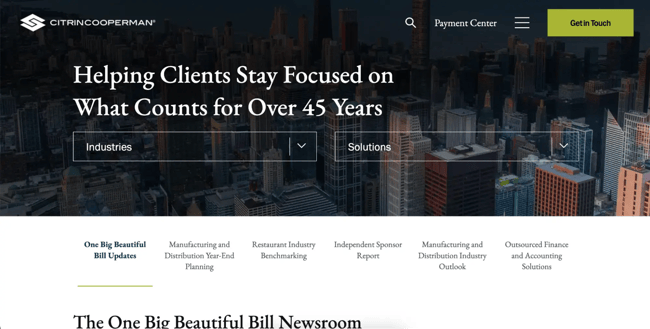
Citrin Cooperman is a cross-industry financial and tax consulting company. The homepage of their website is an example of well-done B2B marketing.
It provides helpful resources on topics that are important to the target audience, which builds trust and provides a sense of expertise.
What I love: The branding is simple and professional but not boring, and I particularly like the background images overlaid with their navy blue brand color.
29. St Elmo Steak House
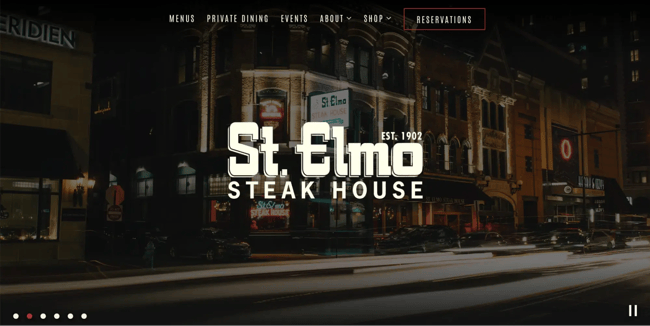
St. Elmo’s Steak House in Indianapolis uses a lot of dark colors and displays its branding on the homepage, reflecting the classic and cozy interior design of the restaurant itself.
They lean heavily on their heritage, highlighting their 100+ year tradition and the dishes they are most known for.
What I love: The scrolling effect on a collage of images showcasing the food, cocktails and dining experience gives visitors an idea of what to expect when they visit the place itself.
30. Pastel salon
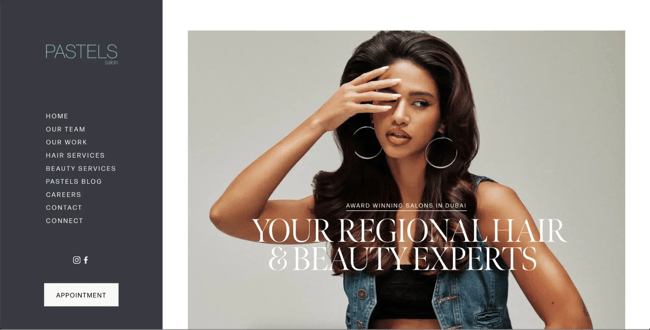
Pastels Salon’s website subverts expectations a bit. Instead of placing the website menu horizontally at the top, it sits on the left and remains static while the user scrolls the homepage.
This keeps the “next step” in view for the user at all times, be it exploring a specific service or clicking the “Appointment” button.
What I love: Pastels includes images of their real team on the homepage to build trust with their website visitors and give the brand a welcoming feel.
31. Advice
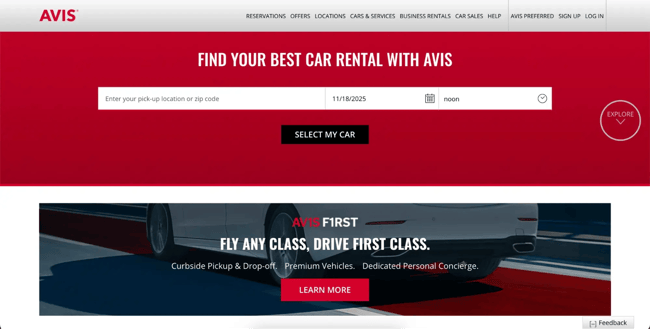
Renting a car can be a stressful experience. There are so many options and it’s difficult to know what to choose. Avis aims to reduce this friction for site visitors across the entire homepage, including the simple “Select My Car” form right in Hero.
What I love: Further down the page you will find a large list of cities that users can click on to further start their booking process with the correct pickup details.
32. Rabbit Hole Distillery
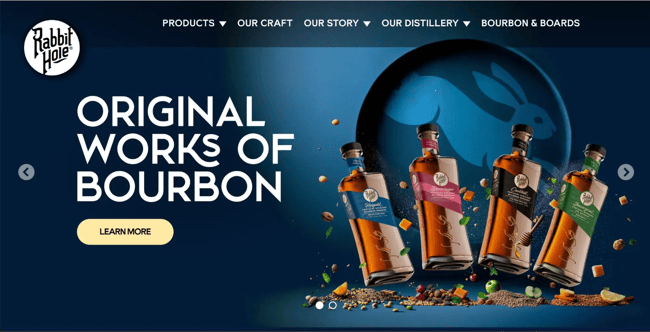
When your website needs to serve more than one purpose, it can be difficult to know which to prioritize. Rabbit Hole does this beautifully, using its homepage to promote both bourbon sales and in-person visits and tours of the distillery itself.
The strong branding and 3D effect on the product images ensure that every section on the homepage stands out and makes scrolling an experience in itself.
What I love: A section of the homepage is dedicated to a brief history of the brand’s founder and highlights the values and journey that underpin their products.
Create a great homepage for your brand.
If you’ve taken the time to go through some examples from my list of favorites, you’ll notice a few key themes that stand out when building a great homepage: build a cohesive brand, focus on CTAs, and minimize user friction wherever possible.
Follow these golden rules and, no matter your industry or target audience, you can create a homepage designed to captivate and convert website visitors into loyal customers.
Editor’s Note: This post was originally published in March 2013 and has been updated for completeness.