


I used to write e-books before I started WordPress and SEO.
I spent weeks writing them in Google Docs, creating covers on Canva, and uploading them to Kindle in hopes someone would find them.
Spoiler alert: no one did.
My books were buried among thousands of others. Zero sales and zero visibility. Just crickets.
Then I created my own website and sold the same e-books directly. Everything has changed. I made real sales, built a small community, and gained real authority in my niche.
This experience taught me something crucial: The platform you choose is just as important as the product you create.
If you sell digital products like e-books, courses, software, or templates, you need more than just a good product.
You need a platform that puts you in control, helps customers find you, and actually delivers your products without having to manually email files at midnight.
In this guide, I’ll show you where to sell digital products online.
These are not random names. I’ve used these platforms myself, tested their features, and seen what works for real people trying to build businesses with digital products.
Whether you’re a complete beginner or switching from a marketplace that isn’t working, I’ll help you find the right platform for your needs.
Key Takeaways:
- Best platforms for various digital products such as e-books, courses and downloads
- Which ones offer comparisons between WordPress plugins and hosted platforms?
- Which tools have free options and paid plans? breakdown
- Can you add payment gateways? Does the platform charge transaction fees?
- How long is the setup time and how easy is it to use each platform?
- Overall star ratings for each digital sales tool
How I tested these digital product platforms
I didn’t just read feature lists and write this article.
I actually set up test shops, created sample products, and went through the entire process from setup to sale. I have been using some of these platforms for years. Others I tested specifically for this guide.
Here’s what I looked for on each platform:
- Set up speed. How long does it take from zero to first sale? I set the time to set up each platform myself. Some lasted 20 minutes. Others took hours.
- Ease of use. Can a beginner figure this out without watching 10 tutorial videos? I paid attention to how intuitive the interface felt and whether I got stuck anywhere.
- Payment options. Which payment gateways work with each platform? I tested credit card processing, PayPal integration, and alternative payment methods like Apple Pay and Google Pay.
- Delivery system. How do customers actually get their files? I made test purchases to see the download process from the buyer’s perspective. Some platforms send download links via email. Others create customer portals.
- Customer experience. How does the checkout process feel? Is it smooth or chunky? Can customers save their cart and come back later? I looked at this from a buyer’s perspective.
- Inexpensive. What do you actually pay compared to what you get? Some platforms are free, but transaction fees apply. Others charge upfront but include everything.
I also considered things like the quality of customer support, available documentation, and ease of scaling as your business grows.
Why trust IsItWP?
You’re probably wondering, “Why should I trust this list?” So…
At IsItWP, we’ve been the go-to source for the WordPress community since 2009, helping over 2 million users choose better tools and plugins.
Unlike review sites that copy features from sales sites, I have built real businesses using these platforms and sold real digital products through them. I use some every day. I tested others extensively for this guide.
My goal is not to push the most expensive option. It is intended to help you find the platform that actually meets your needs and skill level.
Now that you understand my testing process, let’s get started.
Best platforms to sell downloads and digital products
Before we delve deeper, let’s take a quick look at the top platforms for selling digital products.
Short summary: The best platforms at a glance
This table shows which digital sales platform is best, whether it has a free version, pricing, type and ease of use.
Each platform has its strengths, depending on what you sell and your level of technical comfort. First, let’s look at why you need a dedicated platform in the first place.
| platform | Best for | Free version? | type | Ease of use | Starting price |
|---|---|---|---|---|---|
| 🥇 Easy digital downloads | E-books, PDFs, software, templates | ✅ Yes | WordPress plugin | Very simple | Starting at $99.50/year |
| 🥈 WPForms | Easy download delivery via forms | ✅ Yes | WordPress plugin | Very simple | Starting at $49.50/year |
| 🥉 WooCommerce | Flexibility (digital + physical) | ✅ Yes | WordPress plugin | Moderate | Free (paid extensions vary) |
| 4. Shopify | All-in-one hosted solution | ❌ No | Hosted platform | Simply | Starting at $19/month |
| 5. MemberPress | Memberships and Subscriptions | ❌ No | WordPress plugin | Moderate | Starting at $199.50/year |
| 6. LearnDash | Online courses and learning | ❌ No | WordPress plugin | Moderate | Starting at $199/year |
| 7. MemberMouse | Mixed one-off and subscription sales | ❌ No | WordPress plugin | Moderate | Starting at $149.50/year |
| 8. Sellfy | Simple shop without WordPress | ❌ No | Hosted platform | Very simple | Starting at $22/month |
Next, here is a table of contents. This will help you jump to any product on this list that you want to read more about.
With that said, let’s get started.
1. Easy digital downloads ⭐⭐⭐⭐⭐
Over 50,000 active users | Used by large WordPress companies | Best for: eBooks, PDFs, software, plugins, templates
Prices: Free Core Plugin | Pro extensions starting at $99.50/year
Easy digital downloads (EDD) is without a doubt the best digital eCommerce plugin for WordPress because it is so easy to use.
It became my solution after I learned that I could send digital products to customers in just a few clicks without manually emailing them after purchase.
Setting up my shop took about 20 minutes. I installed the plugin, added sample products and configured Stripe.
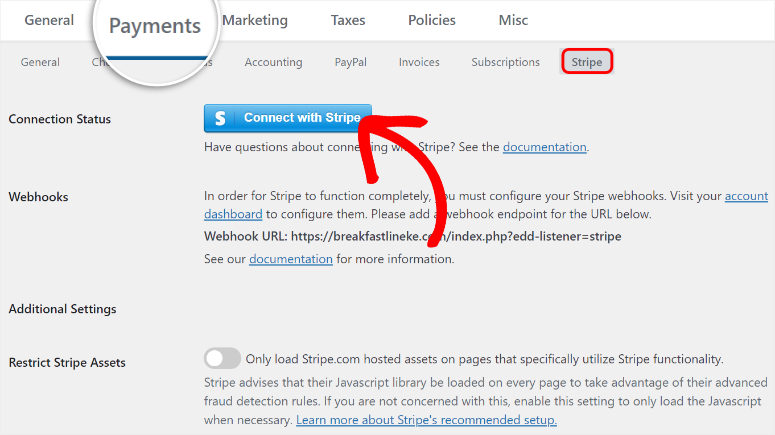
The shopping cart then works immediately and customers can purchase multiple items. They can also check out as guests or create accounts, giving them more flexibility.
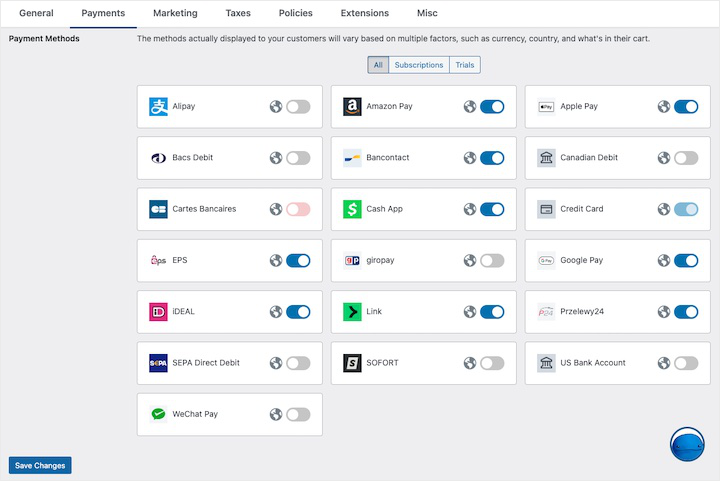
That’s not all, the Stripe connection allows me to add different payment options without any further integrations. So you can add Amazon Pay, Apple Pay, Alipay, Cash App and many more.
This makes it perfect for beginners who want to diversify their payment options.
What impressed me most was the delivery system.
After completing a purchase, customers immediately received secure download links. I could set links to expire after 48 hours or limit downloads to 3 attempts.
This protects your products from being shared everywhere.
In addition, the customer dashboard shows exactly who bought what and when.
I can see lifetime value, track repeat buyers, and manually add purchases if necessary. Additionally, discount codes take 30 seconds to create. You can create a voucher for new or existing customers in no time.
Easy Digital Downloads is designed for digital products, but you can also use it to sell physical products using the Simple Shipping extension.
This is great if you sell an eBook and a physical copy, as customers can purchase both at one checkout without the need for a separate store.
If you need hosting, SiteGround offers managed EDD hosting with pre-installed plugin, free SSL and optimized servers. Plans start at $3.99/month.
►Advantages
- Designed specifically for digital products with features that really matter. No bloating of the physical product.
- Accepts Apple Pay, Stripe, PayPal and Google Pay so customers can pay however they want.
- The shopping cart supports guest checkout, saved carts, and purchasing multiple products at once.
- Complete control over download delivery with time limits and attempt limits to prevent sharing.
►Disadvantages
- There are few WordPress themes designed specifically for EDD, although it includes a free theme.
- Paid extensions add up when you need advanced features beyond the free core plugin.
My verdict
Easy Digital Downloads is the best WordPress solution for selling digital products. If you sell eBooks, software, templates, or downloadable products, start here. It’s powerful for serious businesses but easy for absolute beginners.
Check out my latest Easy Digital Downloads review here. Also, here are the best Easy Digital Downloads alternatives for you to check out.
Prices: Free Core Plugin | Pro extensions starting at $99.50/year
2. WPForms ⭐⭐⭐⭐⭐
Over 6 million active installs | Big brands trust it | Best for: Easy digital product delivery via forms
Prices: Lite version free | Pro from $49.50/year
WPForms surprised me as a digital product platform. Most people know it as the best form builder, but secretly it’s one of the easiest ways to sell simple downloads.
I tested this when a friend needed to sell a single PDF checklist. She didn’t need a full store with shopping carts and customer accounts. She just needed a way for people to pay and receive the file.
WPForms solved it in 15 minutes.
The plugin contains over 2,000 form templates, including a pre-built downloadable form. If you don’t find a form template you like, you can create it from scratch.
Or you can create a form with AI and customize it to your liking.
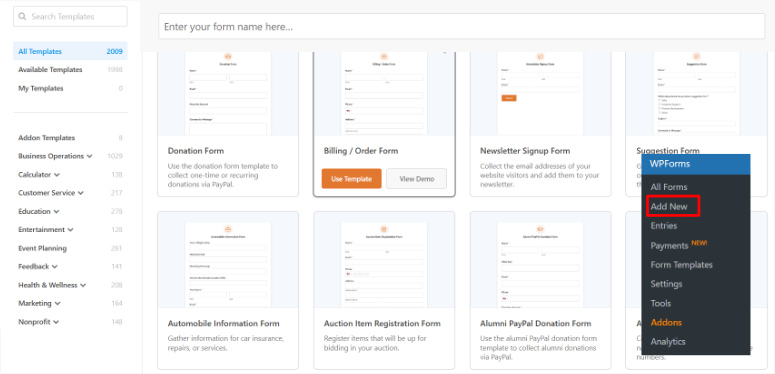
I simply selected the template, connected Stripe for payments, and added the PDF file. Completed.
The drag-and-drop builder makes customization easy. Do you need to add a checkbox for terms? Drag it in. Do you want to collect phone numbers? Add a field. Everything just works.
What really impressed me was the automated email sending.
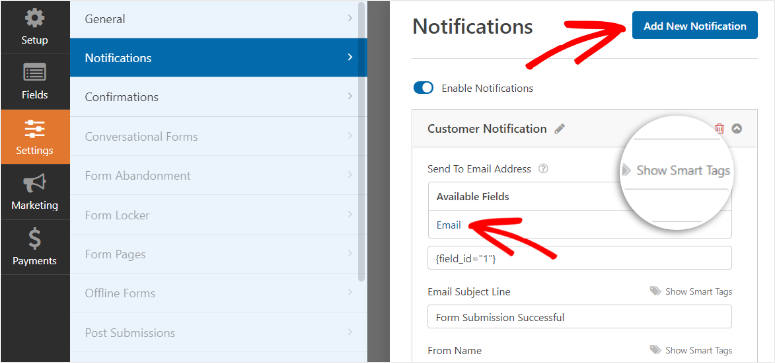
When someone purchases, WPForms immediately sends them the download link. I can set up different email templates for customers and administrators.
Using Smart Tags, I’ve even created custom emails based on what product someone purchased.
Security is also integrated.
The form has spam protection and I added Google reCAPTCHA to block bots. My friend hasn’t received a single spam submission.
But keep in mind that WPForms doesn’t try to be a complete eCommerce platform. That is actually his strength. If you sell a few simple digital products and don’t want to deal with complex shop systems, this is perfect.
►Advantages
- Super easy to set up with over 2,000 templates including pre-built downloadable forms with payment fields that work out of the box.
- The drag-and-drop builder makes customization easy, even if you’ve never created a form before.
- Connects to PayPal and Stripe so you can accept payments without merchant accounts or complex setup.
- The automated email sends instant download links with customizable templates for different products.
►Disadvantages
- Not ideal if you need a shopping cart or want to sell dozens of products with complex variations.
- Limited to form-based sales, so you don’t get features like customer accounts or purchase history tracking.
My verdict
WPForms is perfect for easy digital product delivery. If you’re selling a few eBooks, guides, or templates and want the easiest possible setup, this is better than anything else. The store is not crowded and that is precisely why beginners love it.
Check out my detailed WPForms review. Also, here are the best WPForms alternatives if this isn’t right for you. See how other form builders like Formidable Forms compare to WPForms.
Prices: Lite version free | Pro from $49.50/year
3. WooCommerce ⭐⭐⭐⭐⭐
Operates over 30% of all online shops | Huge plugin ecosystem | Best for: Flexibility with digital and physical products
Prices: Free Plugin | Extensions and themes vary
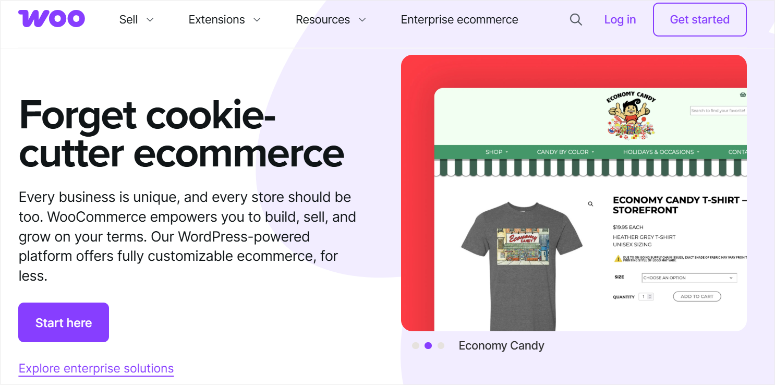
WooCommerce runs more online stores than any other platform. Most people use it for physical products, but it also handles digital downloads perfectly.
I have set up WooCommerce stores for clients who sell both eBooks and physical books. The flexibility is unmatched.
You can start with digital products today and add physical products next year without having to switch platforms.
Setting up digital products is surprisingly easy.
When you create a product, simply check two checkboxes: “Virtual” and “Downloadable”. This eliminates any shipping options you don’t need. Then upload your file and you’re done.
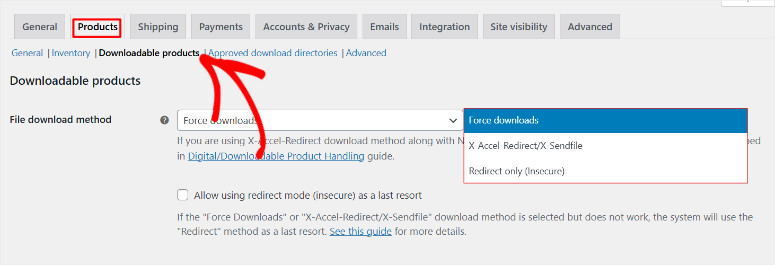
What took me 45 minutes to set up wasn’t the digital product part. It learned WooCommerce itself. There are many settings and options. This power comes with a learning curve.
But once you understand it, you have incredible control.
Do you want to sell bundles? Completed. Do you need subscription products? There is an extension. Do you want to offer variable prices? Simply. The WooCommerce ecosystem offers a plugin for almost everything.
When it comes to payment gateways, WooCommerce shines.
You can accept credit cards through Stripe, PayPal, Square, Authorize.net, and dozens of other providers. More than any other platform on this list.
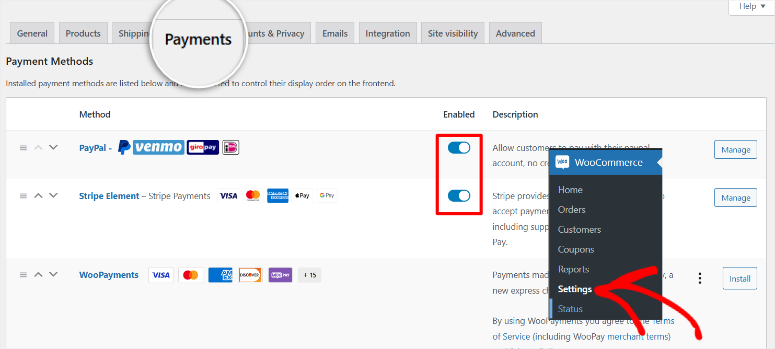
The downside? All of these options can be overwhelming. Plus, extensions add up quickly. The core plugin is free, but as you grow you will likely purchase some paid add-ons.
For the best WooCommerce hosting, both Bluehost and SiteGround offer optimized servers with one-click installation and everything pre-configured for you.
►Advantages
- Completely free core plugin with no transaction fees beyond payment gateway fees.
- Sell both digital and physical products in the same store, ideal if you want to expand later.
- Huge library of free and paid extensions for almost every feature imaginable.
- Works with over 100 payment gateways, including all major payment processors and regional options.
►Disadvantages
- The learning curve is steeper than with simpler platforms, especially if you’re new to eCommerce.
- Extensions and premium eCommerce themes can get expensive as you add features and functionality.
My verdict
WooCommerce is the best choice if you want maximum flexibility. That’s excessive for selling a single e-book, but perfect if you’re building a real business that could grow beyond just digital products. The learning curve pays off with strength and control.
You can find all the details in my WooCommerce review here. Are you looking for options? Compare WooCommerce and BigCommerce here.
Prices: Free Plugin | Extensions and themes vary
4. Shopify ⭐⭐⭐⭐
Millions of stores worldwide | All-in-one hosted platform | Ideal for: Beginners who want to have everything under control
Prices: Starting at $19/month for the basic plan | Start with $1/ for the first 3 months

Shopify is the easiest way to start selling if you don’t have WordPress and don’t want to deal with hosting.
I was testing Shopify when a customer was wondering where to sell digital products like art prints, but had no technical knowledge.
He signed up, chose an eCommerce theme, and had a working store in 30 minutes. You don’t need to buy eCommerce hosting or install plugins. Everything just worked.
For digital products you need a free app called Digital Downloads.
It integrates seamlessly and allows uploading files up to 5GB. When customers purchase, they receive instant download links.
The catch?
Shopify charges a 2% surcharge on each sale if you don’t use Shopify Payments. So if you prefer PayPal or another gateway, you will also pay platform fees in addition to payment processing fees.
Another problem: You can’t easily move your Shopify store to another platform. Shopify hosts everything, which is convenient until you want to leave. Your data remains locked in your system.
There are workarounds to convert Shopify to WordPress, but you need experience.
But for the sake of simplicity, there is nothing better. The dashboard is clean. Support is available 24/7 via chat, phone and email. Additionally, updates and security are automatic.
►Advantages
- No technical setup required. Sign up and start selling immediately without purchasing hosting or domains separately.
- 24/7 support via live chat, phone, email and Twitter with helpful documentation and video tutorials.
►Disadvantages
- Additional 2% transaction fee if you use any payment gateway other than Shopify Payments, which adds up quickly.
- Integrating with WordPress blogs is not easy and migrating your data to another platform is almost impossible.
My verdict
Shopify works if you want a dead-simple setup and don’t mind monthly fees. It’s not ideal for WordPress users, but perfect for absolute beginners who just want to sell without any technical issues.
For more information, see my Shopify review. You can also compare Shopify to WooCommerce to see how the #3 and #4 digital sales platforms on this list fit together.
Prices: Starting at $19/month for the basic plan | Start with $1/ for the first 3 months
5. MemberPress ⭐⭐⭐⭐
Top WordPress Membership Plugin | Thousands trust us | Best for: Subscription-based digital products and memberships
Prices: Starting at $199.50/year for the Launch plan
MemberPress has changed the way I think about selling digital products. Instead of one-off sales, you rely on recurring income through memberships.
I have set up a membership site with three tiers: Free, Premium and VIP. Each level has different content unlocked.
For example, premium members received access to exclusive e-books and videos. VIP members got everything plus monthly coaching calls.
Content protection worked perfectly.
I could restrict each page, post, or download to specific membership levels. This allows members to log in and only see what they paid for.
What impressed me was the course builder included with MemberPress. I created a mini-course with drip content that was one lesson per week.
This keeps members subscribed longer instead of downloading everything on the first day.
Setting up payment plans was easy. I’ve offered monthly subscriptions, annual plans with discounts, and even a 7-day free trial. Coupon codes worked perfectly for promotions.
The reports show exactly which membership tiers are selling best and how much recurring revenue you are generating each month.
►Advantages
- Integrates with major payment gateways such as PayPal, Stripe and Authorize.net for flexible payment processing.
- Create unlimited membership tiers with different access rights, pricing and content for each tier.
►Disadvantages
- Not ideal if you only want to sell one-time downloads without subscriptions or memberships.
- Powerful features mean a learning curve, although documentation and tutorials are helpful.
My verdict
MemberPress is perfect for building membership sites with courses and premium content. If you want recurring revenue instead of one-time sales, start here.
For more information, check out my detailed MemberPress review. Additionally, you can compare MemberPress with WishList Member, another top membership plugin, to find out which one works best for you.
Prices: Starting at $199.50/year for the Launch plan
6. LearnDash ⭐⭐⭐⭐
Leading WordPress LMS Plugin | Used by major universities | Best for: Online courses and learning platforms
Prices: Starting at $199/year for 1 website

LearnDash is what you need if you sell courses, not just simple downloads.
I tested it by creating a mini photography course with 5 lessons. The drag-and-drop course creator made organizing content easy.
This makes it one of the best Learning Management System (LMS) plugins for your WordPress site.
I added engaging quizzes and video lessons and set requirements so that students had to complete Lesson 1 before accessing Lesson 2.
What sets LearnDash apart is its learning features.
Students receive certificates when they complete their courses. I can add badges for achieving milestones. There is even an integrated forum where students can interact with each other.
What impressed me most was the pricing flexibility. I set up one course as a one-time purchase, another as a monthly subscription, and a third as part of a membership package. All from the same platform.
Setup took about an hour because courses require more planning than simple downloads. But once configured, everything runs automatically.
Support is via tickets only, which is fine for most issues. The 30-day money-back guarantee gives you time to test whether it meets your needs.
►Advantages
- Supports multiple pricing models including one-time sales, subscriptions, memberships and course packages.
- Course-specific features like certificates, badges, quizzes, and drip content keep students motivated and completing classes.
►Disadvantages
- No live chat or phone support, just ticket system which can be slower for urgent issues.
- There is no free version or trial period available, but there is a 30-day money-back guarantee.
My verdict
LearnDash is the WordPress standard for selling online courses. If you teach anything beyond simple downloads, this is the starting point for serious course creators.
Here’s a comparison article between MemberPress and LearnDash so you can see how #5 and #6 on this list compare. Still looking for options? Ok, check out LearnDash vs. LifterLMS for even more options.
Prices: Starting at $199/year for 1 website
7. MemberMouse ⭐⭐⭐
Flexible WordPress Membership Plugin | Growing user base | Best for: Mixed one-time and subscription sales
Prices: Starting at $149.50/year for the basic plan
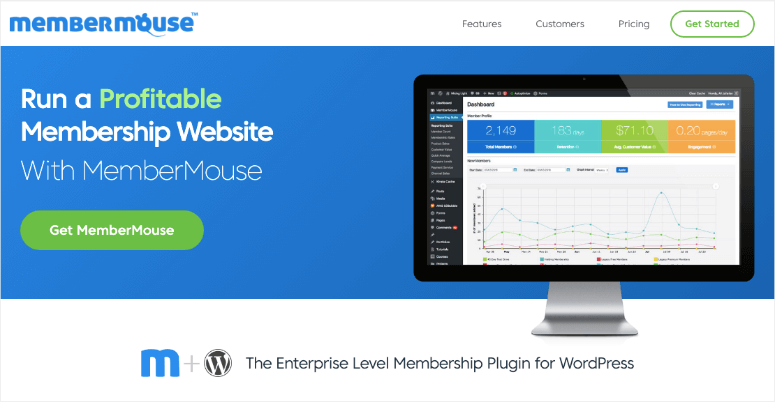
MemberMouse gives you something most platforms don’t: the ability to sell one-off products and subscriptions in the same store.
I tested this by setting up a store that sells both individual eBooks (one-time purchase) and a monthly membership for unlimited access. Most platforms force you to choose one model or the other.
The drag-and-drop course creator is good for creating structured learning content. I’ve added lessons, quizzes, and time-released content that comes out weekly.
What really stood out was the 1-click upselling feature.
If existing members want to purchase something new, they don’t have to re-enter their credit card details. It happens with one click. This significantly increases sales and reduces shopping cart abandonment.
The SmartTags feature allows you to display personalized content based on what someone has purchased. A member who has purchased your beginner course will automatically see recommendations for advanced courses.
MemberMouse also processes failed payments automatically. It reloads and sends reminder emails without you having to lift a finger. This saves income that you would otherwise miss out on.
►Advantages
- Flexible enough to sell both one-time purchases and subscriptions on the same platform without separate stores.
- 1-click upsells for existing members increase sales because they don’t have to re-enter their payment information.
►Disadvantages
- Full analytics and reporting requires the Pro plan, which is not included in the Basic plan.
- Limited built-in integrations compared to competitors, although it can connect to popular payment and email services.
My verdict
MemberMouse is good if you need flexibility between one-time sales and subscriptions. It’s a solid middle ground between simple and complex.
Prices: Starting at $149.50/year for the basic plan
8. Sellfy ⭐⭐⭐
Simple Hosted Platform | Growing creator community | Best for: Quick shop setup without WordPress
Prices: Starting at $22/month for the starter plan
Sellfy is the fastest way to start selling if you want something super simple.
I had a test shop up and running in 10 minutes. No hosting to buy. No WordPress to install. Simply log in, upload products and share your shop link.
The user interface is clean and beautiful. Everything looks professional right from the start. I didn’t have to mess with themes or design settings. It just worked.
Sellfy includes discount codes and email marketing built into the platform. Most platforms require you to pay extra for these features or incorporate third-party tools. They have been here from day one.
Customers can pay in 25 different currencies and Sellfy automatically handles the translation based on their location. This makes international sales child’s play.
The downside? You cannot sell structured online courses like you can with LearnDash. Sellfy is great for eBooks, music, videos and software. However, if you need lessons, tests, and certificates, look elsewhere.
Storage is safe and delivery is immediate. Upload files and Sellfy does the rest.
►Advantages
- Extremely easy setup with a beautiful interface that looks professional without the need for any design work.
- Discount codes and email marketing are included in all plans, features that typically cost extra elsewhere.
►Disadvantages
- Structured online courses with lessons, quizzes, and drip content like dedicated LMS platforms cannot be sold.
- Compared to purchasing a WordPress plugin once, the monthly fees add up over time.
My verdict
Sellfy is perfect for creatives who want things quick and easy. If you sell digital products but don’t want to deal with WordPress or the technical setup, this is your answer.
Prices: Starting at $22/month for the starter plan
Honorable Mentions: Other platforms worth knowing
These platforms didn’t make my top 8, but are worth considering depending on your specific needs.
- Limit Content Pro is created by the same team behind Easy Digital Downloads. It’s a solid WordPress membership plugin that works seamlessly with EDD if you use both. Plans start at $99 per year and there is a free version, but it doesn’t process payments.
- Teachable is a hosted platform specifically designed for online courses. It has a generous free plan that allows you to create unlimited courses and enroll unlimited students. The catch? You pay $1 plus 10% on each sale. To avoid transaction fees, you need the Pro plan for $89/month. It’s great for courses, but not ideal for simple downloads.
- Wix is a website builder with integrated e-commerce. Plans for the Business Basic plan start at $17/month. It’s easy to use but locks you into the platform. Good for beginners who want an all-in-one solution, but not ideal if you already have WordPress.
Well done! This is my list of the best platforms for selling downloads and digital products.
Now let’s take a quick look at why you should set up your platform instead of using third-party websites to sell your digital products.
Why you need a platform to sell digital products
When I sold on Kindle, I thought I could just upload my eBook and watch the sales come in.
That didn’t happen.
See, third-party marketplaces like Amazon offer millions of products. Your e-book is just a drop in the ocean. You have no control over how it is presented, who sees it, or how you engage with buyers.
Plus, you’re building someone else’s business, not yours.
When I transitioned to selling through my own website, everything changed. I controlled the customer experience, built my email list, and set my own prices without marketplace fees cutting into profits.
But here’s the thing: you can’t just put a PayPal button on a page and call it a day.
Of course, if you sell a product to a handful of people, you can also manually email the files after payment is received. But that quickly becomes boring. And it doesn’t scale.
This is where digital product platforms come into play.
These platforms do everything that would otherwise eat up your time:
- They accept payments via multiple methods. Credit cards, PayPal, Apple Pay, Google Pay. Your customers can pay however they want.
- They deliver downloads automatically. Once someone purchases, they get instant access. No manual work from you.
- You create customer accounts. Buyers can log in, view their purchase history and re-download files at any time.
- You manage subscriptions. If you want to earn recurring revenue, these platforms handle billings, renewals, and cancellations automatically.
- They track everything. You know exactly what’s selling, who’s buying and how much you’re making.
Think of it this way: a platform is like hiring a store manager, a cashier, and a delivery person all at the same time. You will manage the store while you focus on developing more products.
Additionally, owning your platform means owning your audience. Every customer email is yours. Every sale builds your brand, not Amazon’s.
That’s the difference between being a vendor in someone else’s market and running your own digital products company.
Now let’s talk about how I actually tested these platforms.
Now let’s look at how these platforms stack next to each other.
Platform Comparison: Where to Sell Digital Products
Here’s how all eight platforms compare in terms of the most important factors:
| platform | Starting price | type | Transaction fees | Payment gateways | Best for | Setup time |
|---|---|---|---|---|---|---|
| 🥇 Easy digital downloads | Starting at $99.50/year | WordPress | 0% (gateway fees apply) | Stripe, PayPal, Apple Pay, Google Pay | E-books, software, templates | 20 mins |
| 🥈 WPForms | Starting at $49.50/year | WordPress | 0% (gateway fees apply) | PayPal, Stripe | Easy download delivery | 15 mins |
| 🥉 WooCommerce | Free | WordPress | 0% (gateway fees apply) | Over 100 options | Digital + physical products | 45 mins |
| 4. Shopify | Starting at $19/month | Hosted | 2% (if Shopify Payments is not used) | Shopify Payments, PayPal, 100+ | Beginners who want an all-in-one device | 30 mins |
| 5. MemberPress | Starting at $199.50/year | WordPress | 0% (gateway fees apply) | Stripe, PayPal, Authorize.net | Memberships, subscriptions | 45 mins |
| 6. LearnDash | Starting at $199/year | WordPress | 0% (gateway fees apply) | Stripe, PayPal, 2Checkout | Online courses | 60 mins |
| 7. MemberMouse | Starting at $149.50/year | WordPress | 0% (gateway fees apply) | Stripe, PayPal, Authorize.net | Mixed sales models | 45 mins |
| 8. Sellfy | Starting at $22/month | Hosted | 0% | Stripe, PayPal | Simple hosted store | 10 mins |
What this table tells you:
- WordPress platforms Gives you more control but requires hosting. Hosted platforms are simpler, but tie you into their ecosystem.
- Most platforms dWe do not charge any transaction fees in addition to payment gateway fees. An exception is Shopify, which charges a 2% fee if you don’t use their payment system.
- Setup time varies greatly. You can sell quickly with simple tools like Sellfy and WPForms. Powerful tools like LearnDash and WooCommerce require more time to configure.
Still wondering where to sell digital products? Let’s look at how to choose a platform.
How to choose the right platform for your needs
Choosing the right platform doesn’t have to be complicated. That’s how I think about it.
Start with what you sell
- If you sell simple downloads like eBooks, PDFs, or templates, go for Easy digital downloads or WPForms. Both are beginner-friendly and ensure quick sales.
- Do you sell online courses with lessons and tests? LearnDash is your answer. It was specifically developed for structured learning content.
- Want to create a membership site with subscription access to premium content? MemberPress Handles this perfectly with recurring billing and content protection.
- Do you need to sell both one-time products and subscriptions? MemberMouse gives you this flexibility.
- Do you plan to sell physical products at some point? Start with WooCommerce. It processes both digital and physical data seamlessly.
Consider whether you have WordPress
- Already have a WordPress site? Stick with WordPress plugins like
- Don’t have WordPress and don’t want to worry about hosting? Go with Shopify or Sellfy. They are hosted platforms that do everything for you.
Think about your technical comfort
- Complete beginner who wants the easiest option? WPForms or Sellfy are the easiest to set up and use.
- Easily learn new tools? Easy digital downloads And MemberPress offer more performance without being overwhelming.
- Do you want maximum control and customization? WooCommerce gives you endless possibilities once you learn it.
Consider your budget
My top 3 recommendations for where to sell digital products:
- Best overall: Easy digital downloads. It is powerful, beginner-friendly and designed specifically for digital products.
- Best for Courses: LearnDash. If you’re teaching anything beyond simple downloads, this is the standard.
- Best for Flexibility: WooCommerce. It grows with your business, from digital downloads to complete eCommerce stores.
The platform that worked for my eBook business may not work for yours. Think about what you sell, where you start, and how much complexity you can handle. Then choose the one that suits you.
If something is unclear, you can find further answers in the frequently asked questions below.
FAQs: Where to sell digital products?
Can I sell digital products without a website?
Yes. Platforms like Shopify, Sellfy, Teachable, and Gumroad are hosted solutions that don’t require a website. You sign up, upload your products and receive a store link to share. But having your own website gives you more control, helps ecommerce with SEO, and builds your brand instead of relying on third-party platforms.
What is the easiest platform for beginners?
WPForms and Easy Digital Downloads are the easiest for absolute beginners. WPForms works if you have WordPress and allows you to create a simple download form in minutes. Easy Digital Downloads is perfect if you want more features like shopping carts and customer management while remaining beginner-friendly. Both have minimal learning curves.
Do I need WordPress to sell digital products?
No. WordPress plugins like Easy Digital Downloads and WooCommerce work great, but hosted platforms like Shopify and Sellfy don’t require WordPress at all. Choose depending on whether you want control and customization (WordPress) or simplicity and convenience (hosted platforms).
Which platform is best for selling courses?
LearnDash is the best WordPress option for selling online courses. It has everything you need including classroom management, tests, certificates and drip content. If you don’t use WordPress, Teachable is a solid hosted alternative designed specifically for courses.
How much does it cost to sell digital products online?
The costs vary greatly. Free options like Easy Digital Downloads and WooCommerce require hosting ($3-$10/month) but no platform fees. Hosted solutions like Shopify ($9/month) and Sellfy ($22/month) include hosting but charge monthly. Course platforms like LearnDash start at $199/year. The budget is between $50 and $500 per year depending on your needs.
Can I sell both physical and digital products on the same platform?
Yes. WooCommerce, Easy Digital Downloads and Shopify seamlessly process physical and digital products. This flexibility is perfect if you’re starting with digital products but may add physical goods later. Most other platforms focus exclusively on digital goods.
Final Verdict: Start selling your digital products today
Choosing the right platform changes everything.
I learned this the hard way with my Kindle e-books that no one could find. When I created my own website and took control of how I sold, sales finally started happening. More importantly, I built an audience that actually knew who I was.
You don’t need the fanciest platform or the most expensive plan. You need what fits what you’re selling and fits your skill set.
The hardest part isn’t choosing the platform. It’s starting. Choose one from this list, set it up and upload your first product. You can always switch later if necessary, but you can’t make sales until you start.
Your digital products deserve a platform that actually works. Now you know which one suits your needs.
Resource Center
Now, selling digital products isn’t the only way to monetize your website. Check out this post to see 30+ ways to make money online.
Here are more articles I knowledge You will be interested in reading.
These resources will help you build a complete digital product business that goes beyond just choosing a platform. Explore them to maximize your revenue and start a business that actually converts.
Your digital product business starts with choosing the right platform. Choose one from this list, set it up today and start turning your knowledge into income.