


My SEO blog had finally taken off. I had published over 100 posts in just a few months and my rankings were rising quickly.
But something wasn’t right.
Traffic increased and rankings looked good. Still, my click-through rates remained disappointingly low and bounce rates skyrocketed.
I spent weeks optimizing my WordPress site using this checklist. I compressed images, minified code, installed caching plugins, and added a CDN. Nothing worked.
Then I ran a speed test which showed me that my website took 4.2 seconds to load.
Then it hit me! The problem wasn’t my optimization skills. It was my hosting.
I initially chose a cheap but unreliable host to save money, which was a big mistake. All of my SEO efforts were sabotaged by slow servers that couldn’t handle even moderate traffic.
So I switched to a better host. Not the most expensive option, just one that balances affordability with actual performance.
The results? My website loaded in less than a second. The best part is that bounce rates decreased and conversions increased. The hosting change fixed what months of optimization couldn’t fix.
This experience taught me something crucial: your hosting is the foundation of everything.
A slow host will ruin your business no matter how much you optimize.
Since then, I’ve tested and compared dozens of hosting providers to find the best options for small businesses like mine. The ones that deliver real performance without breaking the bank.
In this guide, I’ll share what I learned by testing the 11 best web hosting companies with real websites and traffic for three months.
These are not random selections. They are the hosts that passed my tests for speed, reliability, ease of use and value for money.
Whether you’re just starting out or moving from a host that’s holding you back, you’ll find the right option here.
Key insights
- Speed is more important than you think – Slow hosting kills conversions even with perfect SEO and optimization
- Affordable doesn’t mean the performance is cheap – Best value hosts balance price and performance
- Easy migration saves you major headaches – Some hosts make the switch a breeze with free tools and support
- Scaling should be seamless – Your host should grow with your business without forced migrations
- Uptime directly impacts revenue – Every minute of downtime costs you money and customer trust
- Foundation suggests optimization – No amount of caching plugins can fundamentally fix slow servers
Now let’s quickly compare these small business hosts using the table below.
Quick Summary Table: Best Web Hosting Companies for Small Businesses
If you’re short on time, here’s a comparison of the top hosting providers at a glance:
| Provider | Best for | Free domain | Key strength | Ease of use | Starting price |
|---|---|---|---|---|---|
| 🥇Hostinger | Budget + performance | ✅ | High traffic volume | Very simple | Starting at $2.99/month |
| 🥈 SiteGround | Speed and security | ❌ | Fastest loading times | Simply | Starting at $3.99/month |
| 🥉 Bluehost | beginner | ✅ | 99.98% availability | Very simple | Starting at $2.99/month |
| 4. DreamHost | WordPress sites | ✅ | 97 day guarantee | Simply | Starting at $2.99/month |
| 5. HostGator | Easy setup | ✅ | Easy migration | Very simple | Starting at $2.99/month |
| 6. Hosting.com | developer | ❌ | Flexible options | Moderate | Starting at $1.99/month |
| 7. InMotion Hosting | Business reliability | ✅ | 90 day guarantee | Simply | Starting at $3.29/month |
| 8. WordPress.com | Comfort managed | ✅ | Uncomplicated hosting | Very simple | Starting at $4/month |
| 9. Rocket.net | Performance pages | ❌ | Cloud edge speed | Simply | Starting at $30/month |
| 10. Rapyd Cloud | Busy shops | ❌ | WooCommerce optimized | Simply | Starting at $29/month |
| 11. Liquid Web | Business requirements | ❌ | Managed VPS | Moderate | Starting at $4/month |
To break it down for you:
- Price-performance sweet spot: Hostinger, SiteGround, and Bluehost offer the best balance of affordability and reliability for most small businesses.
- Premium Value Leader: Rocket.net and Rapyd Cloud cost more, but offer enterprise-level performance that justifies the investment for high-traffic sites.
- Beginner-friendly winners: Bluehost, Hostinger, and WordPress.com make setup effortless, even if you’ve never built a website before.
With that in mind, here is a table of contents to help you quickly navigate to each small business host on the list.
Now let’s take a look at how I actually tested these hosting providers.
How I tested these hosting providers
I didn’t just read hosting feature sheets and call it research. My team at IsItWP actually signed up for these services and ran real websites on them for three months.
That’s how we did it.
During one of our weekly meetings, we assigned each team member a different hosting provider. Their task was simple: create a real WordPress site, monitor it daily and document everything that happened.
We installed the default WordPress theme, added AI images and content, and ran the sites the way you would run your business website. No empty test pages or shortcuts.
What we measured
👉Check out the list below to see what we tested
- Setup speed: How long does it take from clicking “Sign Up” to having a live website? Some hosts had us up and running within 15 minutes. Others required hours of configuration and confusion.
- Performance under real traffic: We didn’t just check the speed on blank websites. We sent real traffic, simulated multiple users browsing at the same time, and observed what happened during traffic spikes. This showed us which hosts collapse under pressure and which stay quick.
- Migration process: Switching between hosts shouldn’t feel like brain surgery. We actually migrated websites to test each provider’s transfer tools, support quality, and downtime during the transition.
- Quality of support: When something went wrong, we contacted support via live chat, email tickets and telephone. Response time is important. But it also matters whether they actually solved the problem or just sent generic copy-paste answers.
- Value analysis: Cheap is not always the same. We looked at what you actually get for your money. Does a $3/month host provide you with enough resources? Does a $30/month host justify the premium? We weighed price against performance and features.
Performance testing approach
👉 This is what makes our testing different: We focus on what each host does best.
- If a host can handle traffic spikes well, we talk about stress test results.
- If another host’s strength is rock-solid availability, we highlight that.
- Is speed the standout feature? Then the loading time is the focus.
This will give you context instead of drowning you in numbers that don’t matter to your specific needs.
Additionally, we combined our IsItWP test data with performance metrics from driftkingsmediaour sister site to provide you with the most accurate picture possible.
When you see load times, uptime percentages, and stress test results in this guide, they are from actual monitoring over months and not from a single snapshot test.
Now let’s talk about why you should trust our findings.
Why trust IsItWP?
👉 This is why you should trust IsItWP
At IsItWP, we’ve been helping WordPress users make better decisions since 2009. Over 2 million people have used our guides to choose tools, plugins and hosting that actually work.
Unlike review sites that copy features from sales sites, we maintain active hosting accounts with these providers. Some sites on this list? I still host projects on them today.
We do not accept payments to influence our rankings. The hosting providers that made this list earned their spots based on actual performance during our testing period.
Our team approach means you get insights from multiple perspectives. Each author tested different hosts, shared their findings in weekly meetings, and challenged each other’s conclusions.
This is not the opinion of one person. It’s a collective experience.
The hosting mistakes I made with my SEO blog? They are exactly the reason I am so thorough now. I know what it costs to choose the wrong host. I don’t want you to learn this lesson in an expensive way.
The Best Web Hosting Companies I’ve Tested for Small Businesses
Ready to see which hosting providers passed our tests? Let’s start with the best budget option that doesn’t compromise on performance.
1. Hostinger ⭐⭐⭐⭐⭐
After my disaster with my SEO blog, Hostinger became my top hosting solution for small businesses. I needed something affordable that could actually handle traffic without choking.
Short overview:
- 3.5 million + customers
- Best for: Budget-conscious businesses that need real performance
- Prices: Starting at $2.99/month
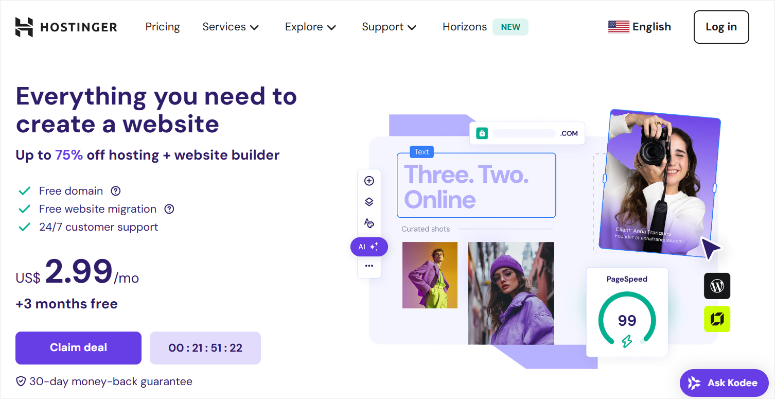
This is the host I moved my SEO website to after the speed crisis and the difference was immediately noticeable.
I was immediately impressed by the flexibility. You are not tied to one hosting type.
You can start with shared hosting and then move to VPS or cloud hosting as your business grows. In addition, there is no forced migration to a completely different company.
My experience
Setup took about 15 minutes from login to live site. The dashboard feels modern and clean, very different from the cluttered cPanel interfaces I’ve encountered before.
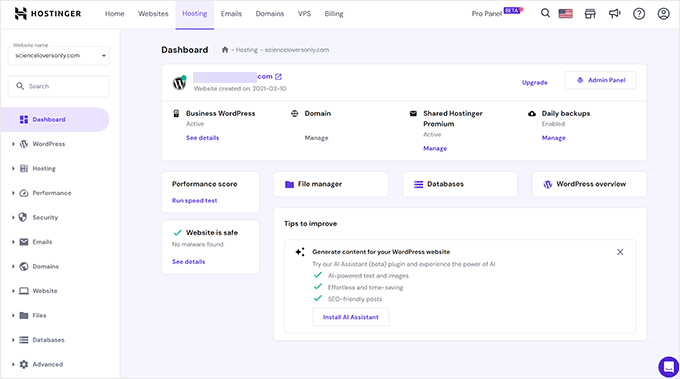
I uploaded my blog with 100+ posts and watched what happens with real traffic.
The special thing about it: Even with shared hosting, the website remained fast even during traffic peaks.
The site builder surprised me. I’m familiar with WordPress, but for quick landing pages or testing ideas, having a drag-and-drop builder built in saves time.
You will also automatically receive a free SSL certificate, which used to cost extra with cheaper hosts.
Support responded within minutes on live chat when I had questions about DNS settings during migration.
They didn’t send me any generic items. Instead, they walked me through the exact steps for my situation.
Performance testing
Stress test focus: Hostinger excels at handling concurrent traffic without any delays.
- Loading time: 374 ms
- Operating time: 99.99%
- Support Rating: 10/10
- Traffic handling: Remained responsive even under high concurrent user load

As my website continues to grow, I needed to find out how well this hosting provider could handle the next surge in traffic.
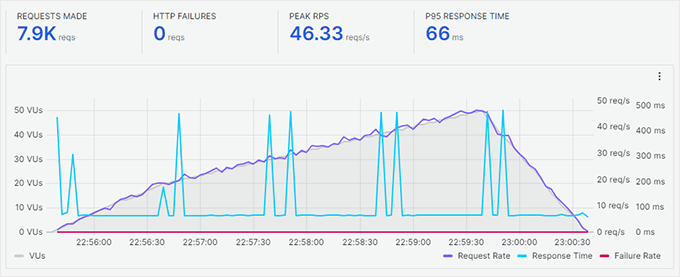
When I simulated 100 simultaneous visitors with k6 load surgeMost budget hosts experienced delays. Hostinger continued to serve pages without any noticeable delay. For a small business expecting growth, this is important.
As I increased the number of users (purple graph below), the response time (blue graph below) remained constant. The average response time was just 66 ms.
►Advantages
- Affordable plans without sacrificing real performance
- Multiple hosting types allow for smooth upgrades as traffic grows
- 24/7/365 support responds quickly via live chat
- Free SSL certificate and 99.9% uptime guarantee included from day one
►Disadvantages
- After the initial term, renewal prices are higher
- The entry-level plan limits you to just one website
- Live chat response may be slower during peak evening hours
My verdict
Choose Hostinger if you need proven performance at affordable prices. It’s perfect for small businesses that are serious about growing but can’t yet justify $30/month hosting. The ability to scale from shared to VPS hosting without having to switch providers saves you future problems.
For more information, see my updated Hostinger review.
Prices: Starting at $2.99/month
2. SiteGround ⭐⭐⭐⭐⭐
SiteGround is one of the few major web hosting companies that hasn’t been acquired by a major corporate parent. They remained independent, and this is also reflected in the way they work.
Short overview:
- Over 3 million hosted domains
- Best for: Speed-obsessed companies
- Prices: Starting at $3.99/month
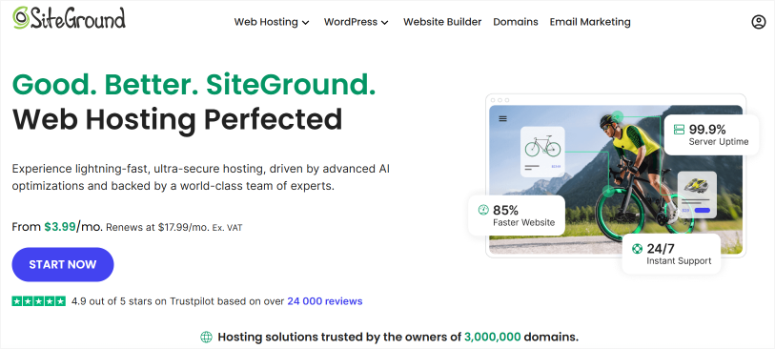
Speed is not just a marketing claim here. It’s integrated into everything they do.
They offer SSD storage, NGINX servers, free CDN, and Google Cloud infrastructure, all of which work together to deliver consistently fast load times.
This is more important than you might think. A one second delay in page loading can reduce conversions by 7%. If you run a business website, that’s real money.
My experience
I tested SiteGround with an eCommerce site I built for a client to see how it handles product pages with images. The difference in speed compared to shared hosting was immediately obvious.
Other than that, setup took about 20 minutes and the interface felt modern and intuitive. Unlike some hosts that overwhelm you with options, SiteGround’s dashboard organizes everything logically.
What impressed me most was the free migration plugin.
I moved a client’s website from another host in under 30 minutes with no downtime. The plugin did everything automatically, without manual file transfers or database issues.
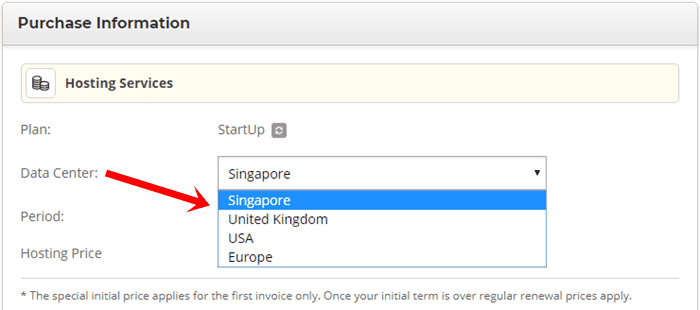
SiteGround offers data centers on multiple continents.
I selected the US location for an American audience and response times remained consistently fast. For companies with international customers, this geographic flexibility helps deliver sites faster around the world.
The support team knows WordPress inside and out. When I had a caching question, the chat agent explained exactly which settings I needed to adjust and why. They didn’t just fix it. They taught me how it works.
Performance testing
Speed focus: SiteGround delivered one of the fastest load times in our test of budget hosts.
- Loading time: 417 ms
- Operating time: 99.98%
- Support Rating: 10/10
- Technology stack: SSD + NGINX + HTTP/2 + free CDN
Since SiteGround has a complex infrastructure, I wanted to see if this combination of tools actually helped speed.
With PingdomI consistently recorded pages loading in less than a second. Even during traffic peaks, loading times remained stable. This is the advantage of servers specifically optimized for WordPress.

►Advantages
- Fastest loading times among affordable hosts
- SSD storage, NGINX and Google Cloud infrastructure are included as standard
- The free migration plugin makes switching from another host a breeze
- Expert WordPress support available 24/7 via live chat
►Disadvantages
- The starting price is higher than low-cost competitors like Hostinger
- After the promotional period, renewal rates increase significantly
- No free domain name is included in the hosting plans
My verdict
Choose SiteGround if speed directly impacts your revenue. It’s perfect for businesses where every second of loading time matters, such as: E.g. online shops or service booking sites. The performance and uptime justify the slightly higher cost.
For more information, see my full SiteGround review. Plus, Current offers can be found on our SiteGround voucher page.
Prices: Starting at $3.99/month
3. Bluehost ⭐⭐⭐⭐⭐
Bluehost is one of the oldest names in web hosting and is officially recommended by WordPress.org. This recommendation is not made lightly. This means WordPress trusts them to provide reliable hosting for beginners.
Short overview:
- Powered over 2 million websites
- Best for: WordPress beginners
- Prices: Starting at $2.99/month

I recommend Bluehost to anyone starting their first website.
The onboarding process walks you through everything step by step, without confusing jargon or assuming you know what DNS means.
In addition, you get real added value from day one with free services such as a domain name for one year, SSL certificates and CDN.
My experience
I set up a test blog to evaluate the beginner experience. From clicking “Sign In” to seeing a live WordPress site took about 20 minutes.
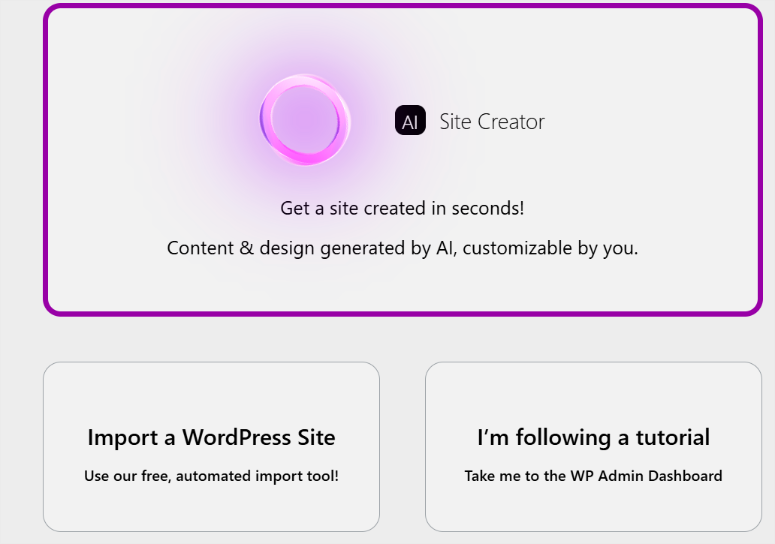
The setup wizard will walk you through choosing your domain, choosing a theme, and launching your website. In fact, you can even let Bluehost AI help you build an entire website.
What impressed me the most was the custom dashboard.
Instead of plunging you into the standard cPanel, Bluehost has created a WordPress-focused interface. Everything you need is right there: WordPress login, email setup, security settings, performance tools.
The one-click WordPress installer is no longer unique.
However, Bluehost’s version pre-configures the settings for optimal performance. For example, SSL certificates are automatically activated and security verification begins immediately.
This means you’ll be protected from day one without lifting a finger.
I tested live chat support when I had questions about email setup. The answer came in less than three minutes.
The agent walked me through creating business email addresses and linking them to Outlook. This all happened without waiting for tickets or waiting on the phone.
Performance testing
Focus on uptime: Bluehost maintained rock-solid reliability throughout our testing period.
- Loading time: 689 ms
- Operating time: 99.98%
- Support Rating: 9/10
- Features included: Free domain, SSL, CDN, Cloudflare integration
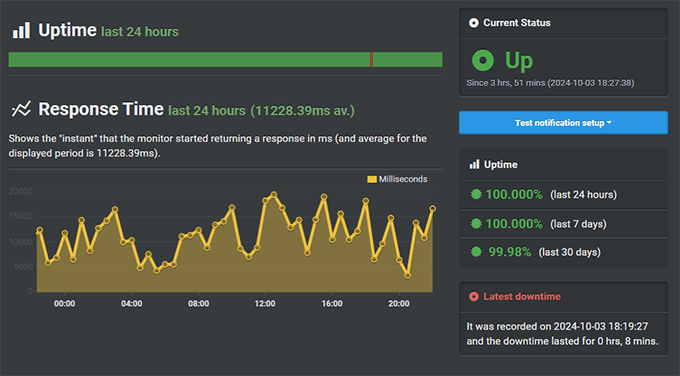
Since Bluehost is a great option for beginners, I tested its uptime to see if it failed businesses when they needed it most.
As you can see in the screenshot below, 99.98% uptime means your website stays active when customers need it. For a small business, just one hour of downtime can cost revenue and damage trust.
►Advantages
- The official recommendation from WordPress.org shows trustworthy reliability
- Beginner-friendly onboarding walks you through every setup step
- Free domain name, SSL certificate and CDN included from day one
- Custom dashboard designed specifically for WordPress users
►Disadvantages
- Email support is no longer available for technical issues
- Monthly billing option is not offered, payment must be made at least annually
- To get the maximum discount, you have to commit to a 3-year plan in advance
My verdict
Choose Bluehost if you’re launching your first WordPress site and want everything taken care of for you. The combination of beginner-friendly setup, included features, and reliable uptime makes it perfect for small businesses just starting out.
Read my detailed Bluehost review for a complete analysis. Plus, Check out our Bluehost coupon page for exclusive offers.
Prices: Starting at $2.99/month
4. DreamHost ⭐⭐⭐⭐⭐
DreamHost offers something no other host on this list can: a 97-day money-back guarantee. That’s over three months to test their service risk-free.
Short overview:
- Over 1.5 million websites
- Best for: Risk-free WordPress hosting
- Prices: Starting at $2.99/month

They are also officially recommended by WordPress.org, which puts them in rare company as only a handful of hosts receive this recommendation.
What sets DreamHost apart is its independent ownership. They are not owned by a huge corporation like so many other hosts. This means they can focus on quality rather than quarterly profits.
My experience
I tested DreamHost with a client’s photography portfolio site. The goal was to see how it handles image-heavy pages without slowdowns.
Setup was straightforward as WordPress comes pre-installed and you can skip the manual installation step.
The custom panel takes some getting used to if you’re familiar with cPanel, but everything you need is there once you get the hang of the layout.

I like how SSD storage makes a noticeable difference with large image files.
This made pages load faster than the same website on the previous host using traditional hard drives. The best part is that SSDs are now standard with DreamHost and are no longer an expensive upgrade.
I really appreciated the free website migration service.
Their team took care of moving the photography site from another host with no downtime during the transfer. Plus, they scheduled it during off-peak hours and kept me updated via email.
The 97-day guarantee isn’t just marketing. I contacted support to ask about the refund process and they confirmed that it is a genuine no questions asked policy.
This allows you to test the service for three months. If it doesn’t work for you, you’ll get your money back.
Performance testing
Speed performance: DreamHost delivered fast loading time and loaded images even faster.
- Loading time: 445 ms
- Operating time: 99.90%
- Support Rating: 7/10
- Guarantee: 97-day money-back guarantee (the longest in the industry)
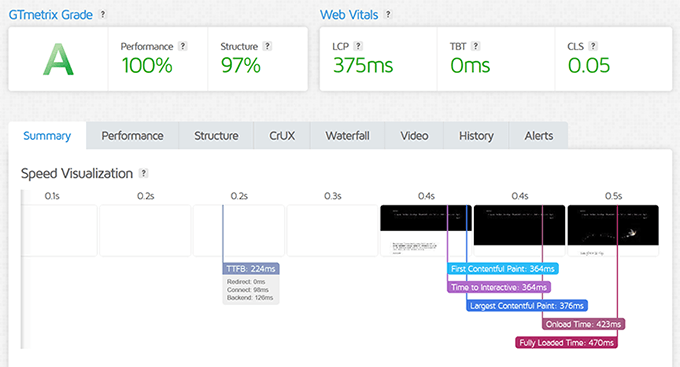
I tested DreamHost to see if SSD storage actually made a difference for image-heavy websites.
Use GTMetrixThe loading speed was 445 ms. What impressed me more, however, was the 375ms LCP (Largest Contentful Paint), which measures how quickly the main content appears on the screen.
Because that’s what visitors actually experience.
►Advantages
- Try it risk-free with the industry’s longest 97-day money-back guarantee
- Independently owned and operated since 1997, not corporate controlled
- The official recommendation from WordPress.org shows trustworthy reliability
- SSD-only storage delivers 2x faster performance than HDD hosts
►Disadvantages
- The custom control panel requires some learning if you are familiar with cPanel
- Live chat support is only available between 5:00 a.m. and 10:00 p.m. PST
- Shared hosting plans incur additional costs for telephone support
My verdict
Choose DreamHost if you want the longest trial period in the industry. Thanks to the 97-day guarantee, you can fully assess whether it meets your business needs without any risk. Perfect for cautious buyers who have had trouble with hosting before.
Read my full DreamHost review for all the details. Plus, For the best deals, check out our DreamHost coupon page.
Prices: Starting at $2.99/month
5. HostGator ⭐⭐⭐⭐
HostGator makes it easy to get started. They’ve been around since 2002 and have nearly perfected the beginner experience.
Short overview:
- Powers ~8 million websites
- Best for: Fast, easy setup
- Prices: Starting at $2.99/month

HostGator’s 45-day money-back guarantee gives you plenty of time to test everything out.
Plus, even on the cheapest plan, they include a website builder, which is helpful if you want to get started quickly without learning WordPress first.
What really stands out is the migration support. Switching from another host shouldn’t require any technical knowledge, and with HostGator it doesn’t.
My experience
I set up a test site to evaluate how truly beginner-friendly HostGator is. It only took 18 minutes from signing up to seeing a live website.
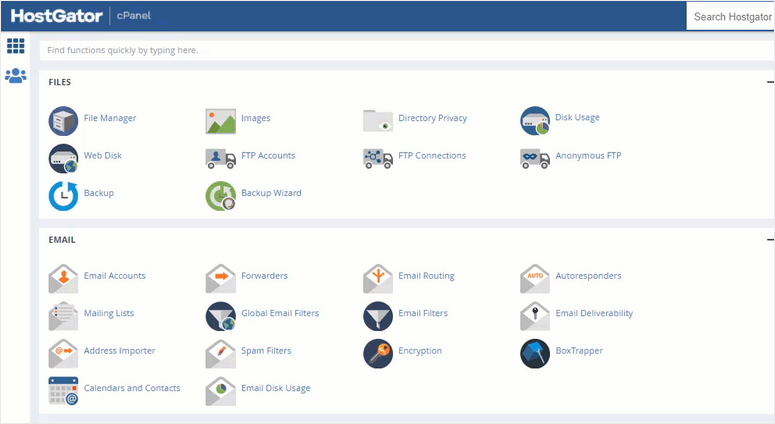
The cPanel interface still looks old-school, but it will look familiar if you’ve used other hosts.
Here you will see that everything is where you expect it to be. WordPress installs with a single click. Email accounts set up in less than a minute.
The website builder surprised me. I’m familiar with WordPress, but to test it out I created a quick landing page using the drag-and-drop builder.
It took about 10 minutes to create something that looked professional. No coding. No confusion.
I tested their migration service by moving a small blog from another host. I made a migration request via the control panel.
Your team got everything done within 24 hours with no downtime. All files and databases were transferred perfectly.
Support responded quickly via live chat when I had questions about domain pointing.
The agent shared step-by-step screenshots that made the DNS changes crystal clear. This level of help is important if you are new to hosting.
Performance testing
Focus on facilitating migration: HostGator’s free migration service and beginner-friendly setup stood out during testing.
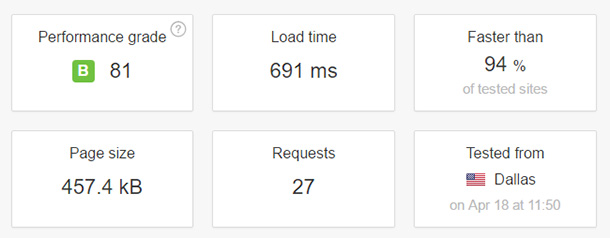
- Loading time: 691 ms
- Operating time: 99.96%
- Support Rating: 10/10
- Setup time: On average under 20 minutes
Use PingdomI measured the loading time at 691 ms.
Older website hosting companies often fall behind newer companies with modern technology. I wanted to see if HostGator had evolved over time, so I focused my testing on speed.
While the loading time isn’t the fastest on this list, the combination of easy setup, included migration, and unlimited storage makes HostGator a solid solution for small businesses that value convenience.
►Advantages
- Setup takes less than 20 minutes from sign-up to live website
- The 45-day money-back guarantee offers a generous trial period
- Free website builder, even included in the cheapest plan
- The free migration service processes transfers within 24 hours
►Disadvantages
- Loading time slower than competitors
- After the promotional period, renewal prices increase significantly
- The quality of support varies depending on which agent you hire
My verdict
Choose HostGator if you want the easiest setup process possible. It’s perfect for small businesses that need to get online quickly without any technical issues. The free migration service alone will save you hours of frustration.
Read my detailed HostGator review for a complete analysis. Plus, All offers can be found on our HostGator coupon page.
Prices: Starting at $2.99/month
6. A2 Hosting (now Hosting.com) ⭐⭐⭐⭐
A2 Hosting recently rebranded to Hosting.com but kept everything that made it popular among developers and technical users.
Short overview:
- Developer friendly choice
- Best for: Technical users who need flexibility
- Prices: Starting at $1.99/month
The anytime money-back guarantee is unique in the hosting industry. Most hosts give you 30 days.
Hosting.com will give you a prorated refund at any time, even years later. This trust in their service says something.
They are one of the few hosts that allow you to choose your operating system. Do you want Linux hosting? Do it. Do you need Windows hosting? They have that too.
This flexibility is important for developers running specific applications.
My experience
I tested Hosting.com with a client project that required SSH access and Git integration. These developer tools aren’t standard on budget hosts, but Hosting.com does offer them.
Setup took about 25 minutes as I spent time exploring the advanced options.
For simple WordPress sites, you can skip most of this and get started faster. However, it is valuable to have these options available when you need them.
The Turbo servers caught my attention.
It’s an optional upgrade that promises 20x faster page loads. I tested the standard plan first to see basic performance. Loading times were acceptable, but not exceptional.
After adding the 20x upgrade, my website loaded in less than a second.
SSD storage is standard on all plans, which is helpful for database-intensive websites. I have noticed faster responses to queries compared to old school disk hosting.
The quality of support felt mixed.
Detailed answers were given to technical questions, while general answers were sometimes given to basic questions. If you are able to troubleshoot errors yourself, this won’t bother you.
But beginners might find it frustrating.
Performance testing
Flexibility focus: Hosting.com’s developer-friendly features and flexible refund policies stood out during testing.
- Loading time: 438 ms
- Operating time: 99.90%
- Support Rating: 9/10
- Unique Feature: Prorated refund at any time (not just 30 days)
I wanted to test whether Hosting.com’s Turbo servers actually make a difference.
The slower loading time is noticeable without the boosters switched on. But when I turned it on, I noticed a drastic improvement in loading speed of 438ms.

►Advantages
- The pro-rata money-back guarantee at any time offers long-term flexibility
- Choice between Linux or Windows operating systems
- Developer tools included: SSH access, Git integration, WP-CLI
- SSD storage standard in all plans for faster database performance
►Disadvantages
- The quality of support varies between basic and technical questions
- Multiple WordPress hosting tiers can be overwhelming for beginners
My verdict
Choose A2 Hosting, now Hosting.com, if you are tech-savvy and need developer tools or Windows hosting. The anytime refund policy eliminates the risk of long-term commitment. Perfect for agencies managing multiple client locations with different needs.
For more information, check out my full Hosting.com review. Plus, Current offers can be found on our Hosting.com voucher page.
Prices: Starting at $1.99/month
7. InMotion Hosting ⭐⭐⭐⭐
InMotion Hosting positions itself as a business option for small businesses. The 90-day money-back guarantee is the second longest in the industry, trailing only DreamHost.
Short overview:
- Growing companies rely on it
- Best for: Business reliability
- Prices: Starting at $3.29/month

InMotion Hosting has been around since 2001 and has built its reputation on reliability rather than flashy marketing. This stability is important for companies where downtime directly costs money.
Plus, you choose the location of your data center, unlike most hosts who assign it automatically. With InMotion Hosting you can choose the server closest to your customers, which can noticeably reduce loading times.
My experience
I tested InMotion Hosting with a service company website that needed rock-solid availability for appointment bookings. Any downtime meant missed customers.
Setup took about 30 minutes and the process felt more business-oriented than beginner-friendly. This is because, as mentioned, you have a choice between server location, backup frequency, and security settings.
These options are valuable, but can be overwhelming for newbies.
The SSD storage performed well in database queries. I noticed faster page loading on customer dashboards compared to the previous HDD based host.
For websites with user logins and dynamic content, this speed difference becomes more pronounced.
I selected the Los Angeles data center for a California based company. Load times for West Coast visitors improved by approximately 200 milliseconds compared to hosting on an East Coast server.
This shows that InMotion Hosting’s geo-targeting is working.
The free automated backups run daily without the need for plugins or manual setup. I tested the restore process by intentionally breaking something on the test site.
The restore took three clicks and about five minutes. Simple and stress-free.
The average support response time via live chat was around four minutes. The agents knew the technical details, but sometimes assumed I had more hosting knowledge than I did.
Ideal for experienced users. Less ideal for absolute beginners.
Their partnership with Trees for the Future adds an eco-friendly aspect. They offset the carbon footprint by planting trees. Not a dealbreaker feature, but a nice bonus if environmental impact is important to you.
►Advantages
- The 90-day money-back guarantee gives you three months for a thorough test
- Choose your data center location for faster regional performance
- SSD storage and unlimited bandwidth are included in all plans
- Free automated daily backups with easy one-click restore
►Disadvantages
- The setup process requires technical knowledge that beginners may lack
- No monthly billing option available, annual minimum required
- Higher renewal rates after the promotional period ends
Performance testing
Focus on business reliability: InMotion’s consistent uptime and choice of data center stood out in our corporate testing.
- Loading time: 982 ms
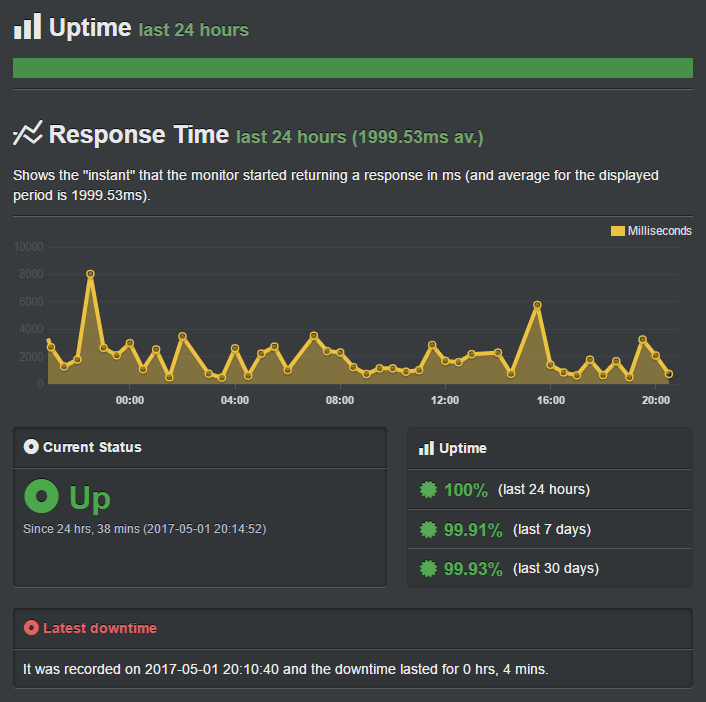
- Operating time: 99.93%
- Support Rating: 9/10
- Guarantee: 90-day money-back guarantee (second longest in the industry)
Since InMotion Hosting is known for its impressive uptime, this was my top review for this hosting provider.
99.93% uptime means approximately 8 hours of downtime per year. For companies where every minute counts, this reliability provides security.
My verdict
Choose InMotion Hosting if your business relies on consistent uptime and you value geographical server selection. The 90-day guarantee eliminates risk, and enterprise-grade reliability justifies the slightly higher cost. Perfect for service companies with appointment systems or customer portals.
Read my InMotion Hosting review for a complete analysis. Plus, For the best deals, check out our InMotion Hosting coupon page.
Prices: Starting at $3.29/month
8. WordPress.com ⭐⭐⭐⭐
WordPress.com is one of the most well-known names in WordPress hosting. It is designed for people who want a simple, convenient experience without having to deal with server management.
Short overview:
- Unlimited traffic and easiest setup
- Best for: Uncomplicated managed hosting
- Prices: Starting at $4/month
The price is slightly higher than the traditional hosting on this list. But here’s what you get for this premium: built-in security, automatic backups, updates done for you, and no bandwidth limits.
This is real managed hosting. You focus on your content and your business. WordPress.com takes care of everything technical behind the scenes.
My experience
I tested WordPress.com with a client’s consulting business site. They didn’t want any technical responsibility, like plugin updates or security monitoring. Just a site that works.
The setup felt different than traditional hosting. There is no cPanel, no FTP access, no SSH. Everything happens through the WordPress.com dashboard.
For non-technical users, this simplicity is liberating. It might feel restrictive for developers.
The website loaded quickly from multiple testing locations. The integrated CDN distributes content worldwide without the need for configuration.
This meant that pages were delivered quickly, regardless of whether visitors were from New York or Singapore.
I appreciated the automatic updates. The WordPress core, themes and approved plugins are automatically updated overnight. I’ve never worried about security vulnerabilities caused by outdated software.
The unlimited visitor allowance is more important than you might think. Traditional hosts often throttle or charge additional fees when traffic increases. WordPress.com handles traffic surges without penalties or slowdowns.
One caveat: you need the Business plan to install plugins. The Starter plan limits you to pre-approved plugins only. This works well for simple websites, but limits customization options.
I was impressed by the quality of the support. The chat responses came within minutes and the agents actually understood WordPress very well. No generic script reading.
They answered specific questions about custom post types and WordPress features.
Performance testing
Focus on Uptime Excellence: WordPress.com delivered perfect reliability throughout our testing period.
- Loading time: 636 ms
- Operating time: 100% (no downtime during the 3 month trial)
- Support Rating: 8/10
- Bandwidth: Unlimited number of visitors without restrictions
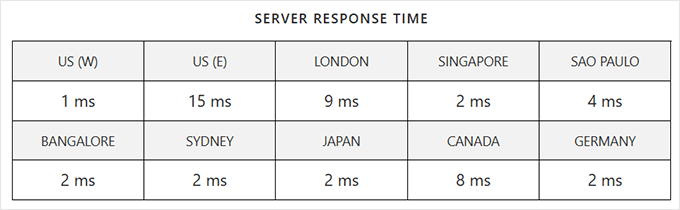
This 100% uptime is extraordinary. Most hosts quote 99.9%, which involves some downtime. But for my priority test, I want to see how the WordPress.com server responds from different locations.
The fast response time of the server distinguished WordPress.com. It averaged 4.7 ms.
►Advantages
- The fully managed platform requires no technical maintenance
- Unlimited visitors with no bandwidth throttling or overage fees
- Integrated CDN and automatic updates are included as standard
- Expert WordPress support available via live chat
►Disadvantages
- More expensive than traditional hosting
- Need a business plan to install custom plugins
- Restricted server access limits advanced customization
My verdict
Choose WordPress.com if you want completely hassle-free hosting and your time is more important than saving a few dollars a month. Perfect for busy business owners, consultants and professionals who need a reliable website without any technical issues.
Read my detailed WordPress.com review for all the details.
Prices: Starting at $4/month
9. Rocket.net ⭐⭐⭐⭐⭐
Rocket.net is one of the fastest WordPress hosts I have tested. Their cloud edge platform, combined with an enterprise-grade CDN, ensures websites load almost instantly for visitors around the world.
Short overview:
- Performance-oriented
- Best for: Highly trafficked WordPress sites
- Prices: Starting at $30/month
The price reflects their performance focus. At $30/month, they don’t compete with budget hosts. They are aimed at companies where speed has a direct impact on sales.
Security comes with features that typically cost extra elsewhere. You get a web application firewall, malware scanning, brute force protection, and automatic bot defense as standard.
My experience
I tested Rocket.net with a high traffic blog that was having issues with shared hosting. Traffic spikes during viral posts would slow down the site for crawling. Rocket.net handled these spikes without breaking a sweat.
Other than that, the dashboard looks modern and clean and setup took about 20 minutes. Everything is logically organized, from the staging environment to the CDN settings.
What impressed me the most was the cloud edge caching.
Unlike traditional caching, which stores files on a server, edge caching distributes content across global locations.
So when someone in Australia visits your website, they will receive content from a nearby edge server and not your main host in the US.
I have run speed tests from multiple continents. Loading times remained consistently fast regardless of the visitor’s location. This global consistency is difficult to achieve with traditional hosting.
The integrated Redis object caching noticeably accelerated database queries. Pages with complex WordPress queries load faster than the same content on traditional hosts.
The free site migration took 24 hours with no downtime. Their team took care of the entire transfer and optimized the settings for their platform. I didn’t touch a single file.
Support responded quickly via live chat when I had questions about CDN configuration. The agent understood the technical details and gave specific recommendations for my setup.
Performance testing
Speed Champion Focus: Rocket.net delivered the fastest load times and most consistent global performance.
- Loading time: 291 ms
- Operating time: 99.94%
- Support Rating: 9/10
- Average response time: 3.8 ms global
- Technology: Cloud edge caching + enterprise CDN
This 291 millisecond load time beats any other host on this list.
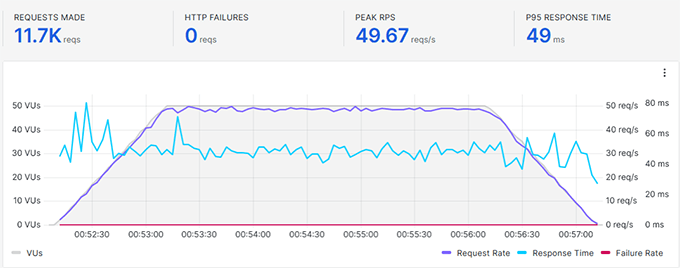
The most impressive thing was seeing how the built-in Redis object caching worked during the k6 Load Impact stress test. It processed almost 12,000 requests without any HTTP errors with a response time of just 49ms throughout the test.
For high-traffic businesses where conversion rates directly depend on page speed, this performance advantage pays off.
►Advantages
- Fast average load time
- Enterprise CDN and Redis object caching are included by default
- Advanced security with WAF, malware scanning and bot protection
- Free SSL certificates and website migration with no downtime
►Disadvantages
- It is not budget-friendly due to the premium pricing
- No free domain name is included in the hosting plans
- Excessive performance for low-traffic hobbyist websites
My verdict
Choose Rocket.net if your business relies on lightning-fast performance and you handle a lot of traffic. The premium price makes sense for established websites where speed improvements directly increase revenue. Perfect for popular blogs, online magazines and content-rich company sites.
Prices: Starting at $30/month
10. Rapyd Cloud ⭐⭐⭐⭐⭐
Rapyd Cloud is not your typical hosting company. It is specifically designed for WordPress sites with many concurrent users, such as WooCommerce stores, membership sites, and online communities.
Short overview:
- WooCommerce specialist
- Best for: Online shops and websites with high concurrency
- Prices: Starting at $29/month
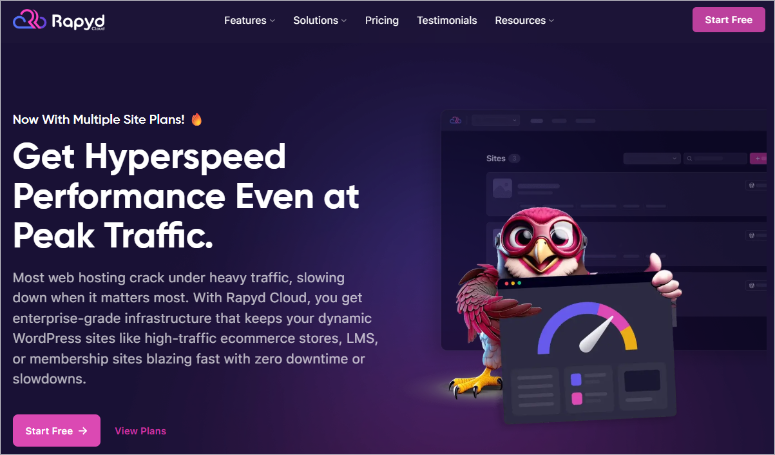
Most hosts rely heavily on caching for speed. But caching doesn’t help logged in users. When customers visit your store or members browse your community, they see uncached pages.
This is where most hosts slow down.
Rapyd Cloud’s infrastructure effortlessly processes logged in traffic in real time. This makes it perfect for websites where slow checkouts or laggy dashboards directly cost money.
My experience
I tested Rapyd Cloud with a WooCommerce demo store to see how it handles checkout pages under load. This is where most hosts have problems because the checkout pages cannot be cached for security reasons.
The first thing I noticed was that the dashboard felt clean and intuitive. This resulted in the setup taking about 30 minutes.
Plus, staging environments, version control, and auto-scaling are right there without having to wade through menus.
What impressed me most were the premium tools included. Object Cache Pro typically costs $95 per month. Rapyd Cloud includes its standard as well as Redis caching, CDN and malware protection.
I simulated 50 concurrent users adding products to cart and checking out at the same time. Most hosts experience lag when they have around 20 concurrent users. Rapyd Cloud handled all 50 tasks without any delays.
The checkout process remained fast even during the stress test, with pages consistently loading in under a second. For an online shop, this responsiveness during the checkout process has a direct impact on conversion rates.
Most impressively, the dynamic scaling feature automatically activated when traffic increased.
I haven’t configured anything. The system detected increased workload and immediately allocated more resources. When traffic decreased, it was reduced again.
Free migration including professional help. Their team moved my test site and optimized it for their platform without causing any downtime during the transfer.
The support impressed me with their technical knowledge. They understood the WooCommerce-specific challenges and offered solutions that went beyond general hosting advice.
Performance testing
Concurrency Master Focus: Rapyd Cloud stood out because it could handle concurrent users without sacrificing performance.
- Loading time: 270 ms
- Operating time: 100% (perfect reliability
- Support Rating: 10/10
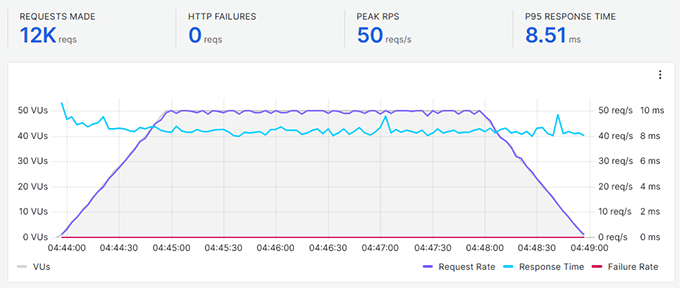
- Parallelism: 12,000 requests are processed with a response time of 8.51 ms
My main concern with Rapyd Cloud was to figure out how it handles traffic spikes and how effective dynamic scaling is.
The k6 load surge Test showed that 12,000 requests were processed with response times under 10 ms, which is exceptional. Most budget hosts fail at a fraction of this load.
►Advantages
- Handles many concurrent users without slowdowns or lags
- Includes Object Cache Pro, Redis and CDN at no additional cost
- Perfect for WooCommerce stores and membership sites
- 100% uptime with free professional website migration
►Disadvantages
- Premium prices – not for hobby sites
- No free domain name is included in the plans
- The basic plan is limited to 10GB of storage
My verdict
Choose Rapyd Cloud if you run a membership site, online store, or community platform where logged-in user performance matters. The premium tools included and high concurrency processing justify the cost for businesses that can’t afford slow checkouts or lagging member areas.
Prices: Starting at $29/month
11. Liquid Web ⭐⭐⭐⭐
Liquid Web is a leading managed hosting company specializing in WordPress, WooCommerce and premium business solutions.
Short overview:
- Enterprise quality
- Best for: Managed VPS and dedicated requirements
- Prices: Starting at $4/month
Unlike hosts that only focus on shared hosting, Liquid Web works in the managed VPS and dedicated server space. This gives small businesses more flexibility, but you will need some technical experience.
They have partnered with Amazon Web Services and Google Cloud Platform to provide enterprise-level hosting infrastructure.
This means that your website runs on the same cloud technology that large companies use.
What sets Liquid Web apart is the automatic plugin updates. Most managed hosting services update the WordPress core but leave the plugins alone.
Liquid Web updates everything automatically, protecting you from vulnerable plugins.
My experience
I tested Liquid Web with a busy client site that had outgrown shared hosting. They needed more resources but didn’t want to manage the servers themselves.
The setup felt more involved than typical shared hosting. You configure a VPS environment, which means you have to make decisions about server resources, backup frequency, and security settings.
This control is valuable but requires more technical understanding.
The automatic plugin updates impressed me. I installed several popular plugins and watched as Liquid Web automatically updated them overnight. Additionally, security patches were applied without me lifting a finger.
The no-traffic limit policy eliminates a major concern. Liquid Web handles surges without penalties or slowdown warnings.
I tested their WooCommerce optimization with a demo shop. Product pages load faster than the same store on standard WordPress hosting.
This is because their servers are specifically tuned to handle WooCommerce’s database-intensive operations.
The quality of support exceeded expectations. Chat agents understood the server architecture and could troubleshoot complex issues. This level of expertise costs more but saves time when problems arise.
The one-click staging tool made testing changes risk-free. I was able to try out new plugins, update themes, and experiment without touching the live site.
When everything was working, it only took one click to make changes to production.
Performance testing
Focus on Managed VPS Excellence: Liquid Web’s automatic updates and no-traffic limit policy stood out for high-traffic business sites.
- Loading time: 901 ms
- Operating time: 99.99%
- Support Rating: 10/10
- Unique Feature: Automatic plugin updates (rare in hosting)
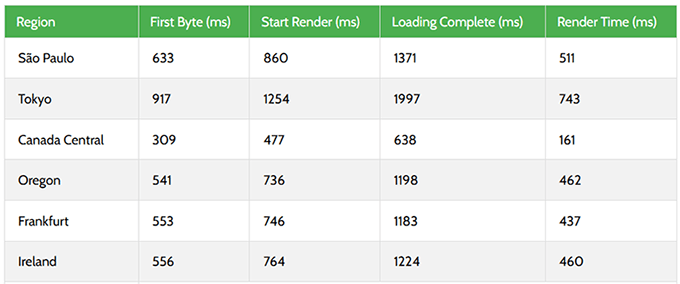
At Liquid Web, I focused on server response time PageSpeedPlus to analyze their VPS servers. I’ve experienced server response times of under 600ms in the US and Europe.
This is great considering I haven’t used CDNs.
►Advantages
- Managed VPS completely eliminates the hassle of server maintenance
- Automatic plugin updates protect against security gaps
- Even during larger spikes, there are no limits on traffic or page views
- Servers optimized for WooCommerce process database queries efficiently
►Disadvantages
- The hosting discount is only valid for the first 3 months
- Not an unmanaged hosting option for cost-conscious developers
My verdict
Choose Liquid Web if you’ve outgrown shared hosting and need managed VPS performance without technical server management. Perfect for established businesses, busy WooCommerce stores, and agencies managing multiple client sites. The automatic plugin updates alone save hours of monthly maintenance.
Read our full Liquid Web review for all the details. Plus, Current offers can be found on our Liquid Web voucher page.
Prices: Starting at $4/month
There you have it! My list of the best web hosting companies for small businesses. But we’re not done yet. Below are hosting providers that narrowly missed this list.
Honorable Mentions: More hosting options
While these hosts didn’t make our top 11, they’re worth knowing depending on your specific needs.
GreenGeeks
Best for: Environmentally conscious companies | Away: $0.95/month
GreenGeeks is the industry’s leading eco-friendly hosting provider. Through renewable energy credits, they feed three times the electricity they use into the grid.
When it comes to performance, they deliver solid SSD storage and decent speed. Load times averaged 697 ms during our testing, which is respectable for the price.
The catch? Uptime was 99.90%, lower than our top offerings. That equates to about 7 hours of downtime per year, compared to just 52 minutes for the best performers.
Choose GreenGeeks if environmental impact is important to your brand. The commitment to 300% green energy is real and the performance is sufficient for most small business locations.
Check out my detailed GreenGeeks review here.
Check out our GreenGeeks coupon page for deals | Get started with GreenGeeks »
iPage
Best for: Ultra Budget Hobby Sites | Away: $1.99/month
iPage offers one of the cheapest hosting plans on this list at $1.99/month. For hobby projects or test ideas, this price is hard to beat.
The problem shows up in performance. The loading times in the test averaged 2,600 ms. That’s 2.6 seconds, which is painfully slow by modern standards.
Uptime was a solid 99.98%, keeping the site online. However, when visitors reach your website, they have to wait significantly longer for the pages to load.
Only choose iPage for personal projects where speed is not an issue. For business websites where every second impacts conversions, slow loading times will cost you more than hosting savings.
Check out my iPage review here.
Check out our iPage coupon page for deals | Get started with iPage »
WP engine
Best for: Premium Managed WordPress | Away: $23/month
WP Engine pioneered managed WordPress hosting and remains one of the premium options. They deliver excellent performance with loading times of 582 ms and uptime of 99.99%.
Their partnership with AWS and Google Cloud Platform provides enterprise-class infrastructure. You can expect automatic updates, staging environments, and expert WordPress support to come as standard.
Why didn’t WP Engine make it to our main list? Rapyd Cloud offers similar performance and features at a better price/performance ratio.
At $29/month, Rapyd Cloud includes Object Cache Pro and handles high concurrency traffic better, making it the smarter choice for most small businesses that need premium hosting.
Choose WP Engine if you want to target your brand’s reputation or maintain existing relationships with them.
Check out my WP Engine here.
Check out our WP Engine coupon page for deals | Get started with WP Engine »
Now that you’ve learned about all the hosting options, let’s talk about choosing the right solution for your specific business needs.
If you like the deals above, check out our full coupon page here for even more deals.
How to choose the right hosting for your small business
Choosing the right host doesn’t have to be complicated. Start by balancing your actual needs with what each host does best.
Here’s how to think through your decision.
Start with your current needs
Don’t buy hosting for the business you want to have in three years. Buy for the business you have today. You can always upgrade later.
Traffic Expectations:
Technical Skill Level:
- Have you never touched a server setting before? Choose beginner-friendly hosts such as: Bluehost or Hostinger.
- Are you familiar with SSH and Git? Hosting.com provides you with developer tools.
Household reality:
- Be honest about what you can afford each month. The promotional price of $1.99/month increases to $7-12/month upon renewal. Take this into account when making your decision.
- If you want to avoid renewal shock, take a look DreamHost or SiteGround. Their renewal increases are gentler than hosts who triple their prices after the promotional period ends.
Growth schedule:
- Are you planning for slow, steady growth? Hostinger enables smooth scaling from shared to VPS.
- Do you expect rapid expansion? Start with scalable options like Fluid web.
Key factors to prioritize
When choosing a web hosting provider for your small business, you need to consider a few different factors:
- Uptime (reliability)
- Loading time (speed)
- Features
- Support
1. Uptime (reliability)
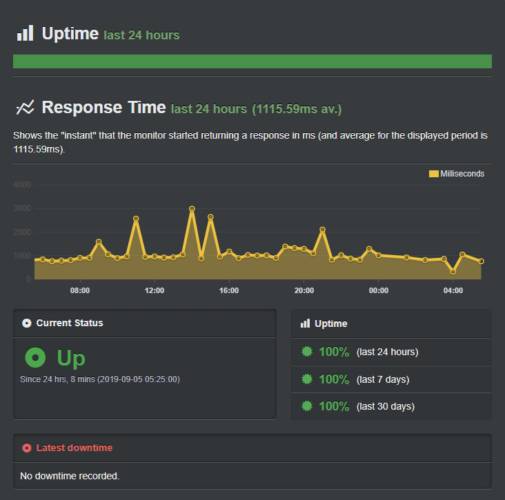
You need to choose a reliable web hosting provider that guarantees maximum uptime. Uptime is the amount of time your website, hosted on a specific type of server, is available online.
Typically, uptime is expressed as a percentage of the total available time, which is 365 days per year.
For example, a website that is available 24 hours a day, all year round is considered 100% available. If the uptime is 99%, it means the website will be unavailable for 3.65 days.
Although no web host can guarantee 100% uptime, anything below 99.9% is unreliable.
Some hosting services offer a refund if they fail to meet their uptime guarantee. However, this does not change the fact that every downtime is associated with costs.
📜Pro tip: To get you started, IsItWP offers a free uptime checker to check your website’s performance.
2. Loading time (speed)
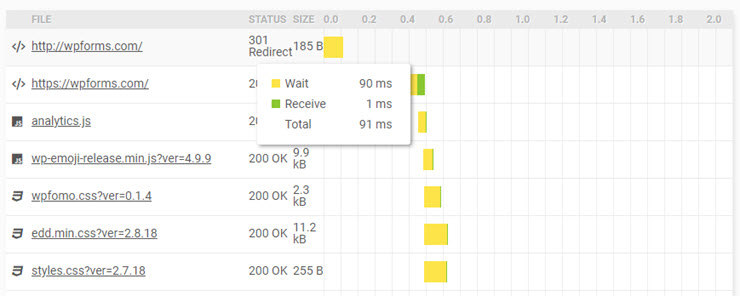
Google continues to emphasize page speed in its algorithm, making it one of the most important factors to consider when choosing a web host.
While you can find plenty of tips and tricks on the web like CDNs and caching to increase your site speed, none of them will help you if your website is hosted on a slow hosting server.
If you want to create a fast website, you first need to find a web host that won’t slow down your website.
📜Pro tip: You can combine the website uptime checker tool mentioned above with our free speed tester tool to get a complete picture.
We have also created a test site and conduct web hosting comparison speed tests using various testing tools such as Pingdom and Load Impact.
3. Features
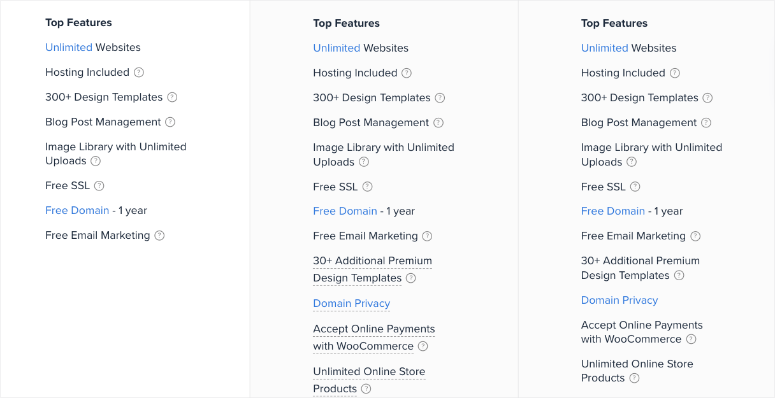
Each web hosting service is unique in terms of its features. Below are some standard features that you will find with almost every popular web hosting provider.
The key to choosing the best hosting provider It’s about finding out if they have the right features you need.
- 1-click script installation: It helps you to easily install website scripts like WordPress, Joomla, etc. on your host.
- Website builder: While most hosting providers offer a website builder as a standard feature, not every builder is the same. For example, some web hosts only allow you to build simple websites with their builder, while others even let you build a full website using AI.
- Control panel: Investigate how your web host allows you to manage your hosting account. The most popular control panel is cPanel, but there are also providers that offer another web-based control panel.
- Number of domains: Pricing is typically based on the number of domains you can use with a particular hosting plan.
- Storage space and bandwidth: Site hosting companies often advertise that they offer unlimited resources such as disk space and bandwidth with their shared hosting plans. However, usage limitations apply to how you use the resources for your website. When you sign up for a service, you are required to comply with your hosting company’s terms of service. And according to the terms, you may only use server resources for the normal operation of a small website.
- E-mail address: Some web hosting companies allow free email accounts, but they also limit the number of email addresses you can set up in your hosting account. You may also want to look at email hosting features before choosing a hosting service.
- Free domain: Companies often offer a free domain with the purchase of a new web hosting account. Your hosting company will cover your domain name registration fee for the first year. Keep in mind that purchasing a domain name from a domain registrar like NameCheap.com can save you money on the renewal price in the long run.
- Free SSL: SSL is an industry-standard security measure that creates an encrypted connection between your visitor’s browser and your website. Installing an SSL certificate on your website adds a small green padlock icon to your address bar, giving your website a trustworthy look. Similar to the free domain offer, some web hosting providers also offer a free SSL certificate when you sign up for their hosting package.
- Integrated Security – In addition to SSL, many web hosting providers offer free security options such as malware scanning and backups to protect your website from hackers.
4. 24/7 support
At some point you will need support for data transfers, backups, migration, SSL, downtime and similar situations.
24/7 support is a standard feature offered by almost all major web hosting providers. Support is typically offered through three options: telephone, ticket-based email and live chat.
Remember to double check if your hosting service offers email support for technical help.
Email or ticket support is required if you need help with advanced issues that may take a little longer to resolve. This way, you don’t have to waste your time on live chat seeking help.
Likewise, you need to check if your hosting provider offers live chat support throughout the day.
Choosing the right hosting plan
Most top web hosting providers offer different types of hosting plans. Wondering which is the best choice for your website needs? Let’s take a look at a few different web hosting plans:
Shared/Cheap Hosting: For new websites with low traffic volume

Cheap hosting, also called shared hosting, is enough to run a new website with low traffic.
In a shared hosting environment, your website shares server resources, including CPU, RAM, etc., with other websites hosted on the same web server.
This allows hosting providers to keep costs down. Even though you share hosting resources with other websites, your website is secure and only you can access your website files.
And the best part is that if you feel your current hosting account isn’t powerful enough to handle frequent traffic spikes as your needs change, you can always upgrade to VPS plans or other costly hosting plans.
Shared hosting often offers unlimited storage, unlimited bandwidth, unlimited domains, and basically unlimited everything.
Although they claim to offer unlimited resources, you must fully comply with your hosting company’s terms of service.
In addition, for the normal operation of a home or small business website, you only need to use storage space and bandwidth.
You will be prompted to upgrade your hosting option if your website exceeds their usage guidelines.
VPS Hosting: For a growing website that cannot justify a dedicated web server

As your website grows and your needs change, you may need more control and flexibility over your hosting server. This is where VPS comes into play.
VPS is the abbreviation for Virtual Private Server. While you still share hosting resources with other websites with VPS, you get much more dedicated power and flexibility for your website.
VPS is the best choice for you if you want to build websites with more secure data or create resource-intensive applications that grow through rapid expansion.
Virtual Private Server plans often include an improved control panel interface that gives you more control over your server, as well as many dedicated VPS management tools.
Some hosting providers offer managed and unmanaged virtual private servers (VPS hosting) at different pricing plans.
WordPress Hosting: For WordPress sites

Do you want to create a website with WordPress but want to avoid the unnecessary installation process? Then you can subscribe to a managed WordPress hosting plan.
Web hosting company offer various WordPress hosting options like cheap WordPress hosting, managed WordPress hosting, etc.
With managed WordPress hosting, you can easily get started with your WordPress site without the unnecessary step of manual WordPress installation.
You also get an optimized WordPress hosting account that immediately prevents WordPress-specific malicious attacks and vulnerabilities.
Managed WordPress hosting could be the best choice for you if you don’t want to handle website maintenance yourself.
However, you’ll always want to seek help from WordPress-specific support experts whenever you need help.
Dedicated server hosting: For extremely busy websites

If you want to host an extremely high-traffic website without sharing your server resources with other websites, you can opt for high-quality dedicated server hosting.
With dedicated hosting, you receive a complete server for your sole use and rented from your hosting provider. This gives you more control over the server’s hardware and operating system.
Dedicated server hosting is expensive regardless of whether you purchase an annual or monthly plan.
That being said, if you don’t employ a system administrator or don’t have experience with servers, I recommend you purchase a managed dedicated server.
Besides performing software updates, they also handle server monitoring, provide phone support, etc. Most top websites use clusters of dedicated servers.
Summary: Which is the best web hosting company for small businesses?
Now, to summarize everything we discussed above, I created a quick table of test results to help you make your final decision.
| Hosting provider | Loading time | Operating time | Support rating | Best for | Starting price |
|---|---|---|---|---|---|
| 🥇 Hostinger | 374 ms | 99.99% | 10/10 | Budget + performance | $2.99/month |
| 🥈 SiteGround | 417 ms | 99.98% | 10/10 | Speed and security | $3.99/month |
| 🥉 Bluehost | 689 ms | 99.98% | 9/10 | beginner | $2.99/month |
| 4. DreamHost | 445 ms | 99.90% | 7/10 | WordPress sites | $2.99/month |
| 5. HostGator | 691 ms | 99.96% | 10/10 | Easy setup | $2.99/month |
| 6. Hosting.com | 438 ms | 99.90% | 9/10 | developer | $1.99/month |
| 7. InMotion Hosting | 982 ms | 99.93% | 9/10 | Business reliability | Starting at $3.29/month |
| 8. WordPress.com | 636 ms | 100% | 8/10 | Comfort managed | Starting at $4/month |
| 9. Rocket.net | 291 ms | 99.94% | 9/10 | Performance pages | $30/month |
| 10. Rapyd Cloud | 270 ms | 100% | 10/10 | Busy shops | $29/month |
| 11. Liquid Web | 901 ms | 99.99% | 10/10 | Business requirements | Starting at $4/month |
My top 3 recommendations by use case
From the table you will learn the following.
Overall Best for Small Businesses: Hostinger
- Why: Perfect balance between affordability, performance and scalability. You get a solid 374ms speed, great uptime (99.99%), and the ability to upgrade from shared to VPS without having to switch companies.
- Who it’s for: Most small businesses start or grow steadily. Budget conscious but serious about performance.
Get started with Hostinger »
Best for Speed and Security: SiteGround
- Why: The fastest load times tested were 417 ms with Google Cloud infrastructure and built-in security features. Advanced caching and daily backups protect your business while ensuring lightning-fast performance.
- Who it’s for: Companies where website speed impacts conversions. Small online shops need security. Growing service providers with traffic peaks.
Get started with SiteGround »
Best for WordPress beginners: Bluehost
- Why: Official WordPress.org recommendation with one-click installations and a guided setup wizard. Includes a free domain, SSL certificate, and 24/7 phone support for peace of mind.
- Who it’s for: First time website owners building WordPress sites. Small companies without technical staff. Entrepreneurs need reliable learning support.
Get started with Bluehost »
The right hosting choice depends on where your business is today and where it is headed. Start with one of these three recommendations based on your primary need. You can always upgrade as you grow.
FAQs: Top Web Hosting for Small Businesses
What is web hosting and why do small businesses need it?
Web hosting stores your website’s files online. Think of it like renting space for your business. Without hosting, your website cannot exist on the internet. When visitors enter your domain name, the hosting company delivers your website to their browser. Every business website needs to be hosted to be accessible to customers online.
How much should I budget for small business hosting?
Most small businesses can get started with hosting plans ranging from $3-$10 per month. Growing businesses typically spend $10 to $30 per month as traffic increases. Premium hosting over $30 per month only makes sense for high-traffic websites where speed directly impacts revenue. Start affordable and upgrade when your traffic actually justifies the cost.
What is the difference between shared and managed WordPress hosting?
Shared hosting means that multiple websites share a server, keeping costs low for small websites. With managed WordPress hosting, updates, backups, and security are handled automatically, but it is more expensive. Choose shared hosting if you are comfortable with basic maintenance. Choose managed hosting if you prefer straightforward technical management and have the budget.
Can I change hosting provider if I’m dissatisfied?
Yes, changing hosts is straightforward. Most reputable providers offer free migration services or simple transfer tools. Many offer generous money-back guarantees, so you can try the service risk-free. Popular hosts like SiteGround and Bluehost perform migrations smoothly and typically complete transfers within 24 to 48 hours with minimal downtime.
Should I buy my domain from my hosting provider?
Not necessarily. Many hosts offer free domain registration for a year, so you can easily manage everything in one account. However, purchasing separately from domain registrars often costs less for long-term renewals. Choose depending on whether you value convenience or long-term cost savings.
Do I need managed WordPress hosting as a beginner?
Probably not. Beginners usually do well with regular shared hosting, which includes one-click installation of WordPress. Managed WordPress hosting costs significantly more for automated maintenance, which you can easily do yourself. Save your budget for other business needs. Upgrade to managed hosting later when time is more valuable than money.
Final Verdict: Best Hosting for Your Small Business
Remember my SEO blog that was dying due to slow hosting? This experience taught me the most important lesson about web hosting: your server is the foundation of everything.
You can optimize images to perfection, install the best caching plugins, and minimize every line of code. It doesn’t matter if your hosting is inherently slow.
I wasted months troubleshooting performance issues that couldn’t be fixed. The problem wasn’t my website. It was the cheap hosting I chose to save a few bucks.
When I finally switched to better hosting, the change was immediate. Same website, same content and same optimization. But suddenly the pages loaded in less than a second instead of more than four.
That’s when I realized: cheap hosting costs you more in lost customers than you save in monthly fees. Use this list of the best web hosting platforms for small businesses so you don’t make the same mistake I did.
Resource Center
Now that you’ve decided on your hosting, here are instructions to help you build a successful website:
These tutorials will help you get the most out of your new hosting and create a website that will actually grow your business.