
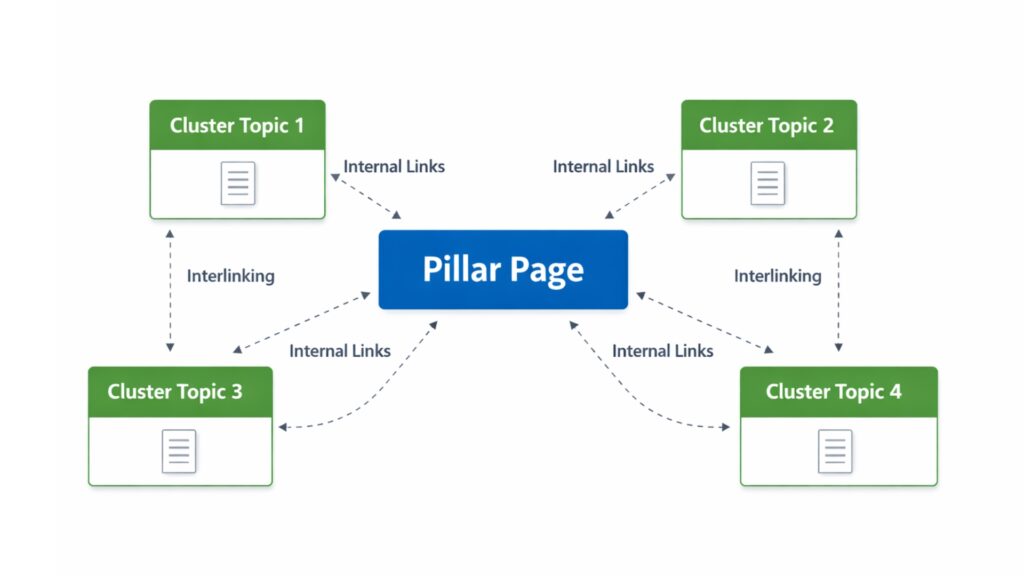
Search engines no longer rank blogs based on one keyword per page. They organize content based on topic coverage, relevance, and how related pages are linked.
Keyword clusters solve this problem by organizing content so that it is understood by search engines and valued by readers.
Instead of creating isolated posts that compete with each other, keyword clusters help blogs build authority around a topic. This leads to better rankings, stronger internal linking, and more consistent traffic growth over time.
Key insights
- Keyword clusters group related keywords under a main topic
- A pillar page supports multiple related cluster pages
- Clusters help search engines understand current authority
- Internal linking is the basis for successful clustering
- Keyword clusters prevent content cannibalization
Table of contents
What are keyword clusters?
Keyword clusters are groups of related keywords that all relate to a main topic.
Instead of writing multiple posts with nearly identical keywords, clustering organizes content so that each page has a clear purpose.
A keyword cluster typically includes:
- A main keyword
- Multiple related keywords
- Supporting blog posts that link together
Search engines see this structure as a signal of authority and relevance.
Why keyword clusters are important for blog SEO
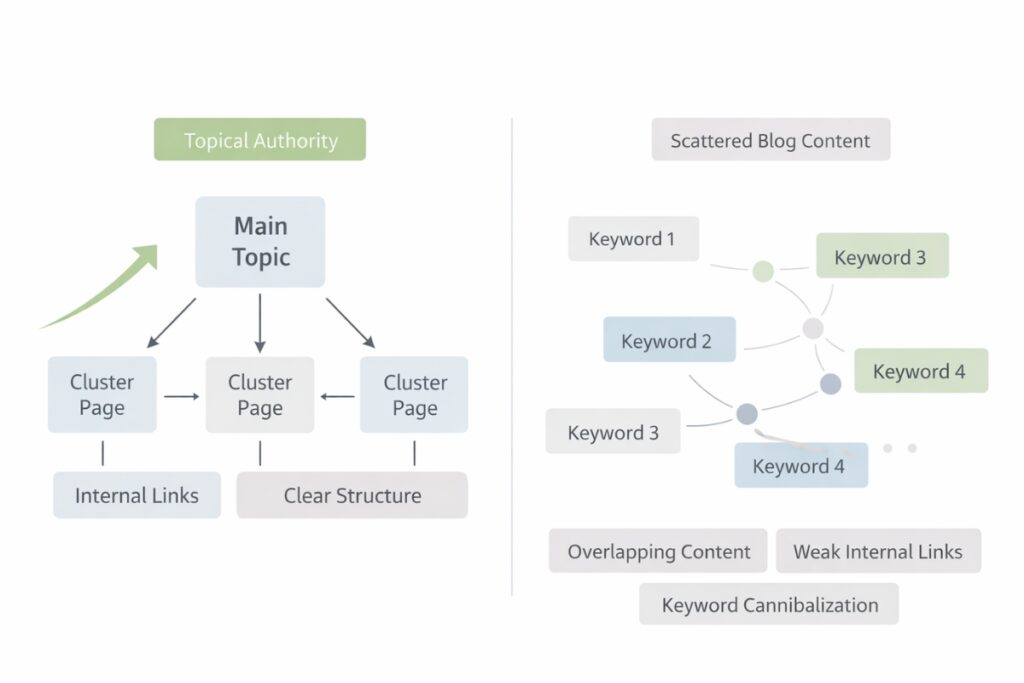
Search engines rank content by evaluating how well a website covers a topic and how clearly related pages are connected.
Search engines reward topic coverage
Modern search algorithms look for signals that demonstrate expertise and relevance.
When a blog publishes multiple related pages on a topic, it sends a clear message that the site understands the topic thoroughly.
Keyword clusters work best when you can clearly see how content is related in practice.
For example, imagine a blog that focuses on this Pinterest SEO.
Instead of writing unrelated posts, the blog creates a main page with the title “Pinterest SEO Tips for Bloggers.”
This pillar is supported by focused cluster contributions such as:
- How Pinterest SEO works
- Best Pinterest keywords for blog posts
- Pinterest board optimization tips
- How to Use Pinterest Analytics for Growth
Each of these pages targets a specific search intent, links back to Pinterest’s main SEO guide, and links to other relevant posts where appropriate.
For search engines, this structure signals topical authority. A clear learning path is created for readers instead of isolated articles.
Keyword clusters improve internal link signals
Internal links help search engines crawl and interpret a website.
Keyword clusters naturally create strong internal linking because:
- Cluster pages point back to the pillar page
- The pillar page links to cluster content
- Related cluster pages may link to each other
This strengthens side relationships and distributes authority throughout the cluster.
Clusters reduce keyword cannibalization
Keyword cannibalization occurs when multiple pages target the same or similar keywords.
This confuses search engines and weakens the ranking of individual pages.
Keyword clusters prevent this by:
- Give each page a clear purpose
- Separate broad topics from detailed subtopics
- Focusing search intent
Each side supports the other rather than competing.
Clusters increase the time spent on site and engagement
Readers benefit from structured content. If you’ve planned your content cluster correctly, there should be a clear next post (or multiple next posts) that your reader can visit to get more information about their question.
When cluster pages are logically connected, visitors are more likely to:
- Click on related articles
- Stay on the site longer
- Find answers faster
These engagement signals support SEO performance over time.
Keyword clusters support long-term SEO growth

Keyword clusters are not a short-term tactic. They enrich and add depth to your content and your blog as a whole.
You create one evergreen content strategy This enables blogs:
- Expand topics without losing focus
- Add new content without restructuring
- Update older posts more easily
As a blog grows, clusters help ensure clarity and organization because you can expand keyword clusters or add new ones.
As an added bonus, this content strategy works well whether you’re creating a niche blog or Planning content for your business.
Why this is important for bloggers
Without keyword clusters, blogs tend to rely on very disparate or disorganized content ideas.
This leads to:
- Overlapping posts
- Weak internal links
- Inconsistent rankings
Keyword clusters replace guesswork with structure and form a clear picture Content strategy foundation This makes SEO more predictable and manageable.
This is especially important for new blogs because searching for keywords in different niches, or keywords that cover very different aspects of your niche, makes it very difficult for search engines to know how to show you content.
How keyword clusters work

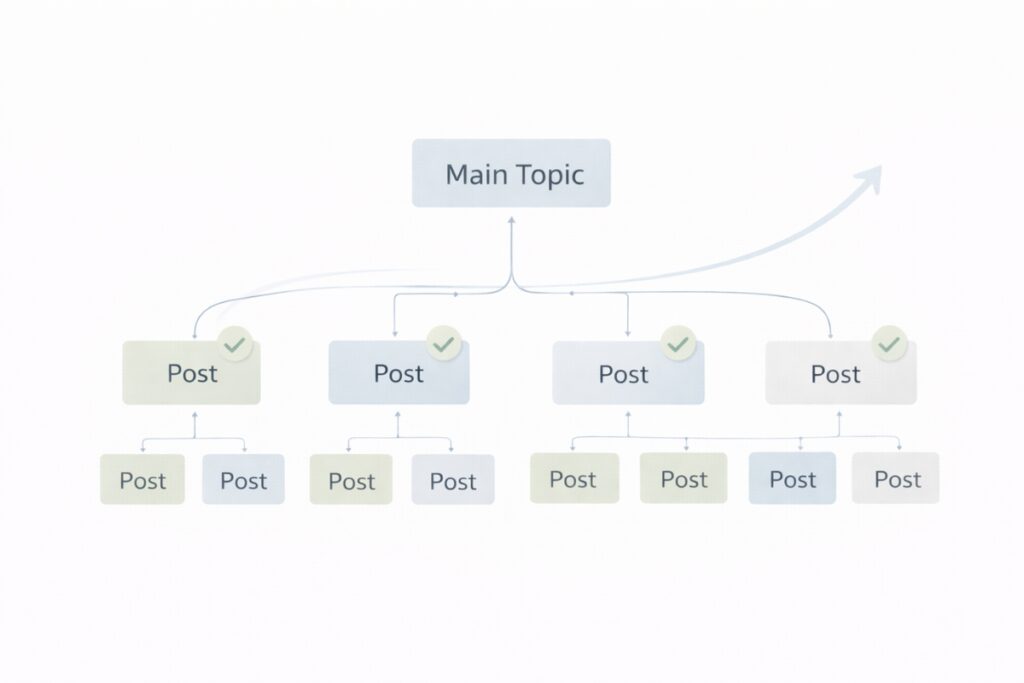
Keyword clusters are based on two content types:
- Column pages
- Cluster pages
The pillar page targets the main keyword and covers the topic broadly.
Cluster pages go deeper into related subtopics and link back to the pillar.
This creates a clear content hierarchy that can be easily searched and understood by search engines.
Step 1: Choose a strong primary keyword
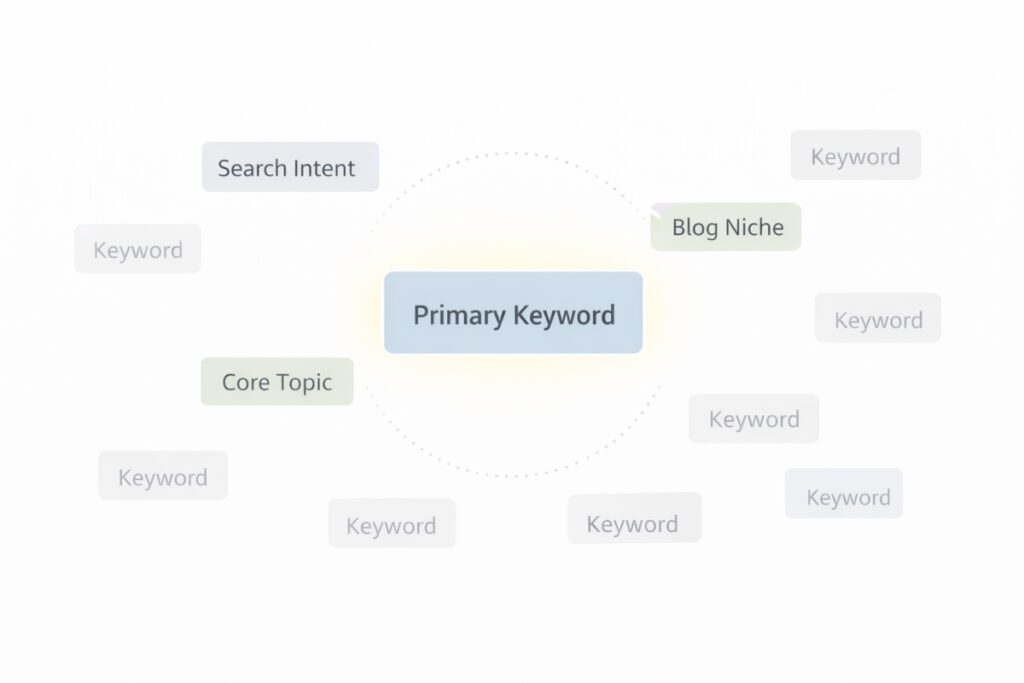
Start with a main keyword that represents the core topic.
A strong primary keyword should:
- match search intent
- Be wide enough to support multiple articles
- Match the general niche of the blog
Examples of this are:
- Keyword clusters
- local SEO strategies
- Pinterest SEO Tips
The primary keyword becomes the foundation of the cluster.
Step 2: Find supporting keywords

Supporting keywords are the backbone of a keyword cluster.
These are related search terms that expand on the main topic and help search engines understand depth and relevance. Each supporting keyword should provide an answer another question or cover one certain angle of the main topic.
The goal is not to collect as many keywords as possible. The goal is to choose keywords that naturally go together.
Start with search intent
Before adding a keyword to a cluster, check the intent behind it.
Questions:
- Does this keyword solve a different problem than the main topic?
- Would it deserve its own page?
- Would a reader expect a separate article for this search?
If the answer is no, the keyword does not belong to the cluster.
This step alone prevents overlaps in content and weak sides.
It is not the task of each individual article to answer all questions on the topic.
It’s your job when planning your keyword cluster to consider the questions the reader might have after completing your post.
These then become additional cluster posts to support your main topic.
Look for keywords that expand the topic
Good supporting keywords are usually:
- Dive deeper into a subtopic
- Explain a process
- Answer a specific how or why question
Examples of strong supporting keywords for keyword clusters include:
- Pillar page vs. cluster page
- Keyword clustering strategy
- internal linking for keyword clusters
- how to organize blog content for SEO
Each of these expands on the topic without repeating the same idea.
Avoid keywords that compete with each other
One of the most common mistakes is choosing supporting keywords that are too similar.
If two keywords:
- Answer the same question
- Have almost identical search intent
- Would lead to very similar content
Only one should be used.
This avoids keyword cannibalization and ensures every page stays focused.
Easily check for keyword cannibalization by entering both keywords into the search engine of your choice. If you see the same articles for each of these keywords, you don’t need to create a second post.
Review the search results before finalizing them
A quick way to validate supporting keywords is to look at search results.
If the top ranking pages:
- Cover the topic in short paragraphs within a larger article. The keyword may not require its own page
- If the articles are standalone, the keyword is probably a good cluster candidate
This step helps align the content with what search engines already prefer.
How many keywords should be in a cluster?
There is no set number that each keyword cluster must follow.
Most clusters work best with:
- A main keyword
- Five to ten closely related keywords
The focus should be on relevance, search intent and quality, not quantity.
Each supporting keyword should naturally expand on the main topic and deserve its own page. If a keyword doesn’t provide value or answer the same question as another page, it doesn’t belong in the cluster.
This approach keeps content clear, organized, and easier for search engines to understand.
Step 3: Create a Pillar Page
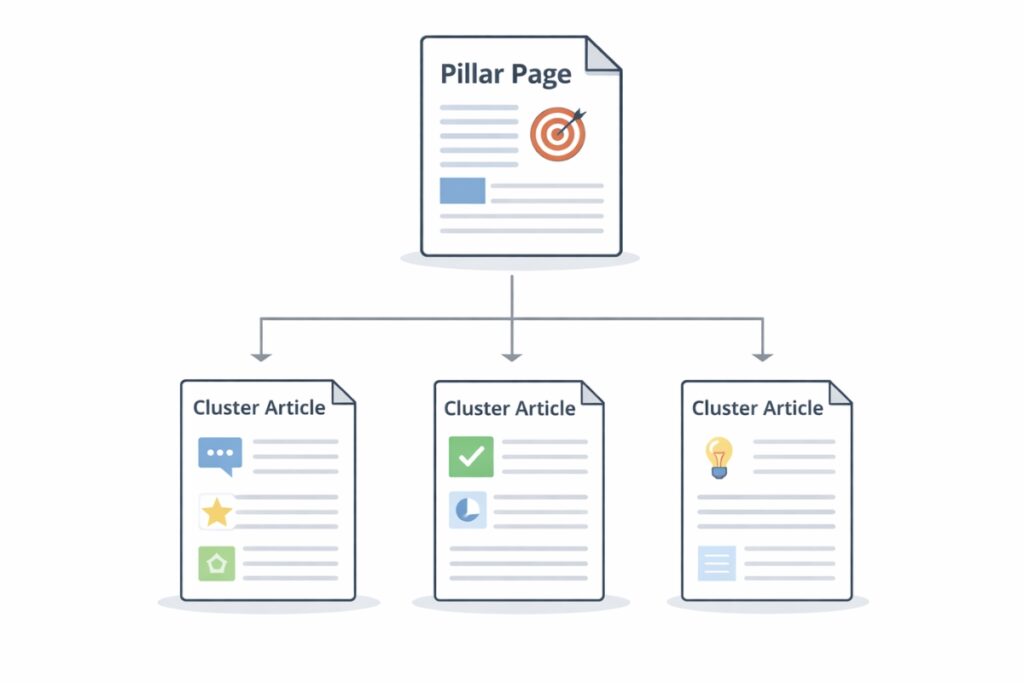
A pillar page is the central hub of a keyword cluster.
This page targets the main keyword and connects all related cluster content in one place. Search engines use pillar pages to understand what a website is about and how different pages relate to each other.
The goal of a pillar page is clarity, not complexity.
What a pillar page is and isn’t
A pillar page Is:
- A broad overview of the main topic
- A guide that introduces important subtopics
- A page that links to all related cluster contributions
A pillar page is not:
- A collection of independent blog posts
- A long article full of keywords
- A replacement for clustered content
Keeping this distinction clear avoids overlap and confusion.
How detailed a pillar page should be
A pillar page should explain each subtopic sufficiently so that readers understand what it is about.
Not every detail should be discussed.
A good rule:
- Answer what something is
- Explain why it is important
- Point readers to a more in-depth resource
This keeps the pillar page readable and effective.
A well-formatted pillar page that links to clustered posts will rank higher than a single post that attempts to cover all aspects of the topic in one place.
The natural connection between pillar and cluster content is one of the most valuable elements of this strategy.
Recommended length for a pillar page
There is no exact word count requirement.
Most pillar pages fall within a range that allows:
- Clear explanations
- Strong internal linking
- Easy scanning on mobile
The focus should always be on usefulness and not length.
If the page seems overwhelming, it is too long.
How to structure a pillar page
A strong pillar page structure includes:
- A clear introduction
- Short paragraphs on each subtopic
- Internal links to each cluster page
- Easy navigation using headings
Each section should introduce the topic and lead the reader to the next step.
When to create or update a pillar page
A pillar page can be created before or after clustered content.
If cluster posts already exist:
- Create the pillar page to connect them
- Update internal links immediately
If you’re starting over:
- First create the pillar page
- Add clustered content over time
As a blog grows, pillar pages should be updated to include new content and updated links.
Step 4: Write cluster content

With cluster content, a keyword strategy turns into real rankings.
Each cluster page focuses on a supporting keyword and goes deeper than the pillar page. These pages provide detailed answers and at the same time deepen the main topic through internal links.
Each cluster page should have a clear purpose.
Focus on one question per page
Each cluster contribution should answer a specific question or cover a clear point.
Before writing, ask:
- What problem does this page solve?
- What would a reader expect?
- How is this page different from the Pillar page?
If the answers seem vague, the topic may be too broad.
Matches search intent exactly
In today’s search, search intent is more important than keyword placement for blog SEO.
A cluster post should match what searchers are actually looking for.
If you see the following in the search results:
- Step-by-step instructions, write instructions
- Compare, write a comparison
- Definitions, write an explanation
Ignoring intent leads to poor engagement and weak rankings.
Avoid repeating the pillar side
The cluster content should be expanded and not duplicated.
Concepts are presented on the Pillar page.
Repetitive content from the pillar page can weaken both rankings and user experience. Cluster pages should assume that the reader has already seen the overview and instead focus on adding deeper, more specific information.
They are explained in detail on the cluster pages.
If content feels repetitive:
- Remove basic definitions
- Focus on details, examples, or steps
- Link back to the column instead of restating it
This keeps the content unique and focused.
Use clear internal links
Internal links connect cluster content to the pillar page.
Best practices include:
- Link to the Pillar page at the beginning of the post
- Use of natural, descriptive anchor texts
- Avoid overlinking
Each cluster page should also link to related cluster posts when necessary.
Keep cluster pages focused and skippable
Cluster content should be easy to read on mobile devices.
Use:
- Short paragraphs
- Clear subheadings
- Bullet points were helpful
This improves the user experience and keeps readers engaged.
How detailed should the cluster content be?
Cluster pages should fully answer their specific topic.
You should:
- Go deeper than the pillar side
- Avoid unnecessary filler
- Focus on one intention
If a page starts to cover multiple topics, it probably needs to be split up.
When to stop adding content to a cluster
A cluster does not require unlimited contributions.
Stop adding pages if:
- New keywords repeat the existing intent
- Content begins to overlap
- The topic seems to be completely covered
A smaller, well-structured cluster performs better than a large, unfocused one.
Step 5: Create Smart Internal Links

Internal links connect each part of a keyword cluster.
Best practices include:
- Link from the Pillar page to each cluster post
- Linking cluster contributions back to the column
- Linking between relevant cluster contributions
- Use clear, descriptive anchor text
Avoid forced or excessive links. Each link is intended to help readers move through the topic naturally.
Search engines pay attention to which text is used as an anchor link. Use your linked text to draw their attention to the topic of the post.
Example of a broken anchor link: For more information, learn how to promote your blog (based on your blog niche). this post. Good example of an anchor link: Search engine research is one way to find keywords, but there are also specific ways SEO tools to help you find keywords for your blog.
Common keyword clustering mistakes to avoid
The most common errors include:
- Targeting the same keyword on multiple pages
- Forgetting to link cluster content
- Creating clusters without a pillar page
Fixing these issues often leads to quick ranking improvements.
How keyword clusters scale as a blog grows

Keyword clusters make blogging more efficient over time.
Instead of guessing what to write next, Content planning is structured and easier to execute.
When keyword clusters are present, each topic naturally reveals its next content opportunity. Authors can identify gaps, expand subtopics, and publish specifically instead of relying on random ideas or trends.
Each new post strengthens existing content instead of starting from scratch.
This approach works particularly well when using content systems or marketing platforms to organize topics, track links, and manage publishing workflows.
Some bloggers use tools like GHL systems to adjust content planning, SEO, and internal structure to the size of their blog.
The focus remains on clarity and consistency rather than volume.
Put keyword clusters into action
Keyword clusters are not advanced SEO tactics reserved for large websites. These are fundamental strategies that blogs benefit from at every stage.
Organizing content by topic rather than isolated keywords makes blogs easier to grow, easier to manage, and easier to rank.
For bloggers planning to start a blog or restructure an existing one, keyword clusters provide a clear roadmap that supports long-term SEO success without adding unnecessary complexity.
Frequently asked questions
A keyword cluster is a group of related keywords built around a main topic.
Each cluster helps search engines understand content relevance and topic focus.
Yes. Keyword clusters help new blogs build authority faster by keeping content focused and organized from the start.
Results depend on competition and publishing consistency. Some blogs see an improvement in rankings within a few weeks once the cluster content is indexed and linked internally.
No. Each post should focus on one main topic to avoid confusing search engines and splitting ranking signals.
No. Keyword research is still required to select strong topics and relevant supporting keywords.
No. Keyword clusters can be created using basic keyword research, search intent analysis, and internal linking.