
On May 20, 2026, the next major version of WordPress was released: WordPress 7.0. While previous versions focused on improving the block editor, this version takes it to a new level. It takes the platform to the next phase of its roadmap with smarter workflows and a more app-like experience. So let’s take a look at what’s new and what features you might be interested in.
A modern admin experience
Although seemingly a small thing, the new color palette is another cool thing. As you can see in the screenshot above, the default color scheme has changed. The palette previously known as Modern is now the new default palette, better aligning the administrator with the visual direction of the block and site editor. If you prefer the old look, don’t worry, it’s still available in your profile settings and is now listed as “Fresh.”
Overall, these and other improvements give your website’s backend a fresh look. With the intention of making WordPress seem less like a traditional CMS and more like a modern web app.
Revisions are now more visual
Whenever you need to review or restore a previous version of a page, revisions in WordPress will help you do that. These give you an idea of what was changed on your site and when. Now WordPress 7.0 makes this even easier with visual revisions instead of the raw text that was previously displayed.
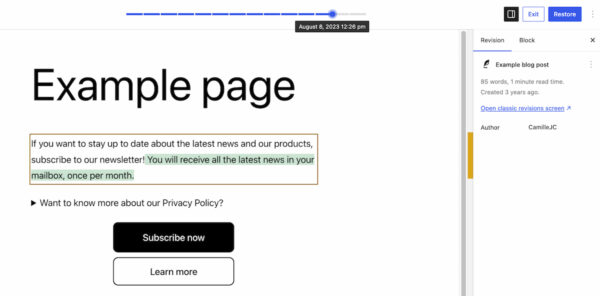
The revision function is in the same place as before. Clicking on it now will take you to a preview of your page, where you can use the slider at the top to view previous versions. The slider also shows you the date and time of the change. When you view a previous version of the page, additions appear in green, changed sections appear in yellow, and deleted sections appear in red. This way you can immediately see the changes you have made.
As before, this allows you to quickly restore previous versions of a page, find the cause of layout problems, and verify updates. This visualization of the revisions makes this easier because you don’t have to dive into the text to find out what’s changed. You’ll notice it immediately when you switch between revisions.
New blocks in the block editor
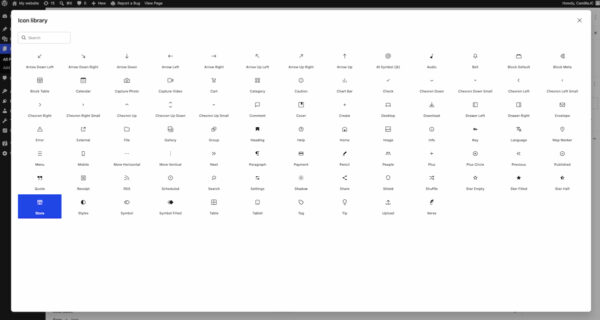
As expected, the block editor also received some innovations with the release of WordPress 7.0. First, the new Breadcrumbs block lets you add breadcrumbs to your pages to improve navigation on your website. When added, the correct breadcrumb path is automatically added to the top of your page, but you also have the option to customize it. The other new block in this release is the Icon block. This allows you to add icons to your pages from a directory of icons added in the backend.
There are also some improvements to existing blocks, such as the Grid block and the Cover block. The Grid Block used to have an Auto/Manual toggle feature, but this has been replaced with several options that allow you to set the responsiveness of the block and the columns it displays. Cover Block now offers the ability to use embedded videos as backgrounds, allowing you to display videos from platforms like YouTube there. These new blocks and improvements continue to reduce the need for plugins and custom work to achieve the desired design.
Better responsive design controls
Designing for mobile just got a little easier. This latest version of WordPress introduces viewport-based controls that allow you to show or hide blocks depending on the user’s screen size. Simply go to the block, click View in the toolbar, and choose which devices you want the block to appear on (desktop, tablet, or mobile). This will automatically hide it on the devices you don’t select. This allows you to optimize your design for different devices and create responsive designs without using custom CSS. A big win for anyone building websites without relying heavily on code.
Smarter pattern editing
Patterns and templates now have different editing modes to make changes without accidentally messing up the design. When you select a pattern, the list view shows you all the text and image elements in that pattern. This allows you to focus on the content-oriented elements and change them when necessary. However, if you click on “Edit Pattern”, the remaining elements (design elements such as spacers) will also be displayed so that you can still customize them. This helps users focus on content optimization, but still provides the ability to make design or layout changes if necessary.
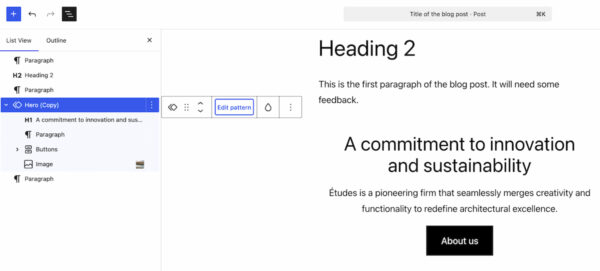
This new approach makes it a little easier to customize patterns to specific use cases on your site.
WordPress 7.0 doesn’t include any AI-powered tools, but it does lay some foundations. It has a “Connectors” section under “Settings” in your WordPress backend. Here you can connect to external integrations, including AI providers or agents. This allows you to connect to Claude, Gemini, OpenAI and more. You can search the directory if the integration you’re looking for isn’t immediately listed.
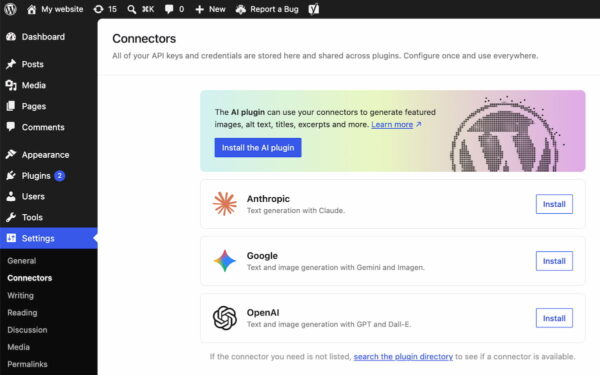
This gives you a central place to manage all the integrations that your website or plugins need to connect to via API keys or other credentials. Additionally, it gives developers a future-proof ecosystem and a standardized framework to work with.
A new list filter for plugins
WordPress 7.0 adds a filter that allows plugins to register custom tabs on the plugins screen. This allows plugins to be grouped under a custom tab with an appropriate label. For example, thanks to this feature we were able to add our own Yoast tab on the Plugins screen. This brings all Yoast plugins on this site into one view, making it easier for site administrators to check versions, manage activation, and stay on top of their Yoast suite.
Final thoughts
As always, these are just a few highlights. New blocks, smarter workflows, a modern admin and AI basics. There is much more that we have not discussed here. For example, performance was not ignored in this version. In particular, client-side media processing (faster uploads, less server load), further improvements in block rendering and responsiveness. These changes help WordPress scale better, especially for media-intensive websites. It’s also worth mentioning that WordPress 7.0 increases the minimum PHP version to 7.4.
Coming: real-time collaboration
Originally, the real-time collaboration feature was intended for this release. But recently it was decided Postpone the release of this feature to ensure the stability of this version. This feature will likely be part of a future release.
But now we’re ready to get started with the new features highlighted above in WordPress! So update to the latest version or delve into more details the publication post on WordPress.org.
