
“Which is better: Claude or ChatGPT?” is the perplexing question every marketer is asking right now. As AI tools become increasingly important to content workflows, understanding the differences between Claude and ChatGPT for marketing can mean the difference between a streamlined operation and a frustrating bottleneck.
In my opinion, both tools have legitimate strengths. ChatGPT – which you can train to your specific needs – excels at rapid ideation, email copying, and social content. However, Claude excels at editing long texts, maintaining brand voice consistency, and dealing with large context windows. The question isn’t really, “Is Claude better than ChatGPT?” It’s about which LLM you should use for the job at hand.
In this guide, I’ll break down everything you need to know, including:
- Claude AI versus ChatGPT for writing
- ChatGPT vs Claude for email
- Claude versus ChatGPT prices
- Claude versus ChatGPT integrations with your existing stack
Additionally, my (very smart) colleagues have tested blog post writing with ChatGPT, explored ChatGPT for SEO, evaluated ChatGPT alternatives including Claude, and even used both for AI-powered spreadsheet tasks. Now I’m putting my money where my mouth is and sharing what I’ve learned so you can make confident decisions between ChatGPT and Claude when it comes to coding, content creation, and everything in between.
Let’s get to the good things.
Table of contents:
Claude vs ChatGPT: Which is better?
Here’s my hot take: I think Claude is the better LLM… and I’m not afraid to say it.
Don’t get me wrong. ChatGPT has its strengths and I have used it frequently for quick drafts. But when it comes to the work that really matters (the things that build trust, increase conversions, and represent your brand), Claude consistently delivers outstanding results.
Here are two big reasons why I prefer Claude as a content marketer:
- Writing quality: Claude versus ChatGPT for writing is not even remotely comparable in my experience. Claude produces prose that sounds human, maintains tone across long documents, and requires fewer revision cycles before content is ready for publication.
- Context preservation: Claude’s 200,000 token context window allows me to upload brand guidelines, source documents, and drafts at the same time without the AI ”forgetting” my instructions halfway through.
But here’s the bottom line: When it comes to marketing, Claude vs ChatGPT comes down to what you value most. If you prioritize speed and volume, ChatGPT delivers. If you prioritize quality and brand consistency, Claude wins.
That’s my opinion, and after using both tools daily for months, I stand by it.
Which is better for common marketing workflows: Claude or ChatGPT?
Maybe not Love But what I’m going to say next is the truth: the answer depends on the task.
In my opinion, Claude is well suited to editing long content and handling large contexts, making him ideal for:
- Blog posts
- White papers
- Document verification
However, that doesn’t mean ChatGPT doesn’t have advantages. Personally, I think ChatGPT is best suited for:
- Quick idea generation
- Email copy
- Social content
Overall, most marketing teams get the best results when they use Claude for editing and ChatGPT for drafting, viewing them as complementary tools rather than competitors.
However, if you really want a comprehensive comparison of each tool based on common marketing workflows, here is a table that does just that:
|
Marketing workflow |
Claude |
ChatGPT |
winner |
|
Writing content |
Creates nuanced, on-brand long copy; Handles 200K token context windows for large documents |
Produces quick first drafts; supports image generation via DALL·E |
Claude for depth, ChatGPT for speed |
|
Email marketing |
Strong in personalization logic and writing A/B variants; consistent tone across all sequences |
Faster processing of large email copies; integrated templates |
Bind! (ChatGPT vs. Claude for email depends on volume versus nuance) |
|
Social media |
Maintains brand voice across platforms; better for longer LinkedIn posts |
Great for short hooks and quick iteration; creates images natively |
ChatGPT for volume, but Claude for vocal consistency |
|
SEO briefings |
Synthesizes large competitive data sets; outputs structured briefings with semantic relationships |
Fast keyword clustering and outline generation |
Claude for research-intensive briefings, ChatGPT for speed |
|
Research reliability |
Provides citations with web search; conservative towards unconfirmed claims |
Searches the Internet in real time; occasionally hallucinates sources |
Claude for accuracy, ChatGPT for breadth |
|
Long-form content |
The 200,000 token context manages complete eBooks and reports. strong structural processing |
128K token context; better in iterative sectional design |
Claude |
|
Coding and automation |
Reliable for marketing scripts, API integrations and data analysis; fewer logic errors |
Faster code generation; broader plugin ecosystem for no-code users |
ChatGPT for speed, but Claude for accuracy |
|
Integrations |
Native Claude connector with HubSpot; API access for custom workflows; Zapier and Make support |
Over 1,000 plugins; GPT store for ready-made marketing tools; direct Zapier triggers |
ChatGPT for plug and play; Claude for HubSpot native workflows |
|
Governance and privacy |
The Enterprise tier includes data retention controls, SSO, and audit trails. No user data training by default |
Team and Enterprise plans offer data controls; both require an opt-out option for training exclusion |
Claude |
So, wWhat does this mean for your AI-powered workflows?
When evaluating Claude AI vs ChatGPT for writing, consider your content type. I recommend using ChatGPT for high-speed tasks where speed is most important, including:
- Social Captions
- Email subject lines
- Quick drafts
Alternatively, I suggest using Claude for:
- Long format editing
- Brand sensitive content
- Research synthesis (where accuracy and context preservation are critical)
Claude vs. ChatGPT for marketing content and branded editing
In my experience as an in-house writer for a well-known SaaS brand, marketing teams really get the best results when they use Claude for editing and ChatGPT for drafting.
As I mentioned earlier, this department leverages the core strengths of each tool. Claude excels at editing long-form content and dealing with complex contexts, while ChatGPT is best for quick ideation, email copy, and social content.
But here’s the key takeaway: Knowing when to use each tool transforms AI from a novelty to a production-quality content engine.
To put my previous statement into practice, I will explain how to use Claude for content and editing in the next section.
When to use Claude for content and editing
If you’re wondering when Strictly speaking Use Claude AI instead of ChatGPT for writing. I’m here to break it down for you in layman’s terms.
Here’s why I think Claude is the right option in these scenarios:
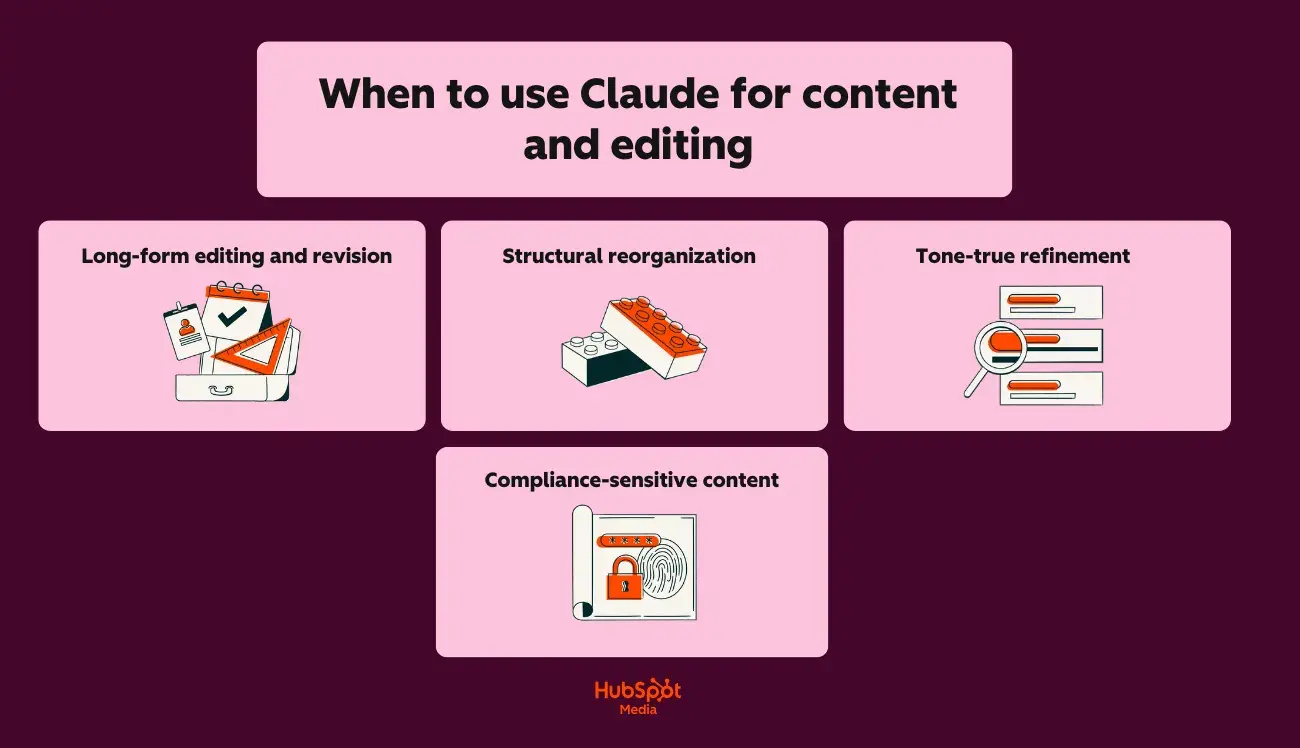
- Long-form editing and revision: Claude’s 200,000 token contextual window simultaneously includes complete style guides, brand documentation, and design content. (For example, try uploading your 50-page brand book along with a blog draft. Claude applies language rules without losing context during editing.)
- Structural reorganization: Claude identifies logical gaps, redundant sections, and flow problems in documents up to 150,000 words. It also rewrites transitions and restructures arguments while preserving the original meaning.
- True-to-tone refinement: Claude maintains a consistent voice throughout the longer pieces. It captures subtle changes (from conversational to corporate, from active to passive) that undermine brand identity.
- Compliance-relevant content: Claude provides stronger privacy and governance controls for enterprise teams. Content that requires legal review, HR approval, or regulatory compliance benefits from Claude’s audit-proof results and data processing policies.
When to use ChatGPT for content creation
Here on the HubSpot blog you can always express your own opinion, especially on the use of AI. However, I am a strong supporter of ChatGPT for content creation.
I think it’s a better choice when it comes to speed and versatility for the following reasons:
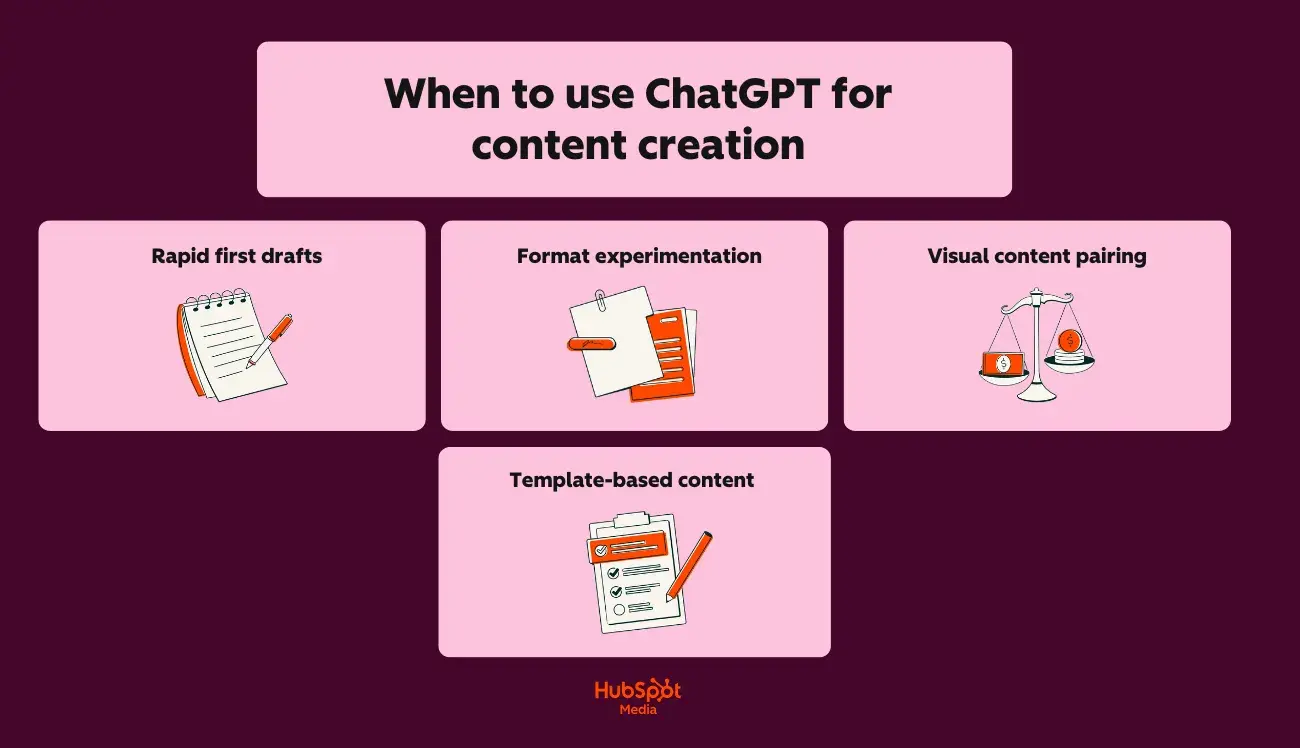
- Quick first drafts: ChatGPT generates usable text faster for large requirements such as product descriptions, ad variations, and landing page sections.
- Format experiments: Do you need the same message as a LinkedIn post, email subject line, Instagram headline, and Google ad? ChatGPT quickly iterates across formats.
- Visual content pairing: Through the DALL·E integration, ChatGPT can generate accompanying images, infographic concepts and social graphics in addition to text.
- Template-based content: ChatGPT’s custom GPTs and pre-built prompts speed up repetitive tasks like weekly newsletters or social calendars.
Branded voice control: step-by-step setup
I may have strong opinions about choosing AI tools, but I’m not going to tell you that one tool is better without showing you why. Below I’ve created two step-by-step guides to branded voice control, for both Claude and ChatGPT.
For Claude:
- Create a branded voice document (sound descriptions, word preferences, forbidden phrases, example sentences).
- Upload the document at the start of each project meeting (Claude’s Project feature maintains it across conversations.)
- Paste the draft content and type the following message: “Edit this to exactly match our brand language document. Highlight any sections where the original tone conflicts with the guidelines.”
- Review Claude’s tracked changes and justifications before accepting changes.
To make sure this works for you, I tested it myself. Take a look:
First, I created a fake brand voice guide for a Gen Z beauty brand with Claude, using the parameters described above.
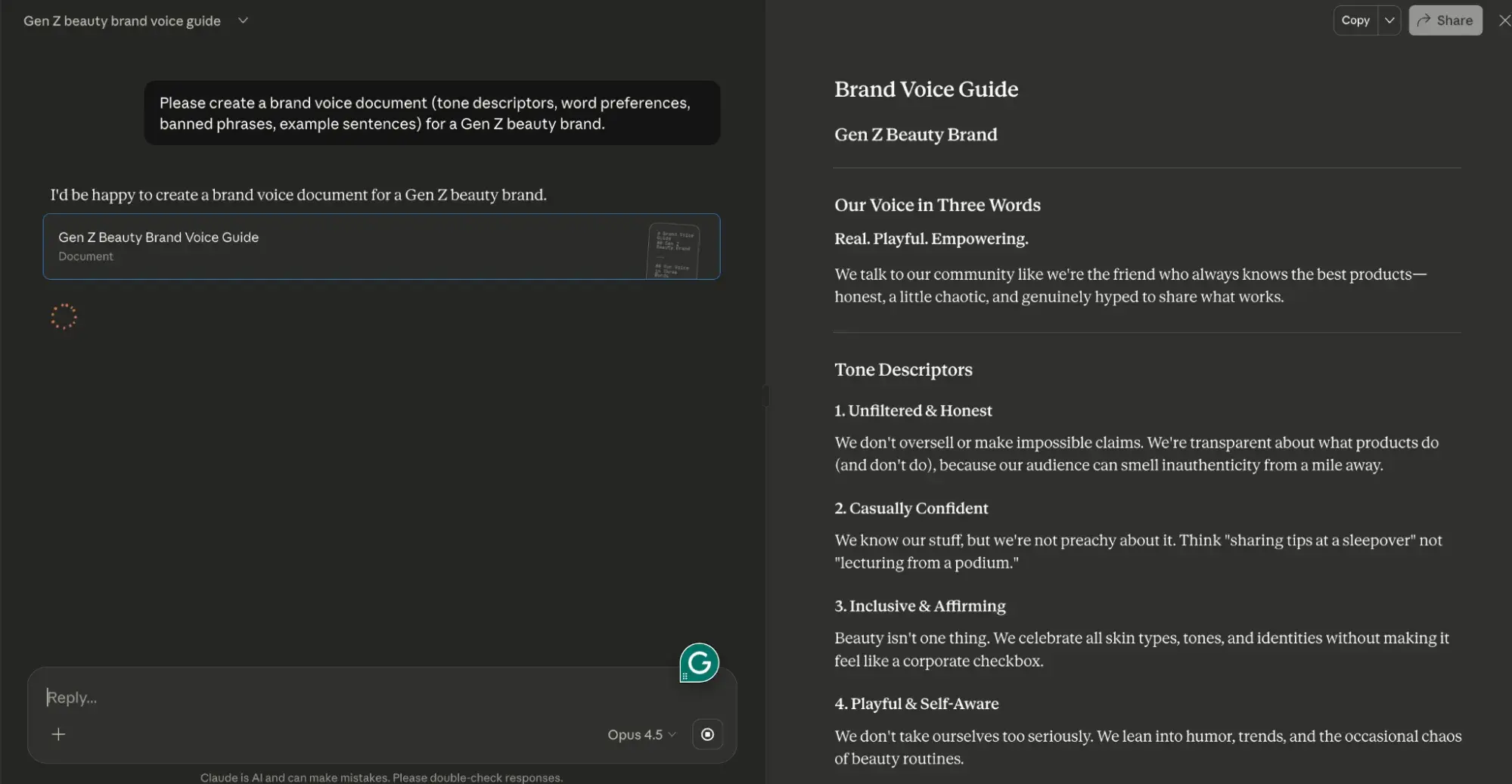
Next, I took the brand phrasebook Claude created for my fake Gen Z beauty brand and placed it in a Claude project.
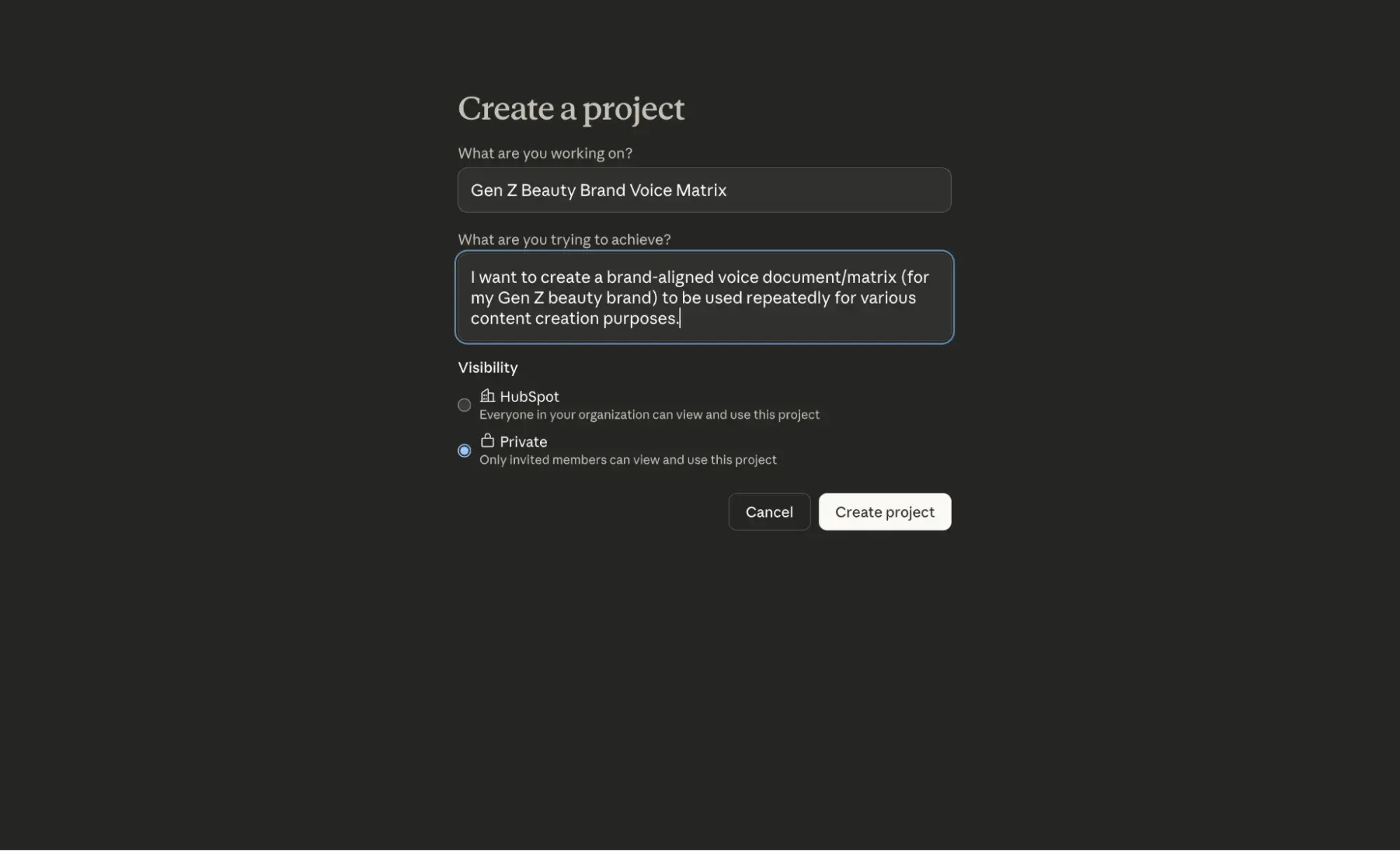
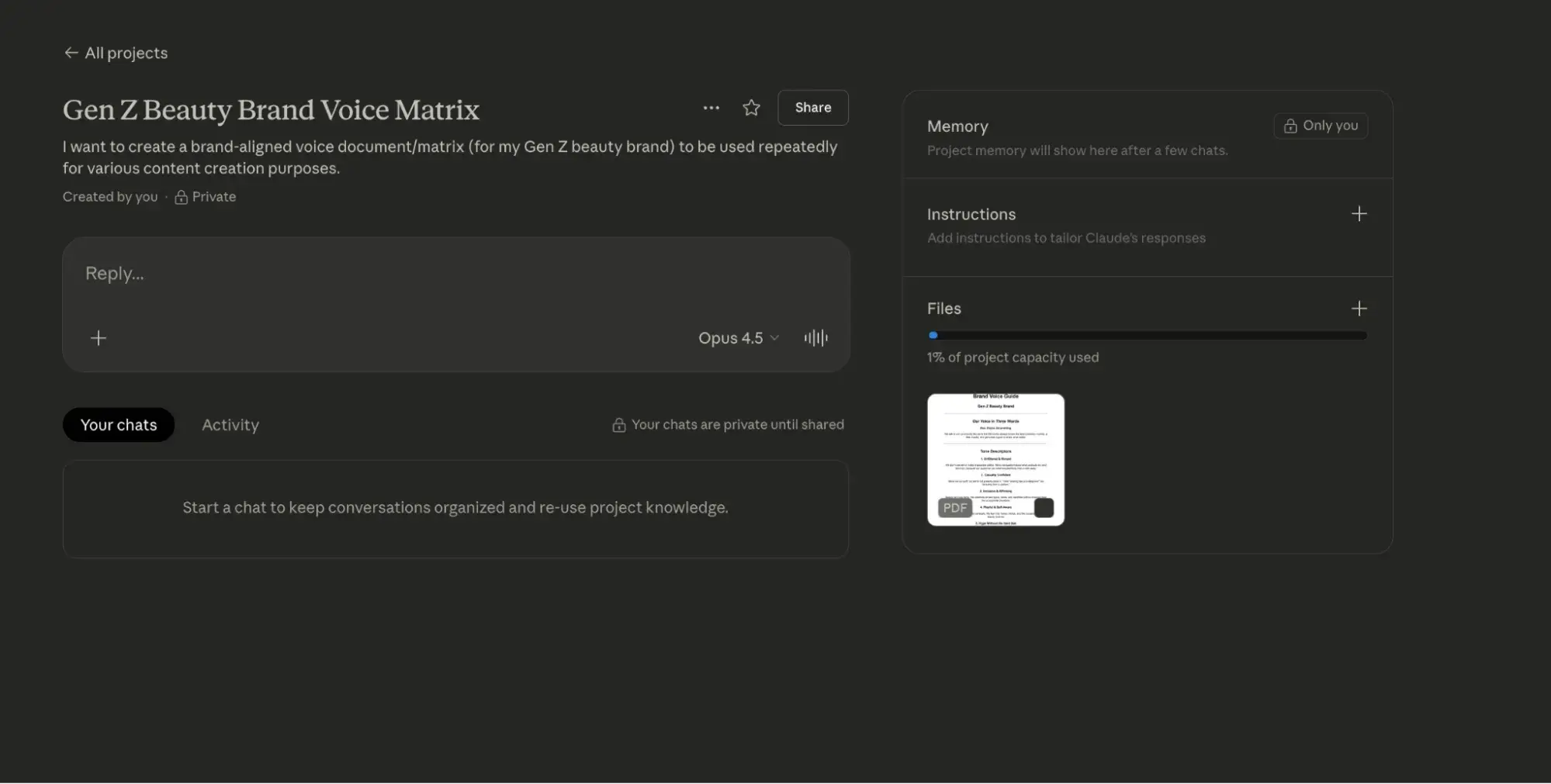
Then I used the prompt (in step 3) above to edit a potential social media post.
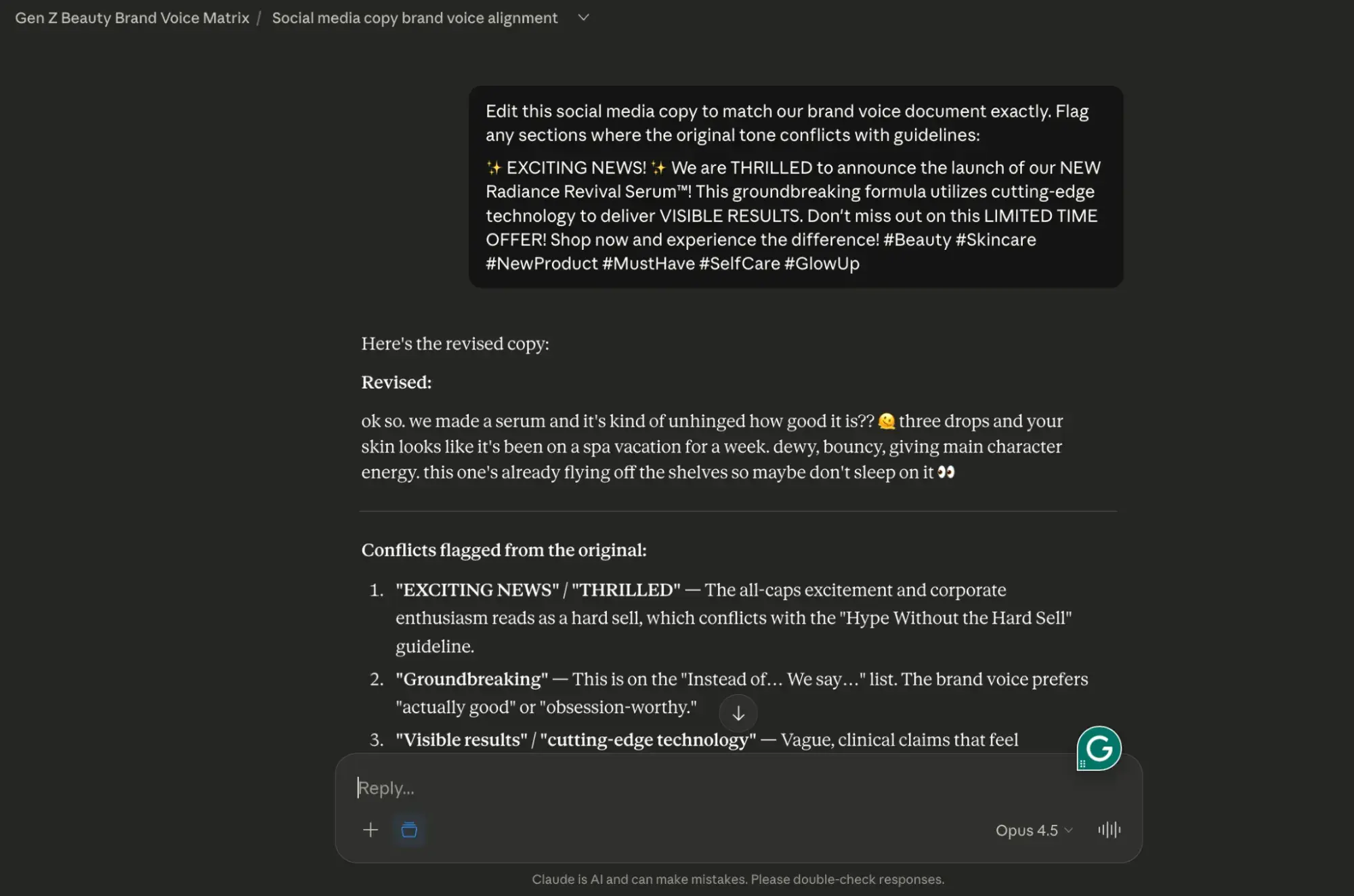
For ChatGPT:
- Create a custom GPT with your brand’s voice rules embedded in the system prompt.
- Add 3 to 5 example paragraphs that demonstrate the ideal tone.
- Use custom GPT for all design tasks to ensure basic consistency.
- Export designs to Claude for final comparison with your complete brand documentation.
Again, I wanted to make sure this framework would work for you, so I tested it. This is how it went:
First, I gave ChatGPT the same branded phrasebook that I gave Claude.
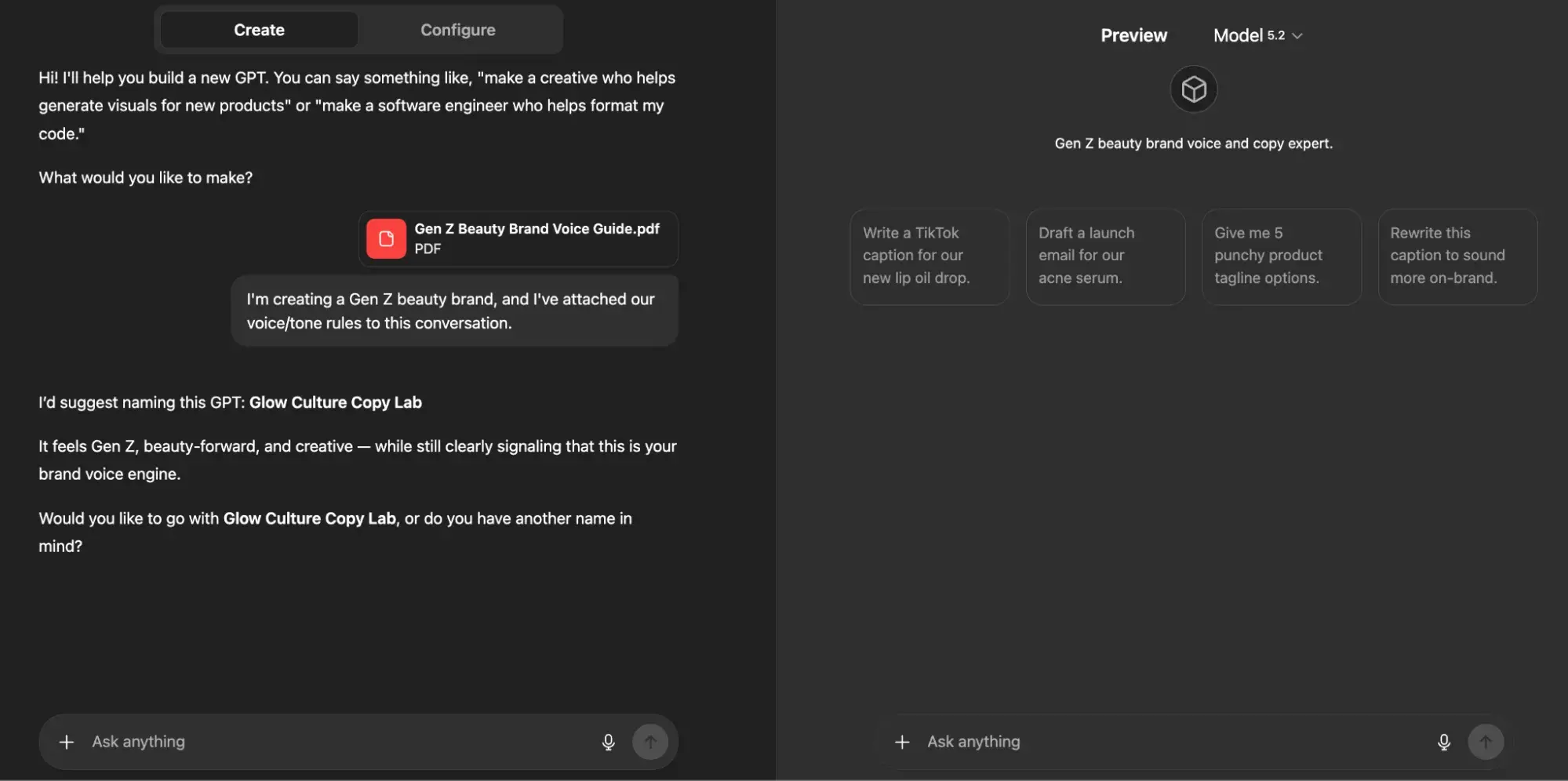
Then, as I outlined above, I provided my custom GPT with three examples of how I would like the tone and voice of my Gen Z beauty brand to translate across social media.
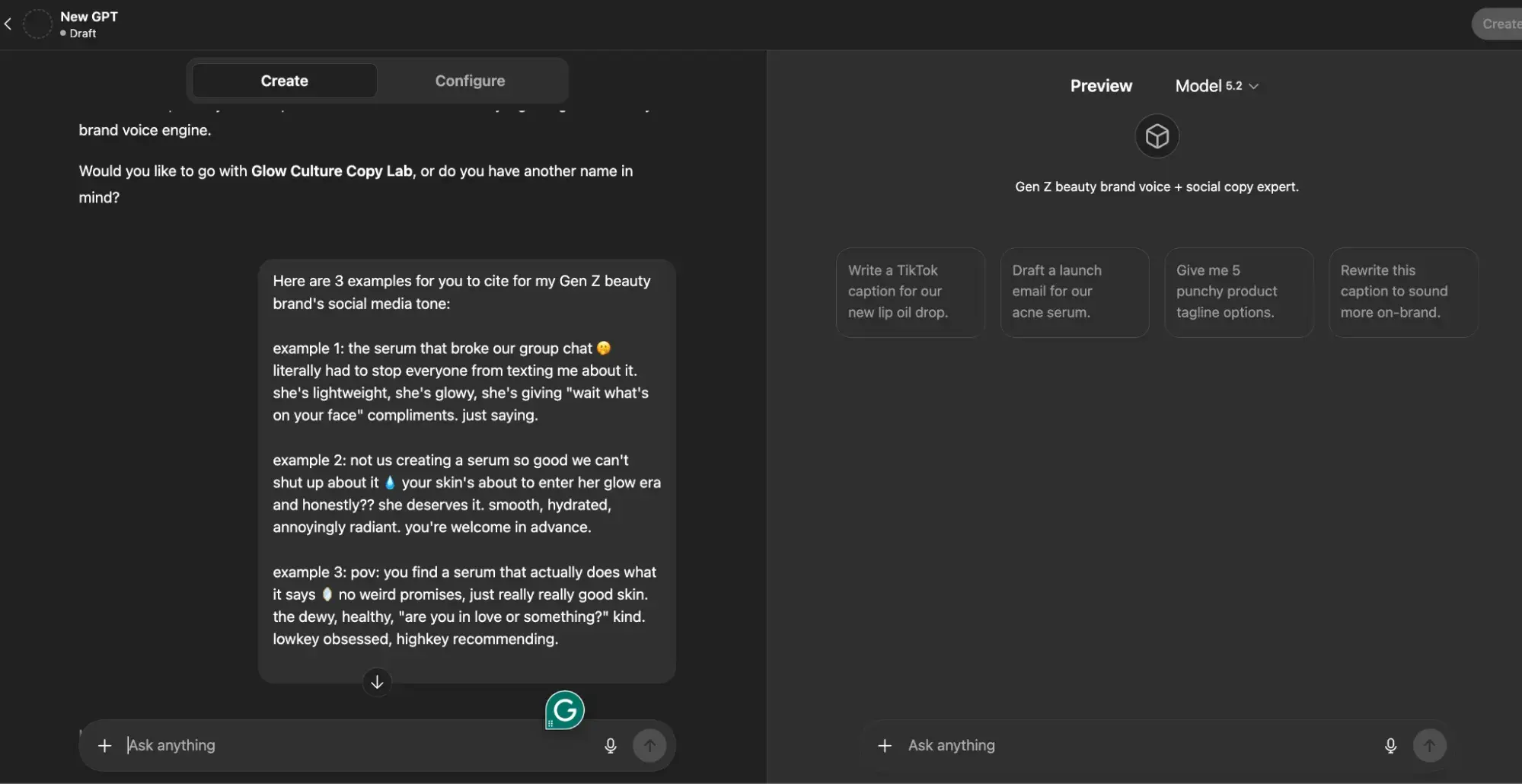
From this point on, if I were to actually build this brand (which I’ve now named “Skin Agenda” – thanks ChatGPT!), I would continue to use this custom GPT as a space to brainstorm and iterate ideas for it.
Approval flow integration: Claude and ChatGPT in HubSpot
Want to use both tools in a single content pipeline? Well, you’re in luck. HubSpot’s intelligent CRM enables seamless integration of Claude and ChatGPT into marketing workflows via these approval channels:
- Design phase: ChatGPT generates initial content via API or Zapier triggers.
- Edit stage: Claude refines designs using the native Claude connector with HubSpot, applying brand voice and structural improvements.
- Verification phase: Content routes to HubSpot’s Content Hub for team review, version control and approval tracking.
- Publication phase: Approved content is delivered directly from the Content Hub to blogs, landing pages, or email campaigns.
This CMS-approved workflow answers the question “Is Claude better than ChatGPT?” with nuances: Claude is better suited for editing, control and context-intensive tasks, while ChatGPT is the leader in terms of speed and format variety.
The Claude versus ChatGPT for marketing argument isn’t about choosing one; It’s about sequencing for maximum output quality and efficiency.
Claude vs. ChatGPT for email and social copy
As I mentioned earlier, ChatGPT is best for quick ideation, email copy, and social content; Claude is better suited for editing long content and dealing with large amounts of context.
So the question of whether ChatGPT or Claude is better for email depends on whether you prioritize speed or nuance.
In the following section, I’ll break down each tool’s performance on important email and social tasks.
Generation of subject line and preview text
In my opinion, the following are ChatGPT’s strengths when it comes to generating subject lines and preview text:
- Creates 20+ subject line variations with character count restrictions in seconds
- Simultaneously tests emotional aspects (urgency, curiosity, benefit-oriented, question-based).
- Combines subject lines with appropriate preview text that extends the hook without redundancy
In comparison, here are Claude’s strengths:
- Analyzes your existing high-performing subject lines to identify patterns before generating new options
- Maintains brand voice consistency across subject line stacks
- Reports compliance issues (misleading claims, spam trigger words) during generation
Recommended workflow: Use ChatGPT to generate initial subject line batches, then run top candidates with your brand guidelines through Claude to filter them by tone alignment.
Claude vs. ChatGPT for SEO briefs and trusted research
Claude vs. ChatGPT for SEO briefs and trusted research
So, is Claude better than ChatGPT when it comes to creating SEO briefs and conducting accurate research? Honestly, it’s a difficult decision, but I can say with certainty that both tools require human review.
Before I get into the details, take a look at the table below for a quick comparison of how each tool performs on common SEO tasks.
Model behavior comparison for SEO tasks
|
SEO task |
Claude |
ChatGPT |
Best choice |
|
Content descriptions |
Summarizes multiple source documents and ensures structural consistency across detailed briefs |
Creates short descriptions quickly, but can lose coherence in complex documents with multiple sections |
Claude for comprehensive information; ChatGPT for simple briefings |
|
Blog outlines |
Creates logically structured outlines with clear hierarchies and handles differentiated topic relationships |
Fast contour generation, strong in generating multiple variations quickly |
Claude for depth; ChatGPT for speed |
|
Keyword clustering |
Groups keywords by semantic relationships and identifies content gaps across clusters |
Fast clustering with easy categorization, good for initial groupings |
Bind! ChatGPT is faster; However, Claude is more |
|
Topic cluster planning |
Maps pillar-cluster relationships across large content ecosystems |
Quickly generates cluster ideas; less effective at maintaining cross-cluster coherence |
Claude for complex architectures |
|
Content analysis of the competition |
Processes multiple competitor pages simultaneously in the context window |
Requires chunking for large competitive sets; faster for single page analysis |
Claude for the multi-competitor analysis |
|
Search intent classification |
Accurate intent categorization with explanations |
Quick classifications sometimes oversimplify mixed-intent queries |
Claude for the accuracy |
Claude vs. ChatGPT for SEO research
Having trouble deciding between Claude and ChatGPT for SEO research? I understand it. When I’m struggling with decision making, I segment my approach based on two things:
- My end goal
- The capabilities of the tool I use
Additionally, choose Claude if your SEO work includes:
- Briefings that require a synthesis of more than 5 source documents
- Topic clusters with 15+ supporting pages to map to
- Competitor analysis across multiple URLs
- Content checks require consistency checks across large sets of pages
- Do research where factual accuracy directly impacts the quality of the content
Alternatively, you can choose ChatGPT if you need:
- Quick keyword brainstorming for new topics
- Multiple outline variations for evaluation
- Quick title and meta description drafts
- Initial content-related gap hypotheses before more in-depth research
- Quickly process simple briefings on a single topic
Secure “Research with Verification” pattern
Neither Claude nor ChatGPT should be trusted as a primary research source. Both can:
- Hallucinated statistics
- Misattribute quotes
- Fabricate sources
Follow this verification pattern for trustworthy research:
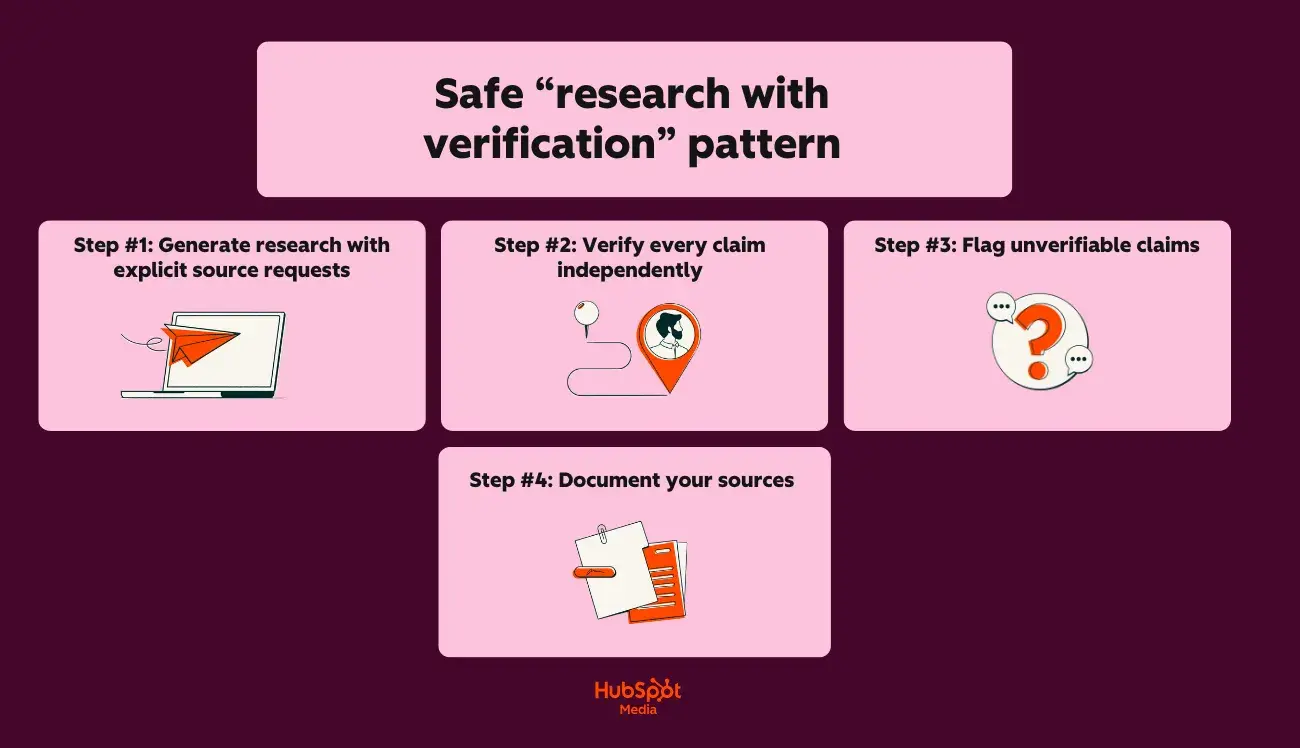
Step #1: Generate research with explicit source requests
Start with this prompt:
“Provide 5 statistics related to (topic) that I can use in a blog post.
For each statistic, provide the following:
- The specific claim
- The original source (organization, publication, study name)
- The year of publication”
Step #2: Verify each claim independently
Next, do the following:
- Check the claimed source for the exact statistic
- Confirm that the source exists and is credible
- Check whether the data matches the data provided by the AI
- Check release dates for current currency
Step #3: Flag unverifiable claims
If you notice an inaccuracy, do the following:
- If you can’t find the source, don’t use the statistics
- If the source exists but the data differs, use the verified version
- If AI allows for uncertainty, prioritize verification
Step #4: Document your sources
Finally, ensure the following:
- Maintain a source table for each piece of content
- Record: Claim, Source URL, Verification Date, Verification Status
- Link directly to primary sources in your content
Hallucination prevention checklist
Use this checklist before publishing AI-powered SEO content:
Before you are prompted:
- Where possible, provide the AI with verified source documents
- Request citations for all factual statements in your prompt
- Ask the AI to flag uncertainties: “Write down any claims about which you are less than 90% confident.”
- Specify: “Do not make up statistics or sources.”
Next during the review:
- Verify each statistic against the original source
- Confirm that quoted experts actually said what they are credited with saying
- Check whether cited studies exist and contain the referenced data
- Validate company names, product names and proper names
- Cross-reference data, percentages and numerical information
Then, before publishing:
- Replace AI-suggested sources with direct links to primary sources
- Remove any claims that you have not been able to independently verify
- Add “As of (Date)” qualifiers to time-sensitive statistics
- Execute content HubSpot’s AI Search Grader Evaluate optimization and accuracy signals
Finally, beware of these warning signs that indicate possible hallucinations:
- Statistics with suspiciously round numbers (exactly 50%, exactly 1 million)
- Sources you’ve never heard of sound authoritative
- Quotes that match your argument too perfectly
- Data points that contradict your industry knowledge
- Quotes about “current studies” without specific names or dates
Claude vs. ChatGPT for long-form content and sales enablement
When it comes to using LLM for long-form content and sales enablement, I’m open to experimentation. But regardless of your approach and the LLM you use to achieve it, ask yourself what matters most? How much context does the LLM need to successfully complete your request?
This capacity is defined by the term “concept window,” meaning that an LLM like ChatGPT only has a limited amount of space to process and store information from your conversation.
Take a look at the comparison table below to see how Claude and ChatGPT compare:
|
Special feature |
Claude |
ChatGPT (GPT-5.2) |
|
Maximum context window |
200,000 tokens (~150,000 words) |
28,000 tokens (~96,000 words) |
|
Practical working limit |
~100,000 tokens for optimal performance |
~64,000 tokens for optimal performance |
|
Complete e-book in a single context |
Yes |
Partial (may require splitting) |
|
Brand Guide + Draft + Instructions |
Fits easily |
Fits with restrictions |
So what does this mean for long-form content? Allow me to elaborate:
- Claude can save your entire style guide, brand voice document, and a 50-page draft all at once without losing context
- ChatGPT requires more careful prompt management for documents longer than 40-50 pages
In the following section, I’ll talk about a cool feature set that makes creating long-form content with Claude easy. Let’s chat about Claude Projects and Artifacts.
Using Claude Projects and Artifacts for large-scale work
So what Are Claude projects and artifacts? Here is the TLDR version:
- With Claude Projects you can create dedicated workspaces with your own chat histories and knowledge bases
- With Claude Artifacts you can transform ideas into functional apps, tools or content
Here’s a closer look at what Claude Projects can do for your long-term work:
- Upload persistent documents (brand guides, style sheets, product documentation) that remain accessible across all conversations within the project
- Create separate projects for different content types: “eBooks”, “Case Studies”, “Enablement Decks”
- Reference uploaded documents without reinserting them: “Apply our Brand Voice Guide to this draft.”
Additionally, Claude Artifacts allows you to do the following:
- Generate standalone pieces of content (sections, chapters, full drafts) that display in a separate area
- Iteratively edit artifacts without losing conversational context
- Export finished artifacts directly to your CMS or document editor
- Version artifacts within a single conversation for comparison
Now that you know how to use Claude to optimize long-form content production, let’s talk about chunking strategies in the following section.
Chunking strategies for long-form content
When documents exceed practical contextual limits or when you need tighter control over output, this is the time to “chunk” your content (break your content into smaller, manageable segments).
The best thing about chunking is that you can take different approaches to it. Check out some of my favorites:
1. Chapter wise division
Chapter-by-chapter chunking works like this:
- First, create a complete outline with all chapter summaries
- Draft each chapter individually, referring to the master outline
- Include the context “Previously Covered:” at the beginning of each chapter prompt
- Assemble chapters and perform a continuity check throughout the document
2. Section-based chunking
Section-based chunking (my favorite approach) works a little differently, but I think it’s pretty intuitive once you try it. Here’s a table I like to refer to when using section-based chunking:
|
Content type |
Recommended piece size |
Context to include |
|
E-Book (10+ chapters) |
1 chapter per prompt |
Outline + summary of the previous chapter |
|
Guide (5 to 10 sections) |
2 to 3 sections per prompt |
Full outline + adjacent sections |
|
Case study |
Complete document (usually fits) |
Template + Brand Guide |
|
Activation deck |
5 to 10 slides per prompt |
Deck overview + messaging framework |
3. Overlap technique for continuity
Finally, here’s an approach I like to use when I want to maintain narrative flow and consistency across multiple sections:
- In each new prompt, include the last 2 to 3 paragraphs of the previous section
- Refer to specific transitions: “Continue where we discussed (topic).”
- Maintain a continuous summary document that is transmitted with each chunk
Outline strategies by content type
To help you maximize efficiency with Claude, below is a step-by-step guide to creating an outline that, once fully fleshed out, will eventually become long-form and segmented by different long-form content types:
For eBooks and comprehensive guides, use this approach:
- Start with a topic description: audience, goal, key differentiators
- Create a detailed outline with Claude (use the full context window)
- Request chapter summaries (2-3 sentences each) before drafting
- First, draft the introduction and conclusion to establish the tone
- Fill the middle chapters with references to the established bookends
For case studies, try this workflow:
- Upload a case study template + raw interview notes/data
- Create a structured outline: Challenge → Solution → Results → Offer
- Draft a complete case study in a single pass (typically less than 3,000 words)
- Claude AI vs ChatGPT for case study writing prefers Claude for maintaining narrative consistency
For more extensive activation packages, try this method:
- Define the purpose of the deck: sales training, product launch, competitive positioning
- Create a slide-by-slide outline with a speaker notes frame
- Design content in logical groupings (problem slides, solution slides, evidence slides)
- Request variations for different audience segments
Finally, to get content descriptions shared with external authors, try the following:
- Use Claude to create comprehensive briefs with minimal input
- Include: target keywords, audience profile, competitive aspects, required sections, tone guidelines
- Claude’s context window contains short requirements as well as reference materials (competitor content, source documents).
Handover template: Long form of sales documents
A big part of the job in marketing is knowing that the long-form content you create is getting into the hands of sales reps.
To ensure a smooth handoff from marketing to sales, follow the simple step-by-step instructions below:
|
Step |
Tool (Claude or ChatGPT) |
output |
|
Full eBook draft |
Claude |
Full document in Claude Artifacts |
|
Extract important statistics |
Claude |
Bulleted statistics list with context |
|
Generate one-pagers |
ChatGPT |
Quick summaries by chapter |
|
Create social proof snippets |
ChatGPT |
Quote cards, testimonial formats |
|
Create slide content |
ChatGPT |
Cover-ready bullet points |
Pro tip: Export completed assets to Marketing Hub via Claude Connector from HubSpot for staging, approval routing and team-wide access.
Claude vs. ChatGPT for easy marketing automation and analytics
ChatGPT vs Claude for coding depends on task complexity: ChatGPT for speed on simple scripts, Claude for accuracy on multi-step operations.
But there’s more to AI-powered automation than you think. Using Claude or ChatGPT for marketing automation and analytics requires the right use cases. To help you get started, I have put together a few for you below:
Secure use cases for AI-powered automation
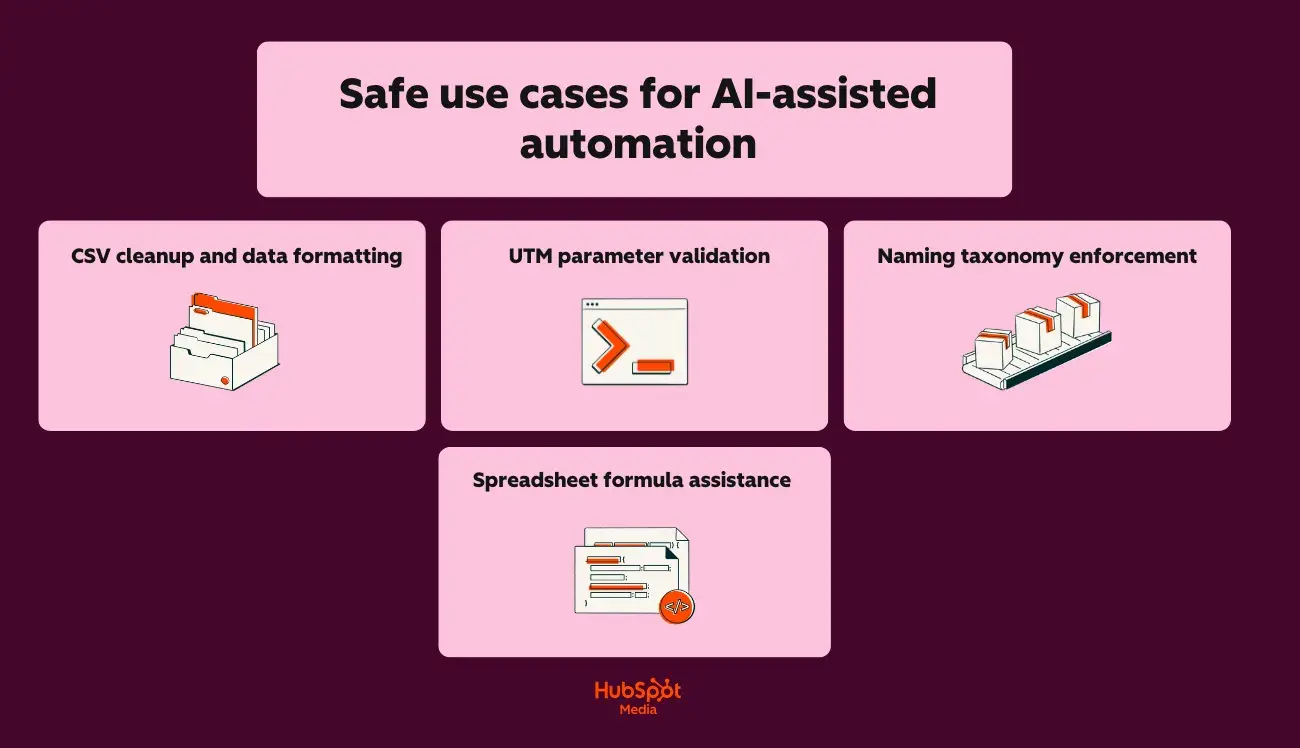
For CSV cleaning and data formatting, try the following:
- Standardize date formats for all exported campaign data
- Removing duplicate lines and removing spaces
- Converting column headings to consistent naming conventions
- Split or combine fields (e.g. split “City, State” into two columns)
For UTM parameter validation you should:
- Check URLs for missing or incorrect UTM parameters
- Make sure utm_source, utm_medium and utm_campaign match the documented taxonomy
- Report inconsistent capitalization or spacing errors
- Generate corrected URLs for reimport
When working with naming taxonomy enforcement, try the following:
- Validate campaign names against your naming convention rules
- Identify assets that do not follow folder/file naming standards
- Generate compliant names for new campaigns based on templates
- Review historical assets for taxonomy discrepancies
Finally, try the following for help with spreadsheet formulas:
- Writing VLOOKUP, INDEX/MATCH or XLOOKUP formulas
- Creating pivot table configurations
- Creating conditional formatting rules
- Debugging formula errors
I recommend using Claude for any AI-powered automation that requires precision. Now that I’ve given you some use cases to consider, next I’ll explain what you’ll use to keep your spending safe and secure.
Guardrail checklist for AI-generated code and analytics
I’ll say this once, maybe I’ll say it again, but still read this statement carefully: Never deploy AI-generated code and never perform AI-generated analysis without human review.
Here’s what you should do before running an AI-generated script:
- Read the entire script line by line (don’t assume it’s correct)
- Make sure the script only accesses the intended files/data sources
- Look for hard-coded values that should be variables
- Ensure that there are no destructive operations (DELETE, TRUNCATE, Overwrite) without explicit security measures
- Test a sample data set before running it on production data
- Back up the original data before any transformation
- If possible, run in a sandbox environment first
Before you begin AI-generated analysis, you should also consider the following:
- Verify the accuracy of source data before accepting conclusions
- Manually verify the calculations against a sample subset
- Question surprising findings (Spoiler art: AI can misinterpret data structures)
- Confirm that the AI correctly understood your column headings and data types
- Look for hallucinated patterns (AI can invent correlations)
- Validate statistics with your analytics platform’s native reports
Claude vs. ChatGPT: Privacy, Governance and Brand Protection
When it comes to privacy, governance, and brand protection comparisons, I’ll be honest with you: both Claude and ChatGPT offer adequate protection (when configured correctly, of course).
But I understand that you want to know all about all the bells and whistles when it comes to this stuff, so for simplicity’s sake I’ll cover the following for both tools in this section:
- Data processing guidelines
- Governance frameworks
- Brand protection strategies
Let’s get into it:
Claude vs. ChatGPT: Data Protection Comparison
Here’s a quick look at Claude and ChatGPT’s privacy features:
|
Data protection function |
Claude |
ChatGPT |
|
Exclusion of training data |
Default: User data is not used for training |
Requires opting out in Settings or Enterprise plan |
|
Data retention (consumer levels) |
30 days for trust and security |
30 days for abuse monitoring |
|
Data retention (company) |
Configurable including zero retention |
Configurable including zero retention |
|
SOC 2 Type II certification |
Yes |
Yes |
|
HIPAA Compliance (with BAA) |
Enterprise level |
Enterprise level |
|
GDPR compliance |
Yes |
Yes |
|
Data residency options |
Available through the Enterprise tier |
Available through the Enterprise tier |
Claude vs. ChatGPT: Governance Features (by Tier)
Next, let’s take a look at Claude and ChatGPT’s governance features (by level):
Claude’s governance features:
- Per: Conversation history controls, data export
- Team: Admin console, usage analytics, workspace organization, SSO (SAML)
- Company: Audit logs, custom data retention, VPC deployment options, dedicated support
ChatGPT Governance Features:
- Plus: Switching conversation history, data export
- Team: Admin console, workspace management, SSO (SAML), usage limits per user
- Company: Audit logs, custom data retention, Azure-based deployment, admin analytics dashboard
Brand protection strategies
When it comes to using LLMs, no matter which one, one thing applies: you have to teach them to represent your brand.
Below I’ve put together some tips for building a solid foundation for brand protection:
But first, here’s a short and sweet checklist to prevent brand voice drift:
- Upload comprehensive brand guidelines to Claude Projects or ChatGPT Custom GPTs
- Add approved terminology lists, banned phrases and sound samples
How to prevent data leaks:
- Never include customer PII directly in prompts
- Use placeholder tokens (Customer_A, Company_B) and replace them after generation
Here is my advice to prevent unauthorized content publication:
- Route all AI-generated content through approval workflows before publishing
- Flag AI-powered content in your CMS for audit purposes
- Marketing teams get the best results when they use Claude for editing and ChatGPT for elaboration (final human review remains mandatory!)
Pro tip: Use HubSpot’s data hub to control which fields are synchronized with external tools
Claude vs. ChatGPT: Governance Starter Checklist for Marketing Teams
Now that we’ve covered the basics, use these other Checklists to establish basic AI governance before scaling usage:
To ensure successful policy documentation, do the following:
- Create an acceptable AI usage policy that defines approved tools and use cases
- Document which content types require AI disclosure (internal or external).
- Set data classification rules (what can/cannot be shared with AI tools).
- Define the approval authority for AI-generated customer-facing content
To implement technical controls, try the following:
- Enable SSO for all AI tools (at least team level)
- Configure data retention settings appropriate for your industry
- Disable training data sharing on ChatGPT (Settings → Data Controls).
- Set up your workspace organization by team or function
- Connect Claude and ChatGPT integrations through your CMS for centralized content delivery
For effective access management protocols it might be helpful:
- Assign individual seats to users who require audit trails
- Create shared accounts only for non-sensitive, internal use cases
- Review and revoke access quarterly
- Document API key ownership and rotation schedule
For effective quality control measures, do the following:
- Introduce mandatory human review before publishing
- Create brand verification voice prompts for both tools
- Build feedback loops to flag AI output that falls short of brand standards
- Track error rates by tool to optimize Claude vs. ChatGPT for marketing attribution
Finally, to ensure secure compliance alignment, proceed as follows:
- Ensure that the use of AI tools complies with existing data processing agreements
- Update privacy policies if AI helps with customer communication
- Review industry regulations (HIPAA, FINRA, GDPR) for impact on AI
- Document AI governance decisions for audit readiness
Next, let’s talk about the decision that faces privacy issues: pricing.
Claude vs. ChatGPT: Pricing and Subscription Levels
When it comes to Claude and ChatGPT pricing/subscription tiers, here’s what you need to know:
- Claude and ChatGPT’s pricing follows similar structures at the consumer level (but differs significantly at the team and enterprise levels).
- When marketing teams know where costs are accumulating, they can plan their budgets accurately and avoid unexpected overruns.
- API usage often becomes a hidden budget item that surprises teams.
And you’ve probably already guessed this, but there’s more to it than that when it comes to evaluating which LLM tool might be right for your team.
Luckily for you, I’ll take a deep dive into pricing, where the costs add up, and, most importantly, provide recommendations below based on your team’s needs.
Claude vs. ChatGPT: Subscription Tier Comparison (Quick Look)
|
Level |
Claude |
ChatGPT |
Key differences |
|
Free |
Claude.ai (limited news) |
ChatGPT free (GPT-5 limited) |
ChatGPT offers more free messages; Claude offers full model access with lower limits |
|
Pro/Plus |
$17/month |
$20/month |
Identical prices; Claude offers higher usage limits, ChatGPT includes DALL·E and Advanced Voice |
|
team |
$20/user/month (billed annually) or $25/user/month (billed monthly) |
$25/user/month (billed annually) |
Both require a minimum number of seats. However, Claude offers stronger privacy and governance controls for enterprise teams |
|
Pursue |
Custom prices (see Here) |
Custom prices (see Here) |
Both require annual contracts; Claude values security, ChatGPT values the plugin ecosystem |
|
API |
Pay per token |
Pay per token |
Prices vary depending on the model |
Claude vs. ChatGPT: Where the costs add up
In the previous section, I briefly provided an overview of the differences between Claude and ChatGPT pricing tiers. Next, I’ll outline how and where the costs add up.
When investing in a software tool, it is important to know where the hidden costs lie. In this case we are talking about rate limits and usage caps.
Below I’ve outlined what the Claude Pro and ChatGPT Plus limitations might be, as well as the team tiers for both subscriptions:
- Claude Pro: Higher message limits than the free tier, but heavy users (more than 50 long conversations per day) may experience caps
- ChatGPT Plus: Includes GPT-4o with usage restrictions
- Team levels: Higher limits per user, but still limited
Another cost factor to consider is API usage. Take a look at how much token consumption could cost you for both tools:
|
Model |
Entry cost (per 1 million tokens) |
Issuance costs (per 1 million tokens) |
|
Claude Sonnet 4.5 |
$3/MTok |
15$/MTok |
|
Claude Sonnet 4 |
$3/MTok |
15$/MTok |
|
GPT 5.2 |
$1,750 / 1M tokens |
$14,000 / 1 million tokens |
|
GPT-5.2 pro |
$21.00 / 1M tokens |
$168.00 / 1M tokens |
Which model you choose and how many tokens you need obviously depends on how many seats you buy.
In the next section I will discuss when to get individual seats or opt for shared access.
Scheduling seating vs. shared access
Choosing between individual seating and shared access can make or break your AI budget.
Here are some indicators of when individual seats should be assigned:
- Team members need conversation history and saved prompts
- Audit protocols are required for compliance
- Usage monitoring by individual contributors is required
- Claude and ChatGPT integration requires user-level permissions in your CMS
In contrast, here are some indicators of when to deploy shared access:
- Occasional user (less than 10 tasks/week)
- API-driven workflows that don’t require individual accounts
- Teams conduct testing before committing to a full rollout
Which subscription do you need?
Still don’t know which subscription tier would be the best investment? No fear. To help you make your decision, I have recommendations based on:
- Content volume
- Number of users
- Approval required
Take a look:
1. Recommended approach based on content volume
|
Monthly content edition |
Recommended approach (by stage) |
|
Under 20 pieces |
Free tier |
|
20 to 50 pieces |
Pro/Plus level |
|
50 to 150 pieces |
Team level |
2. Recommended approach bdepending on the number of users
|
Team size |
Recommended approach (by tier/subscription level) |
|
1 user |
ChatGPT Plus or Claude Pro |
|
2 to 4 users |
Mix of Pro subscriptions by role |
|
5 to 10 users |
Mix of Pro subscriptions by role |
|
11 to 25 users |
Team level |
|
25+ users |
Company valuation recommended |
3. Recommended approach based on permit requirements
|
requirement |
Recommended approach (by tier/subscription level) |
|
No formal approval process |
Pro/Plus levels are sufficient |
|
Review by manager before publishing |
Team level with workplace organization |
|
Legal/compliance review required |
Claude Team or Enterprise (in my opinion, Claude provides stronger privacy and governance controls for enterprise teams) |
|
SOC 2/HIPAA compliance |
Enterprise tier with BAA (both Claude and ChatGPT offerings) |
|
Audit trail mandatory |
Enterprise tier with BAA (both Claude and ChatGPT offerings) |
In total? Claude versus ChatGPT for marketing budget decisions ultimately depends on your primary use case.
Now that I’ve covered the financial considerations, let’s move on to the practical application: When should Claude, ChatGPT, or both be used in a stack?
When should Claude, ChatGPT, or both be used in a stack?
Claude and ChatGPT are both great; I know that choosing one LLM course over the other is a difficult decision. However, it is not always necessary to choose just one.
To determine whether you should use one, the other, or both tools, use the following decision matrix:
|
Use case |
Recommended tool |
Why |
|
Blog posts and long-form content |
Claude |
Claude is great at editing long content and dealing with complex contexts |
|
Email sequences and newsletters |
Both |
ChatGPT for volume, Claude for personalization logic |
|
Social media content |
ChatGPT |
ChatGPT is best for quick ideation, email copy, and social content |
|
SEO briefings and research synthesis |
Claude |
Processes competitor data and source documents in a single context window |
|
Ad copy and landing pages |
ChatGPT |
Faster iteration on short form variants and hooks |
|
Enforcing the brand voice |
Claude |
Better audio consistency across expanded content |
|
Marketing automation scripts |
Both |
ChatGPT for speed, Claude for accuracy |
|
Compliance-relevant content |
Claude |
Claude provides stronger privacy and governance controls for enterprise teams |
|
Visual content idea |
ChatGPT |
ChatGPT supports multimodal content generation, including images and code |
|
Customer-focused chatbots |
Both |
ChatGPT for speed, Claude for nuanced answers |
Still not sure which tool is best for your team? To help you make a confident decision, here is a quick guide based on the role:
1. SME marketer
Is Claude better than ChatGPT for an individual marketer? Not necessarily. Speed and cost efficiency are most important at this stage.
- Recommended stack: ChatGPT Plus ($20/month)
- Main use cases: Social content stacking, email drafts, ad copy variations, blog drafts
- When to Add Claude: If you create large-scale content (white papers, e-books) or work in regulated industries
- Pricing consideration between Claude and ChatGPT: A single subscription keeps costs manageable; ChatGPT’s broader range of functions (images, plugins) offers added value for generalists
- HubSpot integration: Connect ChatGPT to Marketing Hub for draft creation; Use Breeze AI for additional content support
2. Medium-sized teams
Both Claude and ChatGPT can be integrated into CRM, MAP and CMS platforms via API or third-party connectors. Medium-sized teams benefit from using both.
- Recommended stack: ChatGPT Team + Claude Pro ($20-25/user/month together)
- Workflow structure:
- Content strategists use Claude for briefings and research summaries
- Authors use ChatGPT for first drafts
- Editors use Claude to refine the brand voice
- Social managers use ChatGPT for follow-up
- Claude versus ChatGPT for marketing attribution: 60% ChatGPT (volume tasks), 40% Claude (quality tasks)
- HubSpot integration: Native Claude connector for editing workflows; ChatGPT via Zapier for automation triggers
3. Corporate teams
Claude provides stronger privacy and governance controls for enterprise teams. Compliance-focused organizations should contact Claude.
- Recommended stack: Claude Enterprise + ChatGPT Enterprise
- Governance configuration:
- Claude handles all customer-facing content, regulated materials and data-driven personalization
- ChatGPT handles internal ideation, creative brainstorming and unregulated content
- All output goes through Marketing Hub’s approval workflows before publishing
- Security requirements: SSO integration, audit logging, data retention controls, PII exclusion protocols
- Claude vs. ChatGPT integrations: API level integration with middleware transformation layer; No direct PII exposure to either model
- HubSpot integration: Both connections active; Content delivery in Marketing Hub with role-based release gates
4. Agency (multiple clients, different brand requirements)
HubSpot enables seamless integration of Claude and ChatGPT into marketing workflows. Agencies need both tools to meet different customer needs.
- Recommended stack: ChatGPT team + Claude team (scale seats according to team size)
- Customer allocation model:
- High volume clients with speed priority → ChatGPT dominant workflow
- Brand-sensitive premium customers → Claude-dominant workflow
- Compliance-heavy clients (finance, healthcare, legal) → Claude only
- Social media staff: ChatGPT for batching, easy Claude review
- Blog content: ChatGPT drafts, Claude edited
- White papers and reports: Claude end-to-end
- Email campaigns: ChatGPT for variants, Claude for sequence logic
- HubSpot integration: Separate HubSpot’s marketing hub portals per customer; Configure the Claude connector and ChatGPT automation according to the customer’s brand requirements
How to integrate Claude and ChatGPT into your stack and HubSpot
This section provides step-by-step instructions for each integration, starting with the table below that breaks down your options at a glance:
|
Proceedings |
Technical skills required |
Best for |
Setup time |
|
Native HubSpot Claude connector |
Low |
Teams already use Marketing Hub |
15 to 30 minutes |
|
Zapier/Make middleware |
Low-Medium |
No-code automation between tools |
1 to 2 hours |
|
Direct API integration |
High |
Custom workflows, high-volume operations |
4 to 8 hours |
|
Custom GPTs with HubSpot actions |
medium |
ChatGPT-centric teams |
2 to 3 hours |
In order. I’ve shown you a bird’s eye view of each integration method. Next, let’s go into detail with a step-by-step guide. Check out how you can integrate Claude and ChatGPT into your tech stack and HubSpot:
How to set up the native Claude connector with HubSpot
First, Claude Connector from HubSpot offers the fastest path to integration.
How to connect Claude with HubSpot’s marketing hub:
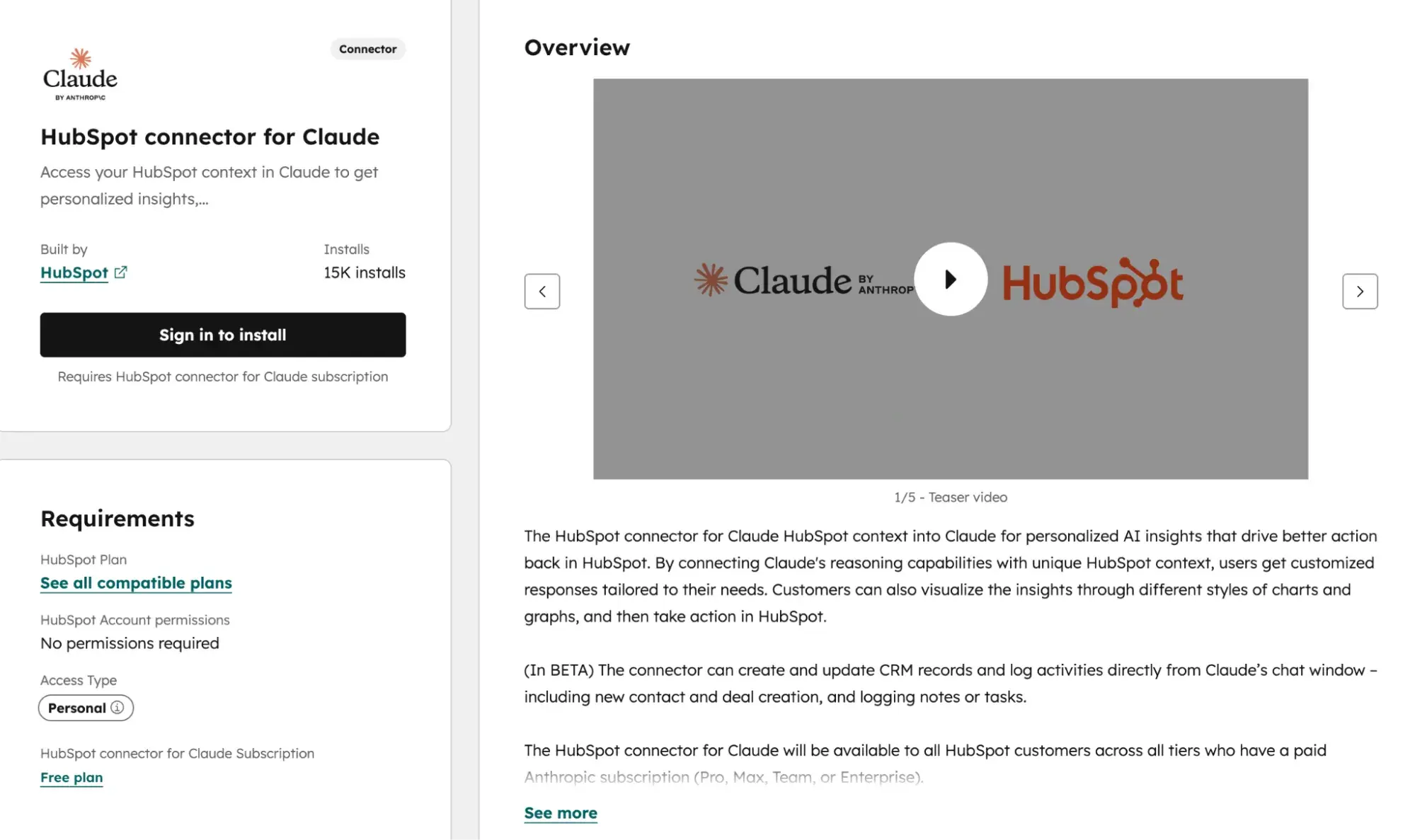
(Alt text) A screenshot of Drift Kings Media’s Claude connector
- In your HubSpot portal, navigate to Settings → Integrations → Connected Apps.
- Search for “Claude” in the App Marketplace.
- Click “Connect App” and authenticate with your Anthropic account credentials.
- Choose which HubSpot objects Claude can access (e.g. Contacts, Companies, Offers, and Content).
- Configure data permissions based on your team’s data protection needs.
- Test the connection by running a sample content task.
Once you have successfully connected Claude to Marketing Hub, the following will happen:
- Pull CRM data into Claude prompts to create personalized content
- Push Claude-generated content directly into Marketing Hub drafts
- Trigger Claude workflows based on HubSpot events (new lead, deal stage change).
- Maintain audit trails of all AI-powered content creation
How to set up the native ChatGPT connector with HubSpot
Similar Claude Connector from HubSpot, HubSpot’s native ChatGPT integration connects these functions directly to your marketing workflows without middleware.
How to connect ChatGPT to Marketing Hub:
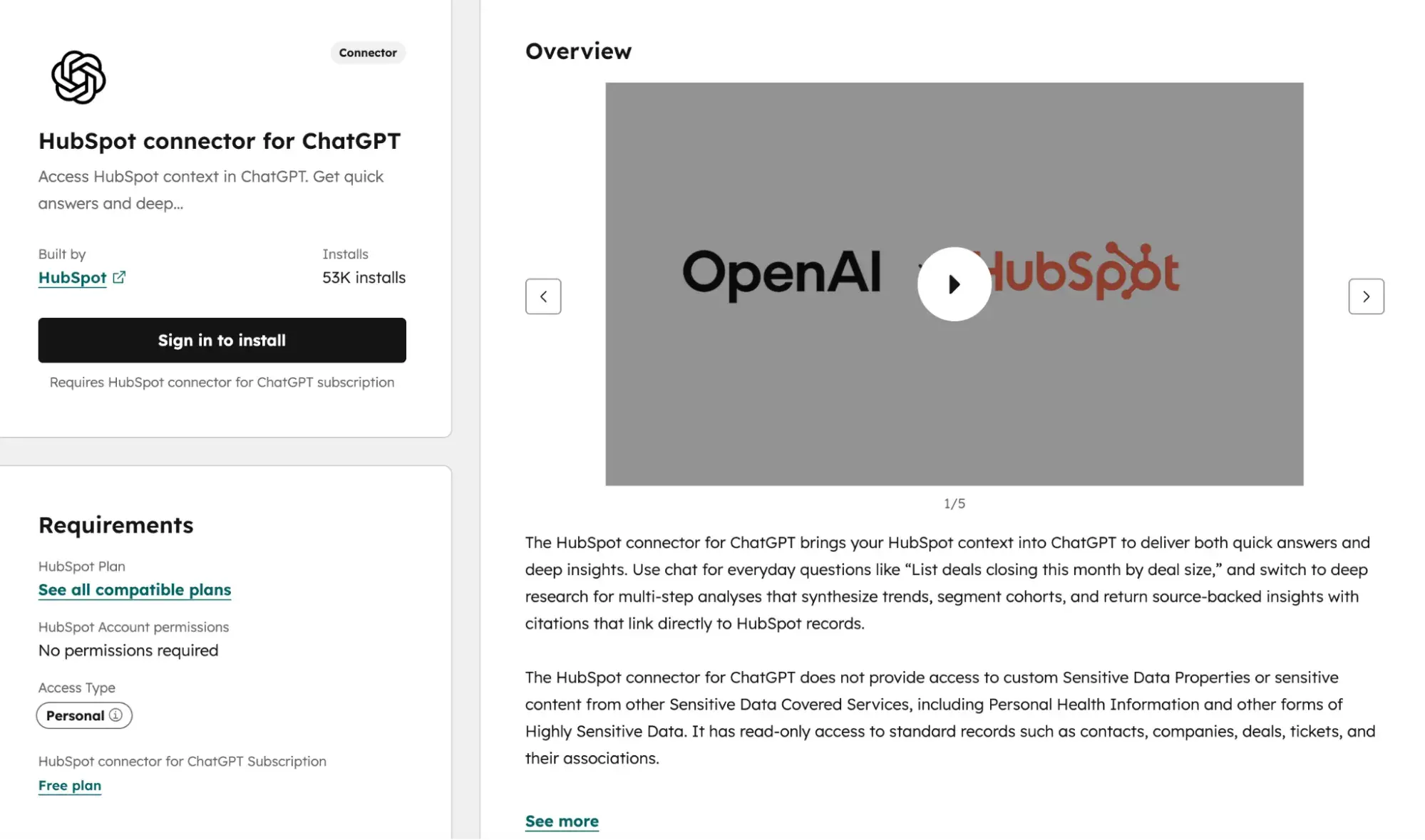
- In your HubSpot portal, navigate to Settings → Integrations → Connected Apps.
- Search for “ChatGPT” in the App Marketplace.
- Click “Connect App” and authenticate with your OpenAI account credentials.
- Select which HubSpot objects ChatGPT can access (Contacts, Companies, Offers, Content).
- Configure data permissions based on your team’s data protection needs.
- Test the connection by running a sample content generation task.
Once the connector is activated, you can do the following:
- Generate email drafts, social media posts and ad copy directly in Marketing Hub
- Incorporate CRM context into ChatGPT prompts for personalized messages
- Create A/B test variations for email subject lines and CTAs
- Access ChatGPT’s multimodal features for content ideation and text generation
Now you know how to integrate both tools HubSpotLet’s answer some of the most common questions marketers have about Claude versus ChatGPT.
Frequently Asked Questions (FAQ) about Claude vs. ChatGPT for Marketing
Can I use both Claude and ChatGPT in the same marketing workflow?
Yes. Marketing teams get the best results when they use Claude for editing and ChatGPT for elaboration. It’s a symbiotic relationship, if you will.
For greater clarity, here is a table that breaks down how to effectively chain tasks using both LLM platforms:
|
stage |
Tool |
Task |
|
idea |
ChatGPT |
Create topic lists, outline variants and hook concepts |
|
First draft |
ChatGPT |
Quickly create an initial copy |
|
Structural editing |
Claude |
Reorganize processes, eliminate redundancies, strengthen arguments |
|
Branded vocal polish |
Claude |
Apply tone guidelines throughout the document |
|
Format adjustment |
ChatGPT |
Convert approved texts into social media posts, email variants, and ad copy |
I admit that integrating one of these LLMs into a CRM/CMS system can be daunting. To make it easier, here are some best practices to keep them in sync:
- Use Zapier or Make to trigger workflows between tools. Example: New draft in Google Docs → Claude API for editing → HubSpot CMS for staging.
- Store all final content in your CMS as the only source of truth – never in AI chat histories.
- Tag AI-powered content in your CMS with metadata (tool used, draft version, approval status) for audit trails.
Pro tip: HubSpot enables the seamless integration of Claude and ChatGPT into marketing workflows Marketing Hubs native connectors and workflow automation.
Which is better for fact-checked SEO content?
As I highlighted above, Claude is your go-to source for long-form content, improving research synthesis and citation accuracy. ChatGPT is best for quick ideation, email copy, and social content where speed is more important than depth of review.
Assuming you’re using Claude, here’s a handy verification workflow you can use to ensure accuracy:
- Research phase: Use Claude with web search enabled to collect sources. Claude provides quotes and points out uncertainty.
- Design phase: Generate content in both tools based on speed requirements.
- Fact check phase: Paste the draft into Claude with the prompt: “Identify all factual claims in this content. For each claim, indicate whether it is verifiable, cite a source if possible, and identify any statements that require human verification.”
- Source check: Manual cross-references between Claude’s labeled claims and primary sources.
- Final review: Run the finished content through Claude to ensure that no new, unsupported claims were introduced during editing.
However, if you are still on the fence about which LLM does heavy SEO content lifting best, consider the following:
- Prefer Claude for statistics, quotes, historical facts and technical specifications. Claude’s training emphasizes accuracy over confidence.
- Prefer ChatGPT for general knowledge frameworks, introductions, and transitional content where factual precision is less important.
How do I keep AI spend on brand across channels?
In my opinion, a consistent brand voice requires a documented system and not ad hoc prompts.
That said, here’s a branded voice system setup to help you keep AI spend – be it for blogs, emails or social media posts – consistent across all channels:
Create a branded voice document that includes:
- 5 to 7 tone descriptions with examples (e.g. “Confident but not arrogant: say ‘We recommend’ and not ‘You should'”)
- Permitted and prohibited word lists
- Sentence length and structure preferences
- Channel-specific variations (LinkedIn = more formal; Instagram = more conversational)
Next, configure each tool:
- Claude: Upload the complete trademark document to a project. Claude keeps it in all conversations within this project.
- ChatGPT: Create a custom GPT with branded rules embedded in the system prompt. Add 3-5 example paragraphs that demonstrate the ideal tone.
After implementing and using the branded voice system template above, next review the loop with specific prompts.
Below I’ve outlined the order in which you should perform your checks and which tools and prompts you should use:
- Review before publishing (Claude): “Review this content against our brand voice document. List any phrases that violate our tone guidelines and suggest replacements.”
- Batch Audit (ChatGPT): “Rate these 10 social media posts from 1 to 5 for consistency of brand voice. Highlight anything below 4 that points to specific issues.”
- Cross-channel adaptation (Claude): “Rewrite this blog excerpt for LinkedIn, Instagram and email. Keep the core message but adjust the tone according to our channel-specific guidelines.”
Finally, here are some quick tips about CMS/CX controls that may be helpful when using these tools:
- Save approved AI prompts as templates in Marketing Hub for team-wide access.
- Require approval workflows for AI-generated content before publishing.
- Use content staging to compare AI drafts to previously approved parts.
What is the safest way to connect AI models to my CRM data?
The short answer? A secure CRM integration requires architectural discipline, regardless of the tool. Never share raw PII directly to AI models.
|
Proceedings |
Security level |
Best for |
|
API with a data transformation layer |
Highest |
Enterprise teams with developer resources |
|
MCP server (Model Context Protocol). |
High |
Structured integrations with defined schemas |
|
Custom actions via middleware (Zapier/Make) |
medium |
Teams without dedicated developers |
|
Direct copy and paste |
Low |
Ad hoc tasks only; never for PII |
Not sure how to separate personal information from prompts? Here are some pointers (in plain English, of course):
- Create a transformation layer that replaces personal data with tokens before sending it to AI. (Here is an example: “John Smith, john@company.com“becomes “Customer_A, Email_A.”)
- Process AI outputs through reverse transformation to reinsert actual data.
- Never include names, email addresses, phone numbers, addresses, or account numbers in prompts.
- Use aggregated or anonymized data for analysis tasks. (For example, a prompt that says “Analyze interaction patterns for business segment” rather than “Analyze John Smith’s email history.”)
Since it never hurts to be extra careful, here are a few additional tips for safely handling first-party data:
- Behavioral data (pages viewed, content downloaded, email engagement) can serve as the basis for personalization prompts without revealing identity.
- Segment descriptions are safe: “Software buyer, 50-200 employees, rated competitor X.”
- Purchase history summaries work: “Customer for 2 years, purchased products A and B, average order $5,000.”
How do I measure the impact of AI without attributing too much?
Here’s the thing: AI speeds up production but doesn’t guarantee results. Measure efficiency gains separately from performance improvements to avoid false attributions.
However, here are some efficiency metrics that are directly attributable to AI:
- Time from briefing to first draft (hours saved)
- Content volume produced per week/month
- Revision cycles before approval
- Cost per content (tool subscription ÷ output volume)
When you use AI for marketing-related tasks, you also need to track other metrics. Below I have also outlined outcome metrics (just for clarity: these metrics are influenced by the AI, not caused by it):
- Click-through rates for AI-powered content compared to purely human content
- Conversion rates by content type
- SQLs generated from AI-powered campaigns
- Engagement rates (time on page, scroll depth, shares)
To help you stay on top of things, I’ve created a simple, easy-to-use campaign reporting framework. It should
- Tag content by production method in your CMS: “AI designed”, “AI edited”, “Humans only”.
- Run parallel tests if possible. Same campaign, same target group segment, different production methods.
- Track leading indicators first. Speed and volume improvements are immediately noticeable. It takes 30-90 days for CTR and conversion changes to reach statistical significance.
- Isolate variables. AI-powered content may perform differently based on topic selection, not AI quality. Compare comparable content types.
Reporting frequency:
- Weekly: Efficiency metrics (volume, speed, costs)
- Monthly: Engagement metrics (CTR, time on page)
- Quarterly: Outcome metrics (conversions, SQLs, revenue impact)
Claude vs. ChatGPT: Who is the real winner?
Despite my personal opinion on which LLM I prefer when it comes to marketing teams in general, here is my honest opinion: There isn’t a single one.
After comprehensively walking you through pricing tiers, integration methods, use cases, and governance considerations, my answer remains the same as when I started: the best tool depends on the task at hand.
Claude excels at editing long content and dealing with complex context and is therefore your contact for:
- Blog posts
- White papers
- Enforcing the brand voice
- Compliance-relevant content
On the other hand, ChatGPT is best for:
- Quick idea generation
- Email copy
- Social content
But honestly, here’s what I hope you take away from this guide: Claude vs. ChatGPT for marketing is not a competition. It’s a collaboration. So who is the real winner? The marketing team that learns when to use each tool strategically.
Whether you’re designing email sequences, creating SEO briefs, building enablement decks, or scaling social content, you now have the frameworks, checklists, and decision matrices to make confident decisions.
Ready to put your AI-powered content into action? Get started with HubSpot’s Marketing Hub to integrate Claude and ChatGPT into your workflows, automate approvals, and measure the impact of every piece of content you create – all from one platform.