


Before WordPress, I was an SEO expert. All my work was focused on keywords, backlinks and ranking reports.
When AI writing tools first came out, I was the loudest skeptic in the room. I had seen the edition. Robotic, hollow and full of keywords. I told my clients to stay away, and Google agreed with me for a while.
Then it wasn’t like that.
AI content started to rank as tools got better. And I realized that I had been arguing about AI for two years while everyone else was using it to outdo me.
That’s why I tested these AI SEO tools to find out which ones actually help you rank and which follow Google’s guidelines.
Most importantly, they’ve truly moved beyond the era of “AI sloppiness” that I’ve been warning people about for so long.
These are the ones that are worth your time.
Key insights
- I’ll show you which AI SEO tool is built right into WordPress without the need for additional apps or context switching
- I reveal which tool finds low competition keywords by analyzing actual search results, not just difficulty scores
- Mention a tool that tracks how your brand appears when people ask ChatGPT or Gemini, not just Google
- I tested 6 dedicated tools and 3 bonus options, including free and freemium options
🔍 Click here to see my testing methodology
This is exactly how I rate AI SEO tools:
- Impact on ranking: I track keyword positions in Google Search Console before and after using each tool. If positions shift, I notice it. If not, I notice that too.
- Google compliance: I examine whether AI suggestions encourage practices that could trigger a manual action.
- This includes keyword stuffing, thin AI content without editorial review, or manipulative linking patterns.
- WordPress workflow: How many steps are required from keyword research to a published, optimized post? Native plugins perform better than tools that require constant tab switching.
- AI output quality: I test each tool’s AI writing by prompting the same topic for all tools and reading the output out loud. If it sounds like it was written by a machine, it will fail.
- Setup time to the first value: Time from plugin activation or account creation to first actionable insight. Over 30 minutes and I’m reporting it.
- Creditworthiness and price transparency: What is actually free, what is protected and how clearly is this communicated during setup?
Tools I use:
- Google Search Console: Position tracking before and after
- GTmetrix: Performance testing for WordPress plugin installations
- Several clean WordPress test sites: one per plugin
Why trust IsItWP?
At IsItWP, we’ve been the WordPress community’s go-to source since 2009, helping over 2 million users choose better plugins, tools, and security solutions.
Unlike review sites that never actually use the products, we maintain active accounts, run real customer sites, and offer ongoing WordPress advice.
For this article, I installed each WordPress plugin on a dedicated test site, conducted real keyword research using each SaaS tool, and tested the AI writing capabilities.
Then I tracked the ranking positions before and after via Google Search Console. This is what you read is based on.
Not all AI SEO tools do the same job.
Some are built into WordPress and optimized as you write, while others are standalone platforms that cover everything from keyword research to content evaluation.
Some track how your brand appears in AI chatbots, not just Google. So before you read the full reviews, this table shows the key differences at a glance.
For a more comprehensive look at how these tools fit into your strategy, check out our list of the best SEO tools to increase your website traffic.
Additionally, you can use the table of contents below to see everything at a glance or jump to any section you want to read.
With that out of the way, let’s dive in.
1. All in one SEO ⭐⭐⭐⭐⭐
Ideal for: WordPress website owners who want AI-powered SEO, content generation, and technical SEO without having to switch between tools
Most AI SEO tools are SaaS platforms. This means you have to leave WordPress, research or write, and then come back to add content.
All in one SEO leaves that out completely. The AI lives in your editor. When you write a post, the AI Assistant block is present directly in Gutenberg.
You simply type a prompt, create a section, add FAQs, and create key insights without touching another browser tab.
Why is All in One SEO one of the best AI SEO tools?
But the feature that really surprised me, and that no competitor covers in this overview, is the LLMs.txt generator.
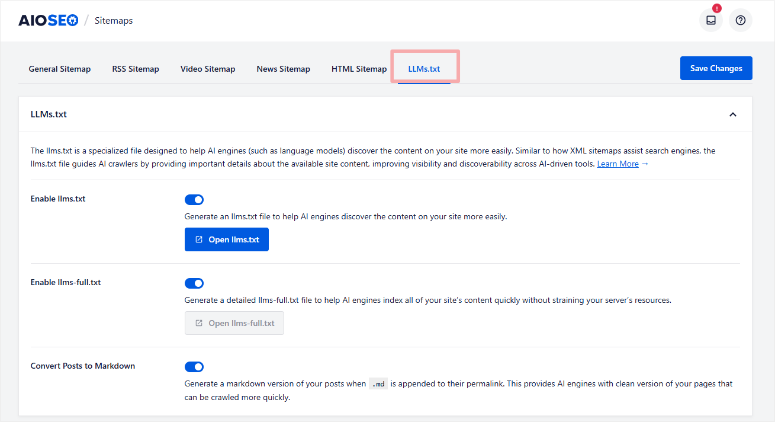
It creates a structured file that helps AI search engines like ChatGPT, Gemini, and Perplexity discover and index your website content.
This is important now as AI-generated answers are gobbling up Google’s featured snippet territory.
Getting your content to this level requires a different technical signal than an XML sitemap, and All in One SEO is one of the few tools that actively builds on this.
The AI also processes large amounts of metadata. AIOSEO recently added an AI Schema Generator that analyzes your content type.
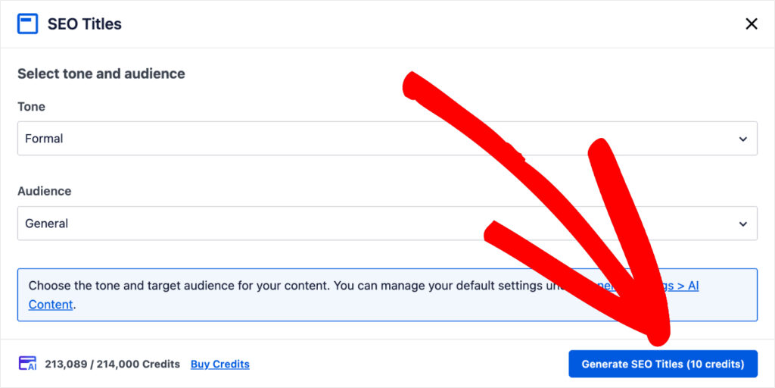
It then uses AI to generate appropriate structured data, eliminating the need to manually select a schema from a drop-down menu.
Combined with mass AI meta generation of titles and descriptions for all posts in one go, you cover technical SEO and content AI in a single plugin installation.
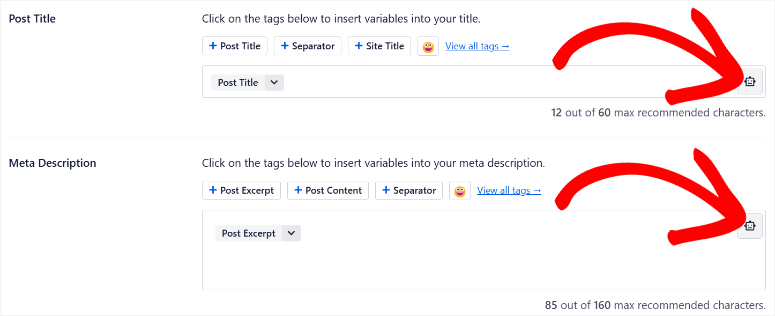
Before you set it up, you should know one thing: The quality of AI content may vary from post to post when using the bulk features. To ensure quality is maintained across the board, double control is important. I’ve seen this on two occasions out of fifty. So pretty good quality across the board.
My experience with All-in-One SEO
Setup took less than five minutes. The wizard configured my sitemap, schema, and Google Search Console connection before I had written a single word of content.
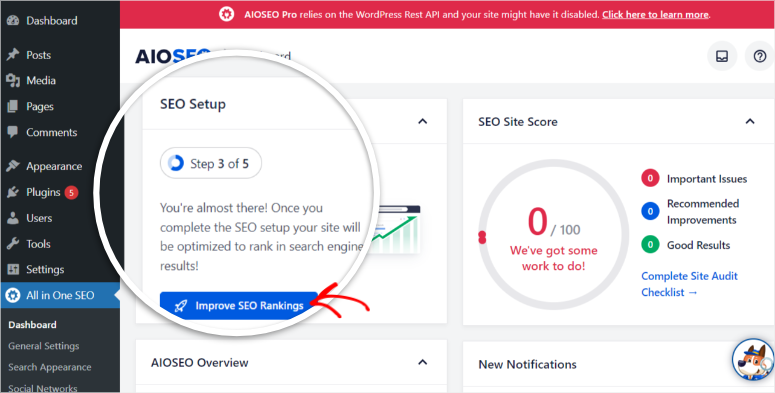
I first tested bulk AI metageneration by selecting all posts, running the AI, and reviewing the results. Approximately 85% was usable without processing.
The remaining 15% were too general for competitive keywords. Basically, the AI picked the keyword but didn’t pick a compelling angle.
Still, creating 60 design descriptions in two minutes far beats writing them manually.
I also ran a GTmetrix check before and after installation. Load time increased by 0.3 seconds on the test page. This is within the acceptable range, but is worth noting for hosts with tight resource allocations.
🟢► Advantages
- Native WordPress AI: I generated entire sections and FAQs in the block editor. No SaaS account or tab switching required.
- LLMs.txt generator: Automatically creates the file AI search engines need to index your website. One of the few tools built for AI search discoverability at this price point.
- Mass AI meta generation: Generated SEO titles and descriptions for 60+ posts in one go with approximately 85% usable output.
- AI schema generator: Uses AI to create structured data based on your content type and covers rich result permission without manual schema selection.
- Link wizard: Provides contextual internal linking capabilities as you write with one-click insertion.
- Comprehensive Free Tier: Sitemaps, basic schema, and meta optimization are all available without a paid plan.
🔴► Disadvantages
- AI meta quality varies depending on competing keywords: About 15% of mass-generated descriptions are too general. Review issues before posting them to high-priority pages.
- No comprehensive AI features in the free version: While the free version is great for technical SEO and on-page SEO, the AI SEO features are only available in the paid versions.
My verdict: All in One SEO is the clearest answer for WordPress website owners who no longer want to switch between their editor and external AI tools.
The LLMs.txt generator alone outperforms all others on this list when it comes to future-proof content for AI search.
If you need AI SEO features, you need the Pro plan. Here’s my breakdown of All-in-One SEO Free vs. Pro, showing exactly what you get before upgrading.
Check out my AIOSEO review. Also compare AIOSEO and Yoast SEO if you are still looking for an SEO plugin that meets your needs.
Prices: Free SEO plugin available | Pro plans start at $49.50/year.
👉 Start here with all-in-one SEO
2. SEOBoost ⭐⭐⭐⭐
Best for: Content teams running a structured research-to-publish workflow for 10 or more articles per month
The thing that goes down SEOBoost What sets it apart from all other content optimization tools I’ve tested is the depth of competitor analysis.
Most tools analyze the top 10 or 15 results for a keyword. SEOBoost analyzes the top 30. This gap is more important than it sounds.
The difference between rank 10 and rank 30 often reveals patterns that the top 10 tools miss.
Why is SEOBoost one of the best AI SEO tools?
With such in-depth analysis, you can better see patterns in areas like thin content stuck to page one, topic clusters that everyone ignores on the first page, question angles that appear in positions 11-25 but not in the top results, and more.
For example, when I created a topic report on a competitive keyword, the short report generated by SEOBoost included 14 subtopics and question angles that none of the 10 results tools showed.
Beyond research, SEOBoost runs the entire content workflow in one place:
Keyword research → Content letter writing → Writing with real-time SEO scoring → Content audit → Publishing calendar.
For content teams juggling multiple clients or topics, this calendar saves time and enables coordination among each other.
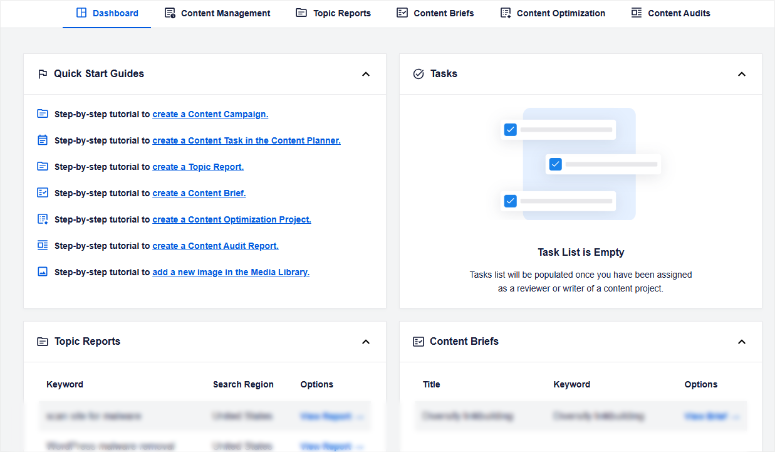
You can see what’s in research, what’s being written, and what’s been reviewed without having to open a separate collaboration management tool.
The limitation is the only thing WordPress users immediately feel: SEOBoost is a SaaS tool. You research and evaluate there and then return to WordPress to publish.
To use SEOBoost directly in WordPress, you need to install AIOSEO.
This integrates AI-powered content briefings, keyword reports, and optimizations from SEOBoost directly into your WordPress editor
My experience with SEOBoost
I created a topic report on a target keyword and created a complete content brief in about four minutes.
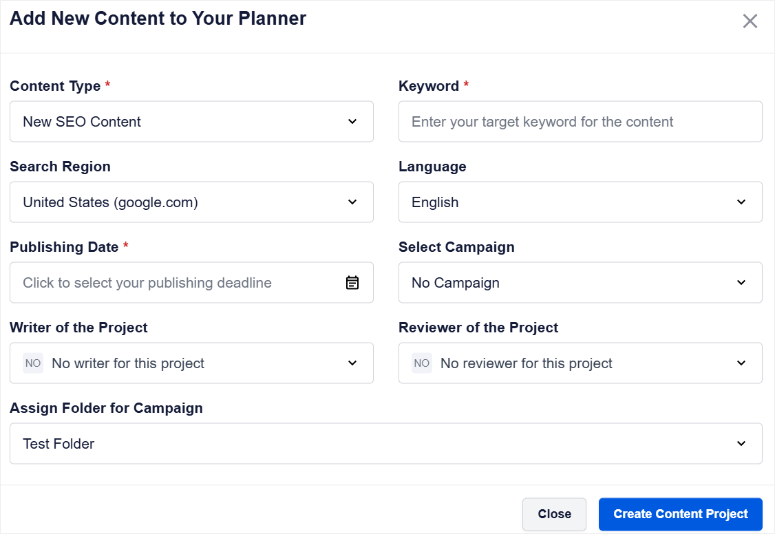
The brief included the primary keyword, related words and phrases sorted by frequency, “People Also Ask” questions, and a recommended heading structure based on the use of the top 30 results.
I wrote in the SEOBoost editor while the real-time score was running. It started at 31/100 and ended at 65/100 after following the recommended conditions.
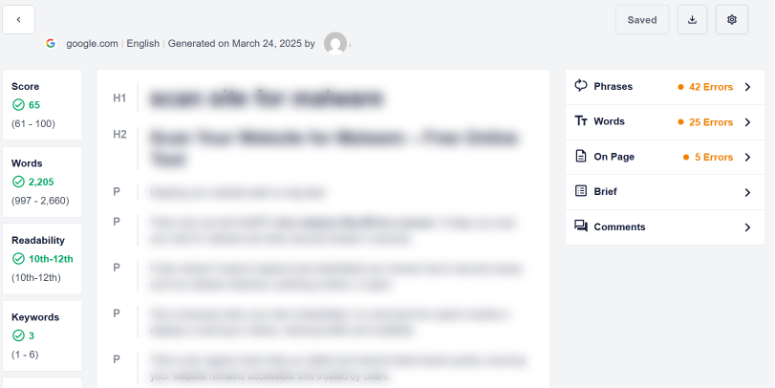
The scoring felt calibrated because it didn’t penalize natural writing, as is sometimes the case with tools that require a precise number of keywords.
AIOSEO expands beyond traditional SEO rankings to AI search visibility.
The newer AI Insights/AI Suite feature allows you to research how brands appear in ChatGPT, Gemini, Claude, DeepSeek, and Perplexity directly from your WordPress dashboard.
Instead of just tracking Google rankings, it analyzes which brands mention AI engines for specific prompts and compares visibility across different platforms.
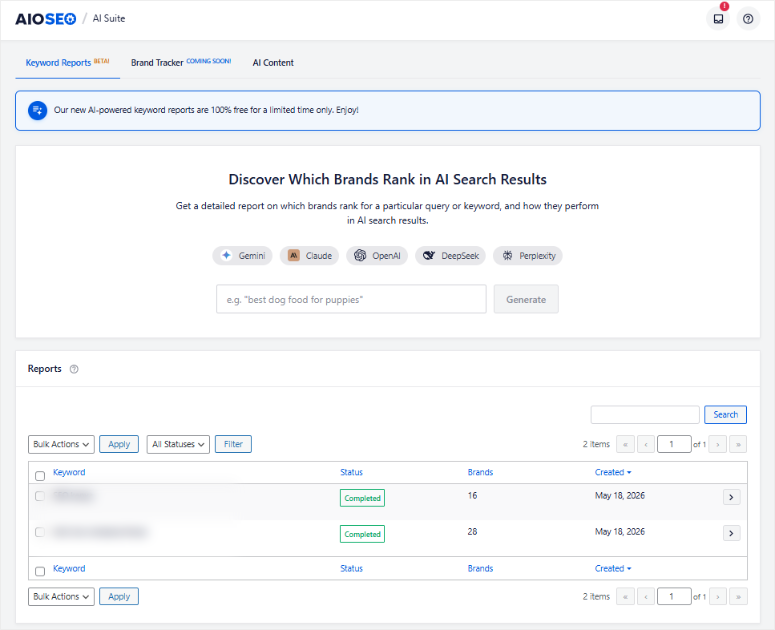
This is still an early stage compared to the more sophisticated AI tracking systems. But it shows that AIOSEO is already preparing for the shift towards AI-driven search discovery, not just traditional search engines.
The friction: copy finished content into WordPress and reformat it in the block editor. But once I connected SEOBoost to AIOSEO in my WordPress dashboard, I could see all the changes and results directly.
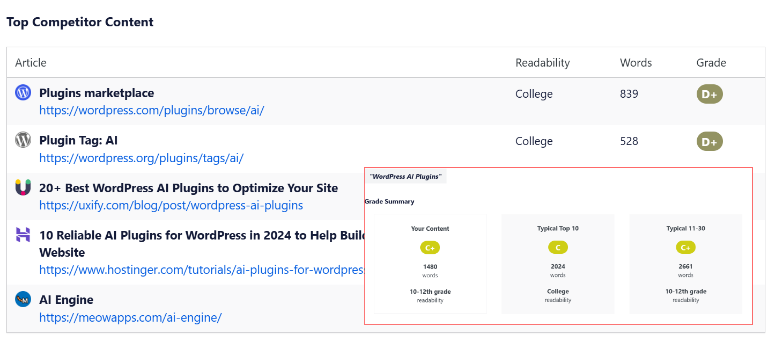
I was then able to edit everything directly in WordPress.
This is an additional step, but not a dealbreaker for teams with an established editorial process. However, if you are new to WordPress, you may need to take a few minutes to see how the connection works.
🟢► Advantages
- Analysis of the top 30 competitors: Reveals topic gaps and keyword patterns that 10 results tools regularly miss.
- All-in-one content workflow: Research, briefing, writing, assessment, testing and calendar on one platform. No tool change in the middle of the project.
- Real-time SEO assessment: The content score updates as you write without affecting natural language like keyword count tools do.
- Content check: Analyzes existing posts for gaps and opportunities for improvement, not just new content.
🔴► Disadvantages
- No native WordPress editor integration: All work is done through the SEOBoost interface or you can use the all-in-one SEO integration.
- Smaller user community: This AI SEO tool is still new. Therefore fewer tutorials and community resources than Surfer or Clearscope.
My verdict: For a solo blogger who writes one article per week, SEOBoost’s workflow can help create a content calendar in a more defined way.
SEOBoost deserves its place with content teams that publish regularly and need structure: briefings, assessment, audits and a calendar that keeps everyone informed.
Read my full SEOBoost review for a deeper look at each feature level.
Prices: Starting at $22.50/month | 14-day free trial available; no credit card required.
3. Low fruit ⭐⭐⭐⭐
Ideal for: Solo bloggers and niche website owners looking for low-competition keywords that are regularly overlooked by KD Scores
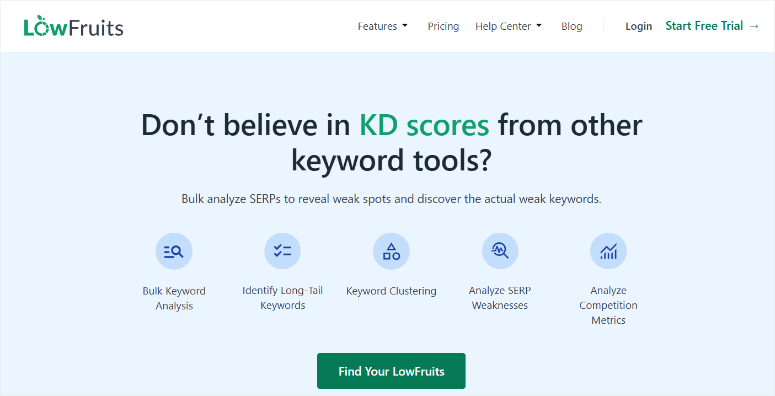
Every popular keyword tool will give you a keyword difficulty level. The problem is that KD scores measure the average domain authority across all ranking sites, not who is actually in those positions.
A keyword can show KD 25 on Ahrefs and still have three strong domains and a Forbes article in the top 5.
Even if the keyword difficulty is not high, it can be very difficult to rank your article due to strong competition.
Why is LowFruits one of the best AI SEO tools?
Low fruit does something different. It analyzes the actual SERP for each keyword and shows which positions weak websites occupy. It examines low-authority blogs, thin affiliate sites, and outdated content.
A new or medium-sized website can realistically compete with these vulnerabilities. This distinction applies to the entire product and is not repeated by any other tool on this list.
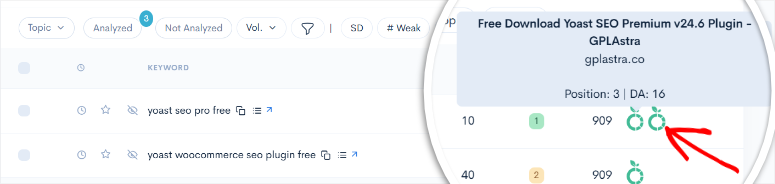
The Keyword Finder feature uses Google Autocomplete with wildcard search to generate hundreds of long-tail keyword ideas and then performs SERP analysis on all of them at the same time.
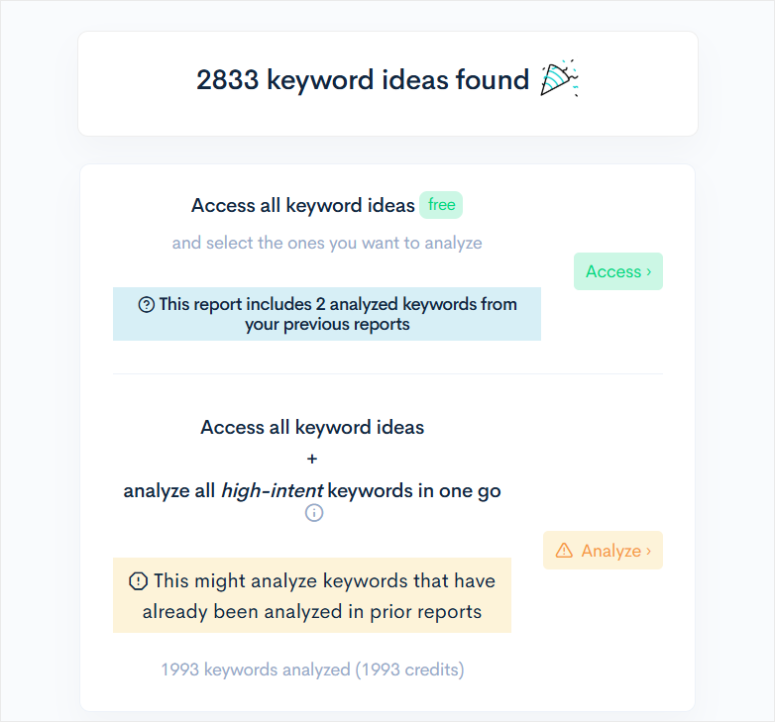
When I ran a batch on a home improvement topic, LowFruits flagged 34 keywords with at least one weak site in the top five.
Six of these had two or more vulnerabilities in the top three. This really opens up an area that the KD scores would have rated as “medium difficulty” without mentioning the actual chance.
Domain Explorer adds another layer: a database of over 150,000 weak websites for competitive analysis. Knowing which sites to look at, not just which keywords to target, changes the way you create a content calendar.
My experience with LowFruits
I imported 200 long-tail keyword ideas and ran a bulk SERP analysis. The results came back in about 20 minutes: 34 chances for an “easy win” were eliminated, including 6 with multiple weak contenders in the top three.
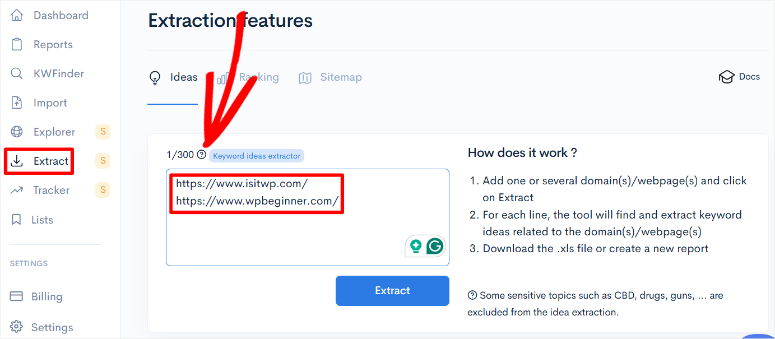
But I wanted to find out what other low competition keywords I can use in my content. So I used the Extract feature, which allows me to add 300 URLs.
These keywords were then analyzed and using a checklist I added the ones I wanted to my master list. In the end, I had enough keywords to target both high and low competition keywords.
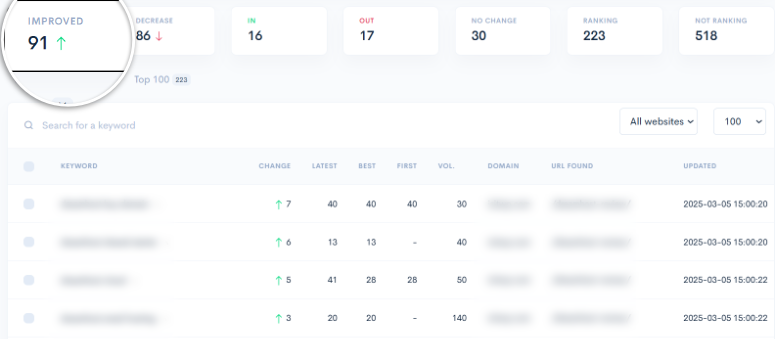
The rank tracker works well and is much easier to read than Google Search Console. Every morning, before I do anything else, I click the refresh button on the rank tracker page.
This allows me to immediately see how my keywords are performing. A green arrow for all keywords that increased rankings and a red arrow for those that lost rankings.
What I noticed when testing: the credit system. The 500 keyword batch I tried next used up a significant portion of the monthly credit allotment in one go.
With that in mind, I suggest testing a smaller set before finalizing your full keyword list.
🟢► Advantages
- Actual SERP weakness detection: Identifies positions held by low authority sites instead of relying on KD scores. Reveals real opportunities missed by difficulty metrics.
- Bulk Keyword Analysis: Processed over 200 keywords simultaneously and identified the most actionable opportunities in a single pass.
- Keyword finder: Generates long-tail ideas from Google Autocomplete with wildcard inputs and intent filtering.
- Domain Explorer: Database of over 150,000 weak websites. This allows you to track competitors that you should keep an eye on, not just the keywords you want to target.
🔴► Disadvantages
- Credit consumption: Large batch analyzes consume credits faster. Run a small test batch before scaling.
- Rank Tracker Limited to Standard Plan: 100 keywords only in the starter plan. This is feasible for a single niche site, but is not sufficient for agency use without an upgrade.
My verdict: LowFruits solves a specific SEO problem with AI better than anything else on this list: finding keywords that your website can now realistically rank for. It is not a complete SEO platform, not content scoring, not AI writing, not backlink analysis.
Read my detailed LowFruits review to get an in-depth look at the loan system and plan tiers before you commit.
Prices: Starting at $20.75/month. Pay-as-you-go option with 3 free searches every 7 days.
4. Surfer SEO ⭐⭐⭐⭐⭐
Ideal for: Content teams that produce a consistent volume of articles and need AI-powered writing and real-time on-page optimization on one platform
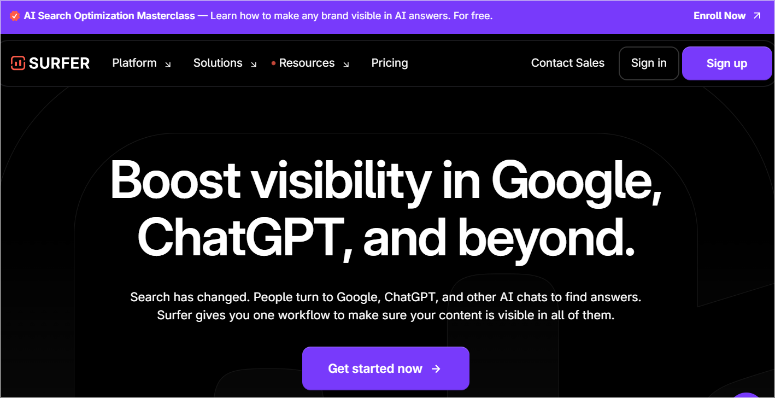
Content Score is SurferSEO’s flagship feature. If you have ever heard of this SEO tool, you know it. However, what I didn’t expect when I started testing was the AI Tracker.
Surfer SEO now monitors how your brand and target keywords appear when users ask ChatGPT, Gemini, and Perplexity questions.
Surfer SEO is one of the few SEO platforms that integrates visibility tracking into the same dashboard where you write and optimize.
Why is Surfer SEO one of the best AI SEO tools?
The Content Score itself works differently than most scoring tools.
Natural Language Processing (NLP) analysis is used to determine which topics, terms, and entities appear in high-ranking content, not just how often a keyword appears.
This means that stuffing is penalized and thematic depth is rewarded using the Content Score. An article with 45 keyword repetitions may perform worse than one with 12 usages but broader coverage of the topic’s related concepts.
In addition, Surfer SEO’s AI generates complete article drafts that start with a content score of over 60. This means that you optimize from the start and not from scratch.
Surfy Assistant refines and reformulates texts in real time as you edit them.
The important caveat: Following the content score recommendations also literally results in content that sounds optimized rather than scripted.
I found myself adding terms that interrupted the flow of sentences just to get the highest content score. The score increased; readability decreased.
The tool works best when you view it as a guide rather than a goal that you must pursue at all costs.
My experience with Surfer SEO
I wrote a test article in Surfer’s SEO editor while Content Score was running. The starting score was 23/100.
After including recommended terms, restructuring two sections, and adding three suggested natural language subtopics, it achieved a score of 78/100 in about 45 minutes.
When I first started fighting the tool, “SEO audit” and “website audit” were marked as separate entities that required separate placement despite having identical search intent.
I had to deliberately ignore some recommendations in order to keep the text readable. Knowing when the score is helpful and when it’s putting you in a corner is the skill that no tutorial covers.
The best part? Surfer SEO’s WordPress plugin inserted the finished content directly into my draft without losing formatting via copy and paste. This alone makes it one of the best SEO plugins today.
For teams publishing in large volumes, this integration alone saves significant time per article.
🟢► Advantages
AI tracker for ChatGPT/Gemini/Perplexity: Monitors brand and keyword visibility in AI-generated responses. One of the few tools that tracks visibility after Google searches.
Content rating based on natural language processing: Rewards topical depth via keyword frequency. This is harder to trick and is more in line with how Google evaluates content quality.
Surfer AI article generation: Drafts start at a content score of over 60, which significantly reduces optimization time.
WordPress integration: Sends finished content directly to your draft; No copying, pasting or formatting loss.
Automatic internal links: Automatically suggests and inserts contextually relevant internal links.
🔴► Disadvantages
Content score over-optimization is real: Following recommendations too strictly leads to mechanical-sounding content. Treat the score as a guide, not an assignment.
High prices for solo bloggers: The value is obvious when teams publish more than 10 articles per month. for freelancers or personal websites, this is harder to justify.
My verdict: For content teams that produce a consistent volume, Surfer SEO is the best workflow choice here. You get NLP assessment plus AI drafting plus WordPress integration all in one platform.
Solo bloggers will have a hard time justifying the price when Rank Math’s free tier handles on-page optimization for free.
The AI tracker is a feature worth seeing. Tracking ChatGPT and Gemini visibility is the goal of SEO measurement.
Prices: Starting at $99/month | Free Chrome Extension | Standalone AI tools are available separately.
👉 Get started with Surfer SEO here
5th rank math ⭐⭐⭐⭐
Ideal for: Budget-conscious WordPress users who want maximum AI SEO capabilities without paying for a SaaS subscription
Why is Rank Math one of the best AI SEO tools?
Rank Math’s free tier is really hard to explain without sounding like marketing copy. So let me be specific.
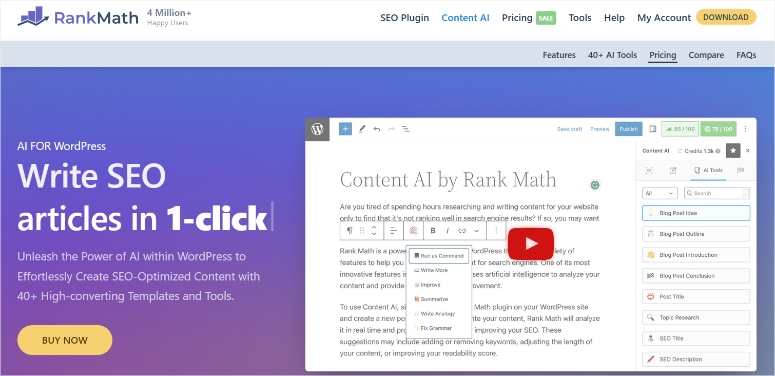
Content AI offers over 40 AI tools for SEO research, content generation and optimization included in the free plan.
This also includes AI-powered schema markup, automated internal link suggestions, Google Analytics integration, and a rank tracker connected to Search Console.
The feature that stands out for me is AI Link Genius (Pro). It’s not just internal links that are suggested; It also monitors link health across your website.
This helps identify orphan pages without inbound links and find variations of automatically linked keywords so you don’t have to manually search for each linking opportunity.
For a site with hundreds of posts where WooCommerce SEO and product page linking are out of control, this automation has a direct impact on rankings.
I’m sure by now you’re wondering why Rank Math is lower on my list?
This is because the country’s credit system is one of the most aggressive. Content AI runs on credits, and those credits are not unlimited, even on paid plans. The plugin does not display this clearly during setup.
You install Rank Math, see Content AI in the menu, start executing bulk operations, and then hit a wall when a batch fails in the middle with a vague error. It’s not exactly hidden, but it’s not exactly obvious either.
My experience with Rank Math
I enabled Rank Math on a clean test site and connected Content AI. Within 15 minutes, I had generated meta titles and descriptions for 20 posts using the mass generation tool.
Output quality was solid.
Then I ran a larger batch and reached the credit limit. The error message was not helpful. I had to navigate to the Rank Math dashboard, find the Credits section, and understand what had happened.
This discovery process took longer than it should have for a tool positioned as beginner-friendly.
The setup wizard is detailed but comprehensive. 15+ configuration steps covering everything from scheme type to redirection rules.
Experienced users will appreciate the depth. First-time WordPress users should plan on 45 minutes, not 5.
🟢► Advantages
- Generous free tier: Content AI (40+ tools), AI schema, internal linking suggestions and Google Analytics, all free. Comparable to paid plans on some platforms.
- AI Link Genius (Pro): Monitors link health, automatically links keyword variations and displays orphaned pages. This ensures that internal linking for large websites runs on autopilot.
- Mass AI meta generation: Generated accurate meta titles and descriptions for 20 posts in under two minutes.
- Cheaper Pro Plan: The starting price is cheaper than many other AI SEO plugins I have included on this list.
- WooCommerce SEO: Automatic schema and meta tags for product pages, available in both free and pro plans.
🔴► Disadvantages
- The Content AI credit system is not clearly disclosed during setup: You will only realize that you are working with a credit model when you run out of credit models. Check the Credits section before performing a bulk operation.
- The dashboard is overwhelming for beginners: Over 15 menu items with no obvious hierarchy. First-time users will need more time than the setup wizard suggests.
My verdict: The free tier alone makes Rank Math worth installing on any WordPress site. The caveat is the Content AI credits. Treat it like a utility meter, not unlimited access.
For developers managing multiple client sites, the Pro plan is a cost-effective premium SEO plugin. For first-time WordPress users, All in One SEO onboarding is smoother.
Check out my comparison between All-in-One SEO and Rank Math to decide which one suits your workflow.
Prices: Free SEO plugin available | Pro plans start at $7.99/month.
👉 Get started with Rank Math here
6. SEMrush One ⭐⭐⭐⭐
Best for: Agencies and established content companies that run comprehensive SEO operations in keyword research, competitive intelligence, and AI search monitoring
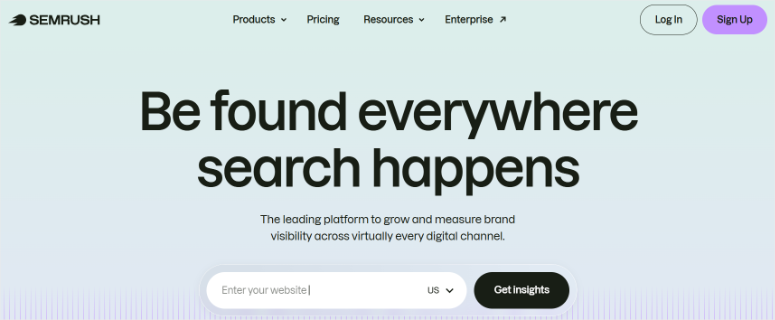
When someone asks ChatGPT, “What is the best CRM for small businesses?” A handful of brands appear in the answer. If your rank isn’t included, that’s a visibility issue that no traditional rank tracker will show you.
Semrush One’s AI Overview Tracker addresses exactly this. It monitors how your brand appears or not in AI-generated responses in ChatGPT, Gemini and Perplexity.
Why is SEMrush one of the best AI SEO tools?
Every other tool on this list tracks Google rankings. SEMrush One tracks the level above Google, which is quietly catching a growing share of searches.
Beyond AI tracking, SEMrush One is the “everything” plan.
It includes keyword research, backlink analysis, competitive gap reports, technical site audits, rank tracking, and content marketing tools bundled into one subscription.
Where specialized SEO tools do one thing in depth, SEMrush does everything with professional depth.
For an agency that runs quarterly SEO audits, monthly ranking reports, and weekly content briefings for five clients, having all of that in one dashboard instead of five separate subscriptions is a real operational win.
Although the features are extensive, it is the price that places Semrush One lower on my list. It costs almost as much as some of the tools on this list combined.
A solo blogger who writes one article per week doesn’t need all the features and technical depth. However, for an agency that charges $5,000 per month per client, this is the case.
That’s why SEMrush One is one of the best SEO tools for agencies.
My experience with SEMrush One
I used the AI Overview Tracker on a home services client site. The report showed that the brand appeared in two out of fifteen AI queries tracked. Three competitors appeared in six or more.
This gap led to a shift in content strategy towards response-optimized formats.
This included direct question structures, mentions of specific entities, and FAQ schemas that would not have appeared with traditional rank tracking.
The keyword gap analysis identified 47 keywords for which direct competitors ranked and the customer had no content at all.
Running across three competitive domains in SEMrush took about 20 minutes. Doing it manually across different tools would have taken up most of the workday.
The only thing I would like to cross-reference: For very niche keywords with fewer than 100 monthly searches, Semrush’s volume estimates differ significantly from Google Search Console reports.
The data has excellent volume but is less reliable in the long tail. For low volume keywords, I check them against the GSC before making any content decisions.
🟢► Advantages
- AI Overview Tracking: Monitors brand visibility in ChatGPT, Gemini and Perplexity. The only tool on this list tracks AI search visibility alongside traditional rankings.
- Complete SEO platform: Keyword research, backlink analysis, competitive gap reports, site audit and rank tracking. One subscription, no juggling.
- Keyword gap analysis at scale: Identified 47 content gaps across three competitive domains in under 20 minutes.
- Depth of Competitive Intelligence: Backlink history, traffic estimates, and competitor ranking data are essential for developing customer strategies.
🔴► Disadvantages
- Prices are prohibitive for most solo WordPress users: The ROI calculation only works for agencies or established content companies, not for personal websites or small blogs.
- Estimates for low volume keywords are unreliable: For niche keywords with fewer than 100 searches per month, SEMrush’s numbers differ from the GSC data. Cross-reference before making content decisions.
My verdict: SEMrush One deserves its price for agencies and large content companies, where a platform that replaces five separate tools actually saves money and hours per month.
For anyone running a personal WordPress site or a single small business, every other tool on this list offers better value for money.
Read our full SEMrush review before choosing the subscription. You can also compare Ahrefs and SEMrush, two of the biggest names in SEO.
Prices: Starting at $117.33/month. Free account available with limited features.
👉 Get started with SEMrush One here
This is my list of the best SEO AI plugins for WordPress. But there are some tools that didn’t make it onto my list simply because they aren’t that comprehensive.
They do one or two things really well, but not enough for me to classify them as a complete AI SEO plugin.
Bonus: Best AI SEO Plugins for WordPress
Writesonic ⭐⭐⭐⭐
Writesonic is an AI writing platform with built-in SEO mode that generates landing pages, articles, and social content optimized for a target keyword.
As a writing tool, it is stronger than an SEO research platform. There is no competitor analysis or keyword discovery here.
However, if you need large-scale AI content designs with basic SEO structure already in place, Writesonic processes output faster than most tools on this list.
Additionally, it integrates with Surfer SEO for optimization assessment if you want to add that layer on top of the AI designs.
Frase ⭐⭐⭐⭐
Frase combines keyword research, AI content briefing and writing into a single workflow, similar to SEOBoost.
Its answer optimization engine is based on People Also Ask clustering, which makes it effective for FAQ-heavy content and featured snippet targeting.
It lacks detailed competition depth and a content calendar, but at this price it’s a credible entry point for solo content creators who need more research structure than a blank document.
Clearscope ⭐⭐⭐
Clearscope is a content assessment tool. You write somewhere else, paste it into Clearscope and receive a letter grade with recommended terms.
The rating engine is precise and enjoys a high reputation in agency circles. The limitation is what it is not: no keyword discovery, no AI writing, or backlink data.
It evaluates content and nothing else. Given the price, that’s hard to justify when other AI SEO plugins I’ve talked about cover the same rating feature as well as AI writing and AI search tracking for less money.
Great. Now you have my complete list of AI SEO WordPress tools and bonuses that I recommend. But with such a long list, it can be difficult to narrow it down to your needs. This is where the next section comes into play.
The right AI SEO tool depends on what your biggest problem actually is. For example, it could be about optimizing content you already write or finding the right topics to write about in the first place.
With this in mind, I would like to help you choose the right tool for your problem.
If you run a WordPress site and want AI SEO without leaving your editor: All in one SEO is the answer.
- It installs as a plugin, manages technical SEO and AI content generation from the same dashboard, and includes the LLMs.txt generator for AI search visibility.
- Nothing on this list matches WordPress native integration.
- If you would like a second free option, Rank MathThe free tier is almost as powerful. Just check the Content AI Credits section before performing your first bulk operation.
If your team publishes more than 10 articles per month and needs a repeatable workflow from research to publication: SEOBoost is the solution.
- Get a 30-competitor analysis and content calendar to make the best choice for structured content operations.
- Writing doesn’t happen in WordPress unless you do it AIOSEO. But for teams with an editorial process, the depth of research and evaluation justifies this workflow step.
If you continue to target keywords and lose to high authority sites that seem beatable: give it a try Low fruits.
- Keyword Difficulty (KD) doesn’t tell you who is actually ranking; LowFruits does.
- Find the keywords where weak sites rank 1-3, write better content, and compete in areas not blocked by authority sites.
If you want to produce long-form content at scale and optimize each piece before publishing: Surfer SEO is for you.
- The NLP-based content score, Surfer AI writing, and WordPress integration combine to create a complete production pipeline.
- To justify the price, more than 10 items per month are required. The math doesn’t work under this.
If you are an agency doing client SEO on multiple websites: Semrush One is the solution for you.
- AI Overview tracking sets it apart for customers who want to know how they appear in ChatGPT and Gemini responses, not just Google rankings.
- The operational value lies in consolidating keyword research, backlinks, competitor analysis and rank tracking into one platform.
Whatever you choose, combine it with a consistent publishing schedule and real editorial review.
AI tools support the process; You don’t override Google’s quality signals and you don’t write with the judgment your readers need.
The only question that simplifies this: Are you trying to optimize the content you’re already writing, or are you even finding the right topics to write about? This will help you come to your decision much better.
Can Google tell if I used an AI tool to write my content?
Google doesn’t penalize content based on how it’s created, only on whether it’s helpful, accurate, and original. AI-powered content that is reviewed, edited, and genuinely useful to readers is treated the same as human-authored content. What triggers penalties is the thin, unedited AI output that is published widely and has no real value to the reader. The tool is far less important than the editorial judgment you then make.
What is the difference between an SEO plugin and a content optimization tool?
An SEO plugin (like All in One SEO or Rank Math) sits in WordPress and manages technical SEO like sitemaps, schemas, meta tags, redirects, and increasingly AI content suggestions. A content optimization tool (like Surfer SEO or SEOBoost) is a standalone platform where you research, design, and evaluate content before publishing it. Many content companies use both a technical SEO plugin and a content quality assessment tool.
Do I need both a WordPress SEO plugin and an AI content tool?
Not necessarily. All in One SEO and Rank Math now include AI writing features in WordPress, covering most use cases for solo publishers. Volume producing content teams often add a dedicated tool like Surfer or SEOBoost to provide a more rigorous optimization assessment. Start with a plugin and add a content tool only if you publish consistently enough to need the workflow support.
Which AI SEO tool is best for a website with no budget?
Rank Math’s free tier is the strongest free option. It offers content AI (40+ tools), schema, internal linking, and rank tracking, all included for free. The free version of All in One SEO covers technical SEO basics and on-page SEO. Neither option requires a paid subscription to provide real value on a new or growing website.
Does using AI SEO tools guarantee higher rankings?
No. AI tools improve the efficiency and quality of your publications. They do not override Google’s quality signals. A well-researched, well-written article optimized with AI SEO plugins will outperform a poorly written article on the same topic. But it doesn’t beat a truly better item just because it scores 80/100. Rankings reflect the quality of the content and the authority of the site. These tools help with the content level. Authority still needs to be earned.
How does AI search tracking work?
Tools like Semrush One and AIOSEO regularly survey ChatGPT, Gemini, and Perplexity with a series of target questions and record which brands or pages appear in the AI-generated answers. Your visibility is how often your brand appears. This is different from a Google ranking. There is no position 1-10. Either you appear in the answer or you don’t. The goal is to create content structured the way AI models extract information: clear answers, specific entities, and direct answers to the questions your audience is asking.
Yes, and I say that as someone who has argued the opposite for two years.
I was the one who warned customers about AI content. I had seen the edition. I’ve seen Google penalize low-quality AI spam. I stayed on the sidelines as the tools quietly improved and the landscape silently changed.
If you don’t evolve, SEO will continue to evolve without you.
That doesn’t mean every tool on this list needs to be installed. It means you have to choose the right level for your situation today.
A plugin for technical SEO and basic AI features if you’re just starting out, a scoring tool if you’re publishing at scale, a keyword discovery tool if you’re still focusing on your content.
Review every AI output before it goes live. Use the tools to move faster, not to skip thinking. The verdict is still yours.
Choose a tool from this list, install it this week, and run your first real test. The results tell you more than any comparison article.
Resource Hub: SEO for WordPress
These IsItWP resources cover the entire SEO picture. From basic WordPress setup to content strategy to AI tools in practice.