
Most AI website builders promise that you can create a website in minutes, but what does that timeline actually entail? While AI can create a professional-looking website surprisingly quickly, you still need time to choose a domain, review the generated content, make some changes, and publish your website. In this guide we will break down the entire trip and give a realistic estimate.
Key insights
- AI website builders significantly reduce initial website setup time, but require additional time for edits and refinements
- A simple website typically takes 30 to 90 minutes to create, depending on preparation, while AI can create a first draft in around 3 minutes
- The main stages of website creation include defining the purpose, choosing a domain and adding content, each of which takes a different amount of time
- Once launched, focus on content updates, SEO improvements, and monitoring performance to maintain a strong online presence
- AI tools streamline initial setup, but successful websites still require ongoing personalization and evolution to truly reflect the brand
A realistic timeline: How long each phase of website creation will take
Every website goes through a similar journey before going live. Whether you’re building a portfolio, a business website, or an online store, you’ll need to plan your website, register a domain, set up hosting, create pages, add content, and test everything before publishing.
The time required for each phase depends on the complexity of your website, the resources you already have, and your preparation before you begin. The table below provides a realistic estimate of how long each phase typically takes.
| stage | What it includes | Typical time |
| Define the purpose of your website | Decide what you want your website to achieve, identify your target audience, and outline the pages and features you need. The clearer your goals are, the easier the further process will be. | 30 minutes – 1 day |
| Research your market (Recommended) |
Look at similar websites to understand industry trends, gather inspiration, and identify ways to differentiate your website. | 1-3 days |
| Choose a domain name | Come up with a memorable domain name, check its availability, and register the name that best represents your brand. | 30 minutes – 1 day |
| Set up web hosting | Choose a hosting provider, create your hosting account, and configure the essential elements needed to make your website accessible online.
Tip: Bluehost web hosting includes reliable hosting, a free SSL certificate, domain management and website management tools in one place, helping you get online without having to juggle multiple services. |
30 minutes – 1 day |
| Create your website | Build the structure of your website by creating pages, organizing navigation, choosing layouts, and adding the features your visitors will use. | 1-7 days |
| Add your content | Write and review your page text, upload images and videos, add contact information, and ensure each page accurately represents your brand. | 1-7 days |
| Review and test your website | Test your website on different devices, check links and forms, check loading speed, check mobile responsiveness and fix any issues before launch. | 2-8 hours |
| Publish your website | Connect your domain, perform final checks, and make your website publicly accessible to visitors. | 30 minutes – 2 hours |
Additional factors that may extend your schedule
The timeline above reflects the steps required to create a typical website. However, certain features and functions may require additional time depending on your needs. For example, if you create an e-commerce site or a multilingual site, the following will be added to your timeline:
| requirement | Extra time |
| Setting up an online store | 1-5 days |
| Add products and categories | Several hours to several days |
| Configure product variants (size, color, etc.) | A few hours to 2 days |
| Setting up payment gateways | 1-2 days |
| Configure shipping and tax settings | 1-3 days |
| Configure shipping and tax settings | 2-8 hours |
| Connection of third-party tools (CRM, email marketing, analytics, booking systems, etc.) | A few hours to 2 days |
| Creating multilingual pages | Several days to weeks |
Note that the estimates above focus solely on the website creation process. Some projects may require additional planning before you even begin construction. For example, companies entering a competitive market often spend additional time researching competitors, refining their brand positioning, defining their target audience, or planning their content strategy. While these activities can increase your overall timeline, they often result in a more focused website that better serves your visitors and supports your business goals.
How AI website builders have changed the website creation timeline
Traditionally, creating a website involves much more than just writing content. Before you can even begin customizing your website, you need to make a number of decisions that will affect its overall structure and design.
Manual work AI helps you skip
Building a website from scratch typically involves tasks such as:
- Rowing and choosing a template
- Choice of colors and typography
- Decide which pages to include
- Creating a navigation menu
- Arrange sections on each page
- Designing placeholder content for your homepage and key pages
None of these tasks are particularly difficult on their own, but together they can easily add hours to the website creation process.
AI website builders shorten this setup phase by turning it into a guided onboarding experience. Instead of making every decision manually, you answer a few questions about your business and the AI generates a website structure, page layouts, navigation, design elements and content drafts for you.
Instead of starting with a blank canvas, start with a complete first draft ready for review.
Putting AI website creation into practice
To see how this works in practice, I used Bluehost AI Website Builder while building a website from scratch using AI.
The process was straightforward:
- Describe the website in a single sentence
- Create an account and verify your email address
- Answer a few questions about your business, your website goals, your preferred design style, and the overall tone
- Let the AI generate the website
Once onboarding was complete, the AI produced a complete first draft in about 3 minutes. The generated website already contains:
- A homepage
- A navigation menu
- Pre-built page sections
- AI generated copy
- Placeholder images based on information provided
It’s still WordPress underneath
A standout feature was that the generated website was not tied to a simplified editor. Since Bluehost’s AI Website Builder is based on WordPress, I was able to immediately access the complete WordPress dashboard to:
- Edit pages
- Preview posts
- Install plugins
- Customize themes
- Manage site settings
In other words, the AI sped up the initial site setup without limiting my options afterward.
Where you will probably spend most of your time
Although AI significantly reduces the time required to create the first version of a website, there are still several areas in which you will likely invest additional time.
Refine your content
AI-generated copy provides a good starting point, but should reflect your products, services, brand personality, and unique value proposition. Reviewing and personalizing content is one of the most important steps before publishing.
Choose the right images
The first draft can contain placeholders or stock images. Replacing these with your own photos, product images, or brand visualizations can help you create a more authentic and trustworthy website.
Expansion of your website
Depending on your business, you may want to create additional pages beyond the initial design, such as: B. an about page, service pages, FAQs, testimonials, price information or a blog. AI speeds up initial launch, but your website can continue to grow over time.
Optimization for search engines
Publishing your website does not mean your work is complete. Optimizing page titles, meta descriptions, internal links, headings and on-page content, as well as creating valuable blog posts, will help people discover your website through search engines in the long term.
While AI can dramatically reduce the time it takes to create a website, the biggest improvements typically come after the first draft. Personalizing your content, using original graphics, adding valuable pages to your website, and continually improving your SEO transform an AI-generated starting point into a website that truly represents your brand and stands out from the competition.
Final Verdict: How Long Does It Really Take to Build a Website with AI?
If you’re wondering whether AI website builders really save time, the answer is yes, but perhaps not in the way most marketing claims suggest.
The creation of the website itself is remarkably quick. In my experience, Bluehost AI Website Builder created a complete first draft in about three minutes after the onboarding process. However, creating an account, verifying your email address, answering the AI’s questions, checking the generated website, and making your own changes obviously add to the overall time frame.
For most people starting from scratch, it’s reasonable to expect a basic website to be online 30 to 90 minutesdepending on how well prepared you are. If you already have your domain, branding and content ready, you could realistically publish in under 15 minutes. On the other hand, if you’re building a more sophisticated website with custom copy, additional pages, and SEO improvements, you should expect to spend few hours or even spend a whole day refining it.
The biggest impact of AI is not that it creates a perfect website in minutes. It compresses what used to be the most time-consuming part of website creation, setting up the structure, layout, navigation, and initial draft, into a guided process that only takes a few minutes. Instead of spending hours building a website from a blank canvas, you can devote your time to improving the content, design, and user experience, which are ultimately the elements that make a website successful.
So are AI-generated websites any good?
Yes, they are a good starting point for most individuals and small businesses. AI website builders can create a professional-looking first draft in minutes, but you’ll still get the best results by personalizing the content, graphics, and SEO to reflect your brand and goals.
AI creates websites quickly, but building one still takes time
Once your website is live, it’s still an ongoing effort to keep it useful, discoverable, and up to date. AI website builders can help you create and publish a website much faster than traditional methods, but launching your website is just the beginning.
Here are some areas to focus on once you get started.
Post helpful content regularly
Whether you run a business website or an online store, regularly publishing helpful content keeps your website fresh and gives visitors more reasons to visit. If you’re not sure where to start, check out our guide to writing an SEO-friendly blog post.
Keep your website up to date
Your website should evolve alongside your business. If your products, services, prices or contact information change, ensure your website reflects these updates. You can also expand your website over time by adding new landing pages, service pages, FAQs, or case studies as your business grows.
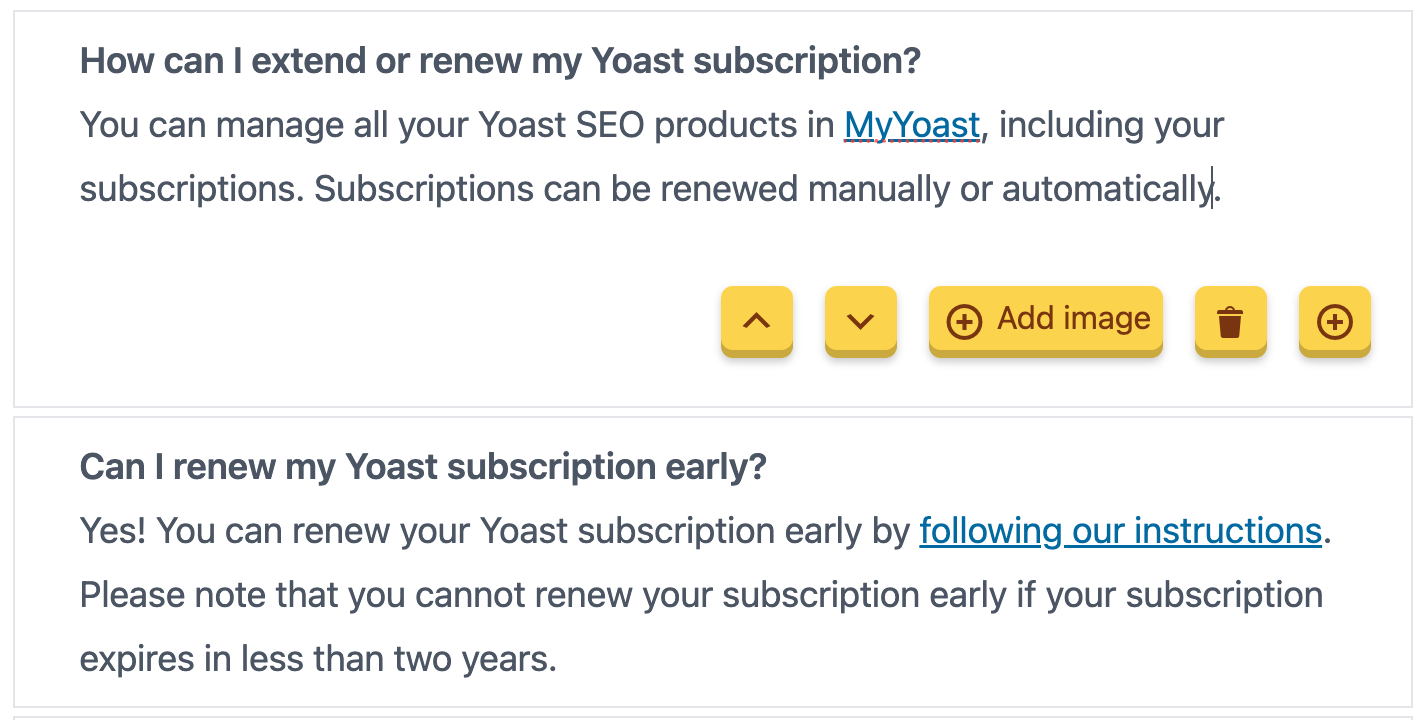
When you use Yoast SEO, creating FAQ pages becomes very easy. The plugin’s FAQ content block converts your questions into structured data, making them easier to understand for search engines and AI crawlers.
A smarter analysis in Yoast SEO Premium
Yoast SEO Premium has one Intelligent content analysis This will help you take your content to the next level!
Continue improving your SEO
Publishing your website is just the first step. To make your website easier to find, you need to further optimize both your content and the technical foundations of your website.
This includes creating helpful content around the topics your audience is searching for, improving internal linking, and regularly reviewing your pages to keep them accurate and relevant. It’s also worth checking that search engines can easily crawl and index your site, that your XML sitemap is up to date, that your pages load quickly, and that there are no broken links or indexing issues affecting your visibility.
If you use WordPress, our comprehensive guide to WordPress SEO covers both on-page and technical SEO best practices to help you lay a solid foundation for long-term growth.
Monitor your website performance
Understanding how people discover and interact with your website will help you make better decisions.
Start by connecting your website to Google Search Console to monitor search performance, identify indexing issues, and see what searches are driving traffic to your website. Combine it with Google Analytics to better understand user behavior and measure the impact of your SEO efforts over time.
Helpful resources:
Build your AI presence
As AI-powered search experiences continue to evolve, it becomes increasingly important to understand how your brand is represented beyond traditional search results.
If you use Yoast SEO AI+, Yoast AI Brand Insights helps you understand how AI platforms perceive your brand and identify opportunities to strengthen your online presence as AI search continues to grow.
How much faster can you build a website with AI?
AI website builders don’t eliminate every step of website creation, but they do significantly reduce the time it takes from idea to working website. Instead of spending hours setting up the foundation manually, start with a complete first draft that you can personalize right away.
Here’s how the experience typically compares.
| Traditional website creation | Building a website with AI |
| Days or weeks to create the first website | A working first draft in minutes |
| Browse and compare templates manually | AI recommends a design based on your needs |
| Create page layouts section by section | AI generates complete page layouts |
| Create navigation menus manually | The navigation is generated automatically |
| Write placeholder copy from scratch | AI creates an initial draft of content |
| Start with a blank page | Start with a complete website structure |
| Take your time putting together the website | Take time to refine and personalize it |
The biggest difference isn’t that AI eliminates the need to edit your website; It changes where you spend your time. Instead of spending hours laying the foundation, you can focus on improving the parts that have the biggest impact on your visitors, like: B. Your messaging, your branding, your content and SEO.
AI gives you a head start, not the finish line
Creating a website no longer has to be a week-long project. AI website builders have turned what was once the most time-consuming part of the process – setting up layouts, pages, navigation, and initial content – into something that can be completed in minutes.
This does not mean that AI itself creates a perfect website. A successful website still depends on thoughtful content, strong branding, regular updates and ongoing SEO. AI gives you a significant head start, allowing you to skip the blank page and spend your time refining a website instead of building it from scratch.
If you’ve been putting off building a website because it felt too technical or time-consuming, AI makes getting started easier than ever. The sooner you start, the sooner you can start expanding your online presence.
