
AI SEO tools for small businesses are essential to keep up with marketing trends and stay competitive. Still, most small businesses are trying to figure out which AI tools are actually worth their time and which ones are necessary, especially when there are a plethora of tools that promise to solve every problem imaginable. The good news is that AI is available in almost every tool.
The truth is that small businesses need to invest in AI SEO tools, either in time or money. The statistics show it clearly: AI in marketing is on the rise. According to the latest version of HubSpot AI trends for marketers Two-thirds of marketers worldwide are reportedly using AI in their role. Among American marketers, that number rises to 74%.
This guide cuts through the noise. It covers the essential AI SEO tools for small businesses that Lean teams actually use to do more with less. It includes free essentials like Google Search Console (GSC) and Google Analytics (GA4), as well as dedicated, paid platforms like HubSpot.
Table of contents
Which AI SEO tools for small businesses provide lasting value?
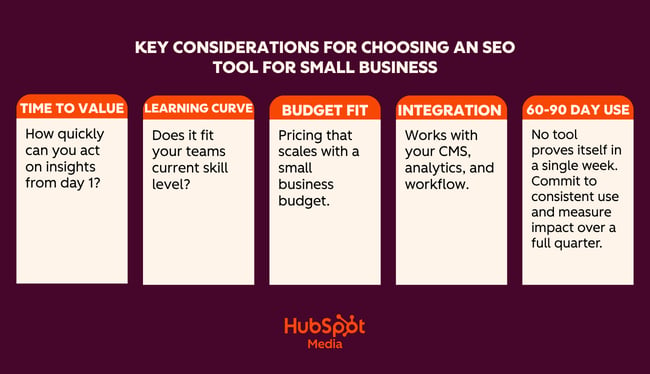
AI SEO tools help small businesses research keywords, create content, optimize pages, troubleshoot technical issues, and track visibility. The challenge is choosing the right SEO tools based on their business benefits. In general, small business buyers should prioritize time to value, learning curve, cost, and ease of integration.
Time to Value
Time-to-value measures how quickly a tool delivers useful results after setup.
For a lean team without dedicated SEO resources, time-to-value is extremely important. A tool that takes two weeks to configure or requires an outside consultant to set up can be more trouble than it’s worth. Unless, of course, the company is sure that the investment is worth it.
Consider how quickly the company needs the tool to be live and operational and what impact it will have on workflows and other business priorities. Sometimes the time investment (and possibly the money investment) is worth it. In other cases, a tool that runs with minimal setup and can display recommendations within 24 hours is more appealing.
Here’s a real-world scenario that shows how to think about time-to-value:
When I’m working with a new client, certain tools are a no-brainer. For example, Google Search Console (GSC) is a free tool and the data it provides is invaluable. I tell all my clients to set this up or I will do it for them. Once someone has added the tracking script to the website, the tool runs independently in the background. Within 24 hours I receive valuable data about the website and SEO performance. For me it is clear that GSC is a must all Websites.
Compared to GSC, HubSpot requires more time to set up. If unlocking certain features is required, a financial investment is also required as some features of HubSpot are only available in higher editions.
The difference is that GSC does some things really well, such as:
- Shows exactly which search queries lead to impressions and clicks.
- Identifies indexing issues and crawling errors reported by Google.
- Tracks average position and click-through rate per page per keyword.
- Reports Core Web Vitals issues that impact page experience.
- Sends sitemaps and requests re-indexing after page updates.
HubSpot does a lot of things really well, adding an extra layer of sophistication to marketing and other business processes. For example HubSpot:
- Provides AI-powered SEO recommendations that prioritize what needs to be fixed and why.
- Features content optimization tools to help teams design, refine, and publish branded content.
- Tracks organic performance along with email, ads, and CRM data in one place.
- Connects SEO activities directly to leads and revenue on the same platform.
- Automates reporting so teams don’t have to manually pull data from multiple tools.
- Has a built-in free CRM – contact, deal and pipeline management without an additional subscription.
- Connects SEO and content efforts directly to leads, deals and revenue on the same platform.
- Tracks the entire customer journey from the first organic visit to the conclusion of the contract.
- Offers email marketing, landing pages, and forms, all in the same ecosystem as SEO tools.
- Includes social media management and ad tracking, as well as organic performance data.
- Automates lead nurturing workflows triggered by content engagement.
- Provides common dashboards so sales and marketing teams can work with the same data.
- Scales with the business with free tools to get you started and Pro and Enterprise editions as your needs grow.
- Reduces tool diversity by replacing multiple point solutions with one platform.
Some tools may take longer to set up and may require payment. However, these tools and their features can be business critical.
If a tool can help save human hours, influence marketing conversions, solve problems across the organization, and directly contribute to business growth, then the investment in time and money is worth it. If a tool takes two weeks to set up and the marketing team never opens it, the value isn’t there.
Learning curve
A tool is only as useful as the team’s ability to use it consistently. Complex platforms designed for enterprise SEO agencies often overwhelm small businesses with a depth of functionality they don’t need. When assessing a learning curve, it’s worth asking:
- Can a non-technical marketer or founder use this tool independently?
- Does it explain? Why Something is a problem, not just pointing out that it is a problem?
The AI tools for SEO that work best for small teams provide guided workflows, plain-language recommendations, and clear next steps rather than raw data that requires expert interpretation.
Cost and budget adjustment
The strongest AI SEO solutions for small businesses are those that live at the intersection of:
- Required functionality
- Affordable price
- Scaling potential at affordable prices
Companies need tools that can be used by teams and that solve a unique problem at an affordable price. From there, every tool must scale with the business. Consider the cost impact one year or even five years in the future. If updated packages are out of budget, it may not be a good idea to invest now as the effort and time required to switch tools later could be extreme.
Pro tip: Before you choose a paid tool, consider the three SEO tasks that take up the most time each week and that no other tool can help with. Then evaluate each platform specifically based on these tasks. A tool that solves one real bottleneck will always be better than a tool that solves multiple bottlenecks.
Easy integration
If a tool can be integrated into existing systems, adoption rates increase. According to MuleSoft86% of IT leaders say AI agents can add complexity instead of value without proper integration.
For example, if SEO data is linked to a content management system (CMS) that is already in use, it is easier to adopt the new tool because it fits into an existing workflow rather than creating a new workflow that works in a silo. Integrations also with existing tools improve And expand Optimize workflows and data instead of complicating them. They are simply more motivating for teams to participate.
When comparing platforms, check how compatible they are with the tools a team already uses.
60 to 90 days of use as a real test
Demo performance and enthusiasm during testing rarely tell the whole story. The more reliable measure of a tool’s value is whether teams are still using it regularly after 60 to 90 days and whether they can point to specific results that the tool contributed to.
If you’re doing an AI SEO tools comparison, talk to a tool’s sales reps and find out what your team can negotiate as a trial period. Or consider paying monthly for a few months before committing to annual billing.
What AI can and cannot do for search engine optimization for small businesses
Design and scale content quickly (proceed with caution)
AI can create blog posts, FAQs, service page copy, and meta descriptions in minutes. For a small business struggling to publish regularly, this is a real time saver. Prompt the AI with your target keyword, audience, and tone of voice and get a solid working draft without staring at a blank page.
The quality of an AI design depends on the topic. For example, an objective truth or a simple question like “What is anchor text?” or “What does bounce rate mean?” is easy to write with AI.
However, thought-provoking or content that requires a new opinion or an expert opinion is better written or extensively edited by a human. For example: “Is SEO dead in the age of AI search?” or “How should small businesses respond to Google’s latest algorithm update?”
Where human verification still matters: AI does not know your company, your target groups or your industry as well as subject matter experts. Facts may be misrepresented, nuances may be missing, or sound general. Editors should review any AI-generated content to ensure it is personalized and fact-checked before publishing. Google also rewards content with real expertise and first-hand experience – and these are things that AI cannot credibly create.
Finding keyword and topic ideas
AI tools are good for idea generation. Ask someone to suggest keyword clusters around your service, generate questions your customers might be searching for, or identify related topics that might otherwise be overlooked. This can replace hours of manual research for a small team without dedicated SEO resources.
Where human verification still matters: AI often suggests keywords without any real search volume data behind them. Marketers should still run through the best ideas using a tool like Google Keyword Planner to validate demand before creating content based on them. Or at least a check of human senses. While AI can generate a lot of keyword ideas, I don’t rate it for content clustering or search engine results page (SERP) analysis.
Optimize existing pages
Insert a webpage into an AI tool and ask it to rewrite the title tag, improve the meta description, tighten the heading structure, or make the copy more readable. For small businesses with dozens of underperforming sites, this type of audit-and-improve workflow can produce meaningful results without a large budget.
Where human verification still matters: Include a layer of human review or judgment on key pages. On the whole, AI can do this pretty well, and if SEO specialists reduce missed title tags on pages that don’t rely on SEO for visits, then an AI title tag is probably in order.
AI SEO tools for small businesses
The tools in this guide are here because they solve real problems for lean teams and because the AI built into each tool is really useful.
When you build an SEO foundation from the ground up, the HubSpot SEO Starter Pack is a free resource worth downloading before diving into any of these tools.
First, a comparison table for a quick comparison of AI SEO tools for small businesses:
SEO and technical audit tools
HubSpot SEO recommendations
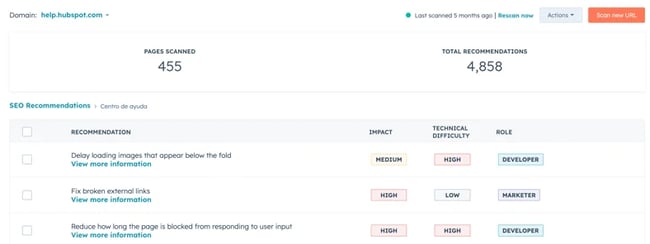
HubSpot SEO recommendation Tools live inside Marketing Hub and represent one of the most integrated SEO approaches available to small businesses. Unlike standalone SEO platforms that hand over a list of problems and leave teams to figure out the rest, HubSpot connects SEO recommendations directly to the content editor, CRM, and reporting dashboard. This unification means that every correction, content and ranking improvement is linked to actual business results.
The real value lies in the presentation of the results. Standalone tools like Screaming Frog are excellent, but businesses need an SEO expert who can decipher problems and assign solutions when using this type of tool.
SEO recommendations in Marketing Hub prioritize on-page updates for non-experts. That’s exactly why it’s well-suited for small business teams without dedicated technical SEO resources. Instead of presenting raw data that requires interpretation, explains HubSpot Why something is marked, What effects It impacts search performance and what action take to solve it. Anyone can figure out what the problem is, how to solve it, and what its impact is, which helps with prioritization.
HubSpots Guide to Understanding SEO Recommendations is a useful reference for a complete breakdown of what each recommendation type means.
What HubSpot’s SEO recommendations do
The SEO recommendation tool automatically scans a website’s live pages and displays issues in order of priority:
Recommendations can be accessed sitewide under Marketing > SEO or page by page using the Optimize panel in HubSpot’s content editor. This means writers and marketers can identify and fix SEO problems without ever leaving the tool they’re already working with.
On the technical side, HubSpot’s SEO tools scan for the issues that most commonly hurt small business website rankings: broken links, missing or duplicate meta descriptions, missing alt text on images, HTTPS issues, slow-loading pages, and heading structure issues. Each reported issue has a clear explanation and a specific action – not just “fix your meta descriptions”, but exactly which pages need attention and what good optimization looks like.
On the on-page side, the Optimize sidebar in the content editor checks keyword placement and relevance, flags keyword stuffing, checks readability, and highlights internal linking opportunities, all while a page is being written or edited. Teams can Analyze SEO performance From a single dashboard, you can manage the entire site and track organic sessions, keyword rankings, and individual page performance over time.
Where HubSpot SEO sits within a broader marketing stack
HubSpot’s value proposition is going to be really hard to match. The SEO tools are part of the same platform as email marketing, landing pages, social media, ads and the free CRM. This means teams can track the entire journey from first organic search visit to deal closure without having to export data between tools or reconcile reports across different platforms.
The CRM integration makes HubSpot one of the best tools for SEO for B2B. This connection links SEO activities directly to pipeline and sales data in the CRM. It becomes possible to show exactly what organic traffic is worth, not just in the form of clicks but also in the form of leads and deals.
Teams on Marketing Hub Pro or Enterprise have access to SEO and Answer Engine Optimization (AEO) tools. Marketers gain insight into traditional organic rankings And how their brand appears in AI-generated responses. More on this below.
Prices
HubSpot’s SEO tools are available in multiple editions. Basic SEO recommendations are available in the Free and Starter plans. A Pro or Enterprise subscription is required for the full suite, including topic clusters, advanced reporting, content strategy tools, and AEO features.
For small businesses looking to evaluate costs based on performance, it’s worth comparing the total cost of HubSpot with the total cost of the individual tools it replaces: CMS, CRM, email platform, SEO tool, and reporting dashboard.
Best for: Small business marketers and lean teams who need one tool for everything: SEO, content, CRM and reporting in one place.
SE ranking
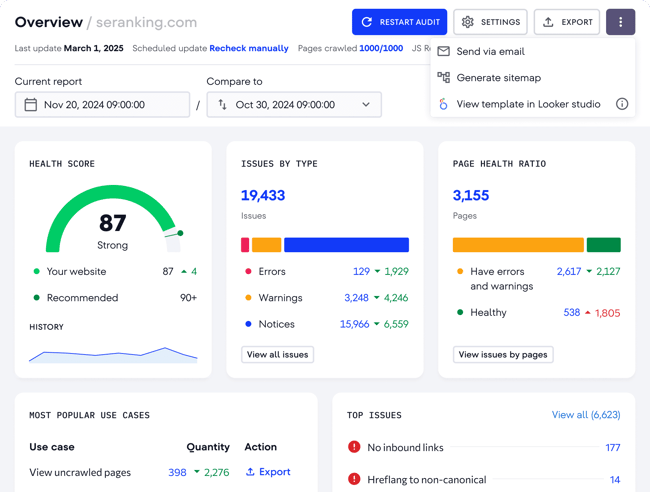
SE ranking is a comprehensive AI-powered platform that offers keyword tracking, website audits, competitive research and AI-specific insights. Beyond technical SEO, SE Ranking also includes keyword research, backlink analysis, competitor monitoring, and content gap identification. It is a comprehensive platform that includes best-in-class AI search optimization tools for content creators working with multiple clients or projects.
Key Features
- AI-powered site audit Crawls the entire site and reports technical issues, including broken links, redirect chains, missing metadata, duplicate content, and page speed issues, with prioritized recommendations for each issue.
- Keyword rank tracker Monitors keyword positions on Google and Bing with daily updates, historical data and integrated competitor comparison.
- On-page SEO checker analyzes individual pages in comparison to high-ranking competitors and provides specific recommendations for improving organic position, e.g. B. to improve relevance, structure and depth of content.
Prices: Plans start at the Wallet tier, with Standalone and Enterprise tiers available for larger sites or agencies. A 14-day free trial is available and no credit card is required.
What I like: SE Ranking is just the thing for small businesses: it has the depth of a premium SEO platform, but is priced so affordable that small businesses can justify it. The interface is clean and the recommendations are actionable. Not only do problems appear; It explains what to do about it, which is important when there is no in-house SEO specialist to interpret the data.
For teams considering alternatives: Semrush And Ahrefs Both are excellent platforms, arguably the most powerful in their category, and both would be good choices for teams with the budget. You can’t go wrong and the right choice depends on your preferences.
Best for: Small businesses and lean SEO teams that need a fully functional SEO platform without the price tag of enterprise tools like SEMrush or Ahrefs.
Automated content optimization tools
Consistent content creation is one of the biggest SEO bottlenecks for small business teams. The tools in this category use AI to accelerate the design, optimization and structuring process.
Content Hub
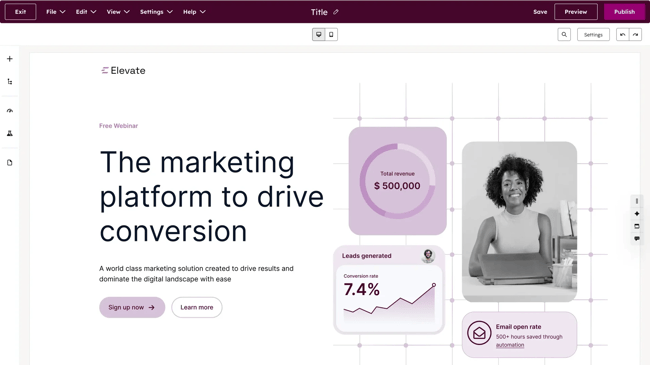
HubSpot’s Content Hub This is where content strategy, creation, optimization and performance measurement come together. This consolidation is essential for lean teams that want to achieve more with fewer people.
One of Content Hub’s most valuable features for small businesses is its topic cluster tool. The premise is simple: Instead of publishing isolated blog posts on loosely related topics, teams create content around a central pillar page (a comprehensive, authoritative article on a broad topic), supported by a network of clustered content that covers related subtopics in depth. Each cluster piece is connected to the pillar, and the pillar is connected to the clusters, creating an interconnected content structure that signals topic authority to search engines.
Read more about the pillar and cluster strategy:
This approach is one of the most reliable ways for small business websites to increase organic traffic. Search engines reward sites that demonstrate depth and expertise on a topic, and a well-structured topic cluster does just that.
For teams new to content planning, the topic cluster tool can transform a scattered blog archive into a structured, rankable content asset. Content Hub makes it easy to map, build and monitor these clusters without a separate content strategy platform.
Breeze: HubSpot’s AI layer for content
Within Content Hub, Breeze acts as the engine behind the platform’s content creation and optimization capabilities. Breeze is not a single feature, but a suite of AI tools embedded throughout the entire content workflow, from identifying a topic to publishing and promoting a post.
Breeze closes the gap between AI authors and humans. Content authors use Breeze as a co-pilot, meaning content is co-created with AI. Human authors can contribute their experiences and changes throughout the process.
Content Hub’s AI Blog Writer helps teams design and refine branded content based on a topic or keyword. A structured draft is then created, allowing authors to refine, expand, or rewrite sections without leaving the editor. Breeze Content Agent suggests blog topics and generates search-optimized designs that incorporate an established brand voice and act as a multiplier for subject matter experts rather than replacing them.
As an author and SEO specialist, I believe that content co-designed by AI is the most efficient way to work. Compared to creating an entire blog post with AI, co-authoring with Breeze offers a higher standard of content. The layer of the ongoing Human review protects accuracy, brand voice and trust.
Beyond the initial drafts, Breeze handles the optimization work that typically falls through the cracks on lean teams: generating meta titles and descriptions, suggesting internal links, reformatting content for better readability, and remixing existing content into new formats. Content Remix Repurposes an asset across formats and channels, turning a blog post into a social caption, email intro, or landing page section without having to start from scratch each time.
HubSpot’s Brand Voice feature allows Breeze to generate content within defined tone and voice parameters. This means that AI-generated designs don’t sound generic. For small businesses where brand messaging is a real differentiator, this feature ensures speed doesn’t come at the expense of consistency.
Performance tracking tied to sales
Because Content Hub resides on HubSpot’s CRM, every piece of content is tracked, not only for traffic and rankings, but also for its contribution to leads, pipeline, and revenue. Teams can see which blog posts are generating contacts, which pillar pages are generating the most organic sessions, and how content is performing over time without having to export data to a separate analytics platform.
For AI SEO solutions for small businesses When you need to justify content investments to stakeholders or customers, this attribution ability is critical. It shifts the conversation from “our blog traffic is up” to “our content contributed X leads and Y deals this quarter.”
Prices: Content Hub is available as a standalone product with a free plan. Paid plans start at $20 per user per month. Content Hub can also be part of a broader HubSpot subscription.
Breeze Content Agent, including AI blog creation and content remix, is available in Content Hub Pro and Enterprise editions. For small businesses already using Marketing Hub, it’s worth checking whether features are already included in the current plan before purchasing separately.
Yeast
Best for: Small businesses running WordPress websites who want to integrate real-time, on-page SEO guidance directly into their content workflow.
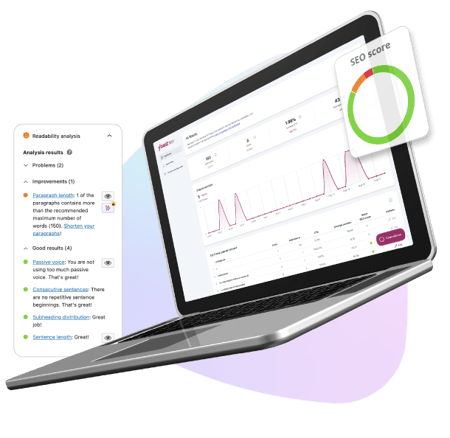
Yeast has long been the default SEO plugin for over millions of websites. For WordPress users, it’s one of the most straightforward ways to incorporate AI-powered SEO recommendations into the writing process – no separate platform to log in, no manual checks. The recommendations appear in the WordPress editor while content is being written or edited.
Key Features
- Real-time on-page SEO analysis: Reviews keyword placement, heading structure, meta titles, meta descriptions and internal linking as content is written, with a clear traffic light scoring system that highlights what needs attention before publishing.
- AI-generated titles and meta descriptions: Yoast’s algorithm analyzes the content of each page and generates multiple options for SEO titles and meta descriptions, allowing teams to select the best, request more options if necessary, and tailor the output to the brand voice.
- Readability analysis: Evaluates sentence length, paragraph structure, use of transition words, and passive voice, helping non-experienced writers create content that is easier for both readers and search engines to digest.
Prices: The free package includes basic on-page SEO analysis, focus keyphrase, readability checks and XML sitemaps. A solid starting point for small businesses with tight budgets. Premium and AI+ packages are available, starting at $9.90 per month.
What I like: I have used Yoast throughout my entire career. I think it’s excellent. Honestly, I found that the free version was enough, but I have the expertise to manage SEO elements even without premium. For small businesses that need more support, consider paying for Premium. It’s very affordable.
Note that Yoast is an optimization assistant and not an SEO platform. It helps teams polish and improve existing content. It is not the right tool for keyword research, competitor analysis, backlink monitoring, or rank tracking. For small businesses that need these features, Yoast works best in conjunction with a tool like SE Ranking.
When teams use HubSpot, Yoast is not needed at all since Content Hub does what Yoast does. It is worth returning to these considerations before purchasing tools, especially the payback period and cost and budget adjustment.
AnswerThePublic
Best for: Small business marketers and content teams who want to quickly identify the questions, topics, and search terms their audience is actually using.
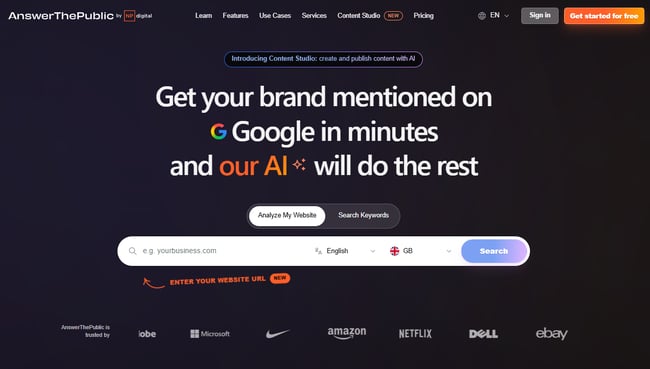
AnswerThePublic is a content ideation tool powered by Google autocomplete data. Enter a keyword or topic and it will create a visual map of the questions, prepositions, comparisons, and related queries that people type into search engines about that topic. This takes a lot of the guesswork out of Lean teams trying to figure out what to write about next.
Key Features
- Visual question mapping: Creates an interactive graph of all questions, prepositions, and comparison searches related to a keyword, organized by search intent and wording, making it easy to identify content gaps and long-tail opportunities.
- AI-powered search insights: Shows trending searches and new topics in a selected niche, helping teams stay ahead of demand instead of chasing it.
- CSV export: All keyword and question data is neatly exported into a spreadsheet, making it easy to create content calendars or brief authors directly from research.
Prices: Three free searches per day, then paid plans starting at $13.33 per month for additional searches and export features.
What I like: For the price, AnswerThePublic is one of the fastest ways to populate a content calendar with topics that real people are actually looking for. The visual format is engaging and helps identify content ideas that naturally lend themselves to a topic cluster structure. It fits well with how HubSpot’s Content Hub organizes content strategy. For a budget tool it is excellent. But for small businesses that use HubSpot in some form, AnswerThePublic can replicate features already available.
Tools to track rankings and AI visibility
Tracking SEO performance has always meant monitoring keyword rankings, organic traffic, and on-page engagement. In modern SEO, this picture is incomplete without also capturing how a brand appears in AI-generated responses. SEO and AEO are complementary disciplines, and small business strategies need to be optimized for both.
HubSpot AEO
Best for: Small businesses and marketing teams who want to monitor and improve how their brand appears in AI-generated responses and then connect those insights directly to CRM data.
HubSpot AEO is designed to show marketers exactly how their business appears in AI response engines and give them clear, actionable steps to improve.
What sets HubSpot AEO apart from other tools in this category is its CRM integration. The tool automatically suggests prompts based on industries, competitors and customer segments because it is connected to CRM data. Other standalone AEO tools do not have this context. HubSpot already does this.
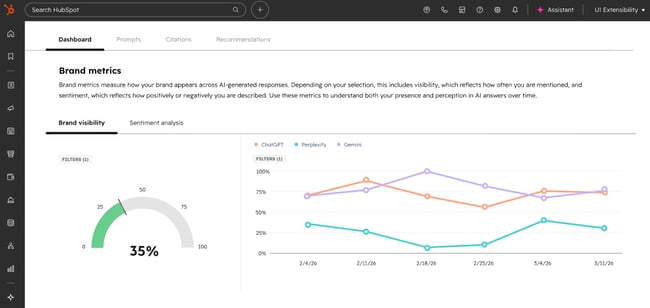
HubSpot AEO is one of the best LLM SEO analysis software. Teams set up prompts, such as the questions their buyers are likely to ask AI engines, and HubSpot runs these prompts daily in ChatGPT, Perplexity, and Gemini. The platform then tracks how the brand appears in the responses: whether it is mentioned, how it is described, how it compares to the competition, and where the gaps exist. A brand visibility scorecard tracks how well a company performs in AI-driven search experiences and highlights opportunities to improve visibility.
Because HubSpot AEO resides in the Marketing Hub, recommendations connect directly to the content and social tools you’re already using, allowing teams to move from “We’re not responding to this prompt” to “We’ve published content to respond to it.”
Key Features
- Daily instant tracking via ChatGPT, Perplexity and Gemini
- Competitive positioning where a brand appears compared to competitors in AI-generated responses
- Sentiment analysis This not only records whether a brand is mentioned, but also how it is described
- Actionable content recommendations directly linked to visibility gaps
- Integration with Marketing Hub Content tools for immediate follow-up
Prices: The 28-day free trial covers 25 prompts across all three engines, no credit card required. It then charges $50/month (or $45/month billed annually) and tracks 25 prompts daily across three engines, up to 2,500 responses per month.
HubSpot AEO Grader
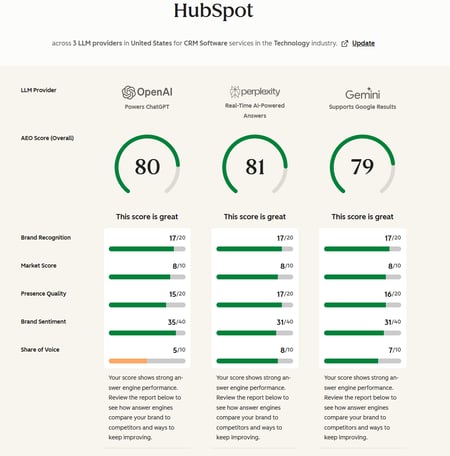
Best for: Any business that wants to get a quick, free overview of how AI engines currently perceive their brand (or competitor brands), with no setup, no subscription, and no prior AEO experience required.
HubSpot AEO Grader analyzes AI visibility across ChatGPT, Perplexity and Gemini in a single free report. It sends brand information to all three platforms simultaneously, validates their responses, and creates a composite score out of 100. Enter a company name, location, industry, and product or service description, and the rater does the rest.
The score is divided into five dimensions:
- Sentiment analysis
- Presence quality
- Brand awareness
- share of the vote
- Market competition
The AEO Grader is best understood as a diagnostic tool – a way to answer: “How does AI currently represent my brand?” before deciding whether ongoing monitoring by HubSpot AEO is warranted. The Grader answers the question of how AI currently represents a brand; HubSpot AEO provides answers to how this changes over time and what to do about it.
What I like: HubSpot’s AEO Grader is free, fast, and the output is really useful. I often use it to get an initial benchmark of the performance of a website or its competitors. It is a tool that I use at the beginning of my auditing process, perhaps in preparation for a discovery interview.
I like that AEO Grader provides a structured, understandable breakdown of a brand’s position across dimensions. For small businesses that have never thought about AI visibility, AEO Grader is the smoothest entry point. Run it, review the results, and use the gaps uncovered to inform the next phase of content planning.
Prices: Free forever
Google Analytics
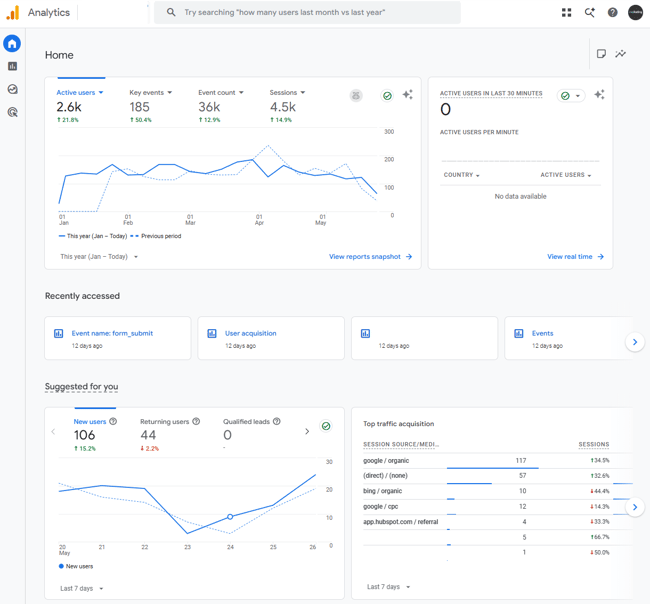
Best for: Any company with a website.
Google Analytics (GA4) is the foundation of any small business analytics setup. It’s free, built by Google, and tracks where traffic comes from, what visitors do when they arrive, and whether that activity produces meaningful results. No paid tool on this list can replace it, and the best ones integrate with it.
Key AI features
- Insights generated: Automatically detects and explains significant changes in GA4 data, appears on the homepage and in reports, uses machine learning to analyze countless combinations of dimensions and metrics, and presents results in plain language with recommended actions.
- Predictive metrics: Displays purchase probability, churn probability, and revenue forecasts based on user behavior patterns, helping teams prioritize where to focus SEO and content efforts.
- Anomaly detection: Automatically flags unexpected drops or spikes in traffic, engagement, or conversions so teams can catch problems before they worsen.
Prices: Free forever.
What I like: As a free Google tool, GA4 is a must-have. These days, my favorite use case for GA4 is segmenting audiences by AI recommendation source and then tracking behavior. It’s a cost-effective way to see the impact of AI traffic without having to purchase other tools. Simply set up a report that tracks conversions from AI traffic.
Google Search Console
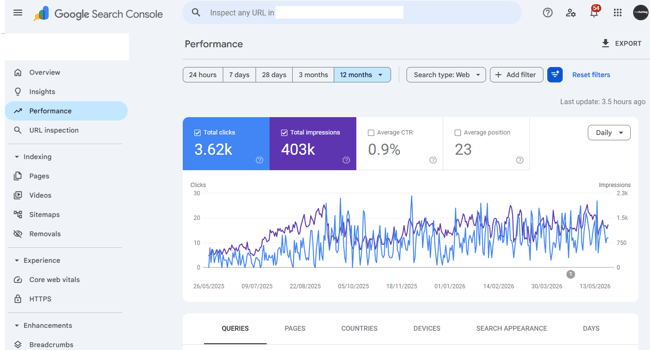
Best for: Any company with a website. It is non-negotiable and should be set up on day one.
Google Search Console Tracks what happens in Google before a visitor arrives. It is the tool for your SEO, while GA4 is a comprehensive marketing analysis tool.
GSC is the only tool that shows exactly which searches are generating impressions and clicks, which pages are indexed, which technical issues Google has reported, and how Core Web Vitals are performing across the site. The data comes directly from Google and is therefore inherently more reliable for understanding actual search performance than any third-party rank tracker.
Key Features
- Performance report: Displays clicks, impressions, average position and click-through rate by query and page, with trending data that makes it easy to see which keywords are gaining or losing importance.
- Reporting and indexing reports: Flags pages that Google can’t crawl or index with specific error types and affected URLs, making fixes easy.
- Core Web Vitals: Displays page issue issues affecting rankings, with breakdowns for mobile and desktop, and guidance on the causes of each issue
What I like: GSC uses AI to provide insight into what’s happening in plain English, making it really easy for small teams without SEO knowledge to see and understand their website.
Prices: Free forever.
Recommended Resource: My 18 favorite SEO tools for website auditing and monitoring
Frequently asked questions about AI SEO tools for small businesses
Do Small Businesses Really Need Multiple AI Tools for SEO?
Small businesses don’t necessarily need multiple AI tools for SEO, but most end up using at least two. No single tool covers the entire SEO workflow. It’s about finding the right combination depending on the internal challenges and bottlenecks. The key is to avoid too much tool variety and pay for overlapping features.
What is the best way to get cited quickly in AI answers?
The fastest way to AI citations is through structured, specific, and authoritative content that directly answers buyers’ questions. Clear definitions and step-by-step sections improve citation potential in AI answers. So, by dividing content into logical, searchable sections with descriptive headings, concise definitions, and direct answers to frequently asked questions, AI systems can perform better.
How do I stop AI from changing my brand voice?
The most reliable protection is a clearly defined branded language document that AI tools can reference. Typically, this is a written guide that covers tone, language, terminology preferences, and phrases to avoid. Most powerful AI content tools, including HubSpot’s Breeze, allow teams to input brand voice parameters that shape the generated output before it reaches a writer for review.
When should a small business invest in paid AI SEO tracking tools?
The right time to switch from free to paid tools is when there is a specific, identified gap that free tools cannot fill. Ultimately, a tool should truly pay for itself in value or time saved. For example, HubSpot’s paid SEO and content tools make sense if the team is ready to combine content production, SEO recommendations, and revenue attribution in one place.
The right AI SEO tool is the one that solves many problems.
For small businesses looking to simplify their stack without sacrificing performance, HubSpot is the strongest all-in-one platform option available. The SEO tools in Marketing Hub include technical recommendations, on-page optimization, topic cluster planning, and performance tracking. Content Hub and Breeze handle content creation. Add AEO for AI visibility monitoring and free CRM for revenue attribution, and one platform replaces what most teams currently cobble together in four or five separate tools.
The HubSpot SEO Starter Pack is the quickest way to get started. It’s free, convenient, and designed for teams looking to scale SEO without a dedicated specialist.