
TL;DR: I review the best WordPress plugins for two-factor authentication. After almost falling for a scam, it became increasingly important to protect my WordPress sites. Wordfence Security took first place due to its all-in-one security approach and a free 2FA feature. WP 2FA comes second because it enforces 2FA for all website users.
My work email address is generally public. My name, what I do and how to reach me can be found there.
Then, in January 2026, Google announced this Gmail on the web no longer supports checking email from third party accounts via the POP3 protocol.
So when emails arrived saying my outgoing messages weren’t being delivered and I had to click a link to fix the problem, I paid attention.
I knew Gmail didn’t work that way, but these emails still caught my attention. What made it worse? I was waiting for an email that never arrived. It felt possible.
So I clicked.
The moment the page loaded I knew. This was a phishing email.
I changed my password immediately. Then I added two-factor authentication. Not because I had been hacked, but because I realized I was just one distracted afternoon away.
And that can happen to anyone, no matter how experienced you are. Scammers and hackers pay just as much attention to the news as you do. You have learned what triggers a reaction in you.
To help you avoid such situations, I researched, tested, and rated the best two-factor authentication plugins for WordPress.
These are the 2FA plugins I use now.
Key insights
- I’ll show you which 2FA plugins will protect your WordPress login even if someone steals your password
- I mention a plugin that allows you to require 2FA from every single user of your website, not just administrators
- Discover which password managers double as authentication apps so you don’t have to juggle separate tools
- I tested 4 dedicated plugins and 2 bonus tools, including completely free options
How I test WordPress 2FA plugins
🔍 Click here to see my testing methodology
This is exactly how I rate WordPress 2FA plugins:
- Setup time: I install and configure each plugin from scratch on a clean WordPress site. If a beginner has trouble getting 2FA working in less than 10 minutes, I’ll report it.
- 2FA method diversity: I check which authentication apps and methods each tool supports. TOTP apps, email codes, SMS and passkeys. The more flexibility, the better.
- Free tier limits: I test what is actually free and what is paid. A plugin that limits the free plan to 3 users is not truly free for most websites.
- User Enforcement: Can you require your members or contributors to set up 2FA? I’m testing how easy it is to apply policies across different user roles.
- Lockdown recovery: I deliberately lock myself out to see what recovery options there are. This is the scenario that most people only test in an emergency.
- Impact on performance: I run a GTmetrix audit and also use the free IsItWP performance tool before and after installation to capture any notable load added by the plugin.
Tools I use:
- Free IsItWP performance and GTmetrix for page loading comparison before and after installation
- Several clean WordPress test sites. One per plugin to avoid cross-contamination
Why trust IsItWP?
At IsItWP, we’ve been the WordPress community’s go-to source since 2009, helping over 2 million users choose better plugins, tools, and security solutions.
Unlike review sites that never actually use the products, we maintain active accounts, run real customer sites, and offer ongoing WordPress advice.
For this article, I installed each 2FA plugin on a dedicated test WordPress site, configured the settings, and worked through all the authentication methods I could access.
I then specifically triggered lockout scenarios to see what recovery looked like. This is what you read is based on.
The best WordPress plugins for two-factor authentication in comparison
Not every two-factor authentication plugin does the same job.
Some integrate 2FA into a full security suite. Others focus solely on the login experience. Some are free for unlimited users, but others only give you three.
Before you read the full reviews, this table shows the key differences at a glance.
| product | Best for | Free version | Authentication methods | Starting price |
|---|---|---|---|---|
| 🥇 Wordfence security | All-in-one security + free 2FA | ✅ Unlimited users | TOTP apps (Google Auth, Authy, 1Password) | $149/year |
| 🥈 WP 2FA MelaPress | Enforcing 2FA for all website users | ✅ Unlimited users | TOTP apps, email, passkeys, YubiKey (Premium) | $89/year |
| 3. MalCare | 2FA + cloud-based malware removal | ✅ Unlimited users | TOTP apps (Google Auth, Authy) | $59/year |
| 4. miniOrange 2FA | Maximum variety of authentication methods | ⚠️ Only 3 users | TOTP, SMS, Email, WhatsApp, Telegram | $69/year |
You can use the table of contents below to jump to any section of this list you want to read.
You can also check out our list of the best WordPress security plugins to see how 2FA fits into a broader security strategy.
With that out of the way, let’s dive in.
1. Wordfence Security ⭐⭐⭐⭐⭐
Ideal for: Website owners who want free 2FA bundled with a full security plugin

Think back to the phishing email I received. Suppose the attacker actually captured my credentials. Without 2FA, they would be in my WordPress dashboard in seconds.
With Wordfence active, they would have hit a second wall. A six-digit code from my authentication app that resets every 30 seconds. They would have captured my password but would have been prevented from logging in.
Why is Wordfence Security one of the best WordPress 2FA plugins?
That’s the core of what Wordfence is doing here. 2FA is free and unlimited and supports any time-based one-time password (TOTP)-based app you already have.
You can use Google Authenticator, Authy, 1Password or FreeOTP. You scan a QR code during setup and from that point on no one can get in without the code from your phone.
But 2FA is just one layer. Wordfence sits on top of a firewall that blocks malicious traffic before it reaches your login page. It also offers a malware scanner backed by a dedicated threat intelligence team.
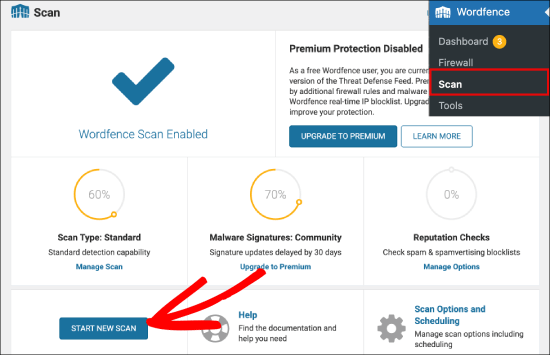
Most importantly, you get rate limiting that stops brute force bots before they reach the 2FA prompt. Not only do you get a 2-factor authentication switch; You get a full login defense stack.
An important update: The old standalone plugin “Wordfence Login Security” is released discontinued on July 1, 2026.
If you only used this lightweight plugin for 2FA, you’ll need to switch to the main Wordfence Security plugin instead. All the same features are included; It is just a larger installation.
What I noticed when testing: Wordfence is the only plugin here where 2FA, ban alerts and brute force blocking work together out of the box.
When I triggered three failed login attempts on a test site, Wordfence blocked my IP within seconds, sent an email notification, and logged the event. No additional configuration.
My experience with Wordfence Security
Setting it up took me just under three minutes. Scan the QR code, link the authentication app, done. The fastest of all the plugins I tested.
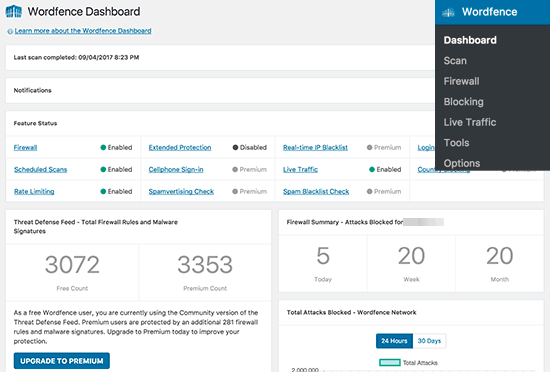
I then ran a quick WordPress security check to confirm that the entire Wordfence stack was configured correctly.
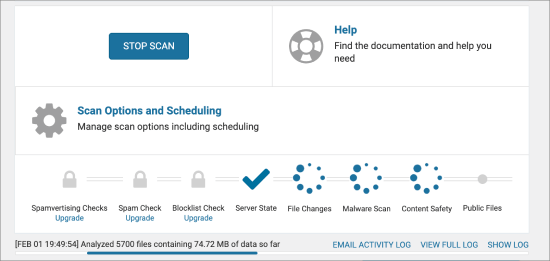
The only point of friction I encountered was on a shared hosting test installation with limited PHP memory. During the first full malware scan, the admin area noticeably slowed down.
After this first pass, the issue has been resolved, but hosts with less than 128MB of memory allocation will feel it. Budget hosting users should know this.
🟢► Advantages
- Completely free 2FA: I set up two-factor authentication on a live site without creating an account or paying anything.
- Any TOTP app works: Google Authenticator, Authy, 1Password, any app you already use is supported.
- Firewall + malware scanner included: 2FA, blocking and scanning from one dashboard instead of three.
- WooCommerce integration, free: I have enabled 2FA for customer accounts without using any paid features.
- Role-based enforcement: Require administrators to use 2-factor authentication immediately while giving editors a grace period.
- Brute force blocking stack with 2FA: Bots are blocked before they even reach the 2FA prompt.
🔴► Disadvantages
- Strong Shared Hosting on First Scan: The malware scanner uses real server resources. For tight hosting plans, the first run results in a noticeable slowdown.
- The standalone login security plugin is discontinued: If you are currently using it, you will need to migrate to the main plugin by July 2026.
My verdict: Wordfence is the right choice if you want free, comprehensive protection without having to install multiple plugins. The combination of two-factor authentication and an active threat research team behind the firewall rules makes this the most comprehensive free security option on the market.
For more information, see my Wordfence review.
Prices: Free Plugin Available (All-in-One Security) | Premiums start at $149/year per location.
👉 Get started with Wordfence Security here
2. WP 2FA MelaPress⭐⭐⭐⭐⭐
Best for: Multi-user websites that require 2FA from each individual user
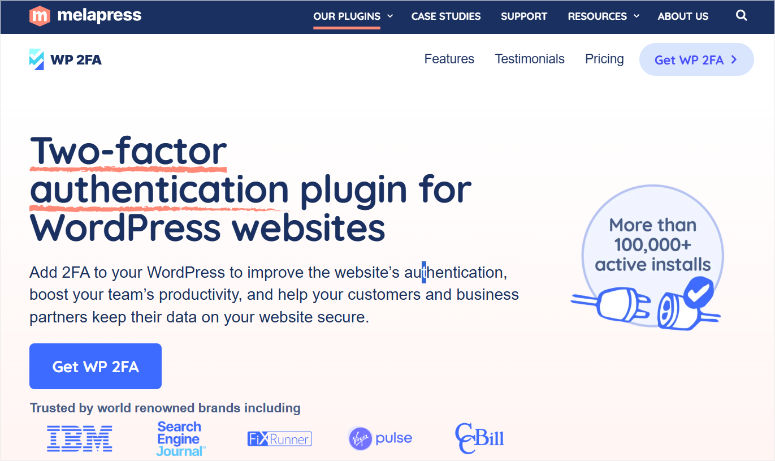
Most 2FA plugins protect your administrator account. WP 2FA MelaPress goes even further. This allows you to require anyone who logs into your website to set up 2FA before they can access anything.
So if you run a WordPress membership site, a WooCommerce store, or any other site where customers or contributors have accounts, your admin’s 2FA will protect you.
Why is WP 2FA MelaPress one of the best WordPress 2FA plugins?
WP 2FA gives you enforcement policies: choose a user role, set a grace period, and after the window closes, anyone without 2FA configured will be blocked until they set it up.
That’s a level of control I haven’t found with the other two-factor authentication tools I’ve tried.
Additionally, WP 2FA supports MelaPress passkeys. This is a relatively new technology that allows users to log in using their device’s fingerprint or facial recognition instead of a code.
This means they don’t need an authenticator app. For sites where your users aren’t particularly tech-savvy, this is a real upgrade. No one needs to install a separate app just to log in.
This 2FA plugin is free for an unlimited number of users, putting it ahead of miniOrange in this regard. The premium version additionally offers SMS 2FA, YubiKey hardware key support, email link 2FA, trusted devices, and white labeling.
For most single site owners, the free version covers everything they need.
One limitation I encountered: If you run WooCommerce with custom payment endpoints or deposit links, WP 2FA MelaPress can intercept and interrupt these flows when enforcing 2FA on the customer role.
I had to completely disable 2FA for customers to resolve the issue. If you have non-standard WooCommerce checkout flows, test them carefully before rolling them out to all users.
My experience with WP 2FA MelaPress
The setup wizard walked me through everything, including user roles, grace period, and authentication methods, without even having to visit a documentation page.
This type of guided setup is important when introducing 2FA to users who have never heard of an authentication app.
I specifically tested the lockout recovery scenario. I disabled my authenticator app during testing. WP 2FA offered backup codes that I set up during configuration and the restore took about 45 seconds.
🟢► Advantages
- Enforcement policies: I set up a 7-day grace period for all editor accounts, after which 2FA became mandatory for login.
- Passkey support: Users can skip the authenticator app entirely and use their device’s biometrics instead.
- Free for Unlimited Users: The free version covers all core features of 2FA without user limits.
- Guided Assistant Setup: Even non-technical users can configure their own 2FA without admin help.
- Built-in backup codes: I set up recovery codes during installation. No FTP is required to re-access if I lose my authenticator.
- WooCommerce 1-click integration: Available as a premium version. This adds 2FA for store customers without a custom code.
🔴► Disadvantages
- Custom WooCommerce flows can fail: Enforcing 2FA for the Customer role impacts non-standard payment endpoints. Test staging before going live.
- SMS and YubiKey require Premium: The free version only covers TOTP and email. Hardware key and SMS support cost extra.
My verdict: WP 2FA MelaPress is the best choice for any website with multiple user accounts. The enforcement policies and passkey support put it in a class of its own when it comes to multi-user security. For a personal website with just one administrator, Wordfence’s free, all-in-one approach may be easier.
Prices: Free plugin available (unlimited users) | Pro starts at $89/year.
👉 Get started with WP 2FA MelaPress here
3. MalCare WordPress Security Plugin ⭐⭐⭐⭐
Ideal for: Website owners who want 2FA paired with cloud-based malware scanning and cleanup

MalCare does something that none of the other plugins here do: all extensive security scanning takes place on MalCare’s own servers, not yours. This is no small thing.
Wordfence runs its malware scan from your hosting environment. As mentioned earlier, on a shared WordPress hosting plan with limited resources, this scan may slow down your website or exceed memory limits.
MalCare relieves this completely. Over 100 intelligent checks run remotely to keep your website running fast.
Why is MalCare one of the best WordPress 2FA plugins?
For the 2FA site, MalCare’s login protection is part of a five-layer free security stack.
These include a firewall, a comprehensive malware scanner, vulnerability alerts, and Atomic Security, which allows you to create custom rules for your specific website’s vulnerabilities.
You enable 2FA via the MalCare dashboard and connect it to any Time-based One-Time Password (TOTP) app. This means it only takes three steps to set up and you’re protected.
What sets MalCare apart is its thorough cleaning. If your website becomes infected, one-click malware removal is possible with a money-back guarantee for failed cleanups.
This is a real safety net if you’ve ever dealt with a hacked WordPress site.
You should keep this in mind: MalCare’s 2FA feature was added in version 5.72, which is relatively new compared to Wordfence or WP 2FA.
It works, but the function is less developed; No master keys, enforcement policies, or role-based grace periods.
My experience with MalCare
The dashboard is clean and visually appealing. Once everything is configured, you’ll get green checkmarks across five security levels.
This allows me to check that 2FA is active, the firewall is running, and the malware scan is complete without me having to dig through settings pages.
What I noticed: The MalCare dashboard is external and hosted on malcare.com and not in the WP admin. This is a conscious security decision. But it means an additional place to log in if you want to check something.
🟢► Advantages
- Cloud-based scanning: Security checks are carried out on MalCare’s servers. No performance hit on your WordPress site during scans.
- 5 levels of security for free: 2FA, Firewall, Malware Scanner, Vulnerability Scanner and Atomic Security for free.
- Easy setup in three steps: Install, add email, done. No manual configuration of rules or settings required.
- Malware Cleanup Guarantee: Premium includes one-click removal and a money-back guarantee if the solution fails.
🔴► Disadvantages
- Newer 2FA feature: Added in version 5.72, meaning it is less mature than other 2FA tools on my list. No enforcement policies or passkeys.
My verdict: MalCare makes sense if you want 2FA as part of a comprehensive security suite and are concerned about performance on shared hosting. Because it’s a standalone 2FA solution, it’s harder to justify that free alternatives work just as well.
Prices: Free plugin available (basic 2FA + scanning) | Pro starts at $59/year.
👉 Get started with MalCare here
4. miniOrange 2FA – Two-factor authentication for WordPress ⭐⭐⭐⭐
Best for: Websites that require SMS, WhatsApp, or Telegram-based 2FA in addition to standard authentication apps
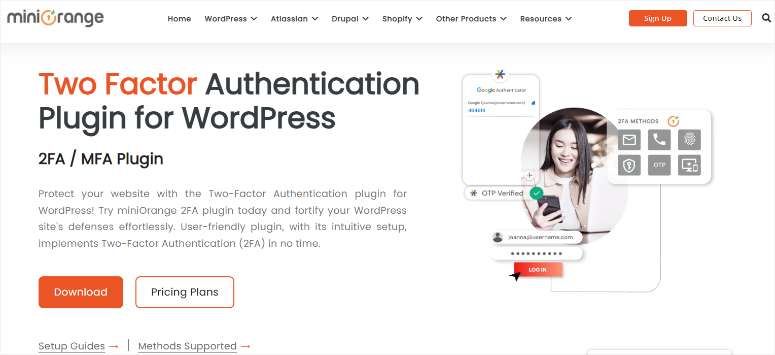
No other plugin on this list supports as many authentication methods as miniOrange 2FA.
TOTP apps (Google Authenticator, Authy, Microsoft Authenticator, LastPass Authenticator), OTP via email, OTP via SMS, WhatsApp 2FA, Telegram, security questions and email verification links. It’s all here.
Why is miniOrange 2FA one of the best WordPress 2FA plugins?
This breadth is important in certain contexts. If your website serves users in regions where WhatsApp is the primary communication channel, requiring them to install a separate authentication app creates friction.
miniOrange can send the 2FA code directly to their WhatsApp number. No new app required, no setup confusion.
The 2F Authentication plugin also integrates with more third-party login systems than any other option I tested. It works with WooCommerce, Ultimate Member, BuddyPress, Elementor and more.
If you have created a custom WordPress login page beyond the standard wp-login.php, this level of compatibility is important.
Here’s the thing about the free version, though. It is limited to three users. And that’s why it’s at the bottom of my list.
For a personal website where you are the only administrator, this is fine. But as soon as a second editor or contributor signs up, the limit is crossed. Most website owners only notice this after installation.
There is also a safety note that should be mentioned. In November 2025, a reviewer documented a vulnerability that allowed authentication tokens to be triggered without properly progressing through the login screen.
The miniOrange team recognized this and took care of it. The changelog shows several subsequent patches, including fixes for session hijacking (version 6.1.1) and fixes for broken access controls (version 6.1.2).
They responded and made things right. This is very important for a security plugin.
My experience with miniOrange 2FA
Setting it up using the wizard was straightforward. I had Google Authenticator up and running in about five minutes.
What confused me was the SMS credits system. Sending OTPs via SMS or email in the free version requires the purchase of miniOrange transaction credit. There is obviously no communication in advance.
Be sure to read the pricing page before choosing an SMS-based 2FA strategy.
🟢► Advantages
- Most 2FA methods available: Google Auth, Authy, SMS, Email, WhatsApp, Telegram. No other plugin comes close.
- Supports custom login forms: Works out of the box with WooCommerce, Ultimate Member, Elementor and more.
- Wizard-controlled setup: Step-by-step configuration even for non-technical users.
- Login Reports and IP Alerts: View every login attempt and get notified when a new device is used.
🔴► Disadvantages
- The free tier only has 3 users: A hard cap. Most websites require payment almost immediately after installation.
- Purchased credits are required for SMS/Email OTP: Not included in the free plan. To use these methods, you must purchase miniOrange transaction credits.
My verdict: miniOrange is the right choice if your website operates where WhatsApp or Telegram 2FA is a practical necessity, or if you have a complex login setup with multiple third-party forms. For most standard WordPress sites, WP 2FA’s free plan offers more depth with fewer surprises.
Prices: Free (up to 3 users). Paid plans start at $69/year for unlimited users.
👉 Start here with miniOrange 2FA
This is my list of the best two-factor authentication plugins. But there are two more tools that I would like to mention. They are good for verifying a user, but they are not WordPress plugins.
They are password managers. These are great if you’re looking for solutions beyond your WordPress site.
Also consider: 1Password ⭐⭐⭐⭐⭐
1Password is not a WordPress plugin. It is a password manager with a built-in TOTP authenticator.
Here’s why: When you log in to WordPress, 1Password populates your password AND your 2FA code from the same app.
This means no need for a separate authentication app or juggling between tools. Watchtower will notify you if accounts in your vault support 2FA but it is not yet enabled.
Also consider: LastPass ⭐⭐⭐⭐
LastPass combines a password manager with 2FA code storage and a free standalone LastPass Authenticator app.
The free plan is really suitable for personal websites.
The catch: LastPass suffered a major data breach in 2022 in which encrypted vaults were stolen.
The company says the master passwords were not compromised, but it’s worth knowing about the incident before trusting them with your credentials.
How to choose the right WordPress 2FA plugin
The right choice depends on what you are actually protecting and who else is logging into your site.
If you are the only person logging in to your WordPress site:
Go with Wordfence Security.
- It’s free, unlimited, and you get a firewall and malware scanner in addition to 2FA.
- There’s no reason to install a separate plugin just for 2FA when Wordfence treats it as part of a complete package.
- If you don’t need the full security suite but just a dedicated 2FA plugin, WP 2FA’s free plan is just as powerful.
If you have a team, members, or customers with accounts:
WP 2FA MelaPress is your best option.
- Enforcement policies allow you to require 2FA for each user role, set a grace period, and block access until users comply.
- Wordfence does not offer this level of control over other users’ 2FA behavior.
- For membership sites, LMS platforms, and WooCommerce stores where customer accounts are important, WP 2FA handles this properly.
If you’re worried about malware and not just login security:
MalCare combines 2FA with premium-level cloud-based malware scanning and one-click cleanup.
- The key advantage is performance. MalCare’s scans do not use your server’s resources.
- If you use shared hosting and Wordfence’s scans are slowing you down, MalCare is the better compromise.
- Upgrading to managed WordPress hosting is another way to completely eliminate this problem.
If you operate in markets where WhatsApp or Telegram are more common than email:
miniOrange is the only plugin that delivers 2FA codes natively via WhatsApp and Telegram.
- For websites whose users don’t download a separate authentication app, messaging-based 2FA completely eliminates this friction.
- The three-user limit on the free plan means that most sites will need to budget for the paid version.
If you want to simplify your tools:
1Password And LastPass Everyone stores TOTP codes next to passwords.
- Instead of managing a password manager and a separate authentication app, you have one app that does both.
- 1Password automatically fills in both the password and 2FA code when you log in. That’s a real quality of life difference when managing multiple WordPress sites.
The one question that simplifies everything:
Do you just need to protect your own login, or do you need to protect everyone on your site?
FAQs: Best WordPress Plugins for Two-Factor Authentication
What is Two-Factor Authentication for WordPress?
Two-factor authentication (2FA) adds a second step to your WordPress login. After entering your password, enter a time-sensitive code from an authentication app or your email address. Even if someone steals your password, they won’t be able to log in without this second code.
Is there a free WordPress 2FA plugin that works for unlimited users?
Yes, both Wordfence Security and WP 2FA offer free 2FA for unlimited users with no restrictions. miniOrange is technically free, but the free plan is limited to three users, which rules this out for most sites.
What happens if I lose my phone and can’t access my authenticator app?
Most 2FA plugins include backup codes that you generate during setup. Make sure you store these in a safe place. With WP 2FA you can send backup codes via email. Wordfence logs backup codes per user. Worst case: You can disable the plugin via FTP or your hosting file manager to completely bypass 2FA and gain access again, then re-enable 2FA once you’re logged in.
Can I force all my WordPress users to use two-factor authentication?
Yes, but only with WP 2FA. It’s the only plugin here with enforcement policies that allow you to require 2FA for specific user roles and lock out anyone who doesn’t set it up within your grace period. Wordfence allows you to enable 2FA per role, but it doesn’t block logins for users who skip it. If 2FA enforcement isn’t enough for your setup, explore other WordPress security authentication plugins too.
Does WordPress have built-in two-factor authentication?
WordPress core does not include 2FA by default. You need a plugin. However, all four plugins in this article are free to install, and both Wordfence and WP 2FA offer full 2FA functionality in their free tiers.
Will two-factor authentication slow down my WordPress site?
The 2FA check itself does not cause any significant burden. It’s a quick code check that only occurs when you log in. What can slow down a website is the more comprehensive security plugin that 2FA is bundled with. Wordfence’s malware scanner uses server resources during its scans. MalCare avoids this by scanning from its own servers. For most websites, the performance impact of adding 2FA is virtually nil.
Final Verdict: Should I use two-factor authentication on my WordPress site?
Yes, sooner than you think.
I clicked on the phishing link I talked about at the beginning of this article because the email was recent, specific and plausible. This is how phishing works. It doesn’t have to be perfect, just good enough for a distracted moment.
Two-factor authentication does not protect you from being deceived. But it closes the door even if you are. Without the second code, a stolen password becomes unusable.
The good news is that no technical knowledge or paid subscription is required to protect your login.
Both top options are free here. Setup takes less than five minutes. And you can protect not just your own account, but everyone on your site.
Choose one, install it today and complete the backup codes setup. This part takes another two minutes and could save your website.
Resource Hub: WordPress Security
Protecting your login is one level. Here you can find more IsItWP resources that cover the rest of your website’s security picture.