


TL;DR: I review the best WordPress event ticketing plugins for selling tickets online.
- This happened after I built a high converting lead magnet for a client.
- They needed to convert the leads into event ticket sales.
- I researched and found that Sugar Calendar offers the best solution because it offers an event calendar and ticket sales.
A few months ago, a customer came to me after I caused what I can only describe as a major problem.
I had built them a lead magnet for a startup event. Something that showed entrepreneurs where their brand stands online and how the startup event could help them.
It worked better than anyone had predicted. Within 48 hours, over 200 founders had registered and asked how they could participate.
Then they called me with the actual problem.
“We have 200 people who want to come. How do we actually sell them a ticket?”
They needed something simple. Something her team could do without me. And it needed to connect to their existing WordPress site, not a third-party platform that takes a cut of every sale.
This conversation led me to test every major WordPress event ticketing plugin I could find. Here’s what I learned.
Key insights
- I’ll show you 7 ways to sell event tickets from your own WordPress site without an Eventbrite account
- I cover tools that skip WooCommerce entirely, saving you hours of setup
- Discover which plugin allows you to go live with Stripe for a single ticket type in under 5 minutes
- I tested which plugins manage multiple ticket levels (VIP, Early Bird, Standing Room) without code
- I’m adding a free option that processes real Stripe and PayPal payments from day one
How I test WordPress event ticketing plugins
🔍 Click here to see my testing methodology
This is exactly how I rate WordPress event ticketing plugins:
- Payment Gateway Quality: Does it support Stripe, PayPal and Apple Pay? Does the company charge a platform fee in addition to Stripe’s standard rate?
- Setup time: How long does it take from plugin installation to completing an initial test purchase? I timed each of these.
- Participant management: Can you see who purchased tickets, filter by ticket type, and export the list to CSV before your event?
- Flexibility in ticket type: Can you offer multiple pricing tiers (VIP, Early Bird, General Admission) with different capacities without touching the code?
- WooCommerce dependency: Does ticket sales require WooCommerce? This is important. WooCommerce adds complexity that not every event site needs.
- Easy for beginners: Could a non-technical team member set this up and manage it independently?
- Support quality: How quick and helpful is the response if something breaks two days before your event?
Tools I use:
- Strip test mode: I do actual test purchases on each plugin before I review it
- Star Ratings from WordPress.org: This is where the true error patterns emerge
- GTmetrix and IsItWP Speed Test Tool: I’m checking to see if the plugin adds meaningful page weight to the events list
Why trust IsItWP?
At IsItWP, we’ve been the go-to source for the WordPress community since 2009, helping over 2 million users choose better plugins, themes, and tools.
Unlike review sites that never actually use the products, we maintain active accounts, run real customer sites, and offer ongoing WordPress advice.
Every plugin in this list has been tested on a live WordPress install and not reviewed on a product page.
The best WordPress event ticketing plugins in comparison
There are two types of tools in this list. Some are dedicated event ticketing plugins built from the ground up for event pages and ticket sales.
Others are payment and forms tools that process ticket purchases without the event management layer. Both have their place, and using the table below you can easily see which solution suits your situation.
If you’re still deciding whether you need a full event management suite, my guide to the best WordPress event plugins covers the entire landscape.
You can also use the table of contents below to jump to the event ticketing tool you want to read.
With that out of the way, let’s dive in.
1. Sugar calendar ⭐⭐⭐⭐⭐
Ideal for: WordPress website owners who want event calendars and ticket sales in a non-WooCommerce plugin
Here’s what was done Sugar calendar the right call for the founding team I mentioned.
They installed it, linked their Stripe account in about three minutes, and created their first event page that same afternoon.
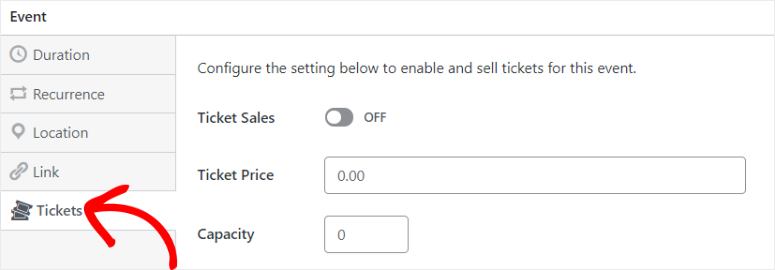
The ticket form automatically appeared on the event page. Within an hour, they had a live “Buy Tickets” button on their WordPress site. Her team handled it without me from then on.
Why is Sugar Calendar one of the best WordPress event ticketing plugins?
This is what Sugar Calendar was developed for. It is among the best lightweight WordPress calendar plugins. However, while these focus solely on viewing, Sugar Calendar adds a full ticketing layer.
A plugin manages your event calendar and payment processing together.
The best part is that you don’t need WooCommerce or any other third-party service. The only deduction is the standard 2.9% + 30¢ per transaction Pay for any Stripe payment plugin.
An additional platform fee of 3% is charged for the free Lite version. Here’s what you should know before scaling. However, this is completely eliminated with the paid plans.
For a plugin that handles both calendar display and payment processing, that’s really fair.
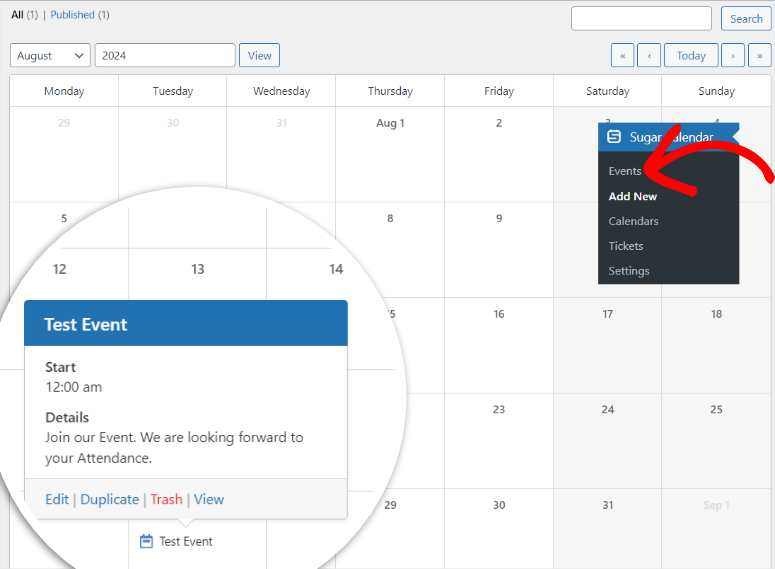
What I appreciated most: Each time you purchase a ticket, a separate participant data record is created.
The founding team was able to see exactly who registered, what ticket tier they chose, and export the full list to CSV before the event without manual spreadsheet management.
One thing to plan for: The free version only supports a single ticket type at a single price. If you want general admission + VIP + early bird price for the same event, you need the Plus plan.
My experience with sugar calendars
I have set up a test event for a new WordPress installation. A workshop for 50 people with two ticket levels. General admission for $49, VIP entry for $99 with front row notice.
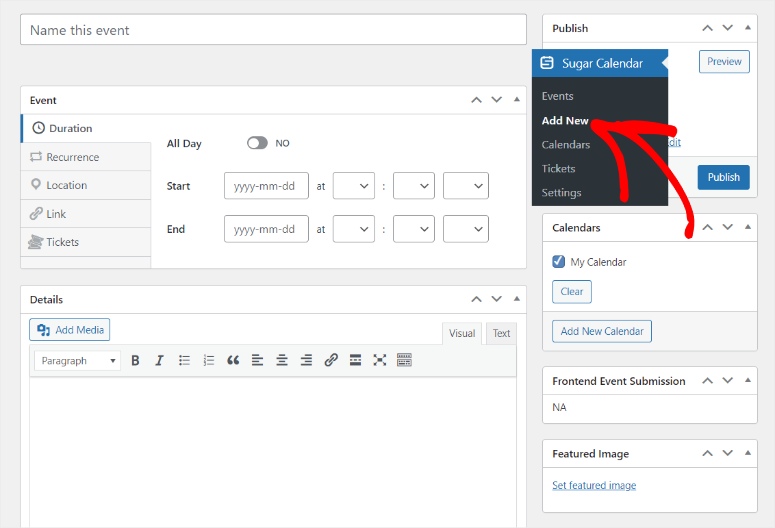
With the Plus plan, both tiers were clearly displayed on the event page. I made a test purchase through Stripe. The confirmation email arrived in less than 30 seconds and was correctly formatted with the event name and ticket level.
The only problem I encountered: the ticket block is not inserted automatically for events created via the classic editor. I had to add it manually via shortcode.
This is insignificant, but if your team uses the classic editor, set aside 10 minutes to figure this out the first time.
🟢► Advantages
- No WooCommerce required: Stripe ticketing works immediately. No store setup, no additional plugins required.
- Free tier for simple events: The Lite version handles single-ticket events using Stripe, making it really useful before you spend anything.
- Clean participant tracking: Each ticket purchase creates an attendee record that you can view and export in your WordPress dashboard.
- One-click migration: If you are currently on the Events Calendar, Sugar Calendar can import all of your existing events in a single step.
- Elementor and Gutenberg ready: No shortcode hunting. Simply drag the calendar or ticket pad where you need it.
- WooCommerce upgrade path: If you later need PayPal or other payment options, WooCommerce integration is available from Plus.
🔴► Disadvantages
- 3% platform fee on the free tier: For a $30 ticket, that’s 90 cents per sale. It adds up quickly when you sell hundreds of tickets without upgrading.
- Classic editor friction: The ticket widget is not automatically inserted in Classic Editor events. You have to add a shortcode manually.
My verdict: Sugar Calendar gets the top spot because it solves the exact problem most WordPress site owners face: selling tickets without overhauling your site. For teams running 1-3 events per year, start with the free Lite plan. If you need multiple ticket tiers or WooCommerce payments, Plus is worth every penny.
Check out my sugar calendar review. Also check out how you can use Sugar Calendar to sell tickets and manage events.
Prices: Free Lite plugin available (3% Stripe platform fee) | Basic $49.50/year (1 location) | Plus $99.50/year (multiple ticket types + WooCommerce)
👉 Start the sugar calendar here
2. WPForms ⭐⭐⭐⭐⭐
Ideal for: Teams that already use WPForms and want to add ticket registration without installing a new plugin

WPForms is not a special ticketing plugin. That’s actually the point.
It is the best drag and drop form builder that can help you create contact forms, inquiry forms or registrations. So why is it on my list for the best ticketing plugin?
WPForms can also help you add ticket sales for events without having to install anything new. Open the form builder, load the ticket booking form template, add a Stripe payment field, and publish.
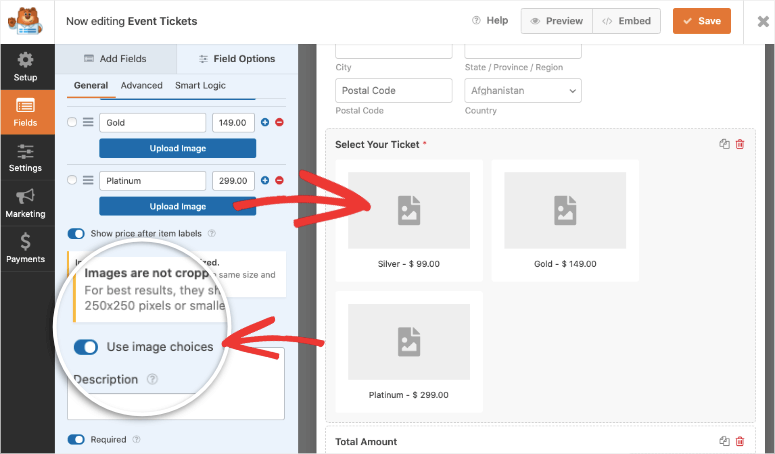
Completed. This takes approximately 12 minutes.
Why is WPForms one of the best WordPress event ticketing plugins?
The event ticket template does most of the work. It already contains fields for the participant’s name, email address, ticket quantity and payment.
Additionally, you can use conditional logic to show or hide fields based on the ticket type someone selects.
You can also set up a multi-page form checkout that breaks down the experience into steps, reducing abandonment rates on longer registration forms.
What WPForms can do that dedicated ticketing plugins can’t: It connects to your email marketing and lead capture tools in the same step.
When someone purchases a ticket, WPForms can automatically add them to your Mailchimp, ActiveCampaign, or any other email list building tool you use.
Then send a custom confirmation, all from the same tool you use for all your forms.
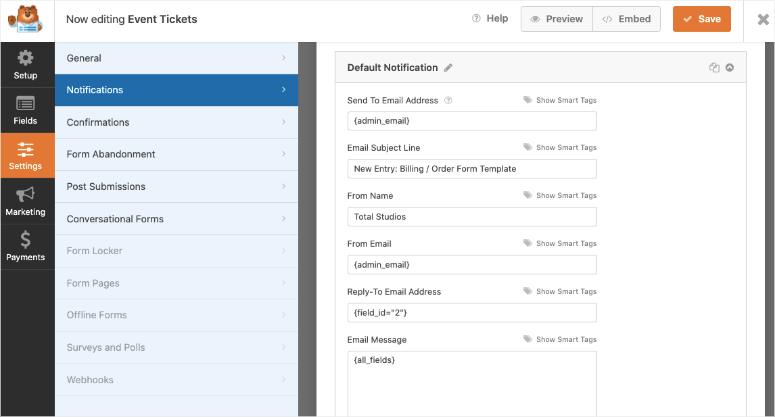
Here’s where I would stop you: Payment processing is only available on the Pro plan. Stripe is not included in the cheaper tariffs. If ticket sales are your goal, budget for Pro from the start.
My experience with WPForms
I created a ticket form using the Ticket Booking Form template in about 12 minutes. Strips connected in 2 steps. The test purchase went smoothly.
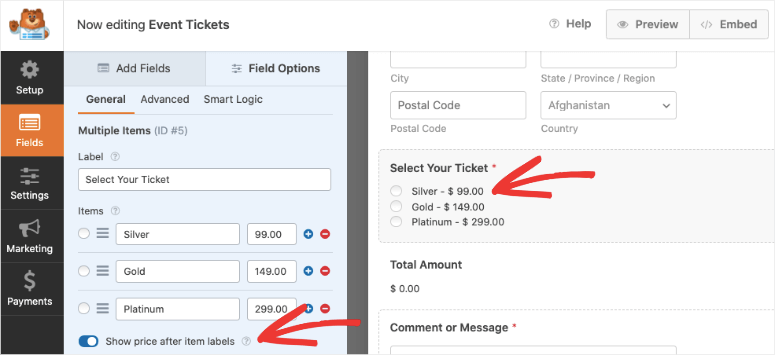
I added ticket tiers using the drag and drop builder. I also added a calculator to the form to help participants who want to purchase large quantities of tickets plan properly.
The Restriction appeared in post-purchase management. WPForms does not have a participant dashboard or a ticket-specific view.
To see who purchased, export form entries and sort them manually. This is feasible for an event with 20 people. For 300 participants with 3 ticket types you need a special plugin.
🟢► Advantages
- Highest WordPress.org Rating on this list: 4.8/5 with over 14,000 reviews. This makes it the most trusted form builder in WordPress.
- No new plugin to learn: Teams already using WPForms add ticketing within the same interface they already know.
- Built-in email automation: Stripe payment + Mailchimp or ActiveCampaign signup triggered in a single form submission.
- Conditional logic for ticket levels: Show different fields or prices depending on which ticket type someone selects.
🔴► Disadvantages
- Pro plan required for payments: If you only need to sell online tickets, the Pro plan can be an expensive purchase.
- No participant management dashboard: WPForms tracks form submissions, not ticket orders. Managing a large attendee list requires manual spreadsheets.
My verdict: WPForms makes sense if your website already runs it or needs a form builder that handles multiple tasks. Most people get WPForms and end up relying on it far more than originally intended.
Check out my WPForms review. You’ll also learn exactly how to sell event tickets using this form builder.
Prices: Free Lite plugin available | Premium plans start at $49.50/year
👉 Get started with WPForms here
3. WP Simple Pay ⭐⭐⭐⭐⭐
Ideal for: Organizers who sell a ticket type and need to accept Stripe payments as quickly as possible
Sometimes the problem is not complex. You have an event, a price and you need people to pay you by next Friday.
WP Simple Pay solves this problem faster than anything else on this list.
Connect your Stripe account (2 steps), select one of the ready-made payment form templates, set the ticket price and embed the form on any WordPress page using a shortcode.
The entire process took me 4 minutes without setting up a store.
Why is WP Simple Pay one of the best WordPress event ticketing plugins?
What makes WP Simple Pay particularly good: It is a verified Stripe partner, which makes the integration unusually reliable.
Your shoppers get Stripe’s full credit card and digital wallet payment options like Apple Pay, Google Pay, and all international payment methods without you having to configure any of them.
This gives your users the opportunity to conveniently choose the payment method they want.
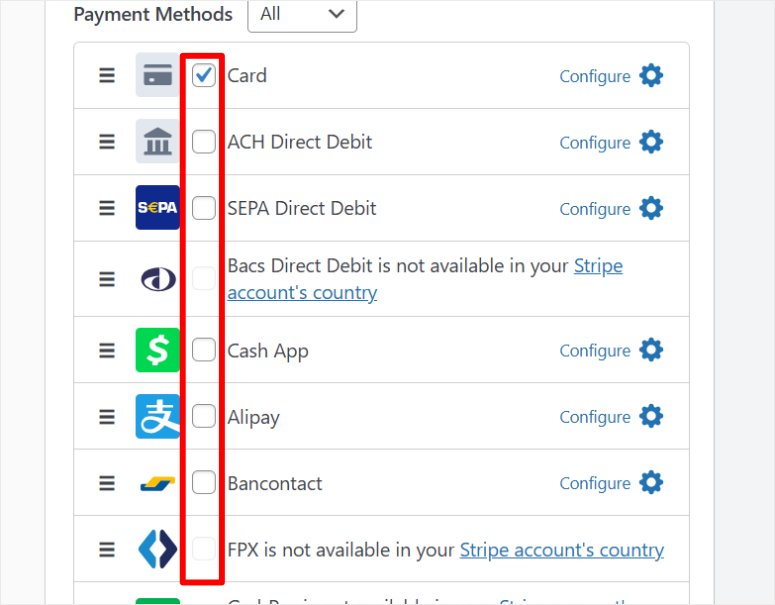
Most importantly, the payment form automatically adopts your website design so it doesn’t look clunky.
Pro plans eliminate the 3% platform fee charged in the free Lite version and add on-site payment forms. So customers pay without leaving your WordPress site.
The free version redirects to Stripe Checkout. For a simple event, forwarding is fine. For a premium event where the brand experience is important, checking out on site is worth it.
A real limitation: WP Simple Pay does not create participant records. There is no “who bought” dashboard. Your attendee list resides entirely in your Stripe account.
You can export it from there, but it requires signing in to Stripe and manual filtering.
My experience with WP Simple Pay
I liked how easy it was to create the event ticket forms. The templates are clean, have a clear description and quick preview so you can see how each looks on a live page.
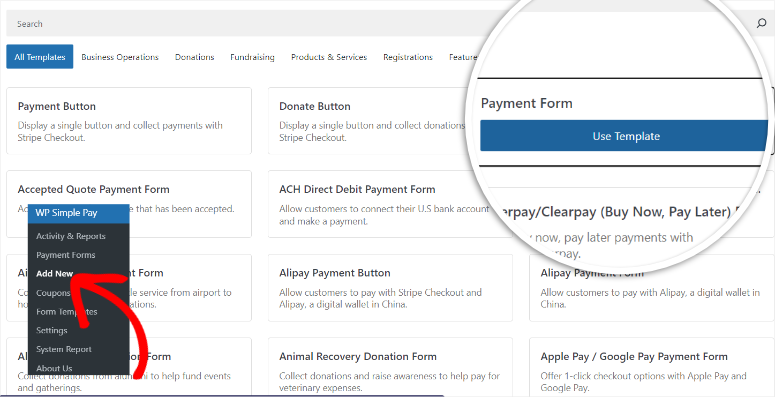
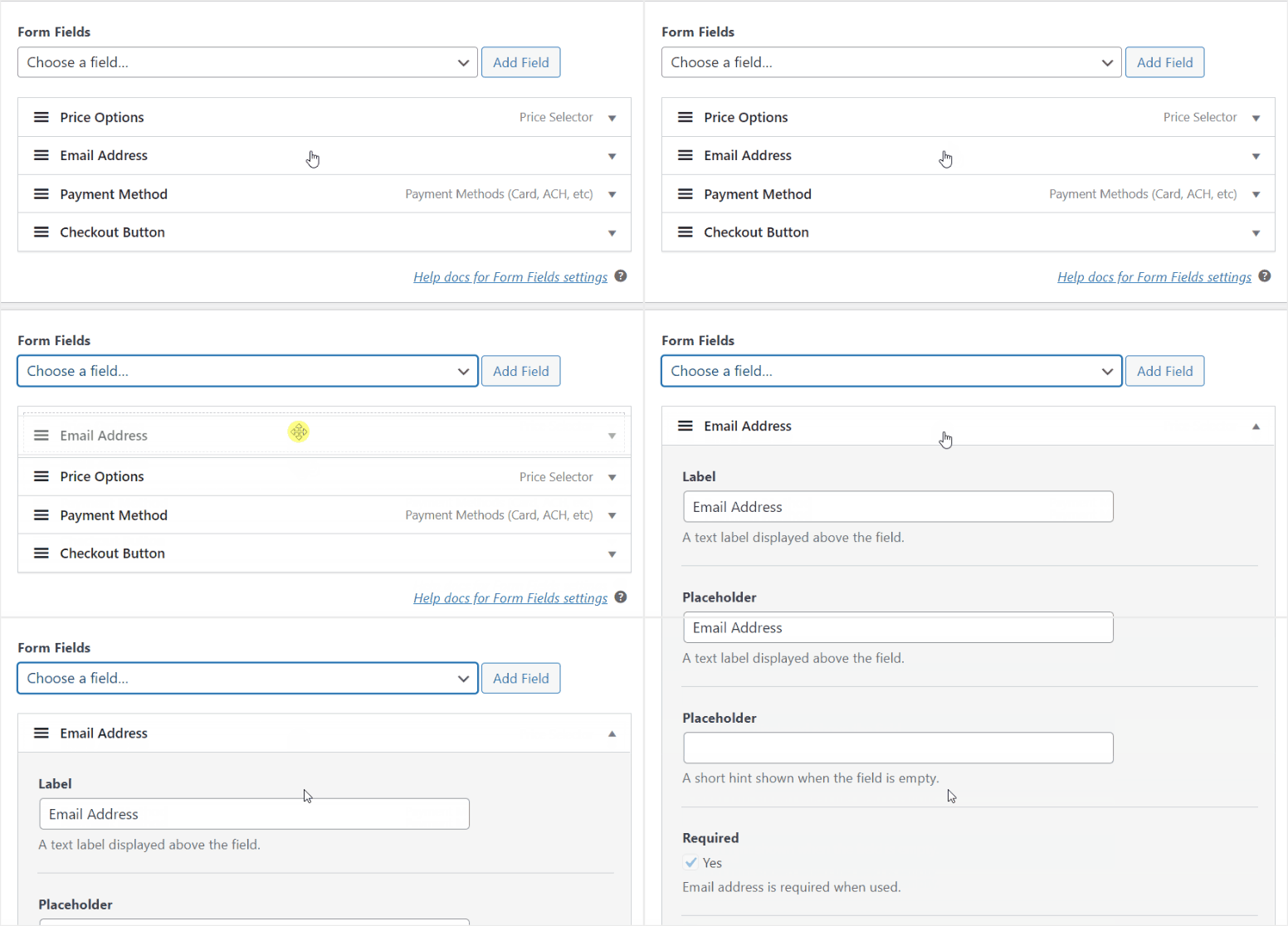
Customization was also easy. I used drag and drop in some sections and a drop down menu in others. If I were to rate this item based on ease of use, WP Simple Pay would come first.
I made three test purchases: one by card, one by Apple Pay, and one by ACH debit. All three made it to Stripe within 10 seconds. The custom receipt email arrived correctly formatted.
🟢► Advantages
- Fastest setup on this list: Four minutes from installation to live Stripe payment form.
- Stripe partner integration: Stripe certified partner status means Apple Pay, Google Pay and over 30 international payment methods work without additional configuration.
- No platform fees for paid plans: The free plan charges 3%, but any paid plan eliminates this amount entirely.
- Subscriptions in the free tier: You can set up recurring payments for event memberships or series tickets, even without upgrading to Pro.
🔴► Disadvantages
- No participant management: Ticket buyers are Stripe records, not attendee records. You manage your list in Stripe.
My verdict: WP Simple Pay is the right choice if speed is more important than features. If you need to sell a type of ticket this week and you have Stripe, nothing will get you there faster. Once your events exceed one ticket type or 50 attendees, you will need a dedicated ticketing plugin that tracks attendees natively.
Check out my WP Simple Pay review.
Prices: Free Lite plugin available (3% platform fee) | Pro plans start at $49.50/year
👉 Get started with WP Simple Pay here
4. Easy digital downloads ⭐⭐⭐⭐
Ideal for: Event organizers selling event tickets along with other digital products in one store
Most ticketing plugins treat event tickets as a separate category. Easy digital downloads treat it the same way you would anything else you sell: as a digital download.
That sounds like a limitation. It’s actually a function.
Why is Easy Digital Downloads one of the best WordPress event ticketing plugins?
EDD’s variable pricing allows you to convert a single Founders Summit Ticket product into a full-tier pricing system without additional add-ons.
This allows you to set Early Bird at $49, General Admission at $79, and VIP at $149 as pricing options for a product.
Each level gets its own storage limit. If Early Bird is sold out, it will automatically disappear from the checkout. This makes the entire checkout experience convenient for both you and your attendees.
Shoppers can add multiple ticket types, apply a discount code, and receive a customized confirmation email in one transaction, all from a checkout page that matches your existing website design.
You can also add PayPal, Stripe and Apple Pay to ensure you receive payment via your preferred method.
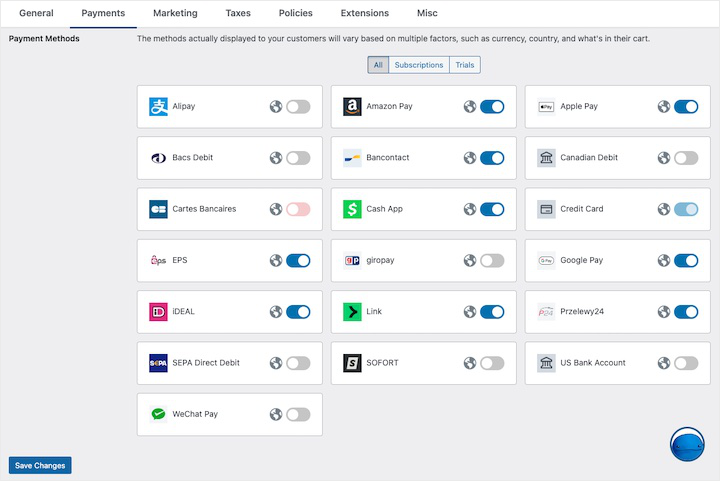
This is where EDD differs from the typical WordPress e-commerce store. It allows you to sell other things besides your events.
For example, a post-event workbook, online courses and LMS content, a digital template, a digital product or even physical products – EDD carries everything from a single store.
This means attendees can purchase their ticket and a resource at the same checkout without having to install a second plugin.
The flip side is the same coin. EDD does not have an event page, attendee check-in, or QR code. It is an e-commerce store that sells tickets.
If you need event-specific functionality, you’ll need to pair it with something like Sugar calendar.
My experience with simple digital downloads
I set up a three-tier ticket product with inventory limits on a personal plan.
The setup took about 25 minutes. This was longer than the simpler tools on this list, but the result felt more like a real product shop than a ticket form.
The feature that surprised me the most was abandoned cart recovery. An incomplete test purchase triggered an automated follow-up email 30 minutes later.
For a 200-seat paid event, such a recovery email could capture 10-15% of incomplete checkouts.
🟢► Advantages
- Variable prices as integrated ticket levels: Create Early Bird, General Admission, and VIP pricing options for a single product. No additional plugins.
- Abandoned Cart Recovery: Automatically sends an email to buyers who have not completed the checkout process. A useful feature for paid events with limited seating.
- Checkout for multiple products: Participants can purchase a ticket and a digital resource in the same shopping cart transaction.
- No platform fees for paid plans: Stripe and PayPal processing without additional EDD incision.
🔴► Disadvantages
- No event-specific features: No attendee check-in, QR codes or event listing page. EDD is a business, not an event management tool.
My verdict: EDD makes sense if your WordPress site is already a digital storefront or if you plan to sell post-event resources in addition to tickets. If you only sell event tickets and have no other digital products, Sugar Calendar or WP Simple Pay will get you there with less setup and lower costs.
Check out my Easy Digital Downloads review. Compare the free and paid Easy Digital Downloads plans
Prices: Free plugin available | Pro plans start at $99.50/year
👉 Start here with easy digital downloads
5. The events calendar ⭐⭐⭐⭐
Ideal for: Organizers building a dedicated event website and wanting the largest WordPress event ecosystem

The events calendar This is what WordPress event ticketing looks like when it has been purpose-built and battle-tested for over a decade.
The free Event Tickets companion plugin adds Stripe and PayPal ticketing to any event you create. Stripe connects in one step. PayPal connects without an API key.
Your buyers can pay however they want and you’ll receive a participant report that you can view and export in your WordPress dashboard.
Why is Events Calendar one of the best WordPress event ticketing plugins?
What sets Events Calendar apart from all the form-based tools on this list is the events page itself.
Events get their own URL, SEO-optimized listing, and calendar view that visitors can filter by category or date.
It is a dedicated event management layer where ticketing runs.
The caveat is the ecosystem itself. Events Calendar has 10+ premium add-ons including recurring events, venue management, Zoom integration, and event aggregation.
Each is useful but costs extra. The events calendar is owned by Liquid Web and we have noticed some significant changes to the plugin. In addition, the pricing has also changed.
We’re still waiting to see how they’ll tackle the add-on base that The Event Calendar is known for. Read the add-on list carefully before setting a budget.
Remember that plugin bloat by stacking multiple add-ons is a real problem for your website performance.
My experience with the event calendar
I created a test event and added two ticket tiers using the free Event Tickets plugin. The checkout flow, Stripe via Tickets Commerce, was clean and quick.
Buyers automatically receive an email with their ticket attached.
Where I noticed the complexity: The Settings window has 12 tabs. Events Calendar is not a 30 minute setup if you want to fully configure it.
For a team selling tickets to an occasional event, that’s more than necessary. For a team building an ongoing events business on WordPress, it’s the right foundation.
🟢► Advantages
- Free Stripe + PayPal ticketing: The free Event Tickets plugin processes real payments. No premium plan is required to start.
- Specially created event pages: Events receive their own SEO-optimized entry with a calendar display. Not just a form embedded on a page.
- Largest ecosystem on this list: Over 10 official add-ons, extensive third-party theme support, and the largest WordPress.org user community of any event plugin.
- Participant exports: Filter and export attendee lists by ticket type directly from your WordPress dashboard.
🔴► Disadvantages
- Complexity of settings: 12 settings tabs and a large add-on ecosystem mean it takes longer to set up than simpler tools. Not ideal for one-off events.
- Additional costs add up quickly: Getting started for free is easy. Adding recurring events + venue management + Zoom integration can drive up the overall cost.
- Purchased from Liquid Web: We have recently seen some significant changes in how the plugin works. Prices have also increased dramatically.
My verdict: Events Calendar is the right choice for anyone who is seriously interested in building a long-term event presence on WordPress. Free Stripe ticketing is a real win. However, if your event is only occasional, the investment in the facility will be more than you need. Get live in a fraction of the time with Sugar Calendar or WP Simple Pay.
Check out my events calendar review.
Prices: Free plugin available | Pro plans start at $259/year
👉 Start with the events calendar here
6. Eventin ⭐⭐⭐
Ideal for: Conference and workshop organizers who need speaker management, individual seating and QR check-in
Eventin was designed for the event which is too complex for a simple ticket form.
Think multi-lane conferences, speaker lineups, reserved seating, and custom printed PDF tickets.
These are features that typically require a dedicated SaaS event platform like Hopin, Eventbrite, or a custom solution. Eventin inserts them into WordPress.
Why is Eventin one of the best WordPress event ticketing plugins?
The feature that first caught my attention was AI event generation. I entered a three-sentence description of a workshop and Eventin created a full event page.
I received a draft schedule, speaker slots, suggested ticket prices, and a registration form. Not perfect, I spent about 15 minutes cleaning it up. But 15 minutes is much faster than building from scratch.
The ticket builder is a real differentiator.
You design the PDF ticket visually: drag in the event name, QR code, participant details and your logo. Each buyer automatically receives an individually branded PDF in their inbox.
Additionally, webinar and virtual event pages are created natively. Zoom links will be automatically sent to registrants after purchase.
Here’s the honest caveat: for a simple, one-ticket event, Eventin is overkill. The settings panel offers over 30 options.
A non-technical team member will spend more time on documentation than getting tickets live.
My experience with Eventin
I created a test conference with 3 ticket tiers and 4 speaker slots in the standard plan. Setup took about 45 minutes, the longest of any plugin I tested.
However, the result was the most complete events page on this list.
The QR check-in worked exactly as described. I used the mobile scanner to complete a test check-in and the participant status updated in real time on my dashboard.
For an event with 500+ attendees and a team managing door access, this is a useful operational feature.
It is particularly suitable for organizations that run membership-based training programs or cohort events where the same participants return repeatedly.
🟢► Advantages
- AI event page generation: Describe your event in a few sentences and Eventin will create a draft page with a schedule, speakers and ticket prices.
- Custom PDF Tickets with Logo: Design and send branded ticket PDFs with attendee information, QR codes and your logo.
- QR code check-in app: iOS and Android app for QR scanning at the door. Real-time participant status in your dashboard.
- Conference-level features: Speaker management, session planning, custom seating charts, all in one plugin.
🔴► Disadvantages
- Complex setup for simple events: Over 30 setting options and a learning curve that is not suitable for one-off or small events.
My verdict: Eventin earns its place for conference organizers who need speaker management and branded ticketing without paying for a SaaS platform. For something simpler, a workshop, a meeting, a single ticket event, the setup time won’t match the depth of functionality you actually need.
Prices: Free plugin available | Pro plans start at $79/year
7. WP event manager ⭐⭐⭐
Ideal for: Budget-conscious organizers who already run WooCommerce and want a modular event listing layer
WP event manager starts with a clear premise: only pay for what you actually use.
The free basic plugin manages event lists and a simple calendar.
All other features, ticket sales, recurring events, a registration system, a calendar view, and a mobile organizer app, are separate modules that you can add or skip.
If you just need listings and tickets, you’re paying for two things. If you need the full suite, build towards it.
Why is WP Event Manager one of the best WordPress event ticketing plugins?
The ticket sales module connects to WooCommerce, meaning buyers go through a standard WooCommerce checkout.
This is a familiar experience for anyone who shops online. This also means that it adopts WooCommerce’s full payment gateway library.
Websites that don’t need a full eCommerce store may want to look into more lightweight WooCommerce alternatives before opting for this setup.
However, for those who already use WooCommerce, the effort is minimal.
The organizer app is worth mentioning. Available for iOS and Android, it allows door staff to check in attendees via QR code from their phone.
This ensures that the check-in process runs smoothly, just like with a special appointment booking system. For events where you manage multiple entry points, a mobile native solution is important.
Where WP Event Manager has problems: There are a few bugs that need to be fixed. For example, ticket prices can be randomly reset to zero.
The issue appeared to be resolved, but it’s the type of report that requires special scrutiny before trusting it with a live event.
My experience with WP Event Manager
I created a simple event listing using WooCommerce ticketing. The core structure worked as described. The practical problem I encountered: The pricing page lists the package cost in Indian Rupees without USD conversion.
I had to calculate what I would actually spend before I could create a budget. Not ideal if you’re looking into purchasing a plugin.
🟢► Advantages
- Truly modular pricing: Only buy the features you need. The basic plugin is free; Add-ons are purchased individually. –
- WooCommerce integration: Adopts WooCommerce’s full payment gateway library. Every payment method supported by WooCommerce is available.
- Mobile organizer app: iOS and Android QR check-in app for participant management right at your doorstep.
- Prepared in multiple languages: WPML compatible for events with multilingual audiences.
🔴► Disadvantages
- WooCommerce required for ticket sales: Adding WooCommerce to a website that doesn’t require a full store adds complexity and overhead.
- Prices published in Indian Rupees: No USD equivalent shown. You carry out the conversion yourself before purchasing.
My verdict: WP Event Manager works, but the ticket price reset error and opaque pricing page introduce friction that most other plugins on this list avoid. This is a good choice if your website is already running WooCommerce and you want a lightweight event listing layer on top of it.
Prices: Free plugin available | Pro plans start at $199 for a one-time license
👉 Get started with WP Event Manager here
This is my list of the best event ticketing plugins for selling tickets online. If you want to narrow down this list further, check out the section below.
How to choose the right WordPress event ticketing plugin
The right choice depends on three things: what your event looks like, what your website already offers, and how technical your team is.
If you need calendar + ticketing in one plugin, not WooCommerce → Sugar calendar
- This is the setup that most small organizers actually need.
- Sugar Calendar displays your events on a calendar, handles ticket sales via Stripe, and tracks attendees without adding WooCommerce.
If you need a multifunctional form builder → WPForms
- It’s a real value-add if you’re looking for a form builder that can do multiple things.
- Additionally, if WPForms is already installed and your team can handle it, adding a ticket booking form with Stripe takes about 12 minutes.
If you need to accept Stripe payments this week, quick → WP Simple Pay
- A ticket type and a Stripe account. With WP Simple Pay you can be live in under 5 minutes.
- There is a 3% platform fee for the free Lite version. Upgrade to Personal when selling any volume.
If you also sell other digital products in addition to tickets → Easy digital downloads
- EDD treats tickets the same way as e-books, courses and software. Variable pricing gives you integrated ticket tiers.
- Abandoned cart recovery helps you recover incomplete purchases. If your event is a product in a larger digital catalog, EDD keeps your entire business in one store.
When you create a dedicated event site → The events calendar
- The Events Calendar + Event Tickets gives you a full event management layer with free Stripe and PayPal ticketing.
- It is the solution specifically tailored to WordPress for an ongoing events business. Read the add-on list carefully; The ecosystem is excellent and the costs stack up.
If you are organizing a conference with speakers and seating → Eventin
- For multi-track events, speaker management, and branded ticket PDFs, Eventin is the most feature-rich option on this list.
- AI event generation saves real time on the first build.
If you are already running WooCommerce and want a lightweight events layer → WP event manager
WP Event Manager is modular: buy only what you need. If WooCommerce already runs your website’s store, adding WP Event Manager’s tickets module requires less effort than migrating to a standalone solution.
Well done. You now have a list of the best WordPress event ticketing plugins and a way to narrow down your choices. If something is unclear, check out the frequently asked questions below.
FAQs: Best WordPress Event Ticketing Plugins
What is the best free WordPress event ticketing plugin?
The Events Calendar + Event Tickets (both free) is the strongest free option. It processes real Stripe and PayPal payments without requiring a premium plan. Sugar Calendar Lite is also free, but charges a 3% platform fee for each ticket sale. To get the most free features, start with the Events Calendar.
Can I sell event tickets on WordPress without WooCommerce?
Yes. Sugar Calendar, WPForms, WP Simple Pay, Easy Digital Downloads, and The Events Calendar all process Stripe payments without WooCommerce installed. WooCommerce is only required for WP Event Manager’s ticketing module and is optional for Eventin.
How do I sell tickets on my WordPress site with Stripe?
Install Sugar Calendar Lite (free), connect your Stripe account in the plugin settings, create an event and activate ticket sales. The ticket purchase form automatically appears on the event page. Total setup time: less than 30 minutes for a first event, no code required.
What is the difference between the event calendar and event tickets?
They are two separate free plugins designed to work together. The Events Calendar creates and displays event lists with calendar views. Event Tickets adds ticket sales layer Stripe and PayPal checkout, attendee tracking, and RSVP collection. For a complete event management and ticketing setup, both must be installed.
Is there a WordPress event ticketing plugin like Eventbrite?
Sugar Calendar and The Events Calendar are the closest WordPress equivalents. Both create event pages, sell tickets, and manage attendees directly on your website without Eventbrite’s service fees (6.95% + $1.59 per paid ticket on the standard plan). If you need dedicated event booking WordPress plugins for more complex registration scenarios, these work well with both tools.
How do I manage attendees after someone has purchased a ticket?
Most dedicated plugins, Sugar Calendar, The Events Calendar and Eventin, create an attendee record for each purchase in your WordPress dashboard. You can filter by ticket type and export to CSV before your event. Many also automatically feed your attendee list directly into your lead capture and email tool, so post-event follow-up is done without manual exports.
Final Verdict: Should I use a WordPress event ticketing plugin on my website?
Yes, and the sooner the better.
The founding team I mentioned at the beginning? They had 200 people willing to participate and no way to accept their money.
A third-party ticketing platform would have solved the problem and collected 7-10% of all ticket sales in fees. Your existing WordPress site could have done the same for Stripe’s default processing rate.
That’s the real reason to do this on WordPress. You keep more of what you earn. Your attendees will shop on an event sales page that looks like your brand, rather than the generic page of a third-party platform.
And when the event is over, the attendee data is yours with no platform-related export restrictions, terms of service changes, or surprise fee increases next year.
Choose the tool that suits your next event, connect it and make a test purchase before opening the sale. That’s it.
Resource Hub: WordPress Event Management
Do you want to go deeper? These guides cover the tools and tactics involved in setting up your event ticketing.