

Writing strong page titles is one of the easiest and most effective SEO optimizations you can do. The title tag is often the first thing users see in search results, and it helps search engines understand the content of your page.
In this article, you’ll learn what SEO page titles are, why they’re important, and how to write titles that improve visibility and attract clicks.
Key insights
- Creating a meaningful page title is crucial for SEO. It attracts clicks and helps search engines understand your content
- An SEO page title appears in search results and browser tabs and gives users the first impression
- To optimize your page title, include relevant keywords and make sure it matches the content to improve your ranking
- Yoast SEO offers tools to check title width and keyword usage and includes an AI-powered title generator
- You can change the page title after publishing and thereby significantly improve click-through rates
What is an SEO page title?
Let’s start with the basics. When you view the source of a page (right-click the page and then select View Page Source), you will find a title in the header section. It looks like this:
This is an example SEO title - Example.com
This is the HTML title tag, also called the SEO title. When you search for something on a search engine, you get a list of results displayed as snippets. The part that looks like a heading is the SEO title. The SEO title usually contains the title of the post, but can also contain other elements, such as the name of the website. Or even emojis!
In most cases, the SEO title is the first thing people see, even before they get to your website. In tabbed browsers, you will usually also see the SEO title in the page tab, as shown in the image below.

What is the purpose of an SEO title?
Your SEO title should entice people to click, visit your website, read your post, or buy your product. If your title isn’t good enough, people will ignore it and move on to other results. Essentially, there are two goals you want to achieve with an SEO title:
- It must help you rank for a keyword
- It needs to get the user to click through to your site
Google uses many signals to determine your relevance to a specific keyword. While click-through rate is not a direct ranking factor, user interaction with search results can be a signal that a result matches search intent.
If your page ranks well but only attracts a few clicks, it may indicate that your title isn’t resonating with searchers. Improving your SEO title can help you get more clicks and perform better over time.
Additionally, as mentioned earlier, Google uses the SEO title provided for your website as a ranking input. So it’s not just about those clicks; You also need to make sure your title reflects the topic being discussed on your page and the keyword you are focusing on. The SEO title you use has a direct impact on your ranking.
Now that you know the importance of SEO titles, let’s look at how you can evaluate and improve them. Tools like Yoast SEO (free) can help by checking key elements like title width and keyword usage. Yoast SEO Premium uses generative AI to create titles.
A smarter analysis in Yoast SEO Premium
Yoast SEO Premium has one Intelligent content analysis This will help you take your content to the next level!
Yoast SEO Premium includes an AI-powered title generator that can help you create SEO-friendly page titles based on your content and focus keyphrase. This can be useful for inspiration or to quickly generate alternatives if you’re unsure how to word a title.
As with all AI-generated content, it’s best to review and refine suggested titles to ensure they align with your page’s intent, brand voice, and audience expectations.
When you use Yoast SEO Premium, you also get various other AI features such as: B. Yoast AI Optimize to help you do the hard work.
What does the blank title check do in Yoast SEO?
The blank title check in Yoast SEO Premium is self-explanatory: it checks whether you have filled out text in the title section of your post. If you haven’t done this, a red light will remind you to add a title. Once this is filled out, the post title can be automatically added to the SEO title field using the “Title” variable.
Note that the title of your post will be output as an H1 heading. A clear H1 helps users quickly understand what a page is about, improves accessibility for screen readers, and helps search engines interpret the page structure. You should only use one H1 heading per page to avoid confusing search engines. Don’t worry; We received an audit for multiple H1 headings in Yoast SEO!
What does SEO title width checking do in Yoast SEO?
You can find this check in the SEO tab of the Yoast SEO sidebar or meta box. If you haven’t written an SEO title yet, here’s a reminder to do so. Additionally, Yoast SEO checks the width of your SEO title. If it’s too long, you’ll get a warning.
We used to warn you if your SEO title was too short, but we’ve changed that since the release of Yoast 17.1. A title with optimal width gives you a green light in the analysis. Remember that we exclude the separator and site title from the title width check. We do not take these into account when calculating the SEO title progress bar.

How to write an SEO title with optimal width
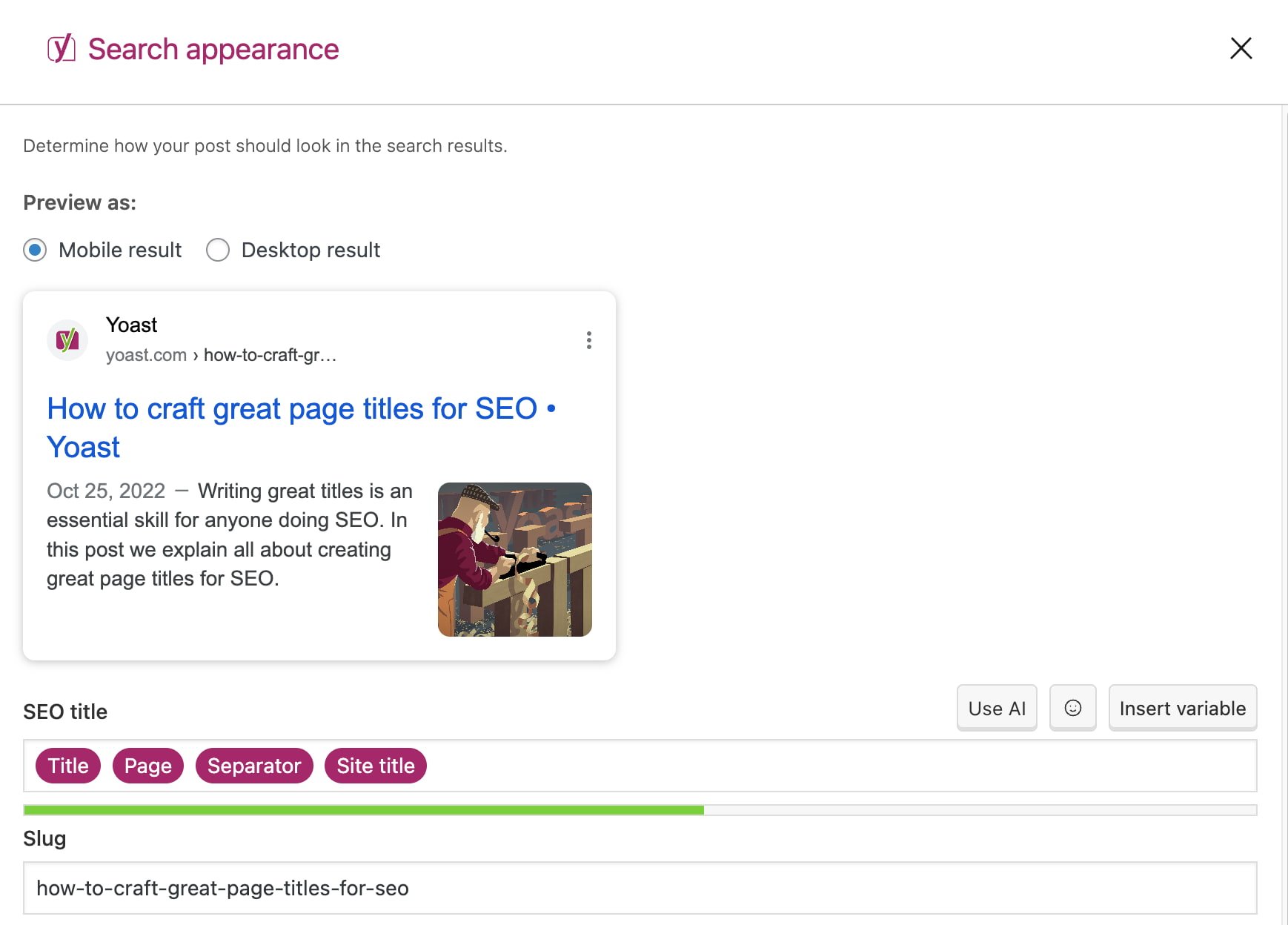
If your SEO title is not the right width, parts of it may be cut off in Google search results. The result may vary depending on the device used. That’s why you can also check how your SEO title will look in mobile and desktop search results in the Search Appearance section of Yoast SEO. The tool is set to the mobile version by default, but you can also switch to display it in the desktop version.
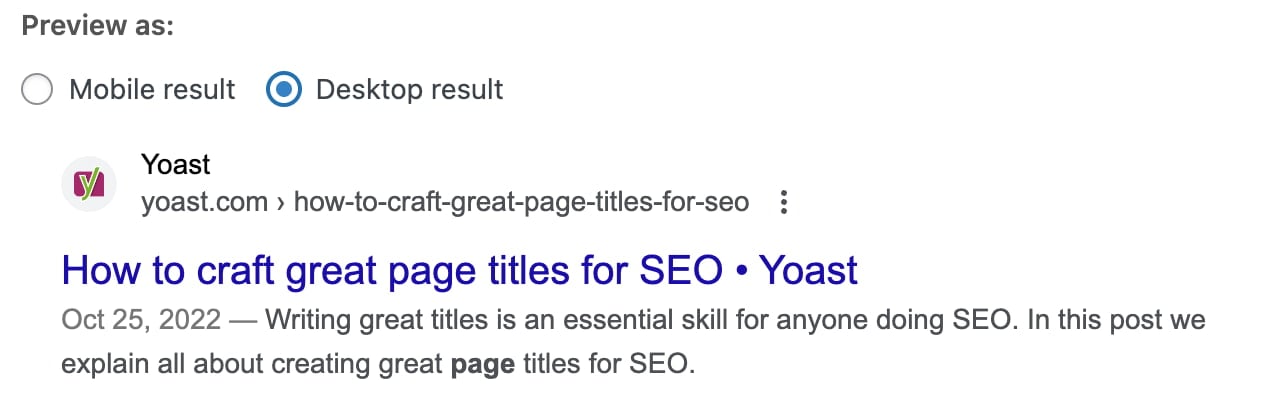
Here is a desktop result:
And here is the mobile result for the same URL:
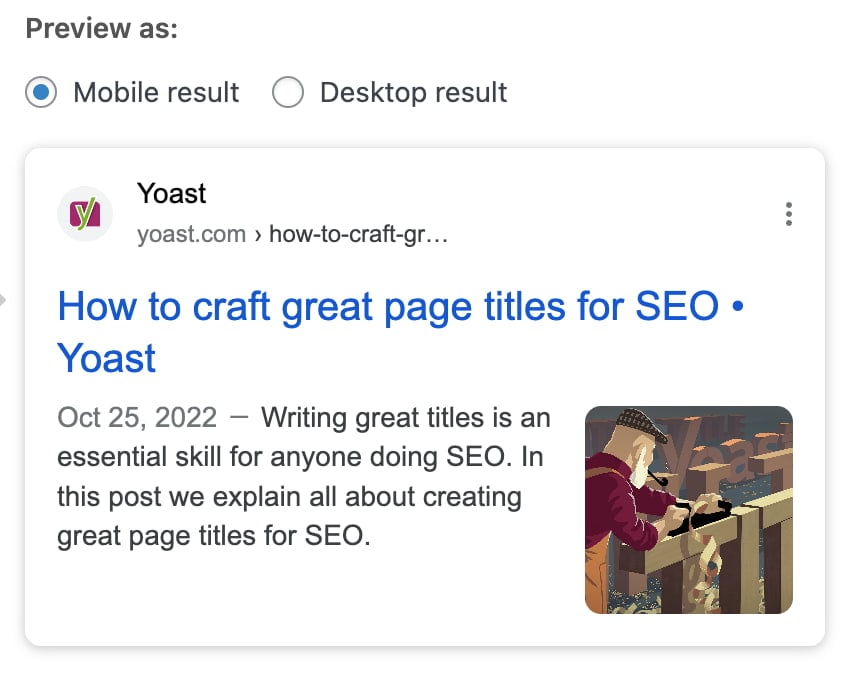
As a general guideline, you should aim for a title that is fully visible in mobile search results, clearly communicates the main topic, and avoids unnecessary filler words. If your title fits visually and still reads naturally, you are on the right track.
Width vs. Length
Have you noticed that we’re talking about width rather than length? Why is that? Instead of using a character count, Google has a fixed width for titles counted in pixels. While your title tags can be long and Google has no limit on the number of characters you can use, there is a limit to what is visible in search results. If your SEO title is too wide, Google will shorten it visually. This might be different than what you want. Additionally, avoid wasting valuable space by keeping the title concise and clear. Additionally, the SEO title often informs other title-like elements, such as: og:titlewhich also has display restrictions.
Luckily, our Find Appearance section can help you! You can enter your SEO title; Our plugin gives you immediate feedback. The green line under the SEO title turns red if your title is too long. Keep an eye on this and use the feedback to create great headlines.

The Search Appearance section in the Yoast SEO for WordPress block editor
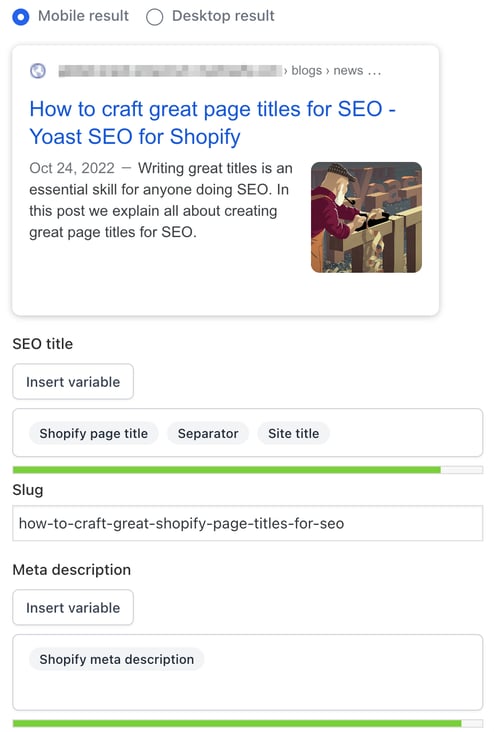
The Google preview in Yoast SEO for Shopify
What does the key phrase do in SEO title check in Yoast SEO?
This check appears in the SEO tab of the Yoast SEO sidebar in WordPress and Shopify, as well as in the meta box in WordPress. It checks whether you use your key phrase in the SEO title of your post or page. This check is intentionally rigorous because the SEO title plays an important role in signaling a page’s theme to both search engines and users. Since Google uses the title to figure out the topic of your page, not having the focus key phrase in the SEO title can hurt your rankings. Additionally, potential visitors are more likely to click on a search result that matches their search query. For best results, try including your key phrase at the beginning of the SEO title.
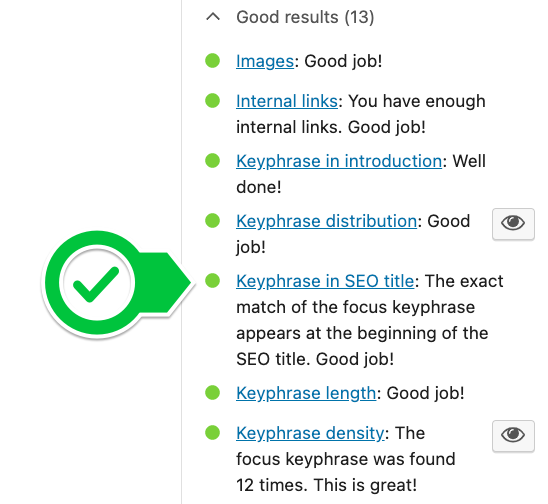
How to use your key phrase in the SEO title
When optimizing for a highly competitive keyword, the keyword is sometimes placed at the beginning of the SEO title. In this case, you can try to make it stand out by putting a word or two before your focus keyword, slightly “indenting” your result. In Yoast SEO, if you start your SEO title with “the,” “a,” “who,” or any other function word followed by your keyword, you will still get a green light.
In other cases, such as if you have a very long keyphrase, it doesn’t make sense to add the full keyphrase at the beginning. If your SEO title looks strange with the key phrase at the beginning, try to include as much of the key phrase as possible in the SEO title as early as possible. But always keep an eye on the natural flow and readability.
How to reduce the chances of Google rewriting your SEO title
Google may rewrite titles if they are too long, keyword stuffed, misleading, or do not match the main page heading.
To reduce the likelihood of rewrites:
- Make sure your SEO title exactly matches the H1 of your page
- Avoid excessive separators, repetitions or boilerplate text
- Make sure the title accurately reflects the page content
While paraphrasing can still occur, clear and concise titles are more likely to appear as they were written.
Would you like to learn how to write easily readable and search engine optimized texts? Our SEO copywriting course can help you with this. You can access this course and our other SEO courses with Yoast SEO Premium. This also gives you access to additional features in the Yoast SEO plugin.
Do you have problems with other aspects of SEO copywriting? Don’t worry! We can teach you to master all facets so you know how to write great copy that gets noticed. Check out our SEO copywriting training and try out the free trial lessons!
Creating an SEO-Friendly Page Title: FAQs
Are the SEO title and H1 heading the same?
To be clear, you should not confuse the SEO title with the post title; both serve different purposes and do not have to be the same.
The post title, also called the H1 heading, is the main heading that users see on the page. Its main role is to help readers understand what the page is about and to provide structure to your content. You should always write your H1 with users in mind.
The SEO title is the title that appears in search results and in the browser tab. This title helps search engines understand the topic of your page and influences whether users click on your result.
Although the SEO title and H1 can be similar, they do not have to be identical. In WordPress, tools like Yoast SEO allow you to set a separate SEO title, giving you more control over how your page appears in search results without changing the heading on the page.
Should you add your brand to the SEO title?
For a long time, it was common practice for some SEOs to omit the website name from the SEO title. The idea was that the “density” of the title was important and the name of the website wouldn’t help with that. Don’t do that. If possible, your SEO title should include your brand, preferably in a recognizable way. If users search for a topic and see your brand multiple times, they may click on it when they see you again on the next page of results, even if they don’t click on it the first time.
However, with that Site name And Favicon To receive updates, be sure to fill out the site settings, upload a favicon, and make general changes to the snippet design. This increases your brand’s visibility in search results. Today, you will notice that Google hardly shows your brand name in the snippet title anymore. However, Google often has its own opinion when generating titles only to change it for a specific reason. The design and function of the SERPs can change at any time. We still recommend adding your brand to your titles.
Can you change the SEO title after a page is published?
Yes. You can also change the SEO title after publishing a page to improve performance.
At Yoast, we once noticed that despite our good ranking for “WordPress Security,” the site wasn’t getting as much traffic as expected. We updated the SEO title and meta description to make them more engaging and relevant. This increased the traffic on this site over 30 percent.
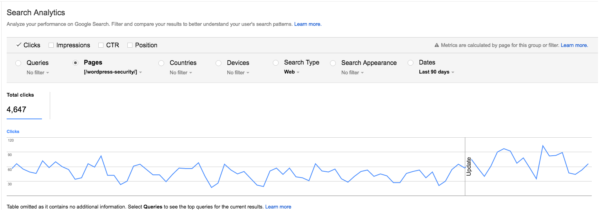
The original SEO title was:
WordPress Security • Yoast
We changed it to:
WordPress security in a few easy steps! • Yeast
This change didn’t have a significant impact on rankings, but it did improve click-through rates. The keywords remained largely the same, but the title became more appealing to searchers.
This shows that post-publish SEO title optimization can be an effective way to increase traffic, especially if your page is already ranking well but is receiving fewer clicks than expected.
Does Google always use the SEO title you set?
No. Google doesn’t always display the exact SEO title you set in search results.
However, the HTML title tag is still the most common source Google uses to generate title links. Google Search uses the following sources to automatically discover title links:
- The
- The most important visible heading on the page, e.g. B. the
- Other headings on the page
- Prominent text designed to stand out
- Anchor text from internal or external links
- Structured data related to the website
Google typically chooses one title per page and doesn’t change it for different searches.
What does this mean for you? The SEO title you set remains important for ranking and relevance. Even though Google sometimes displays a different version, your title still helps search engines understand the content of your page.
To stay on top of changes, monitor your top pages in Google Search Console, check how titles appear in search results, and pay attention to changes in click-through rates.
Can you use the same title for SEO and social media?
You can, but it’s often better not to.
What might be a good SEO title is not necessarily a good social media title. In social media, keyword optimization is less important than creating a title that encourages clicks. Often it is not necessary to include the brand name in the title. This is especially true on Facebook and X when you add some branding to your post image. Our social media presence previews in Yoast SEO Premium and Yoast SEO for Shopify can help you.
If you use Yoast SEO, you can set different titles for Google, Facebook and X. Enter your SEO title in the snippet editor, then customize the social media titles in the Social tab. If you don’t set a specific X title, X defaults to the Facebook title.
This flexibility allows you to optimize your titles for both search engines and social platforms without compromise.
