
Google just provided more information to help us prepare our sites for agents. There’s a new report from Lighthouse that anyone can run. You don’t need any external software to run it. You can do this directly in your Chrome browser.
The report tells you whether your website is discoverable by AI agents, whether you have WebMCP integration set up, and what’s worth discussing: an evaluation of your LLMs.txt file!
How to run the Agent Web report
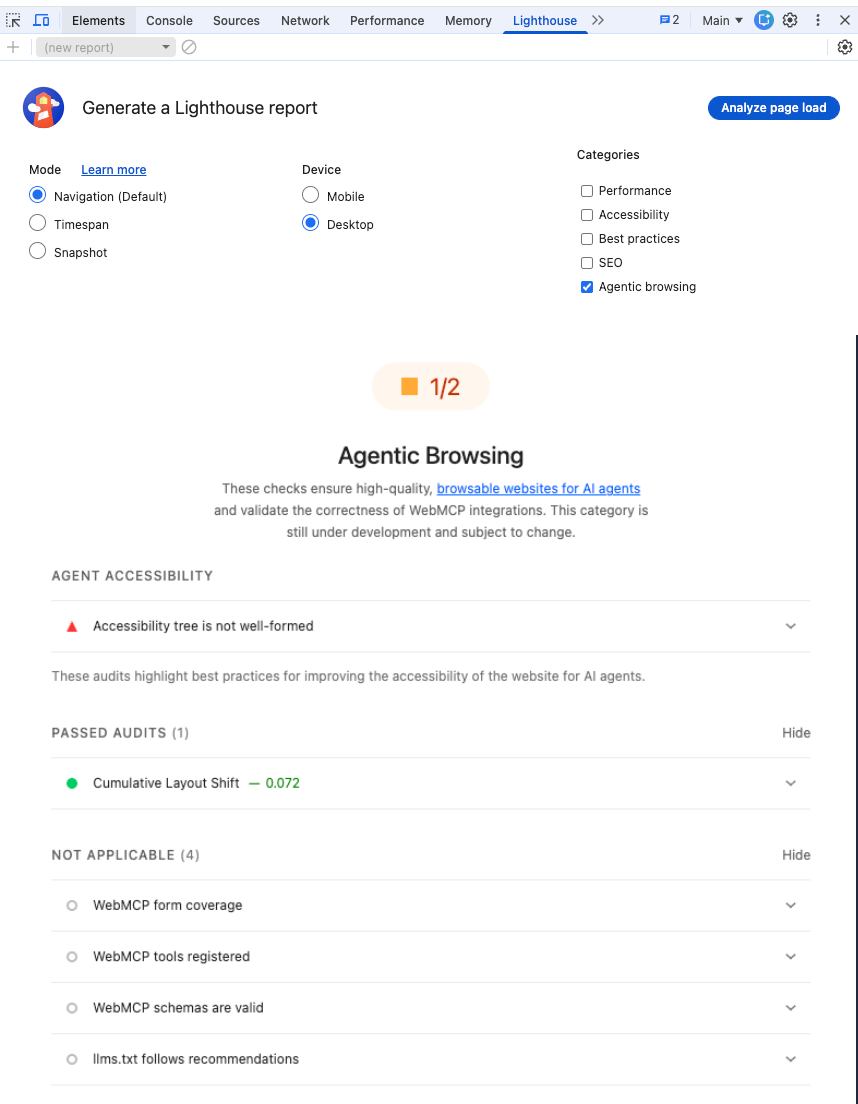
If you currently try to get this report in the standard version of Chrome, you probably won’t find it. You can use it if you have it Chrome Canary. This is the upcoming beta version of Chrome. Once you have that, simply right-click, select “Inspect Page” and then navigate to “Lighthouse” at the top. You will see a new category for “Agentic Browsing.”
Walk me through the new Lighthouse Agent Readiness Report
I ran this on Google’s own page about what’s new Agent Browsing Lighthouse Report and it turns out that Google’s own documentation has problems that could hinder agents! The new report doesn’t give a score out of 100, but rather a ratio that shows how many agent readiness checks your website passes.
3 things to consider when it comes to agent readiness
Here are the topics I have discussed with my clients related to this new shift.
1. AI Accessibility and the Accessibility Tree
Agents can view your pages in three ways:
- Vision (screenshots)
- HTML
- The Accessibility Tree.
The accessibility tree was originally intended for screen readers, but it actually tells an agent where the buttons are and what the important elements are. If your accessibility tree is not well structured, agents will have difficulty using your website. I think that the agent-friendliness of our sites will ultimately be a ranking factor in whether agents recommend your site to others.
2. Understand WebMCP
WebMCP is a proposed web standard to help you build and deploy structured tools for AI agents. Essentially, it’s a way to teach agents how to use your website’s functionality.
There are two types: declarative and imperative. Declarative is simple code that you wrap around a form, while imperative allows the agent to interact back and forth with your website. If you have tools on your site that people use with their agents, WebMCP is going to be very important.
3. The LLMs.txt file
This sounds crazy because Google just released it Documentation for ranking in search AI features say you don’t need LLMs.txt file. But this report isn’t about the search; It’s about agents using your website. The suggestion is to use an LLMs.txt file (similar to robots.txt) to provide Markdown information helps agents understand your website at the time of inference. This allows you to give agents specific instructions about what they can do and where they can find important information. You probably don’t need an LLMs.txt file unless you have items specifically used by agents.
LLMs.txt is intended for agents using your website, not for search purposes.
🦾 I would highly recommend you take some time to audit your own website in Chrome Canary. Most of us don’t need these files at this moment, but we need to be aware of them as our websites start to become agents.
Sign up for the May newsletter to stay up to date on all things search and AI
Or, Join us in the search bar for the latest news on search and AI. Or better yet, join my paid community where we call regularly to brainstorm on the use of AI and I also share tips and ideas.