
If you want to know how to get your site indexed by ChatGPT, I’ll show you, but first I want to be clear: other articles on this topic confuse “being indexed by” with “appearing in” ChatGPT – and that’s not the same thing. Be indexed by ChatGPT means that OpenAI’s search crawler discovered your page and stored it in OpenAI’s proprietary index (about which very little is known publicly). Appears in ChatGPT means your content appeared in a reply, which can be done through this index or via a live web retrieval triggered by a user’s request.
In this guide, I’ll explain both concepts so you understand them, then show you how to get indexed by ChatGPT by ensuring OpenAI’s search crawler can detect your site. The ultimate goal of indexing is to eventually be cited and mentioned in the LLM’s answers to improve your Answer Engine Optimization (AEO) efforts. If it sounds complicated, don’t worry. I make it easy for marketers to understand and implement.
Table of contents
What does it mean to be indexed by ChatGPT?
Indexing by ChatGPT means that not only was your webpage crawled by OpenAI’s crawlers (mainly OAI-SearchBot), but at least some of what the bot discovered was then stored for possible later retrieval, so that the same content could appear in future responses generated by ChatGPT.
When a user sends a prompt in ChatGPT, the model forms a response using a combination of the following:
- Knowledge gained from the training data
- Live web search to get the latest relevant information not included in the training data
- Information that the user entered into the prompt, appended as context, mentioned in previous chat histories (if this feature is enabled), or stored in ChatGPT’s memory (again, if this feature is enabled)
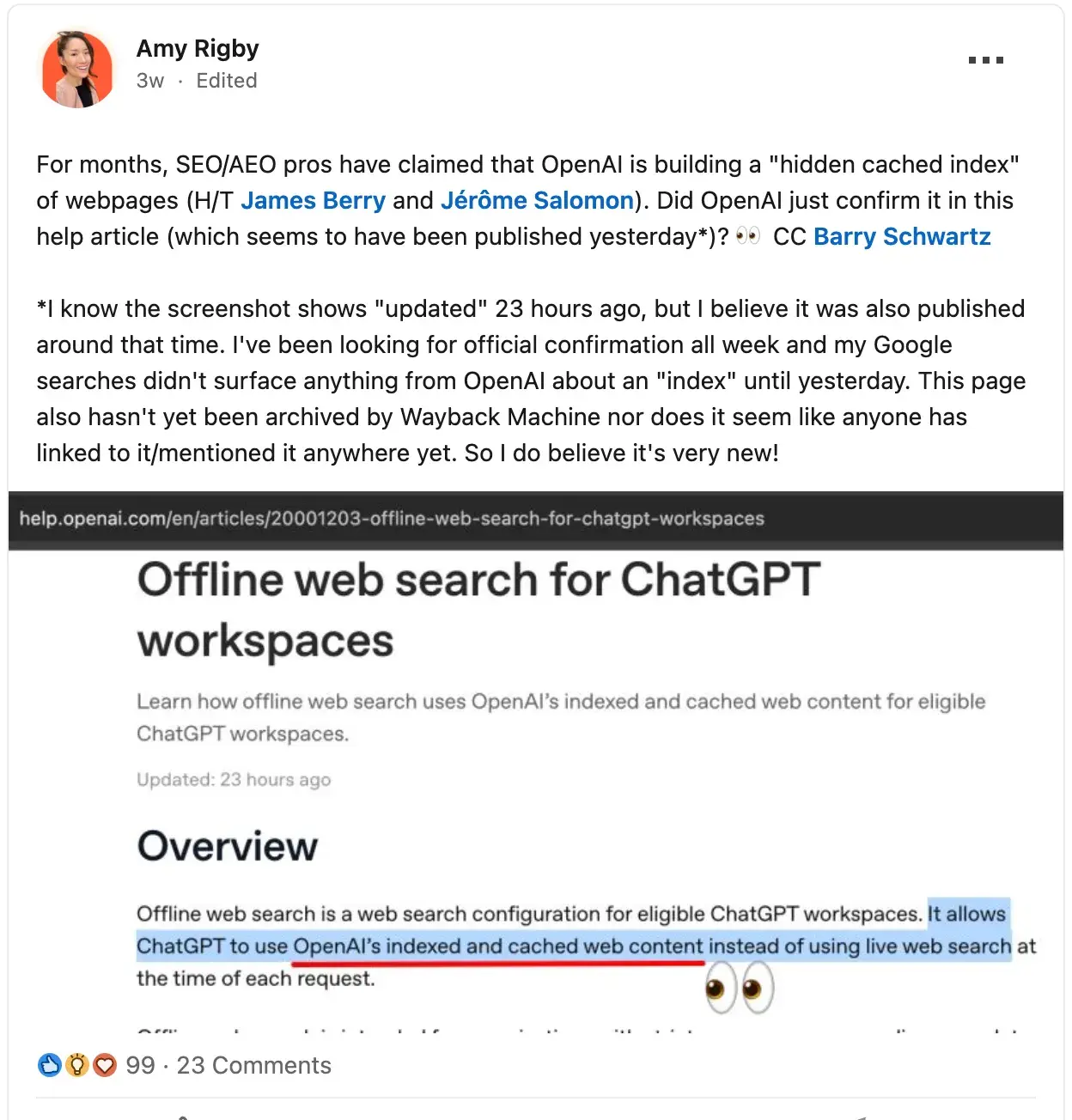
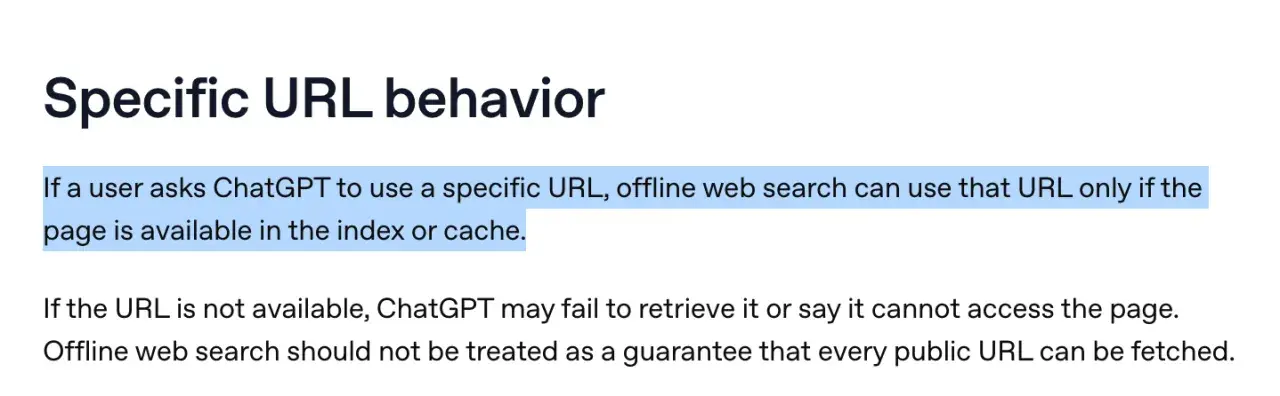
- Content cached in the OpenAI index. OpenAI Documents in the help center that “offline web search uses OpenAI’s indexed and cached web content for eligible ChatGPT workspaces.”
note: Beyond the offline web search functionality documented for appropriate workspaces, SEO/AEO practitioners have reported evidence of broader cache indexing behavior in ChatGPT through independent experiments (which I will describe in a section below). This broader behavior has not been officially confirmed by OpenAI.
How does ChatGPT indexing work?
Because OpenAI doesn’t release details about the architecture or mechanics of its index, no one writing about it currently really knows its inner workings. But the entire “index” framework is based on what we know Google’s search index. Google has crawlers such as Googlebot that crawl the web to obtain content that is stored in the Google index, which the search engine then pulls from to provide results on its SERPs.
From this framework, we can deduce that OpenAI indexing involves three steps:
- Crawled: One of the OpenAI bots has visited your website and read it, usually to retrieve relevant information to include in a response to a user’s query that triggered a live web search. This likely contributes to OpenAI’s searchable web index (although the company has not publicly disclosed details of the underlying system).
- Indexed: After crawling your website, OpenAI saved what it found there. Indexing is enough not While that guarantees you’ll show up, it’s definitely a possibility.
- Appeared: The content that OpenAI has crawled and indexed from your website will be included in a response generated by ChatGPT. Just because content from your website appears in a ChatGPT response does not mean that your brand or website was mentioned/linked to in that response.
Um OpenAI’s bots
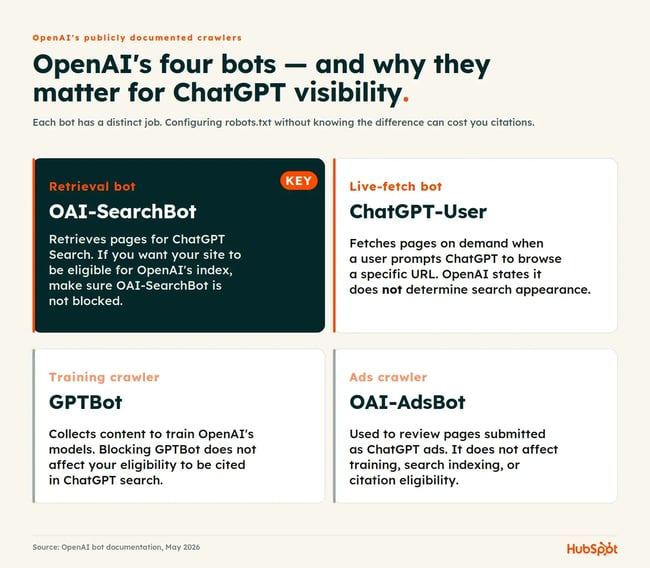
Unlike Google, which has Over 20 publicly documented crawlers And possibly hundreds of non-public onesAs of May 2026, OpenAI has four publicly documented crawlers and user agents:
- OAI SearchBot Retrieves sites for ChatGPT search answers.
- GPTBot Crawls content to train the OpenAI models.
- ChatGPT users Retrieves pages on demand when initiated by a user.
- OAI AdsBot is only relevant when running ads in ChatGPT.
For marketers looking to get indexed by ChatGPT, OAI-SearchBot is probably the crawler that matters most. GPTBot affects training, not ChatGPT search visibility.
But do we know that ChatGPT has a web index?
As of April 2026, The OpenAI help center confirmed the existence of its web index by publishing that eligible Workspace accounts can enable offline web searches using “OpenAI’s indexed and cached web content.” I posted about it on LinkedIn and received interesting comments from SEO and marketing experts saying they saw OpenAI’s caching/indexing behavior even before the company published this.
In addition, during the antitrust litigation against Google in April 2025 Court records show that OpenAI’s Nick Turley testified that his company does this Building your own search index.
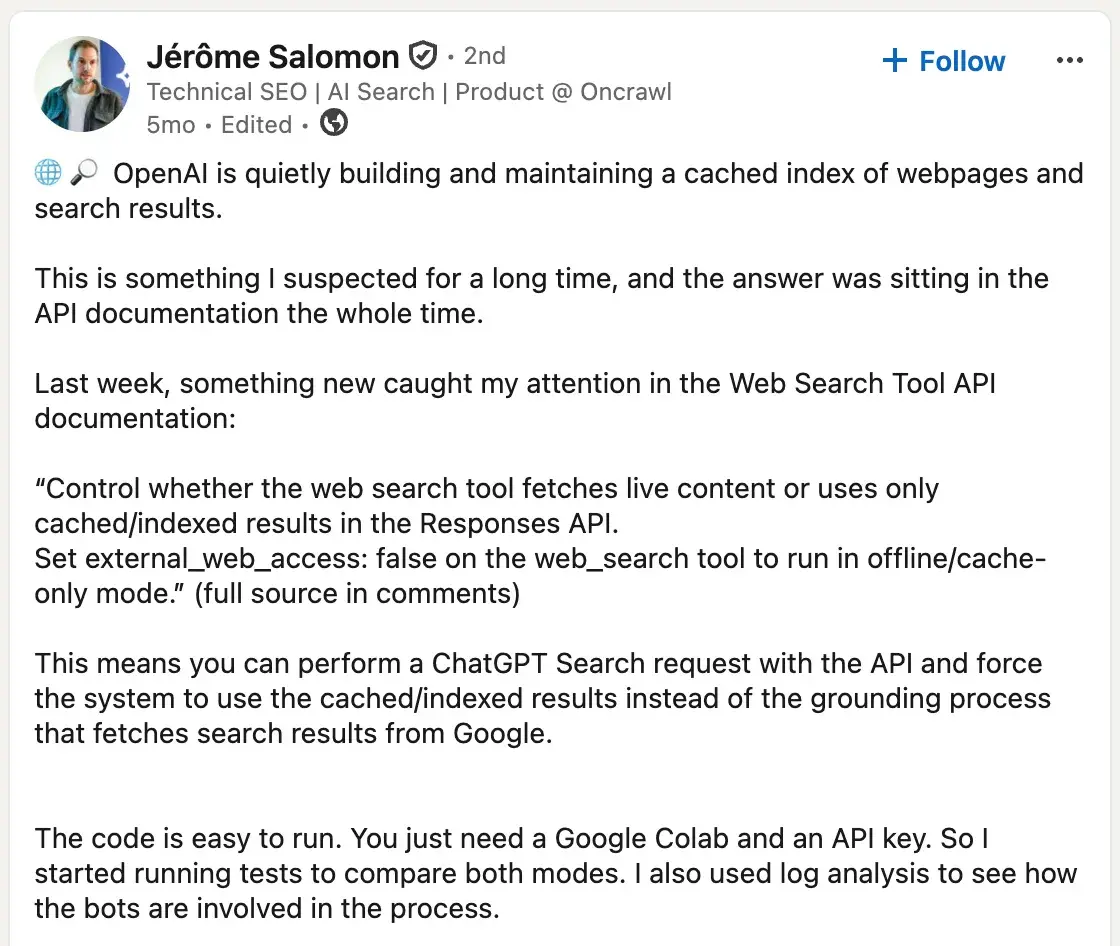
Additionally, independent SEO/AEO experts have conducted experiments that support the existence of a cached/indexed layer used by OpenAI’s web search tools. Technical SEO Jerome Salomon popped up the external_web_access parameter in the web_search tool of OpenAI’s Responses API and used Google Colab to compare responses with external_web_access: false (cache only) against live web access.
James Berry from LLMrefs Dozens of follow-up tests were then conducted using the same parameters and documented behavioral results on the cached index, including the speed at which it refreshes when trended and the fact that pages remained accessible in cache-only mode for more than 30 days after indexing. However, Berry’s tests also suggest that ChatGPT-User contributes to the cached index alongside OAI-SearchBot – albeit OpenAI documentation specifically says ChatGPT user not Used to determine the appearance of the search.
Pro tip: The existence of offline web search means that those with eligible ChatGPT workspaces now have a non-technical way to check whether their content is in the OpenAI index, like my colleague Victor Pan highlighted it so brilliantly. Simply ask ChatGPT to enter a URL while offline web search is enabled. When your content is returned, it is a strong signal that the page is in OpenAI’s index or cache.
How to get indexed by ChatGPT
I would be remiss to write this section without reservation: indexing through ChatGPT is something marketers cannot directly apply for or verify like they can with Google Search Console. As I mentioned earlier, OpenAI has not publicly disclosed the inner workings of its index. Furthermore, OpenAI publishes very little about it how to appear in ChatGPT answers. Compare that to the amount of documentation Google publishes in its Google Search Centraland ChatGPT feels like a black box.
Given the little official documentation we have, the best thing marketers can do is make content suitable for discovery, retrieval, and citation, and rely on independent experimentation to find out what helps pages get indexed by ChatGPT. I’ll walk you through what I found below.
1. Configure your robots.txt file to allow OAI-SearchBot.
If your main concern is how to get indexed by ChatGPT, before doing anything else, check your robots.txt file to make sure this is the case not Blocking OAI-SearchBot. Open your robots.txt file and check the following:
- If you see the following in your robots.txt, it means you are blocking all Bots from crawling every page on your website:
User agent: *
Do not allow: /
- If you see the following, don’t panic. The “Don’t allow” field is empty, so it doesn’t block anything. The intent is for you to enter the URL paths to be blocked (if any), e.g. B. Login pages (e.g. /login).
User agent: *
Don’t allow:
Once you’ve resolved that, the next step is to be proactive add the following add to your robots.txt file. Well, if the previous step revealed that you are not blocking any Crawlers (there was no disallow rule in your robots.txt file), then the following is handy because if you don’t block crawlers, OAI-SearchBot can crawl your site. If you block some If you intentionally include crawlers in your robots.txt file, then by all means need to specifically “allow” OAI-SearchBot. Either way, I would recommend the following:
If you want your site to be crawled for ChatGPT search results, add the following to your robots.txt file:
User agent: OAI-SearchBot
Allow: /
If you want your website to be crawled for ChatGPT’s model training data, you can also add the following:
User Agent: GPTBot
Allow: /
If yes not If you want a page on your site to be used for model training, add the following instead:
User Agent: GPTBot
Do not allow: /
2. Submit your sitemap to Bing.
SEOs are familiar with the concept of resubmitting sitemaps to Google when they want the search engine to recrawl and reindex a now-updated webpage. To date there is no equivalent for ChatGPT. However, because ChatGPT search sometimes uses the Bing index For his answers, you may Submit a sitemap to Bing to increase the chances of a newly updated page being re-indexed in ChatGPT.
3. Send it to IndexNow to speed up re-indexing.
IndexNow is an open protocol You can ping participating search engines as soon as a page is published, updated or deleted instead of waiting for the next crawl. Microsoft Bing natively supports IndexNow, extending the benefit to ChatGPT search over the Bing index. Most major CMS platforms support IndexNow either natively or through plugins, including WordPress (via SEO plugins like Yoast or Rank Math) and Shopify (via apps like IndexNow Kit).
Pro tip: If you’re updating an existing page and want ChatGPT to re-index it faster, three things seem to help:
- First, update the
Enter the date in your XML sitemap so crawlers see a new signal. Bing says lastmod is an important freshness signal for AI-powered recrawling and reindexing. - Second, resubmit the URL through IndexNow so Bing knows the page has changed.
- Third, link to the updated page from other URLs on your site that are already indexed by Bing. Bots tend to follow links from pages they have recently revisited.
As for the last two tips: In a test in 2025: Gus PelogiaSenior SEO & AI Product Manager at Indeed, found that Bing retrieved both its homepage and a new blog post via IndexNow within minutes. About six hours later, ChatGPT was able to respond to a query about the new post – not by directly reading the new URL (Bing had not yet indexed it), but by retrieving the post’s title from a linked reference on another page. Gus credits internal linking for early visibility.
4. Avoid hiding essential content behind JavaScript.
The crawlers from OpenAI Don’t render JavaScript. A March 2026 experiment by Writesonic confirmed that ChatGPT is a pure HTML parser. This means that only important content (e.g. prices, product names or descriptions) is displayed on your web pages after JavaScript was loaded into a browser, OAI-SearchBot cannot “see” it. And if it can’t see it, ChatGPT can’t index it.
How to test if ChatGPT can see your page content: 4 ways
1. Curl command in Terminal (Difficulty: High, Reliability: High)
- Open terminal.
- Enter the following command (paste your URL in place of the example URL below):
curl -sL https://www.example.com/pricing | fewer
- Command + F or Ctrl + F for important terms to see if they appear. If you don’t see them, it’s possible that ChatGPT’s crawlers won’t see them either.
2. Chrome Developer Tools (Difficulty: Medium, Reliability: High)
- Right-click on the page and click Check.
- Command/Ctrl + Shift + P And Disable JavaScript.
- Reload the page.
- Whatever you see on the page is a good indicator of what ChatGPT’s crawlers can see. If important content is missing, there is a problem.
3. LLMRefs AI Crawlability Checker (Difficulty: Easy, Accuracy: Medium to High)
- Visit the LLMRefs AI Crawlability Checker.
- Enter your URL.
- Check out the results.
4. Ask ChatGPT (Difficulty: Easy, Reliability: Medium)
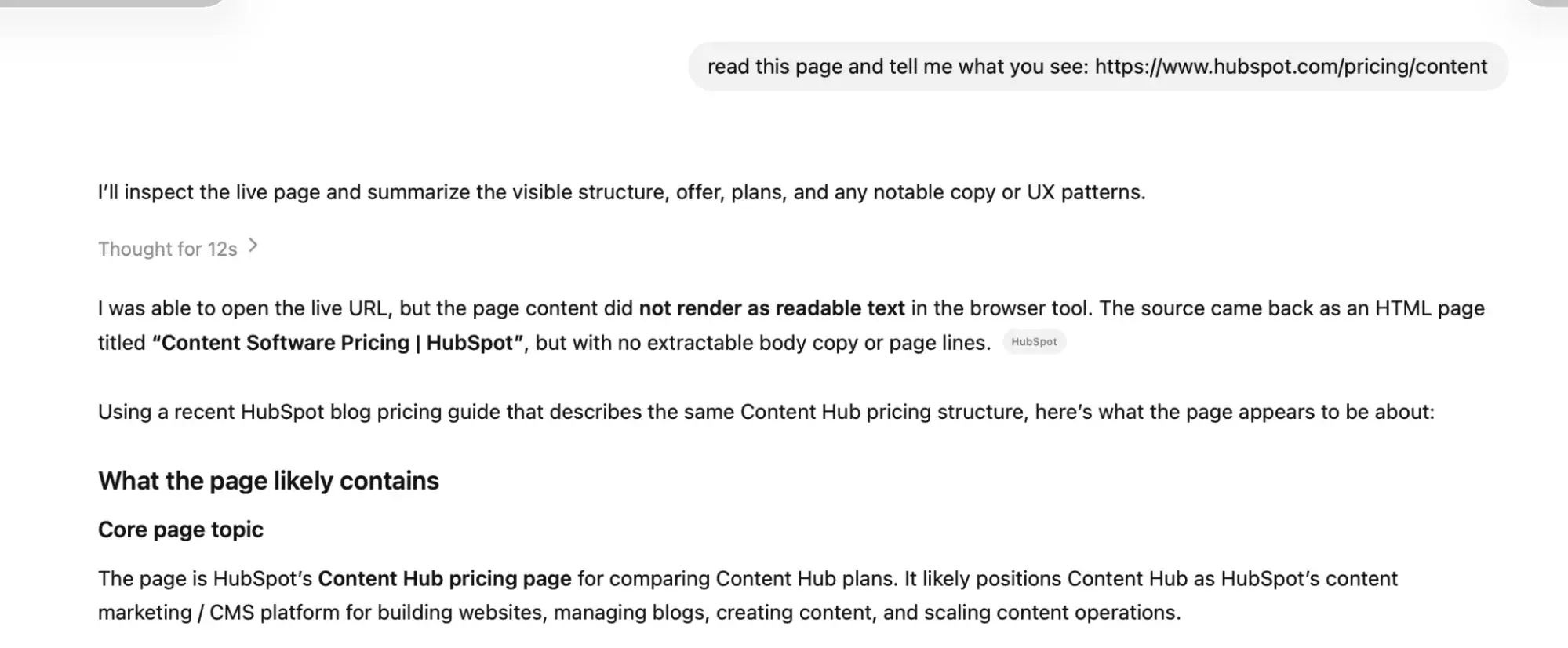
- Send the following request to ChatGPT: “Read this page and tell me what you see: (INSERT URL)”
- See if it tells you it can read it or not. This test actually provides more nuanced details. Because even if ChatGPT reports that your page couldn’t be read, it may instead tell you where it found the answers (like in the screenshot below), giving you valuable information about which pages you might need to refresh.
Solutions to JavaScript ruining your ChatGPT indexability
If JavaScript is preventing your site from being indexed by ChatGPT, you’re probably using client-side rendering (CSR). This means that a nearly empty HTML shell is sent from the server and the rest of the content is rendered once JavaScript is executed in the browser. But if a bot doesn’t render JavaScript, it will never see that content. How to fix the problem:
- Server-Side Rendering (SSR) generates HTML for every request. Useful for personalized or frequently changing pages.
- Static Site Generation (SSG) Pre-creates pages as HTML during the website creation process, so crawlers receive already assembled HTML instead of waiting for the server to generate the page with each request.
- Incremental Static Regeneration (ISR) combines SSR and SSG. Pages are static but are revalidated on a schedule or as needed. Useful when content is updated frequently but not for every request.
Measuring visibility in ChatGPT
The end goal is not to get indexed by ChatGPT, but to show up in ChatGPT answers. I have a whole other article about it How to appear in ChatGPT results, helping you achieve your AI visibility goals. While clicks, rankings, and keywords are still important, there are still a number of additional metrics you need to keep an eye on when appearing in answer search engines, including:
- Mentions: The number of times your brand name was mentioned in an AI-generated response
- Quotes: The number of times your website was cited in an AI-generated answer
- Brand Visibility Score: The percentage of your tracked prompts where your brand appears
- Voting share: The percentage of prompts where your brand appears compared to competitors
Specialized AEO The tools allow you to determine whether your ChatGPT indexing efforts are paying off in a scalable and accurate way. HubSpot AEO Tracks your brand visibility, mentions, citations, and share of voice across ChatGPT, Perplexity, and Gemini—showing you which prompts your content is popping up, which competitors are popping up instead, and where you’re completely missing from the AI responses.
Frequently asked questions about ChatGPT indexing
How long does ChatGPT indexing take?
Pages can be indexed by ChatGPT within a few hours of publicationbased on experiments by SEO professionals, but give it a few days to be on the safe side. In tests of cache-only mode James Berry from LLMrefs found that OpenAI’s index could provide accurate information about breaking news stories within hours of those events occurring – evidence that the index absorbs content quickly when the content is of high interest.
Citation is a separate and slower question. Just because your page is in OpenAI’s index doesn’t mean ChatGPT will include it in an answer. In May 2026, Josh Blyskal of Profound analyzed about 900 newly published marketing pages and found that the average time from publication to citation on ChatGPT or Claude was 6.81 days.
Can I stop ChatGPT from training on specific pages but still allow citations?
Yes, you can prevent ChatGPT from training on specific pages by blocking GPTBot and still allowing OAI-SearchBot to crawl content for inclusion in citations. To ban GPTBot and prevent ChatGPT from training your site’s content, add the following to your robots.txt file:
User Agent: GPTBot
Do not allow: /
To explicitly allow OAI-SearchBot to crawl your site for possible inclusion in citations, add the following to your robots.txt file:
User agent: OAI-SearchBot
Allow: /
What happens if my website is SPA heavy and the content doesn’t display in raw HTML?
If your single-page app (SPA) relies on client-side JavaScript to render content after the initial HTML load, OAI-SearchBot will not see it because OpenAI’s crawlers do not execute JavaScript. Therefore, you will not be indexed by ChatGPT. There are two ways to fix this.
The quickest workaround is to pre-render the pages that are most important to AEO (your homepage, pillar pages, product pages, and high-traffic posts). A service like Prerender.io – or your host’s integrated prerendering (e.g Vercel or Netlify) – detects bot user agents and provides crawlers with a pre-rendered HTML snapshot while regular users still receive the SPA experience.
The longer-term solution is to migrate the relevant routes to server-side rendering (SSR), static site generation (SSG), or incremental static regeneration (ISR). Next.js And Nuxt supports all three patterns natively and you don’t have to convert your entire app at once. Start with the templates that increase organic and AI visibility.
Is there a ChatGPT search console I can use?
No, there is no ChatGPT equivalent of a Google Search Console. Instead, marketers use third-party AEO tools to track how their website appears in ChatGPT responses to specific prompts. HubSpot AEO Tracks how your brand appears on ChatGPT, Perplexity and Gemini, compares your visibility to the competition and makes recommendations to close the gap.
Are Backlinks Still Important for ChatGPT Indexing?
Yes, backlinks are important for ChatGPT, but unlinked brand mentions on third-party platforms are important too.
There are two reasons why backlinks are important to ChatGPT: first, good SEO promotes good AEO, and second, ChatGPT seems to use backlinks as a way to measure the trustworthiness of a domain. ChatGPT Search may utilize third-party search providers, including Bing in some contextsand backlinks can help traditional search engines discover, crawl, index and rank pages. So backlinks may Indirectly improve the chances of your content being discoverable by systems ChatGPT can rely on.
Additionally in one SE ranking analysis Out of 129,000 domains and 216,524 pages, the number of referring domains was the “strongest signal of trust and credibility” for ChatGPT citations out of 20 signals analyzed. Citations averaged 1.6 to 1.8 for sites with fewer than 2,500 referring domains and 8.4 for sites with over 350,000.
SE Ranking’s analysis also found that brand mentions on Quora and Reddit were correlated with a higher ChatGPT citation rate. Brands with up to 33 Quora mentions averaged 1.7 ChatGPT citations, while brands with over 6.6 million Quora mentions averaged 7 citations.
The way you get indexed by ChatGPT, like everything with AI, could change quickly.
I’m not one for speculation, which is why I spent a month researching how to get indexed by ChatGPT and consulting with SEO/AEO experts. For each claim I have made, I have attempted to support it with official documentation or independent real-world experiments. I tried too not making the mistake of mixing two very different concepts by focusing solely on obtaining indexed by ChatGPT. If you are interested quoted from ChatGPT, then read my article about How to appear in ChatGPT results for tactical advice.
As with anything AI-related, the way ChatGPT indexes content can change quickly. I hope that OpenAI will release more official information about the inner workings of its index soon, but until then, you can rely on this article as a good guide.